> ## Documentation Index
> Fetch the complete documentation index at: https://docs.rdrive.io/llms.txt
> Use this file to discover all available pages before exploring further.

# How to share a process with other users?

> Sharing gives ad-hoc read access to other users. You can choose individual users to share with.Let's say if there are users who have edit right only. If you sha

Sharing gives **ad-hoc read access** to other users. You can choose individual users to share with.

Let's say if there are users who have edit right only. If you share a form with them, these users who have edit rights but not read access will be able to edit after you have shared with them. Those who are shared are called “participants”.

To put it simple, you can share a form with other users to give them permission to see the form(s).

You will need "Share" permission to perform the "Share" action.

Here are the steps showing how to share a form to other users using RDrive app:

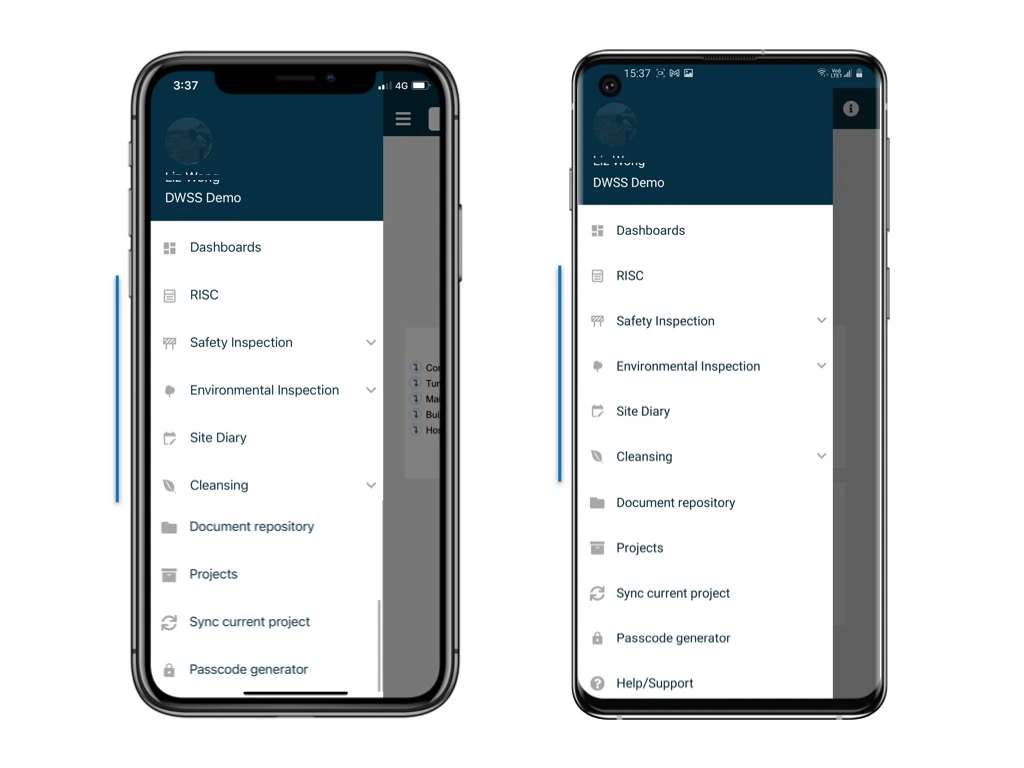
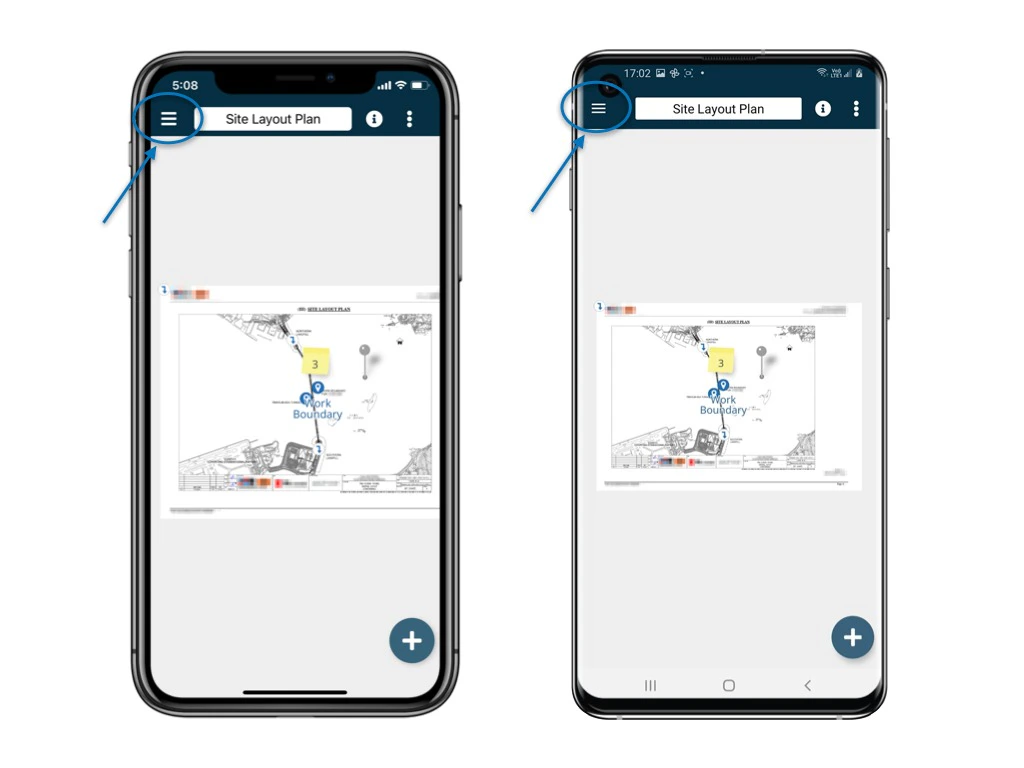
Go to Finder/Plan viewer, and search for a process
<img src="https://mintcdn.com/rdrive/sdA2WDD3FaUG1SbF/images/kb/103000035015/HdXkMsM96MKMEPLeZaUjN8d8CQfqmW9snQ.jpeg?fit=max&auto=format&n=sdA2WDD3FaUG1SbF&q=85&s=22732c67da0e5875d821f94024113ebe" alt="How to share a process with other users?" width="1024" height="768" data-path="images/kb/103000035015/HdXkMsM96MKMEPLeZaUjN8d8CQfqmW9snQ.jpeg" />

<img src="https://mintcdn.com/rdrive/sdA2WDD3FaUG1SbF/images/kb/103000035015/Nu_OueheqYoD4JoMEwl1WJGprx7G-s_doQ.jpeg?fit=max&auto=format&n=sdA2WDD3FaUG1SbF&q=85&s=4dab0b049220fc827607ffb47fda9eee" alt="How to share a process with other users?" width="1024" height="768" data-path="images/kb/103000035015/Nu_OueheqYoD4JoMEwl1WJGprx7G-s_doQ.jpeg" />

<img src="https://mintcdn.com/rdrive/sdA2WDD3FaUG1SbF/images/kb/103000035015/8wuVVqPPzfiHKZVFZxVdPFBJmgUao_-24A.jpeg?fit=max&auto=format&n=sdA2WDD3FaUG1SbF&q=85&s=671e3123a8b41cde87798db4814bb6fa" alt="How to share a process with other users?" width="1024" height="768" data-path="images/kb/103000035015/8wuVVqPPzfiHKZVFZxVdPFBJmgUao_-24A.jpeg" />

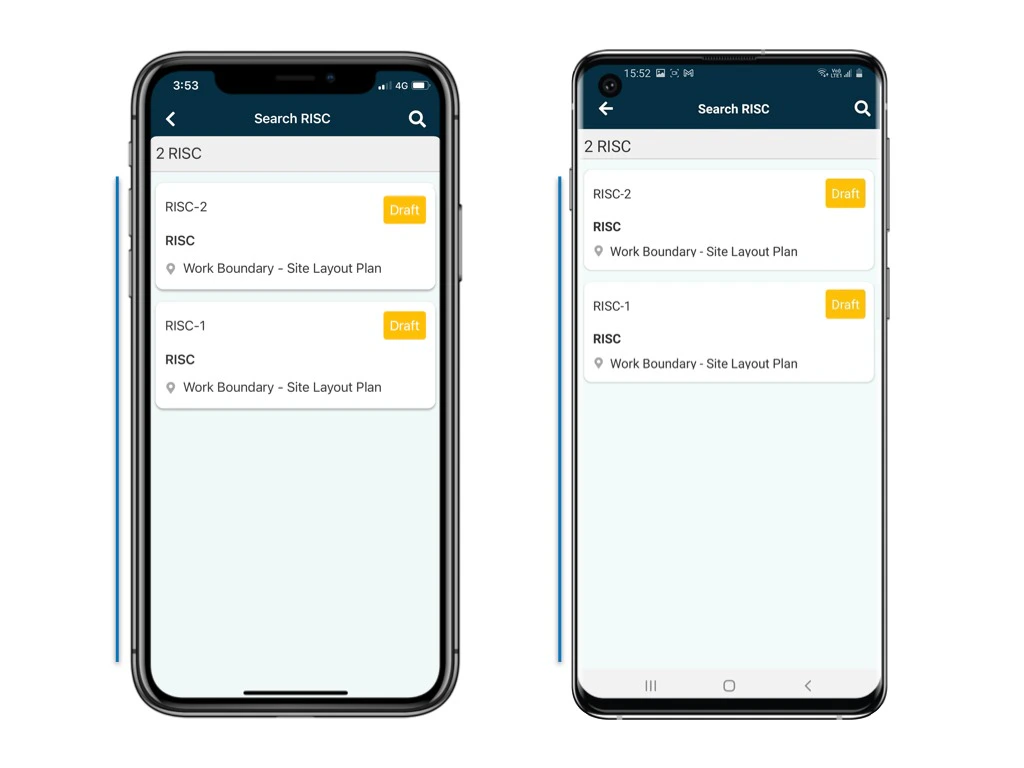
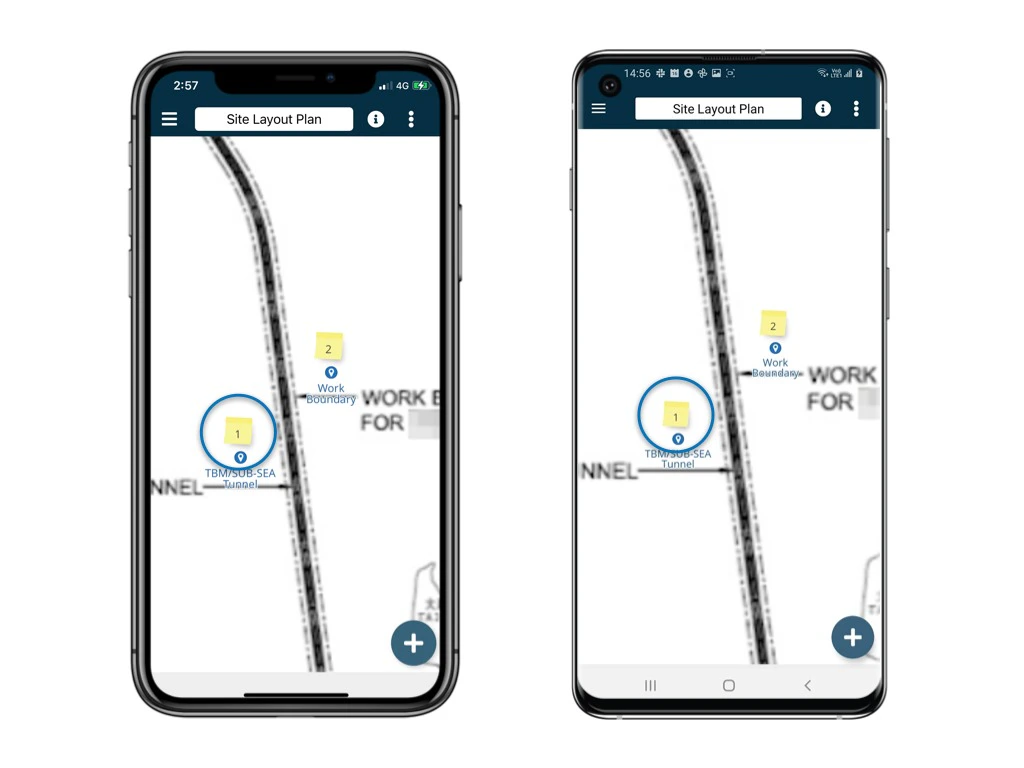
Select a process and access the form list page.
<img src="https://mintcdn.com/rdrive/sdA2WDD3FaUG1SbF/images/kb/103000035015/-NPA45tz6wFp1lZpL39PI-JxP-9ZBvPGRw.jpeg?fit=max&auto=format&n=sdA2WDD3FaUG1SbF&q=85&s=41c8ef119eed72856399d15130207cb9" alt="How to share a process with other users?" width="1024" height="768" data-path="images/kb/103000035015/-NPA45tz6wFp1lZpL39PI-JxP-9ZBvPGRw.jpeg" />

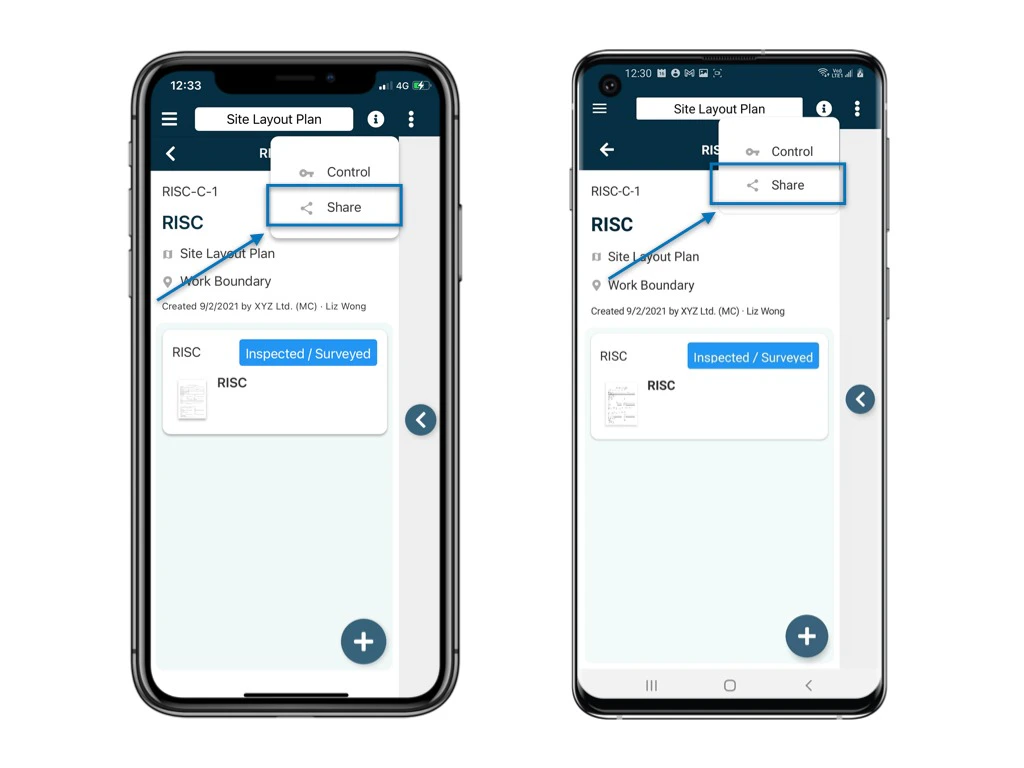
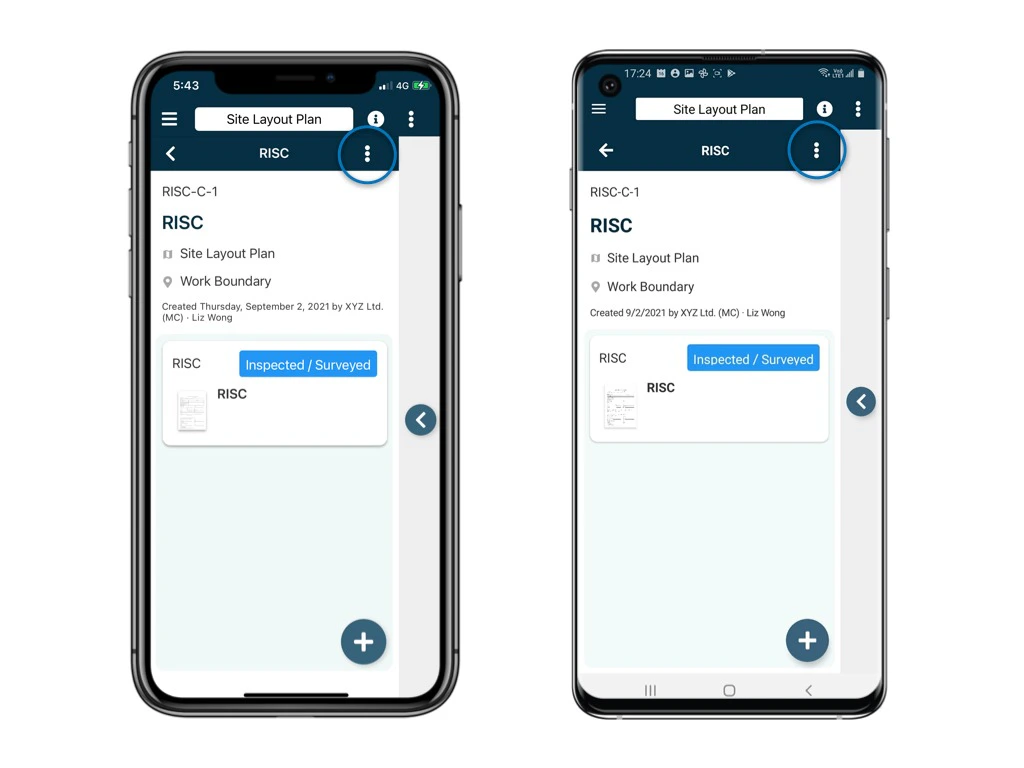
Click the **⋮** on the top right corner of the detail page and select **Share**.
<img src="https://mintcdn.com/rdrive/sdA2WDD3FaUG1SbF/images/kb/103000035015/Az0wl6BPccKRdxj3mFD9t7a_LHersWOkXg.jpeg?fit=max&auto=format&n=sdA2WDD3FaUG1SbF&q=85&s=fe1787c633e00410b26cf50d99252c14" alt="How to share a process with other users?" width="1024" height="768" data-path="images/kb/103000035015/Az0wl6BPccKRdxj3mFD9t7a_LHersWOkXg.jpeg" />

<img src="https://mintcdn.com/rdrive/sdA2WDD3FaUG1SbF/images/kb/103000035015/IgqgoPF4iwydlAS1bwa2ymp7X5jX2iPhJw.jpeg?fit=max&auto=format&n=sdA2WDD3FaUG1SbF&q=85&s=9498f6fc85fc6d58454665e0f853e4a0" alt="How to share a process with other users?" width="1024" height="768" data-path="images/kb/103000035015/IgqgoPF4iwydlAS1bwa2ymp7X5jX2iPhJw.jpeg" />

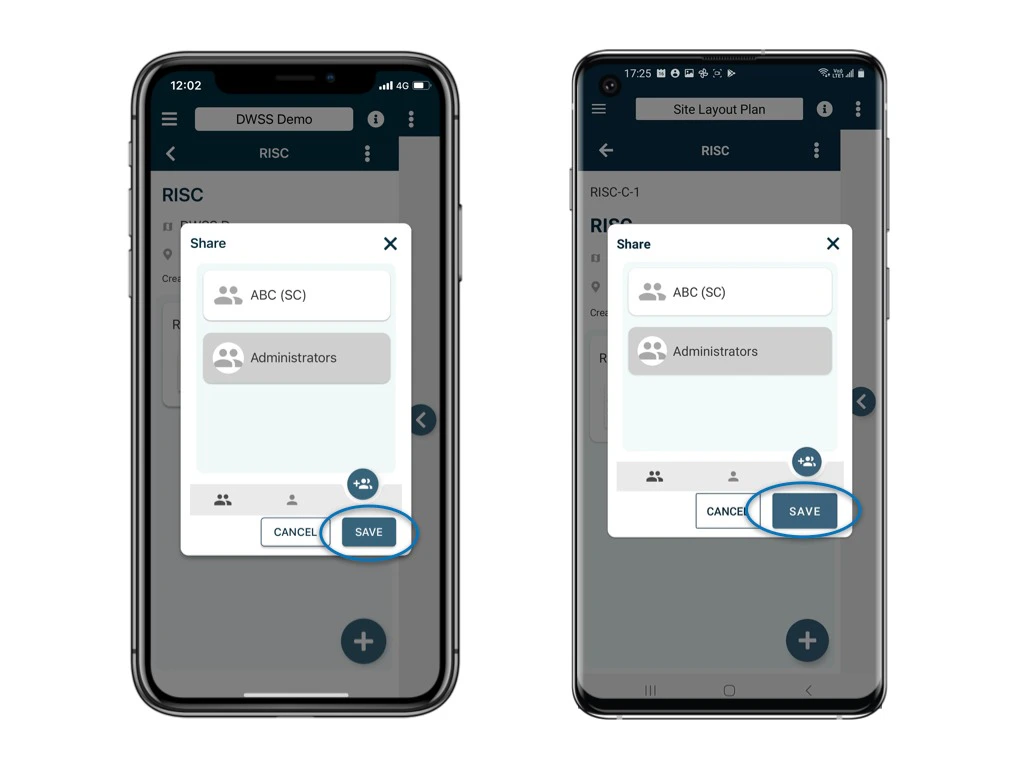
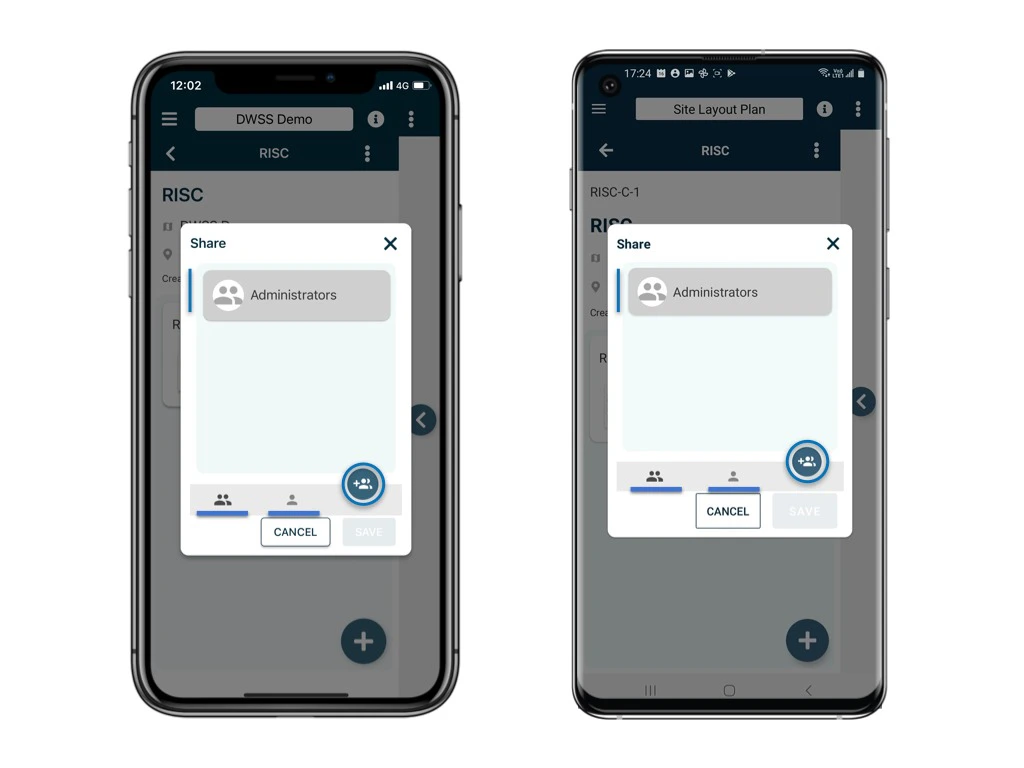
The participants will be listed on the page.

Click the **+** user button to add per team or per user as a participant.

**SAVE** to confirm.
<img src="https://mintcdn.com/rdrive/sdA2WDD3FaUG1SbF/images/kb/103000035015/hqKnej6vFdWR7Mb-NLYwrqieg2jyp_-cbw.jpeg?fit=max&auto=format&n=sdA2WDD3FaUG1SbF&q=85&s=43731663d9deba94c237d7ba0a16c456" alt="How to share a process with other users?" width="1024" height="768" data-path="images/kb/103000035015/hqKnej6vFdWR7Mb-NLYwrqieg2jyp_-cbw.jpeg" />

<img src="https://mintcdn.com/rdrive/sdA2WDD3FaUG1SbF/images/kb/103000035015/0YJDIMCnQ1WTJWD-dfQp1oUR9fNMZPtckg.jpeg?fit=max&auto=format&n=sdA2WDD3FaUG1SbF&q=85&s=c19df70cf502514b3ff3825cad8cffb1" alt="How to share a process with other users?" width="1024" height="768" data-path="images/kb/103000035015/0YJDIMCnQ1WTJWD-dfQp1oUR9fNMZPtckg.jpeg" />

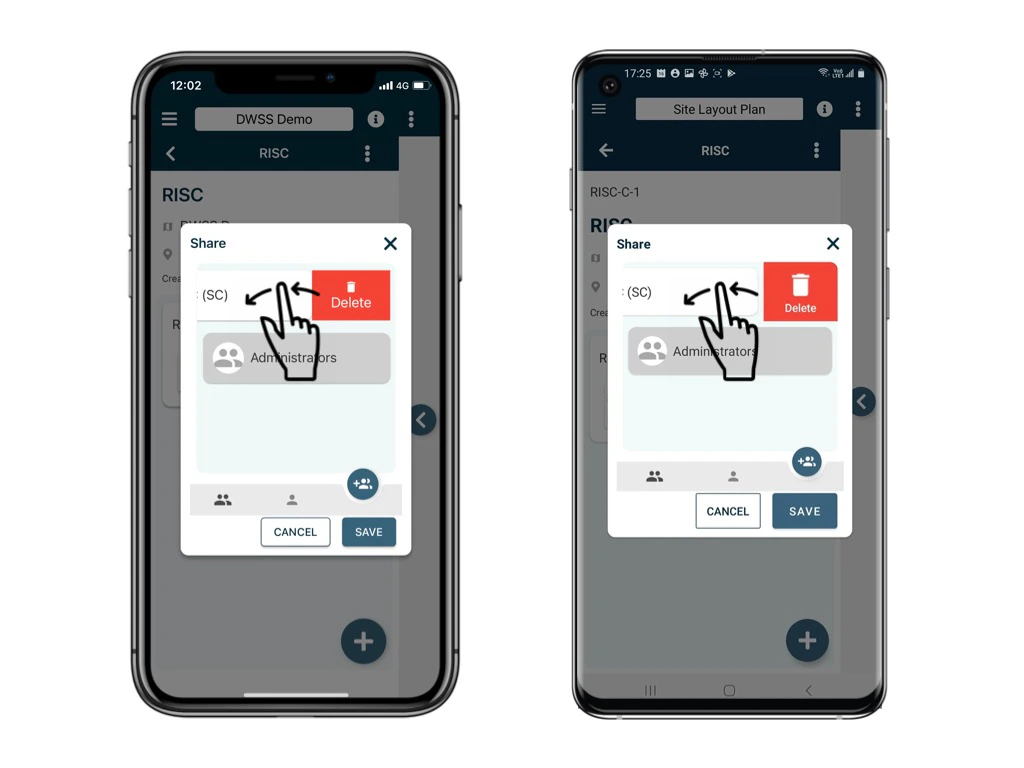
To remove, please **swipe left** to clear.
<img src="https://mintcdn.com/rdrive/sdA2WDD3FaUG1SbF/images/kb/103000035015/iRBFWmggxqPNZEZq8jt7xMlgGBpsN41eUA.jpeg?fit=max&auto=format&n=sdA2WDD3FaUG1SbF&q=85&s=d05ac31edb0fad6be927b85fee9dfedf" alt="How to share a process with other users?" width="1024" height="768" data-path="images/kb/103000035015/iRBFWmggxqPNZEZq8jt7xMlgGBpsN41eUA.jpeg" />

<Note>
  ⚠️ After completing your onsite work, don't forget to synchronize. This action ensures data backup and updates for your project team.
</Note>