> ## Documentation Index
> Fetch the complete documentation index at: https://docs.rdrive.io/llms.txt
> Use this file to discover all available pages before exploring further.
# What to do if the APP crash?
> Welcome to the User Guide on Troubleshooting App Crashes. This guide is designed to assist you in addressing issues when the app crashes unexpectedly. Learn how
**TABLE OF CONTENTS**
* [1. Introduction](#1.-introduction)
* [2. Understanding App Crashes](#2.-understanding-app-crashes)
* [3. Steps to Diagnose and Resolve App Crashes](#3.-steps-to-diagnose-and-resolve-app-crashes)
* [4. Exporting Data for Further Investigation](#4.-exporting-data-for-further-investigation)
* [5. Sending Data to Support](#5.-sending-data-to-support)
* [6. Conclusion](#6.-conclusion)
###
1\. Introduction
Welcome to the User Guide on Troubleshooting App Crashes. This guide is designed to assist you in addressing issues when the app crashes unexpectedly. Learn how to diagnose and resolve app crashes effectively, and understand the steps to export data for further investigation and support.
### 2. Understanding App Crashes
App crashes can be frustrating, but they are not uncommon. This guide will help you navigate through the process of identifying the cause and resolving the issue, ensuring a smoother user experience.
### 3. Steps to Diagnose and Resolve App Crashes
If you encounter app crashes, follow these steps to diagnose and potentially fix the problem:
a. Restart the App: Sometimes, a simple restart can resolve temporary glitches causing crashes.
b. Update the App: Ensure you have the latest version of the app installed, as updates often include bug fixes.
c. Check Device Storage: Insufficient storage space can lead to crashes. Clear out unnecessary files and apps.
d. Check for System Updates: Ensure your device's operating system is up to date, as compatibility issues can cause crashes.
### 4. Exporting Data for Further Investigation
In cases where crashes are not easily diagnosed, exporting app data can provide valuable insights for further investigation. Follow the steps below to export data:
a. Kill the App: Ensure the app is completely closed on your device.
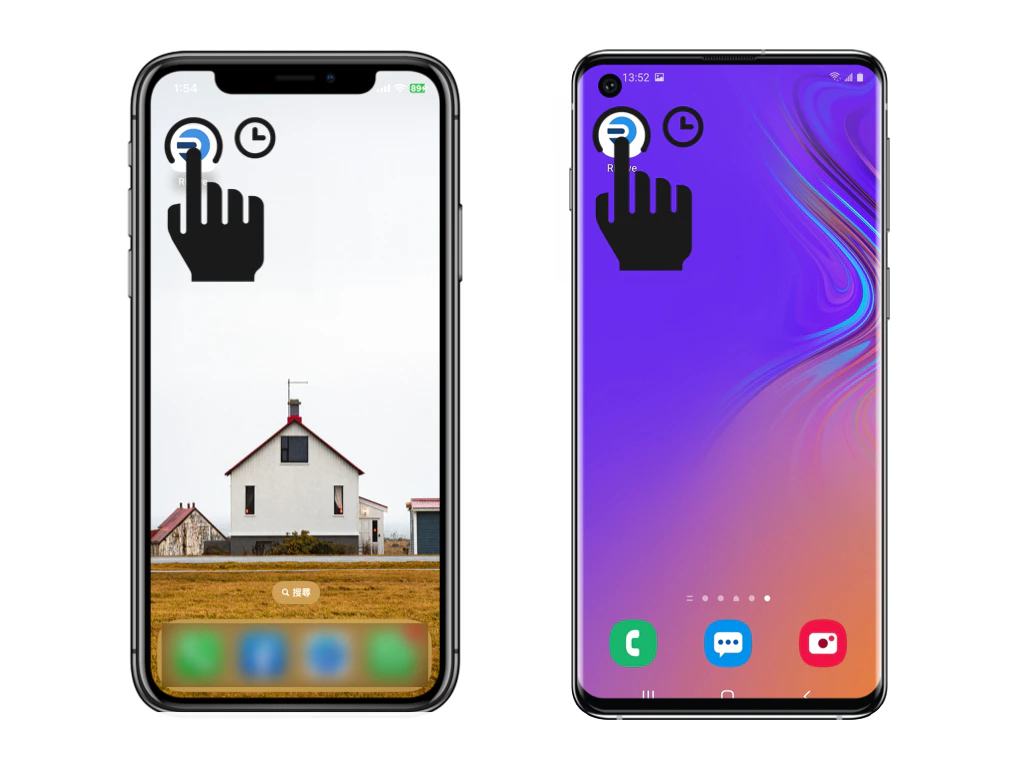
b. Long Press on the App Icon: Long-press the app icon on the home screen to reveal a menu.
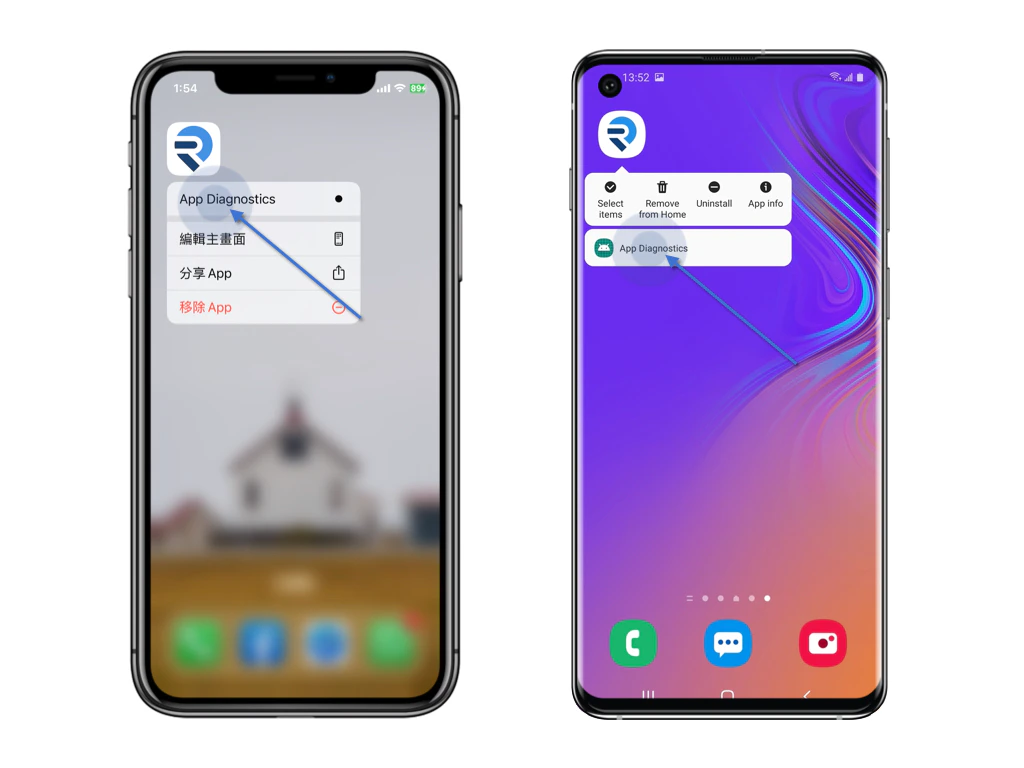
 c. Click on App Diagnostics: Select "App Diagnostics" from the menu to access diagnostics options.
 d. Click on Export All Data: Within the diagnostics menu, select "Export All Data" to compile relevant data for export.
 *P.S. Sometimes the support team would ask to export other logs for the investigation, kindly click to export as well.*
### 5. Sending Data to Support
Once the export process is complete, you will likely receive an archive file containing your app data. Send this archive to the app's support team for analysis. Include a brief description of the crash and any relevant details.
### 6. Conclusion
In conclusion, app crashes can be addressed effectively by following these steps. By diagnosing and resolving crashes and exporting data for further investigation, you contribute to enhancing the app's stability and your overall user experience. Thank you for your collaboration in maintaining smooth and trouble-free app usage.
\_[Tap here for guidance on App Diagnostics.](https://docs.rdrive.io/mobile/troubleshooting/app-diagnostics)\
\_
*P.S. Sometimes the support team would ask to export other logs for the investigation, kindly click to export as well.*
### 5. Sending Data to Support
Once the export process is complete, you will likely receive an archive file containing your app data. Send this archive to the app's support team for analysis. Include a brief description of the crash and any relevant details.
### 6. Conclusion
In conclusion, app crashes can be addressed effectively by following these steps. By diagnosing and resolving crashes and exporting data for further investigation, you contribute to enhancing the app's stability and your overall user experience. Thank you for your collaboration in maintaining smooth and trouble-free app usage.
\_[Tap here for guidance on App Diagnostics.](https://docs.rdrive.io/mobile/troubleshooting/app-diagnostics)\
\_