> ## Documentation Index
> Fetch the complete documentation index at: https://docs.rdrive.io/llms.txt
> Use this file to discover all available pages before exploring further.
# Adjusting Font Appearance in Forms
> This guide explains the available options for adjusting the visual appearance of font size in form pages on RDrive. While font size, color, and style cannot be
### **Overview**
*This guide explains the available options for adjusting the visual appearance of font size in form pages on RDrive. While font size, color, and style cannot be directly edited, this guide outlines how page size settings affect font appearance on printouts.*
* **Purpose:** To clarify font behavior in forms and provide steps for adjusting the form page size to indirectly affect printed font scaling.
* **Who It’s For:** Company Admins
Prerequisites: Access to company-level settings
***
**TABLE OF CONTENTS**
* [Key Notes](#key-notes)
* [Step-by-Step Instructions](#step-by-step-instructions)
* [Access Company-Level Settings](#access-company-level-settings)
* [Select a Process Template](#select-a-process-template)
* [Adjust Page Size](#adjust-page-size)
* [Choose Page Mode](#choose-page-mode)
* [Click OK to Confirm](#click-ok-to-confirm)
* [Example](#example)
* [Reminders](#reminders)
* [FAQs & Troubleshooting](#faqs-&-troubleshooting)
* [Q: Can I adjust the font size, style, or color directly in the form?](#q%3a-can-i-adjust-the-font-size,-style,-or-color-directly-in-the-form?)
* [Q: Who can change the page size of a form?](#q%3a-who-can-change-the-page-size-of-a-form?)
* [Q: Will the page size change affect all pages in the form?](#q%3a-will-the-page-size-change-affect-all-pages-in-the-form?)
* [Q: How can I make sure the printed version aligns correctly?](#q%3a-how-can-i-make-sure-the-printed-version-aligns-correctly?)
***
## **Key Notes**
* **Font size, color, and style** are fixed and **cannot be** modified.
* However, the **page size** of a form can be adjusted. Because the font size remains constant, changing the page size will scale the text visually when printed.
* A **smaller page size** results in text appearing **larger** on paper.
* A **larger page size** makes the text appear **smaller**.
* Changes are applied **per page** and will affect **all content** on that page.
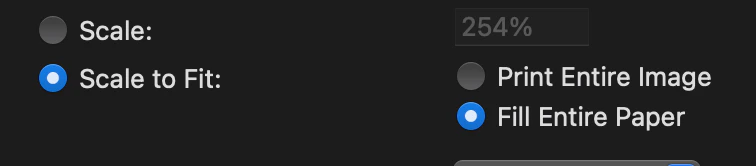
> ⚠️ Please note: When printing, always check that your print settings are set to **“Scale to Fit”** and **“Fill Entire Paper”** to align the layout properly.
 ***
## **Step-by-Step Instructions**
1. **Access Company-Level Settings**
* Go to the sidebar menu > **Settings** > **Categories**
2. **Select a Process Template**
* Locate and click on the desired process template
* Open the template in **Draft mode**
3. **Adjust Page Size**
* Click the **three-dot menu (︙)** of the form page\\
***
## **Step-by-Step Instructions**
1. **Access Company-Level Settings**
* Go to the sidebar menu > **Settings** > **Categories**
2. **Select a Process Template**
* Locate and click on the desired process template
* Open the template in **Draft mode**
3. **Adjust Page Size**
* Click the **three-dot menu (︙)** of the form page\\
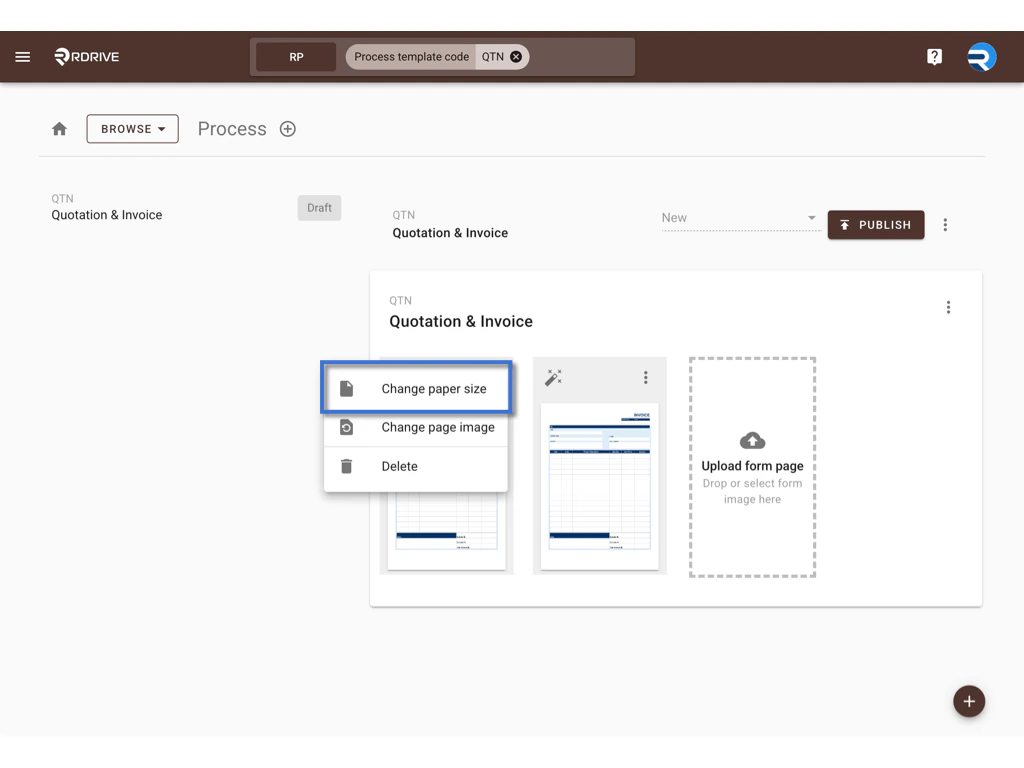
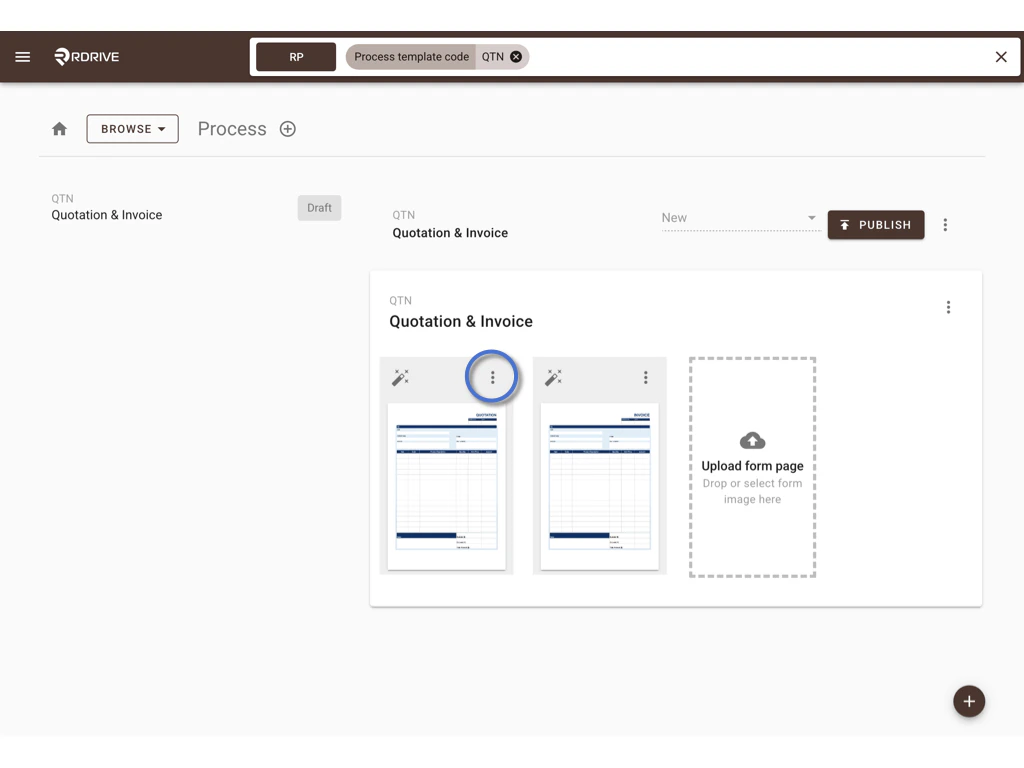 * Select **Change Paper Size**\\
 4. **Choose Page Mode**
* You will have two options:
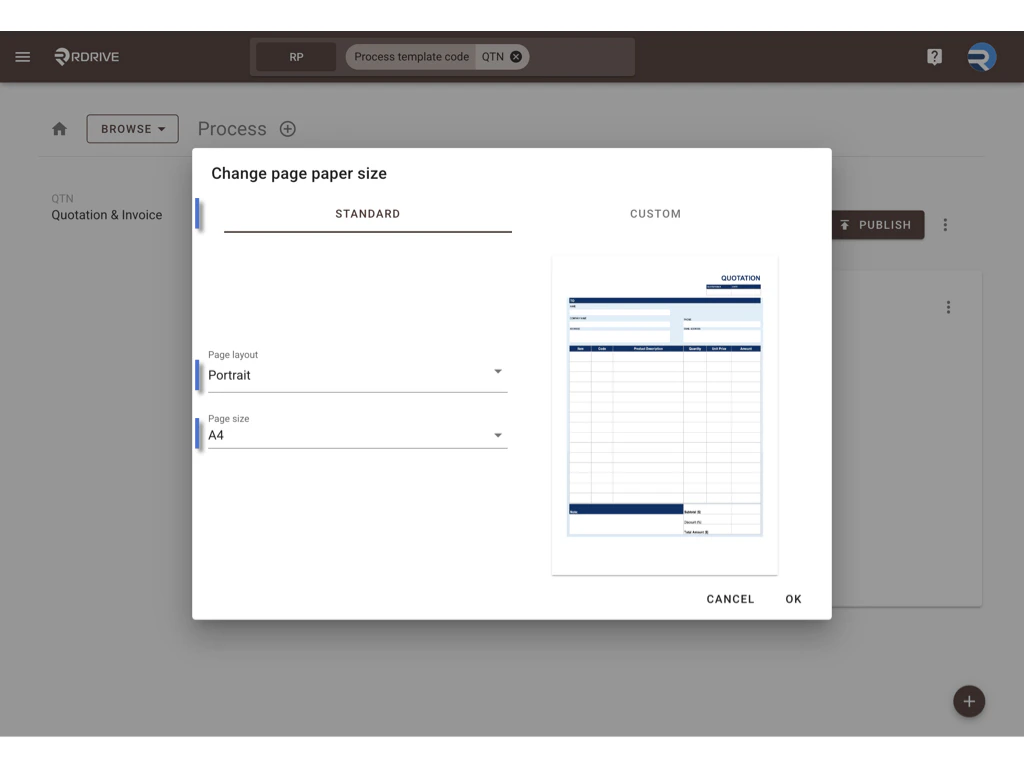
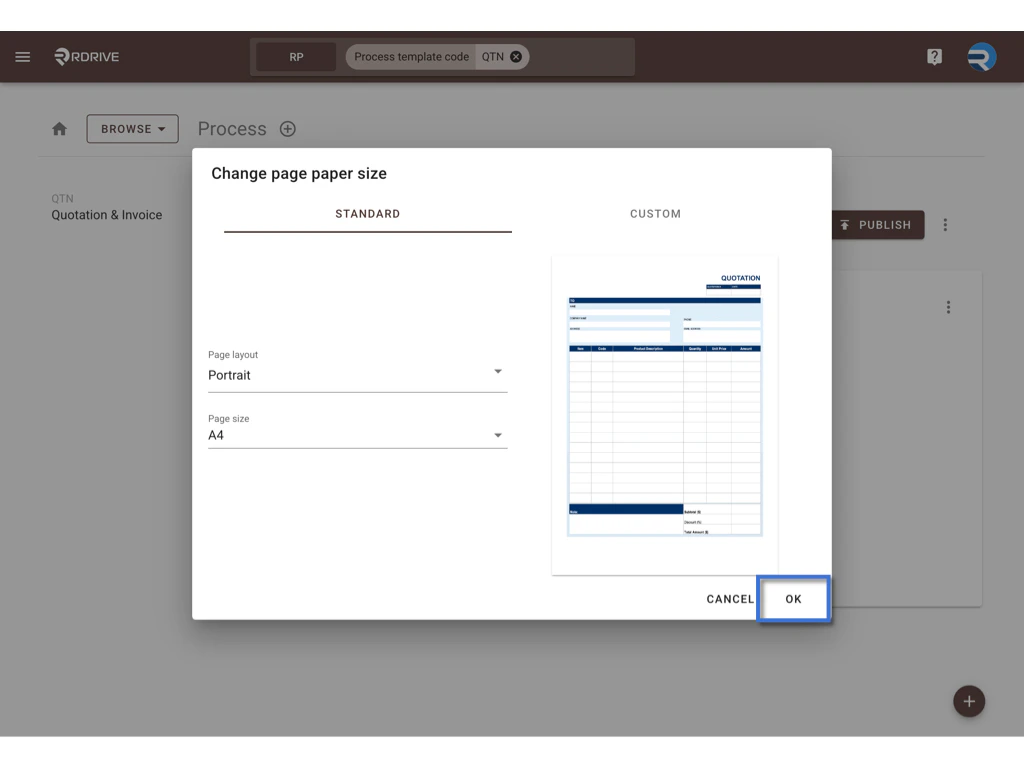
* **Standard Mode**:
* Select a standard page layout: **Portrait** or **Landscape**
* Choose a page size: **A5, A4, A3**, etc.\\
4. **Choose Page Mode**
* You will have two options:
* **Standard Mode**:
* Select a standard page layout: **Portrait** or **Landscape**
* Choose a page size: **A5, A4, A3**, etc.\\
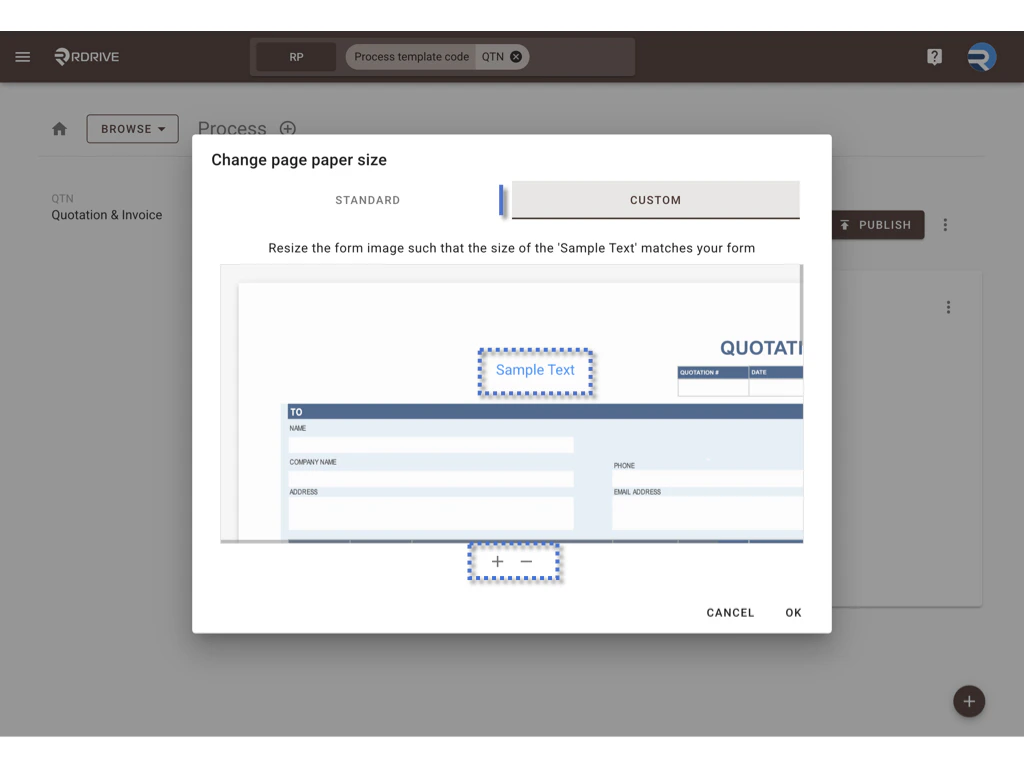
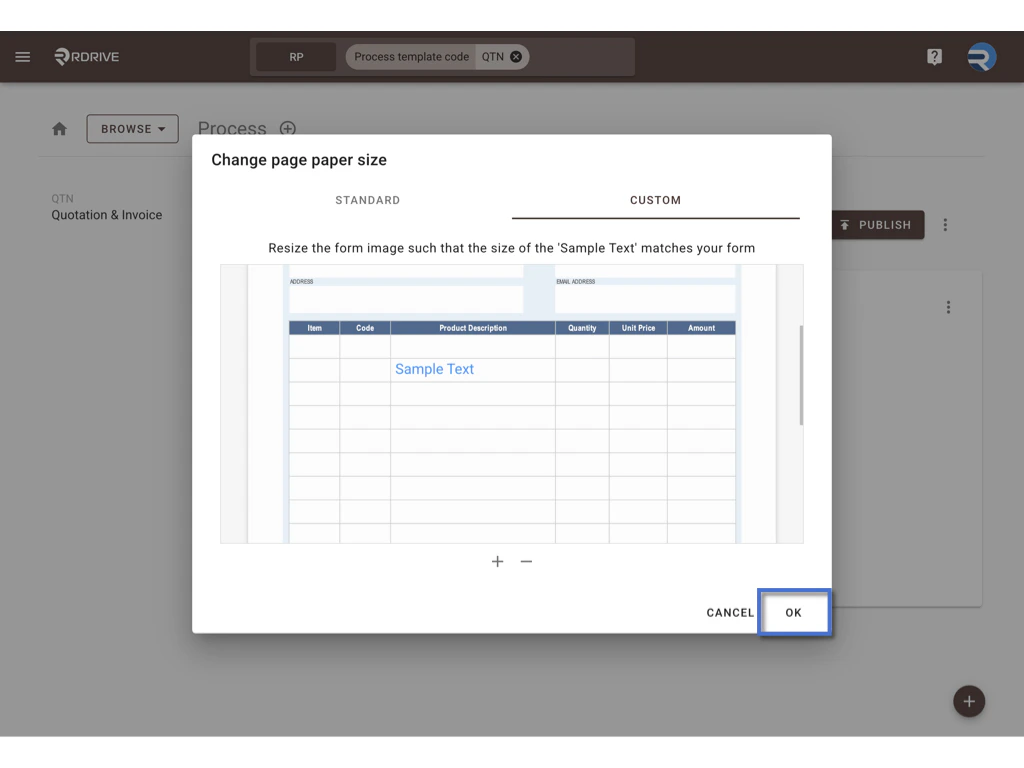
 * **Custom Mode**:
* Zoom in/out to resize the form image manually
* Align the form scale with the “**Sample Text**” preview
* Drag the Sample Text to position it and preview the font scaling\\
* **Custom Mode**:
* Zoom in/out to resize the form image manually
* Align the form scale with the “**Sample Text**” preview
* Drag the Sample Text to position it and preview the font scaling\\
 5. **Click OK to Confirm**
* The change will be applied to the current form page only
***
## **Example**
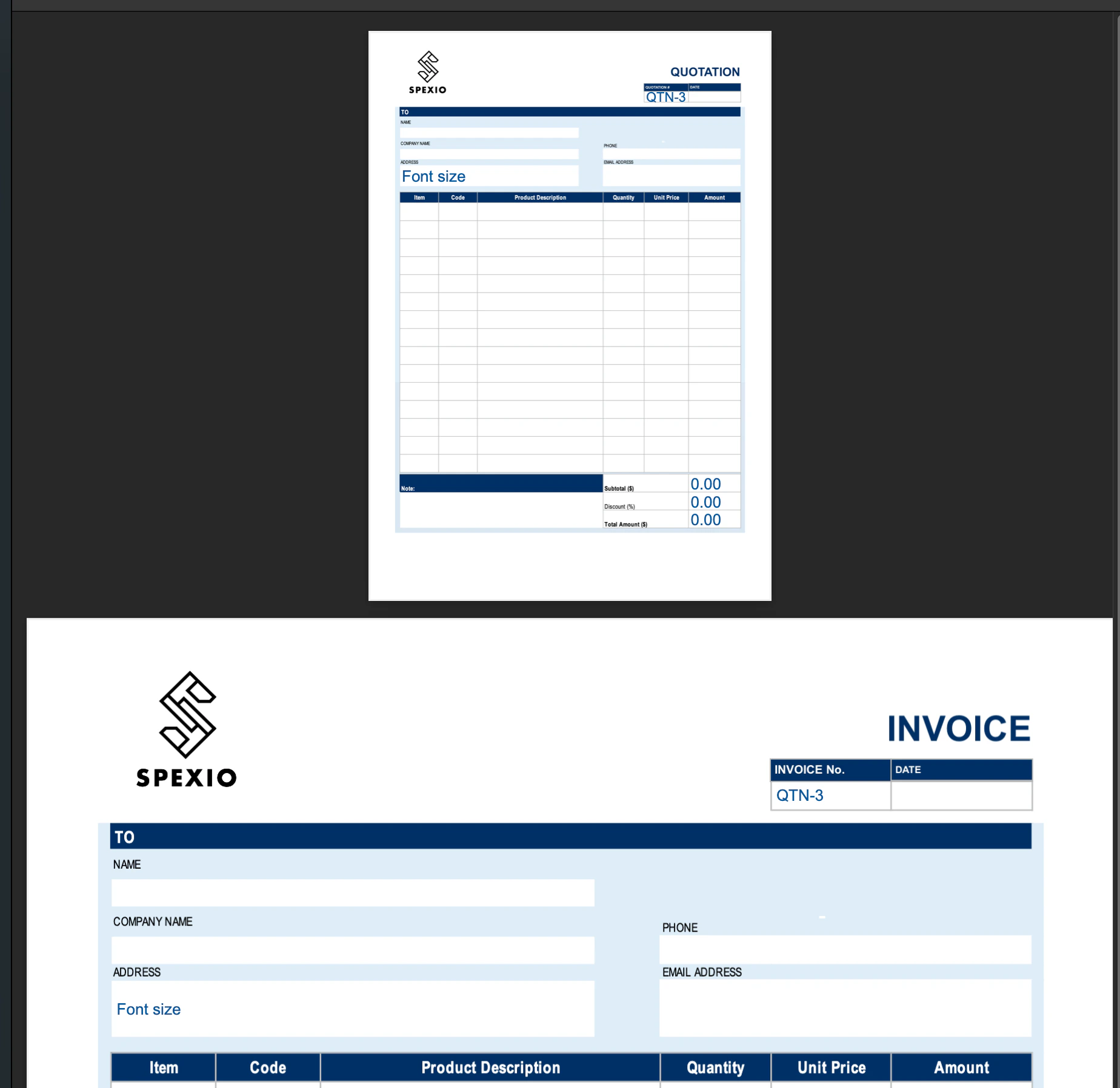
> Below is a sample comparison of different page size settings.\
> Note that the same font appears **larger on smaller pages** due to scaling.
5. **Click OK to Confirm**
* The change will be applied to the current form page only
***
## **Example**
> Below is a sample comparison of different page size settings.\
> Note that the same font appears **larger on smaller pages** due to scaling.
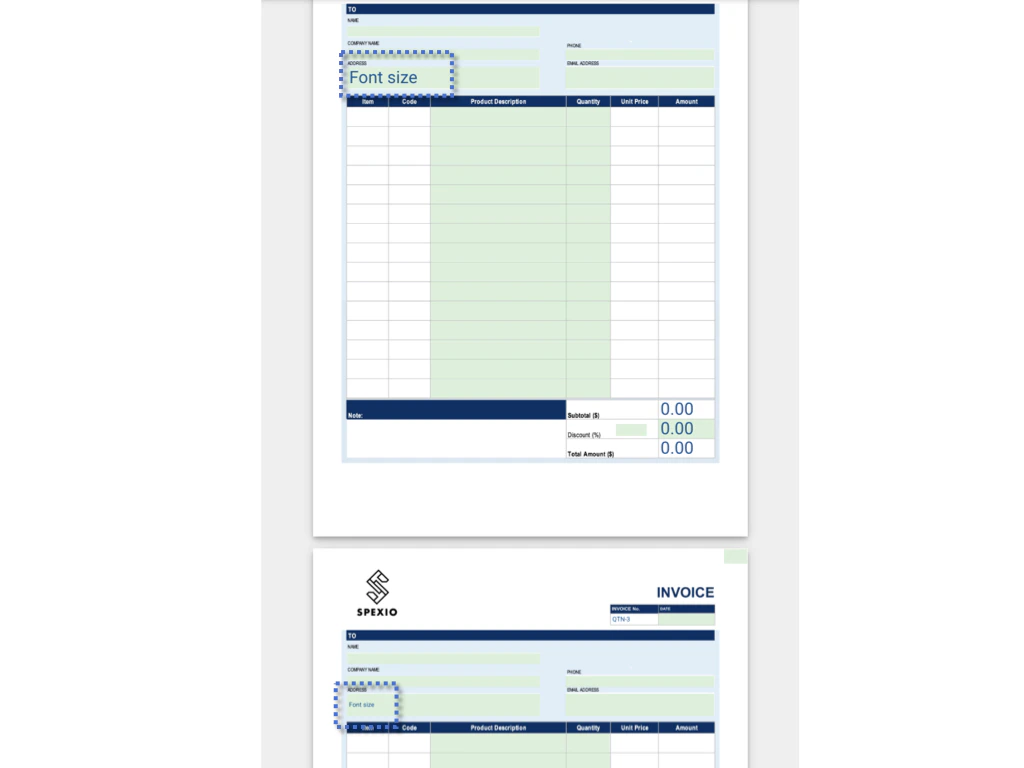 And this is the downloaded version — note that the page size is different in the PDF.
 ***
## **Reminders**
* Only Company Admins can perform this action
* Adjustments apply to **each page individually**
* Ensure consistent paper size settings when printing to avoid layout misalignment
***
## **FAQs & Troubleshooting**
### **Q: Can I adjust the font size, style, or color directly in the form?**
**A:** No. The font style, size, and color are fixed. The only way to influence how the text appears is by adjusting the page size, which affects how large or small the text appears when printed.
***
### **Q: Who can change the page size of a form?**
**A:** Only users with **Company Admin** rights can change the page size in the process template settings.
***
### **Q: Will the page size change affect all pages in the form?**
**A:** No. The change applies **only to the specific page** being edited. Each form page must be updated individually if needed.
***
### **Q: How can I make sure the printed version aligns correctly?**
**A:** When printing, ensure you select **“Scale to Fit”** and **“Fill Entire Paper”** in your printer settings to align the layout with the selected paper size.
***
## **Reminders**
* Only Company Admins can perform this action
* Adjustments apply to **each page individually**
* Ensure consistent paper size settings when printing to avoid layout misalignment
***
## **FAQs & Troubleshooting**
### **Q: Can I adjust the font size, style, or color directly in the form?**
**A:** No. The font style, size, and color are fixed. The only way to influence how the text appears is by adjusting the page size, which affects how large or small the text appears when printed.
***
### **Q: Who can change the page size of a form?**
**A:** Only users with **Company Admin** rights can change the page size in the process template settings.
***
### **Q: Will the page size change affect all pages in the form?**
**A:** No. The change applies **only to the specific page** being edited. Each form page must be updated individually if needed.
***
### **Q: How can I make sure the printed version aligns correctly?**
**A:** When printing, ensure you select **“Scale to Fit”** and **“Fill Entire Paper”** in your printer settings to align the layout with the selected paper size.