> ## Documentation Index
> Fetch the complete documentation index at: https://docs.rdrive.io/llms.txt
> Use this file to discover all available pages before exploring further.

# How to add a category and subcategory?

> Category is a classification tool for you to manage all the templates.

**Category** is a classification tool for you to manage all the templates.

It is one of the customization features on this system for the company admin to design how would the menu look like and how would it display.

You can group templates by type, by area, by participants or by use case etc, all as you needed.

Templates have to belong to one subcategory.

***

First, log in to **Company Area**.

<Info>
  Only the company admin can access this page.
</Info>

Click **Settings** and select **Categories**.

From here, you can add a category and subcategory.

<img src="https://mintcdn.com/rdrive/KIZhkIfUps2KrVy_/images/kb/103000035055/zvgKKI88S2dZJZth4jL-lPeB7NjlTetObw.jpeg?fit=max&auto=format&n=KIZhkIfUps2KrVy_&q=85&s=70252eb2932777bcacc2252d3adea044" alt="How to add a category and subcategory?" width="1024" height="768" data-path="images/kb/103000035055/zvgKKI88S2dZJZth4jL-lPeB7NjlTetObw.jpeg" />

<img src="https://mintcdn.com/rdrive/KIZhkIfUps2KrVy_/images/kb/103000035055/L3tEjNemXVMd_CYT9cUj6fZKc1F_iyDXmQ.jpeg?fit=max&auto=format&n=KIZhkIfUps2KrVy_&q=85&s=1f50b13525a27d436a9bc17d9c7ee2c4" alt="How to add a category and subcategory?" width="1024" height="768" data-path="images/kb/103000035055/L3tEjNemXVMd_CYT9cUj6fZKc1F_iyDXmQ.jpeg" />

You can create a new category by clicking the **⊕** button.

<img src="https://mintcdn.com/rdrive/KIZhkIfUps2KrVy_/images/kb/103000035055/KiQH6VszrpT_AN2FcIj8U9wq0WPXjsvMwA.jpeg?fit=max&auto=format&n=KIZhkIfUps2KrVy_&q=85&s=7df9ebee6faaea67ad1d5ca2ac3e3599" alt="How to add a category and subcategory?" width="1024" height="768" data-path="images/kb/103000035055/KiQH6VszrpT_AN2FcIj8U9wq0WPXjsvMwA.jpeg" />

Choose an icon, enter the category title, click **OK**.

**UPLOAD** if you have a downloaded file.

<img src="https://mintcdn.com/rdrive/KIZhkIfUps2KrVy_/images/kb/103000035055/TTQA4EnqYNAlBVZfXPrEK48AsTEQPlQDxA.jpeg?fit=max&auto=format&n=KIZhkIfUps2KrVy_&q=85&s=69d26ed6e12a535dd983fe73e694412f" alt="How to add a category and subcategory?" width="1024" height="768" data-path="images/kb/103000035055/TTQA4EnqYNAlBVZfXPrEK48AsTEQPlQDxA.jpeg" />

Category added!

Next, you can add a subcategory to this category. Click the **✚** button at the bottom right corner.

<img src="https://mintcdn.com/rdrive/KIZhkIfUps2KrVy_/images/kb/103000035055/KePRMXIEm-ApFLCjGmBKMR4Yjji4Iu9t6g.jpeg?fit=max&auto=format&n=KIZhkIfUps2KrVy_&q=85&s=ee56b912b2311eb9ac069b1c21a63140" alt="How to add a category and subcategory?" width="1024" height="768" data-path="images/kb/103000035055/KePRMXIEm-ApFLCjGmBKMR4Yjji4Iu9t6g.jpeg" />

Enter the subcategory code and title, select the template type *(Issue/record or process)*.\
Click **OK** to save.

<img src="https://mintcdn.com/rdrive/KIZhkIfUps2KrVy_/images/kb/103000035055/pqMNXAznEzXE_kMI2622m7U22HgxnFJQZg.jpeg?fit=max&auto=format&n=KIZhkIfUps2KrVy_&q=85&s=f223d091f6d1c998a5f8d3fa05a72b34" alt="How to add a category and subcategory?" width="1024" height="768" data-path="images/kb/103000035055/pqMNXAznEzXE_kMI2622m7U22HgxnFJQZg.jpeg" />

Subcategory added.

From now, you may access the subcategory to add template(s) or recategorize the template(s) to there.

<img src="https://mintcdn.com/rdrive/KIZhkIfUps2KrVy_/images/kb/103000035055/k6xlIQh1A9CLPYtiYyePietlWqmameSOmQ.jpeg?fit=max&auto=format&n=KIZhkIfUps2KrVy_&q=85&s=a55b957d83c10ced2512ac6df90d955f" alt="How to add a category and subcategory?" width="1024" height="768" data-path="images/kb/103000035055/k6xlIQh1A9CLPYtiYyePietlWqmameSOmQ.jpeg" />

<img src="https://mintcdn.com/rdrive/KIZhkIfUps2KrVy_/images/kb/103000035055/fEls674x1K05gq5iKjjMGpd9_5gGnFaQbw.jpeg?fit=max&auto=format&n=KIZhkIfUps2KrVy_&q=85&s=54d95d34ec0840d9423d0d581b5ca7e1" alt="How to add a category and subcategory?" width="1024" height="768" data-path="images/kb/103000035055/fEls674x1K05gq5iKjjMGpd9_5gGnFaQbw.jpeg" />

##

<Note>
  Tips:
  If the Category and Subcategory have the same title, they will be displayed as 1 tier on the project menu.
  (only available to the category with one subcategory)
</Note>

<img src="https://mintcdn.com/rdrive/KIZhkIfUps2KrVy_/images/kb/103000035055/2YAyLHG6NUJsHixmBqFBbBODsdKi-Pheig.jpeg?fit=max&auto=format&n=KIZhkIfUps2KrVy_&q=85&s=831b1d72bccacfb0d086eddf7fd405cb" alt="How to add a category and subcategory?" width="1024" height="768" data-path="images/kb/103000035055/2YAyLHG6NUJsHixmBqFBbBODsdKi-Pheig.jpeg" />

<img src="https://mintcdn.com/rdrive/KIZhkIfUps2KrVy_/images/kb/103000035055/5JbdYdlWUbVamaenV_5Rm3mq9LJd9hchCw.jpeg?fit=max&auto=format&n=KIZhkIfUps2KrVy_&q=85&s=afd0abe3150167d3161a0d7fb5e1b556" alt="How to add a category and subcategory?" width="1024" height="768" data-path="images/kb/103000035055/5JbdYdlWUbVamaenV_5Rm3mq9LJd9hchCw.jpeg" />

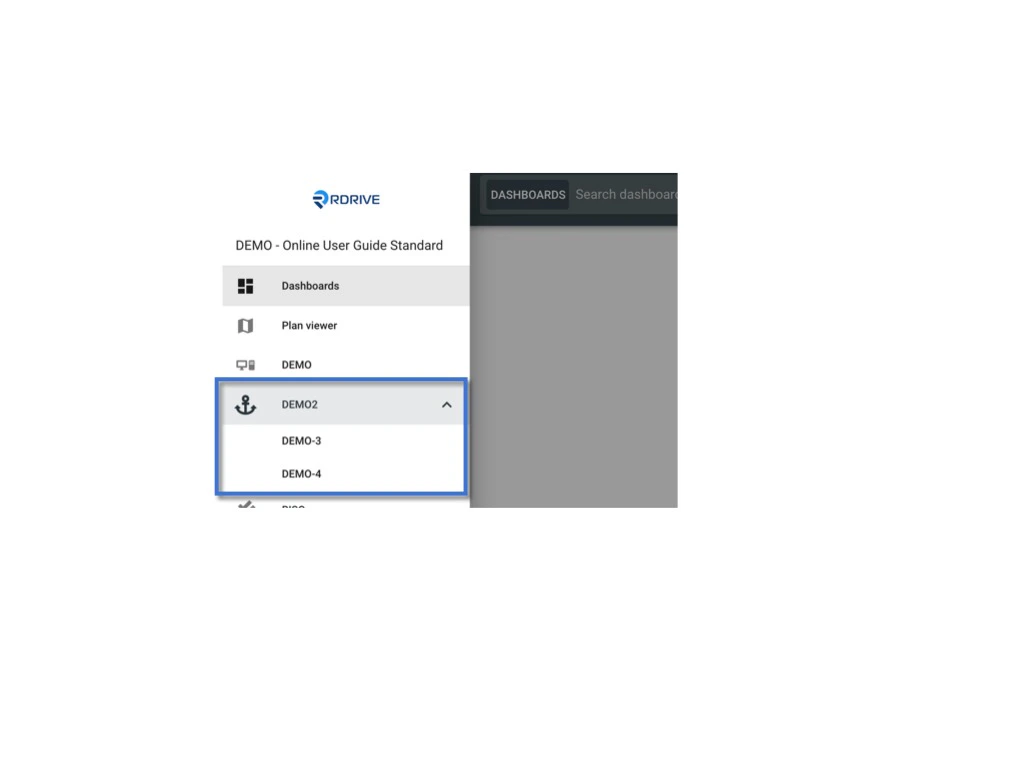
If the **Category** and **Subcategory** have a different title or the **Category** have multiple **Subcategories**, they will be displayed as drill-down items on the project menu.

<img src="https://mintcdn.com/rdrive/KIZhkIfUps2KrVy_/images/kb/103000035055/kmR2DUM0v0oQfeaNyOzSFN7rMS95bTUMjg.jpeg?fit=max&auto=format&n=KIZhkIfUps2KrVy_&q=85&s=5e4ad7a139a5d495f0cbdc655444a1ac" alt="How to add a category and subcategory?" width="1024" height="768" data-path="images/kb/103000035055/kmR2DUM0v0oQfeaNyOzSFN7rMS95bTUMjg.jpeg" />

<img src="https://mintcdn.com/rdrive/KIZhkIfUps2KrVy_/images/kb/103000035055/VAu9yQgAl1Ya3cnNlhabIw_rmIHKwoIq2g.jpeg?fit=max&auto=format&n=KIZhkIfUps2KrVy_&q=85&s=42df9d77fe7dbae86e44b301c776b16b" alt="How to add a category and subcategory?" width="1024" height="768" data-path="images/kb/103000035055/VAu9yQgAl1Ya3cnNlhabIw_rmIHKwoIq2g.jpeg" />