> ## Documentation Index
> Fetch the complete documentation index at: https://docs.rdrive.io/llms.txt
> Use this file to discover all available pages before exploring further.

# How to recategorize?

> Category is a classification tool for you to manage all the templates.

**[Category](https://docs.rdrive.io/setup/company/categories/how-to-add-a-category-and-subcategory)** is a classification tool for you to manage all the templates.

This is a tutorial to let you know how to recategorize templates into another subcategory.

You may single-edit or batch-edit by templates.

* [Single](#single)
  * [Issue/record -](#issue/record--%c2%a0) 

  * [Process template-](#process-template-)
* [Batch-Edit](#batch-edit)
  * [Issue/record-](#issue/record-)[](#process-template---)

  * [Process template -](#process-template---) [](#single) 

First of all, please access the subcategory template list from the company level to start.

***

## **Single**

#### **Issue/record -** 

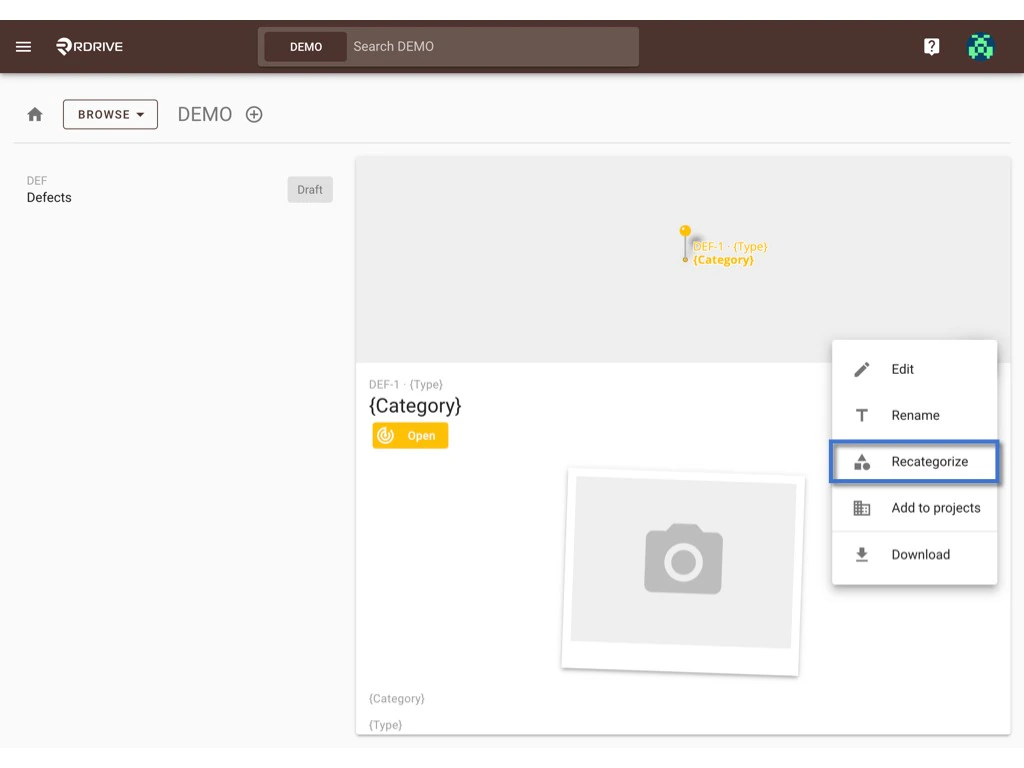
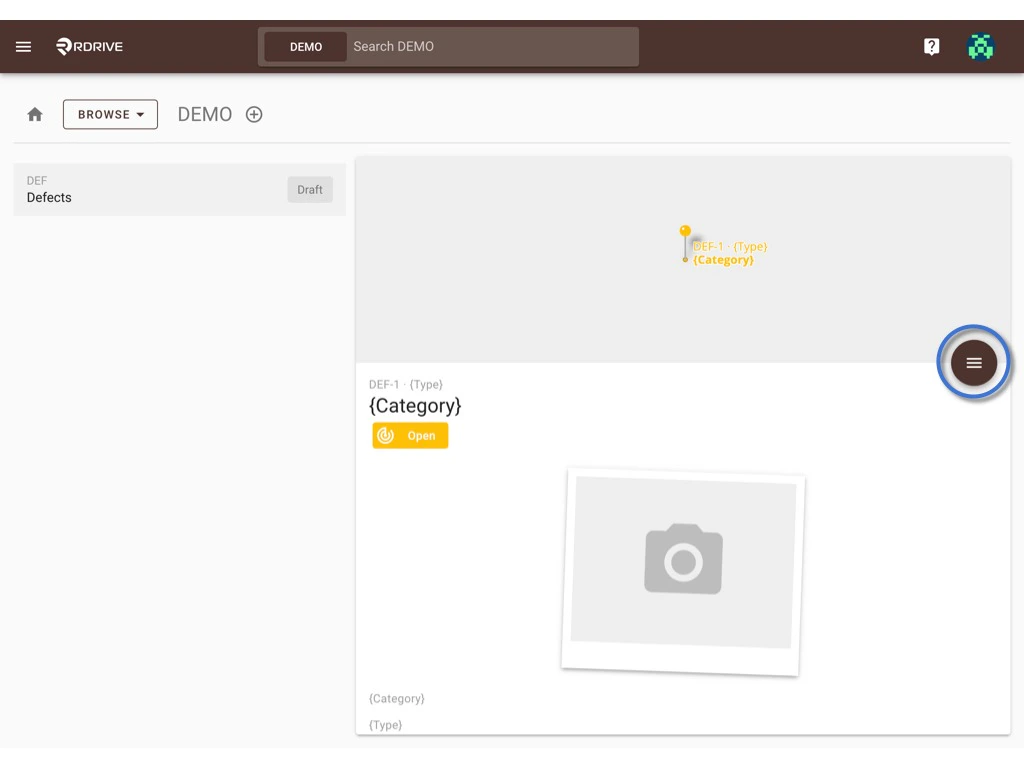
Select the template and click the **≡** button to expand the menu.
<img src="https://mintcdn.com/rdrive/V_uzWi_QxVGWCG1G/images/kb/103000035083/gb6oNH3KbUHOiaNMkG5gi47sCyC7vuwThw.jpeg?fit=max&auto=format&n=V_uzWi_QxVGWCG1G&q=85&s=5b73063e11ee5c83df48c9d892e98c74" alt="How to recategorize?" width="1024" height="768" data-path="images/kb/103000035083/gb6oNH3KbUHOiaNMkG5gi47sCyC7vuwThw.jpeg" />

Select **RECATEGORIZE**.

<img src="https://mintcdn.com/rdrive/V_uzWi_QxVGWCG1G/images/kb/103000035083/ND2S3m38ABmTqAb8Vd9HIyRYcq_Sg_2MZw.jpeg?fit=max&auto=format&n=V_uzWi_QxVGWCG1G&q=85&s=39bea246a6e3a181cccaf083d571262f" alt="How to recategorize?" width="1024" height="768" data-path="images/kb/103000035083/ND2S3m38ABmTqAb8Vd9HIyRYcq_Sg_2MZw.jpeg" />

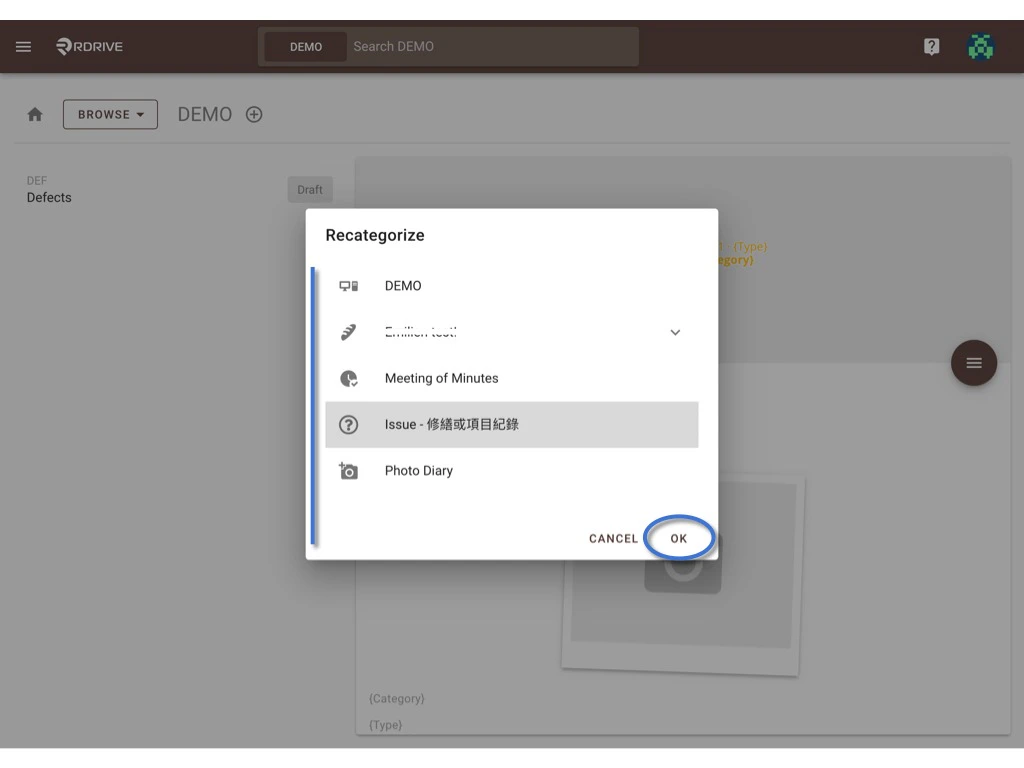
Choose one subcategory, **OK** to confirm the move.

Done.
<img src="https://mintcdn.com/rdrive/V_uzWi_QxVGWCG1G/images/kb/103000035083/yArmODeYsd5KNNFWEg5xqZL7r0bbWit6-w.jpeg?fit=max&auto=format&n=V_uzWi_QxVGWCG1G&q=85&s=d3f529962f94459c6efecb1fc8693a0e" alt="How to recategorize?" width="1024" height="768" data-path="images/kb/103000035083/yArmODeYsd5KNNFWEg5xqZL7r0bbWit6-w.jpeg" />

***

### **Process template-**

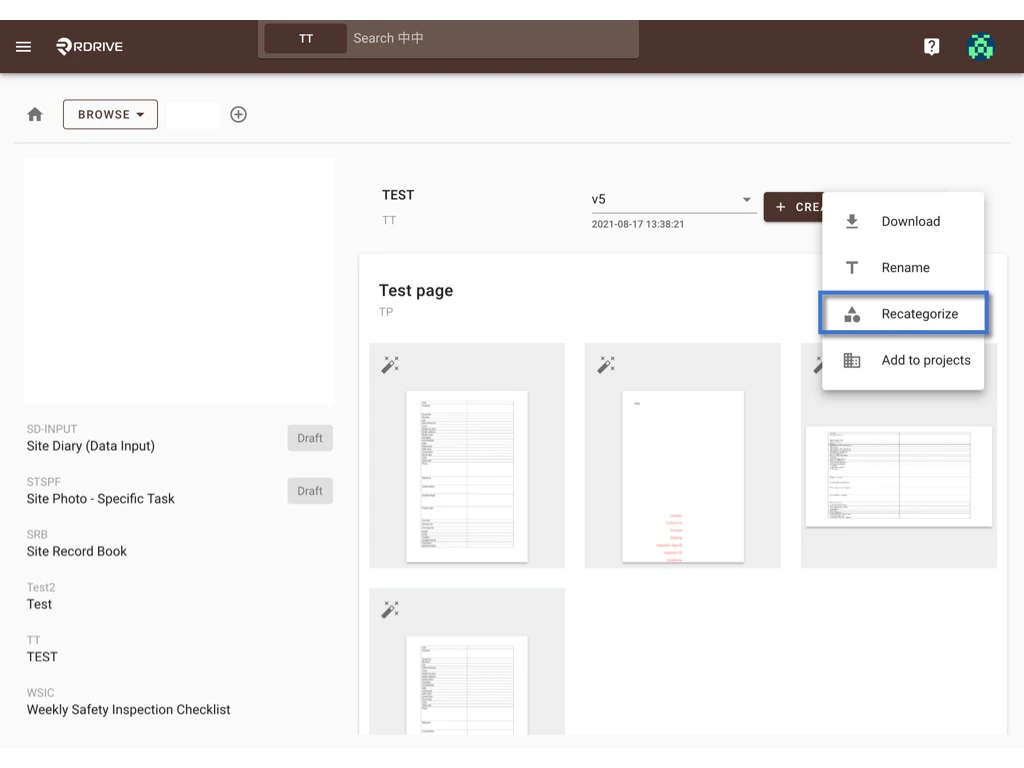
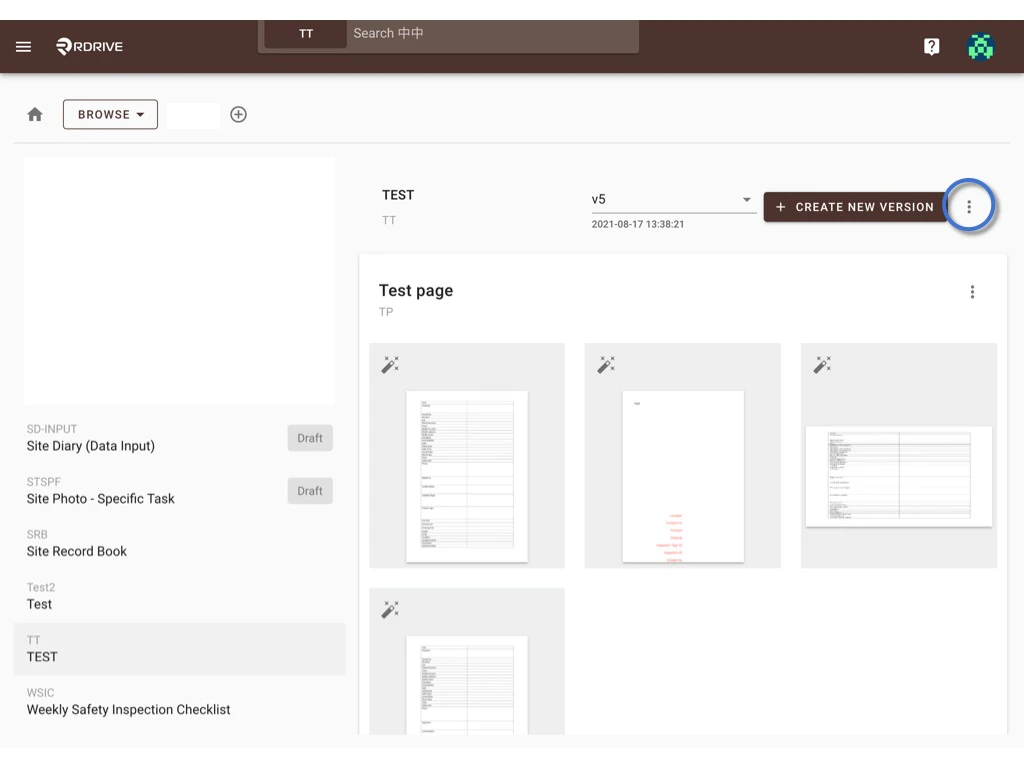
Select the template and click the **⋮** button to expand the menu.
<img src="https://mintcdn.com/rdrive/V_uzWi_QxVGWCG1G/images/kb/103000035083/q1hIgG72Xc-U6zkJBos52oYrB6cXnqrDgQ.jpeg?fit=max&auto=format&n=V_uzWi_QxVGWCG1G&q=85&s=4aea85a9b4ef8fa2eade1b7bc4bfbc9c" alt="How to recategorize?" width="1024" height="768" data-path="images/kb/103000035083/q1hIgG72Xc-U6zkJBos52oYrB6cXnqrDgQ.jpeg" />

Select **RECATEGORIZE**.

<img src="https://mintcdn.com/rdrive/V_uzWi_QxVGWCG1G/images/kb/103000035083/Vh34i8JFOWvi7aD1hkMUuwhnQU_yW72Iww.jpeg?fit=max&auto=format&n=V_uzWi_QxVGWCG1G&q=85&s=f41fde6aa9510573c77c41b4b0d80191" alt="How to recategorize?" width="1024" height="768" data-path="images/kb/103000035083/Vh34i8JFOWvi7aD1hkMUuwhnQU_yW72Iww.jpeg" />

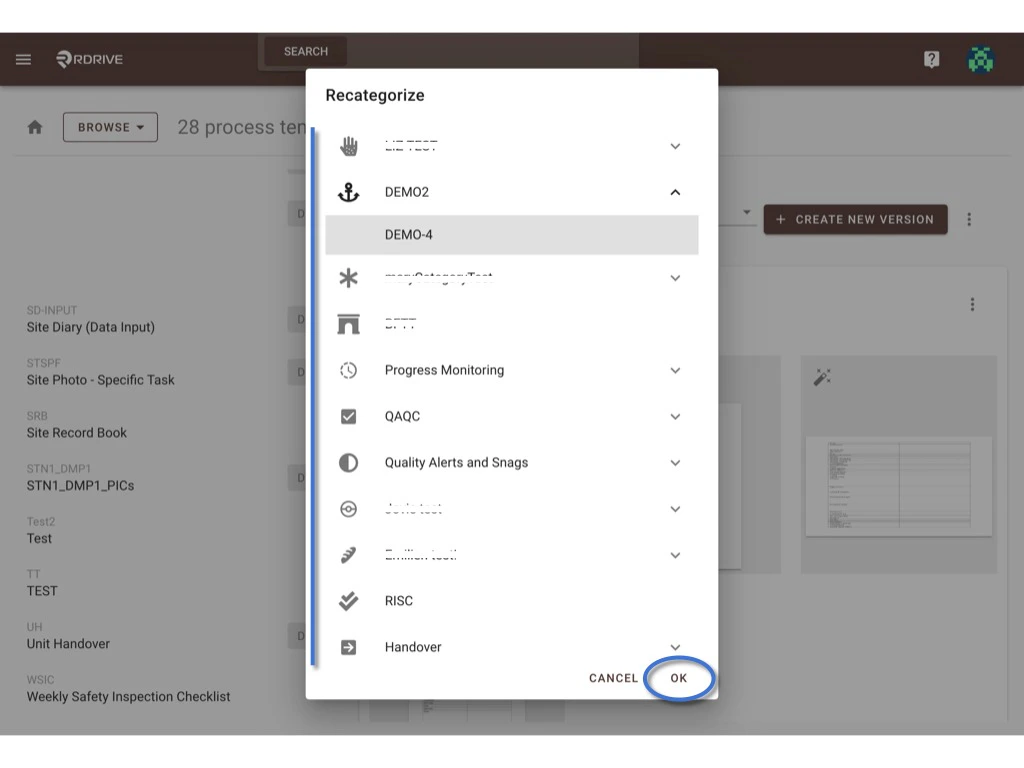
Choose one subcategory, **OK** to confirm the move.

Done.
<img src="https://mintcdn.com/rdrive/V_uzWi_QxVGWCG1G/images/kb/103000035083/tMpvQMgxc2XfN2M73BVDD0ruychPsdvCPA.jpeg?fit=max&auto=format&n=V_uzWi_QxVGWCG1G&q=85&s=8f88b91c82ff4dcd69487c4c235fc835" alt="How to recategorize?" width="1024" height="768" data-path="images/kb/103000035083/tMpvQMgxc2XfN2M73BVDD0ruychPsdvCPA.jpeg" />

***

# **Batch-Edit**

### **Issue/record-**

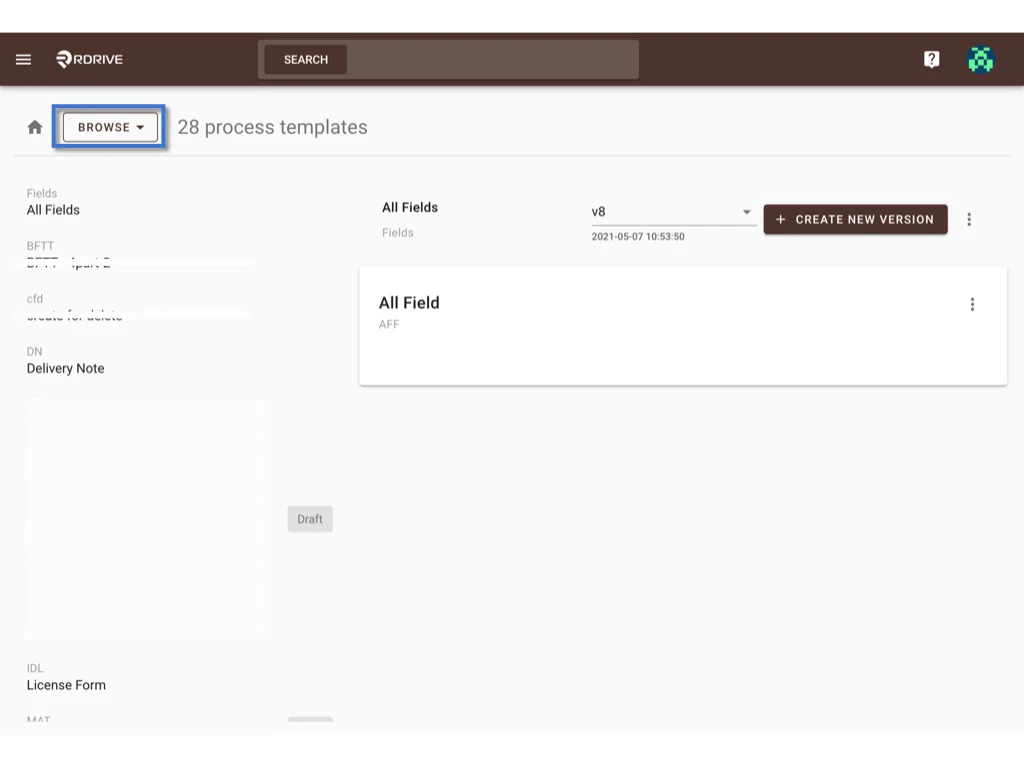
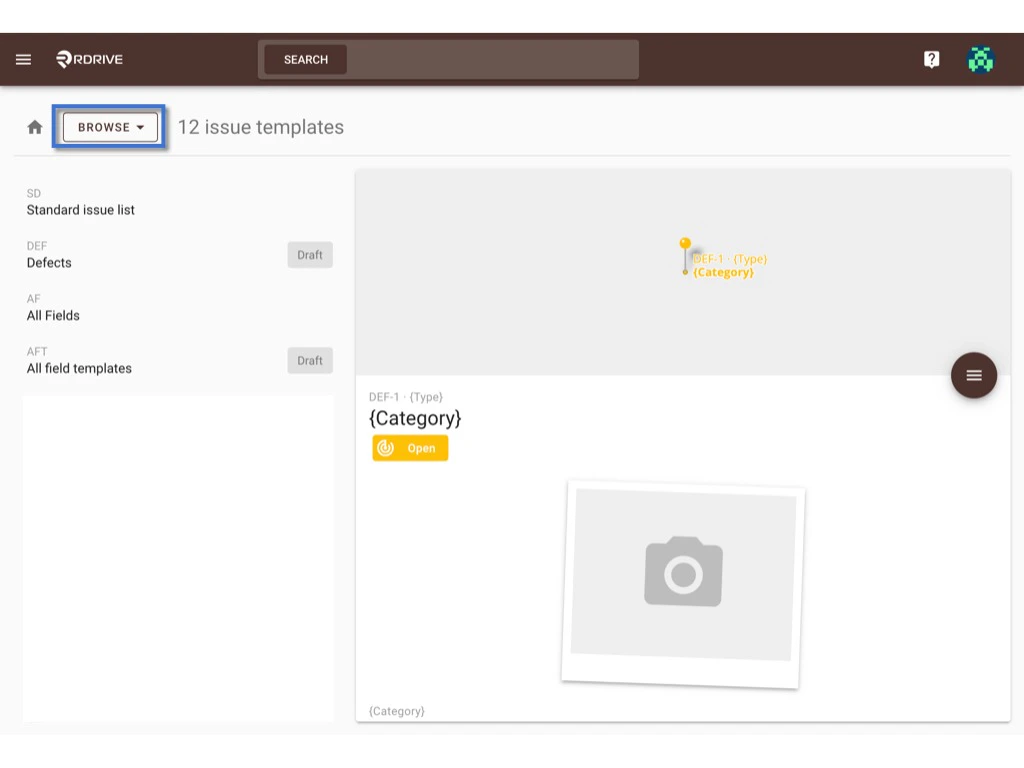
Switch the mode from **Browse** to **Select**.
<img src="https://mintcdn.com/rdrive/V_uzWi_QxVGWCG1G/images/kb/103000035083/B3YM5F8S2si3EB3IUtJ2bmoZ41UcsNxr8Q.jpeg?fit=max&auto=format&n=V_uzWi_QxVGWCG1G&q=85&s=a2fadfb06b124fe0567fb7978e2e1084" alt="How to recategorize?" width="1024" height="768" data-path="images/kb/103000035083/B3YM5F8S2si3EB3IUtJ2bmoZ41UcsNxr8Q.jpeg" />

<img src="https://mintcdn.com/rdrive/V_uzWi_QxVGWCG1G/images/kb/103000035083/-EvT_pnI761EiYH1aCqtFMJOXiNI6Fh6Qg.jpeg?fit=max&auto=format&n=V_uzWi_QxVGWCG1G&q=85&s=dac2ed22daeee65c410937a6c1046b52" alt="How to recategorize?" width="1024" height="768" data-path="images/kb/103000035083/-EvT_pnI761EiYH1aCqtFMJOXiNI6Fh6Qg.jpeg" />

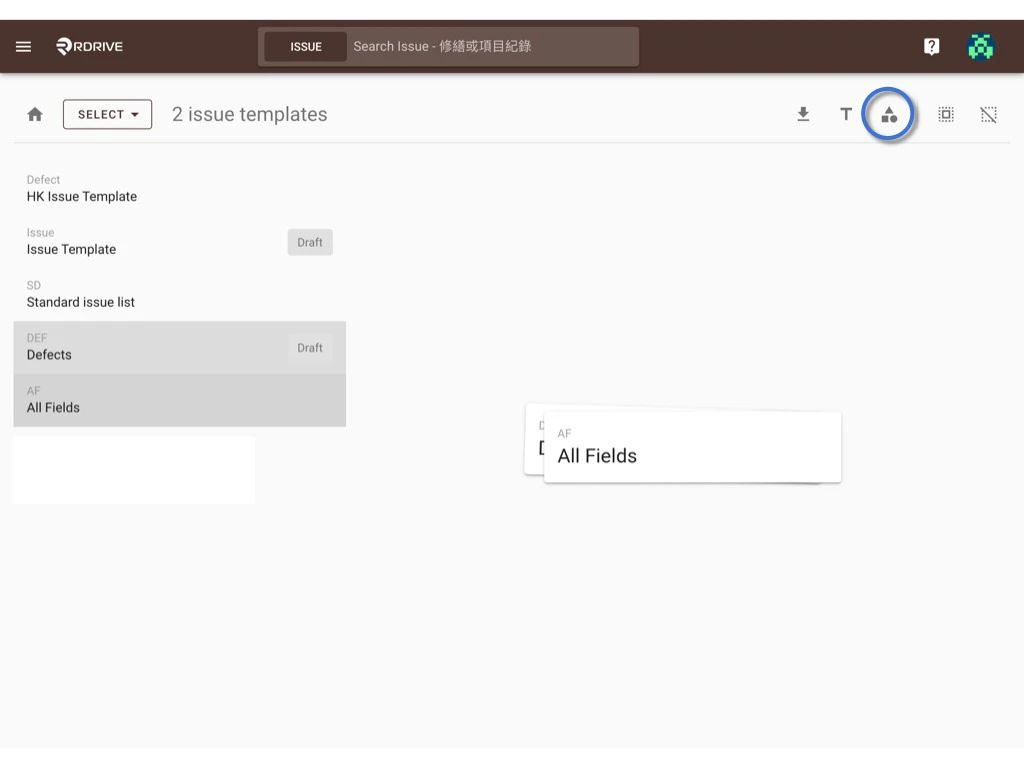
On the select, you can select multiple templates and click the recategorize icon.

<img src="https://mintcdn.com/rdrive/V_uzWi_QxVGWCG1G/images/kb/103000035083/F627g_olbc_om_QuHHTZwpLBcQPEtVjahQ.jpeg?fit=max&auto=format&n=V_uzWi_QxVGWCG1G&q=85&s=9ba3a6a9adde1048630e9fa2f68d0c85" alt="How to recategorize?" width="1024" height="768" data-path="images/kb/103000035083/F627g_olbc_om_QuHHTZwpLBcQPEtVjahQ.jpeg" />

<img src="https://mintcdn.com/rdrive/V_uzWi_QxVGWCG1G/images/kb/103000035083/pHyNCZ4EQDBwdkYJx-xI0ogc2CQZMtngIg.jpeg?fit=max&auto=format&n=V_uzWi_QxVGWCG1G&q=85&s=26b37ea4607e19c77a8c9d26cacfd3e1" alt="How to recategorize?" width="1024" height="768" data-path="images/kb/103000035083/pHyNCZ4EQDBwdkYJx-xI0ogc2CQZMtngIg.jpeg" />

Choose one subcategory, **OK** to confirm the move.

Done.

<img src="https://mintcdn.com/rdrive/V_uzWi_QxVGWCG1G/images/kb/103000035083/b4kSFZj5XqdMm4ZYZVd9RtOUK7dSUSg_2A.jpeg?fit=max&auto=format&n=V_uzWi_QxVGWCG1G&q=85&s=95afb290ce66582191b57be9c7f1848e" alt="How to recategorize?" width="1024" height="768" data-path="images/kb/103000035083/b4kSFZj5XqdMm4ZYZVd9RtOUK7dSUSg_2A.jpeg" />

### **Process template -** 

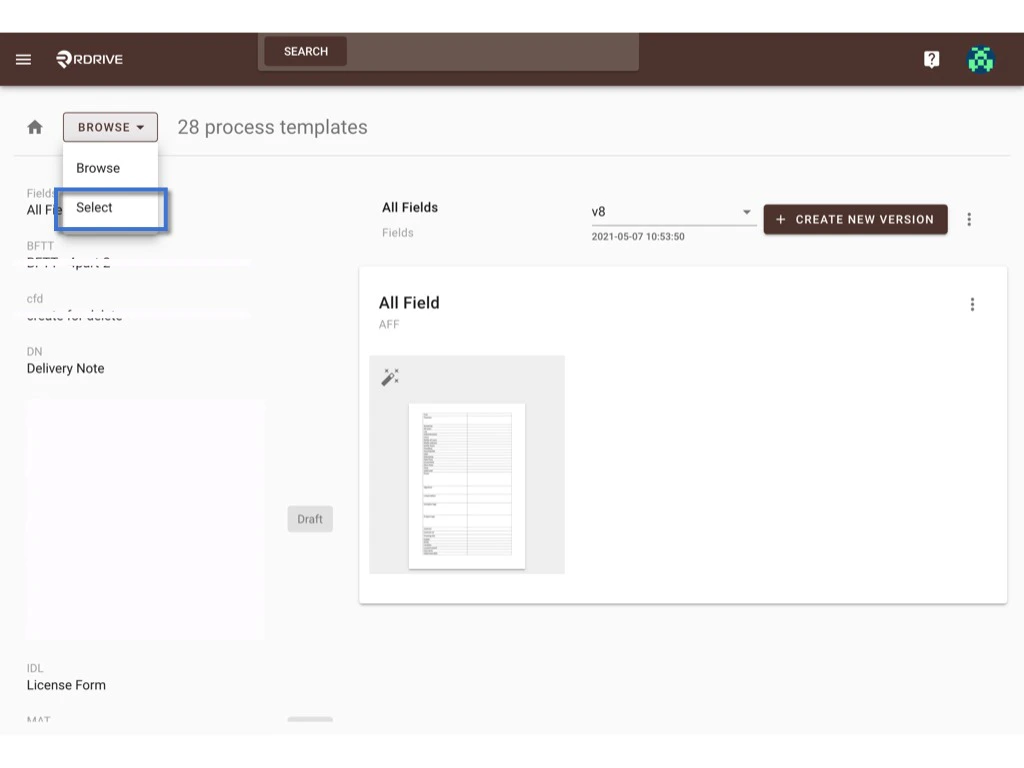
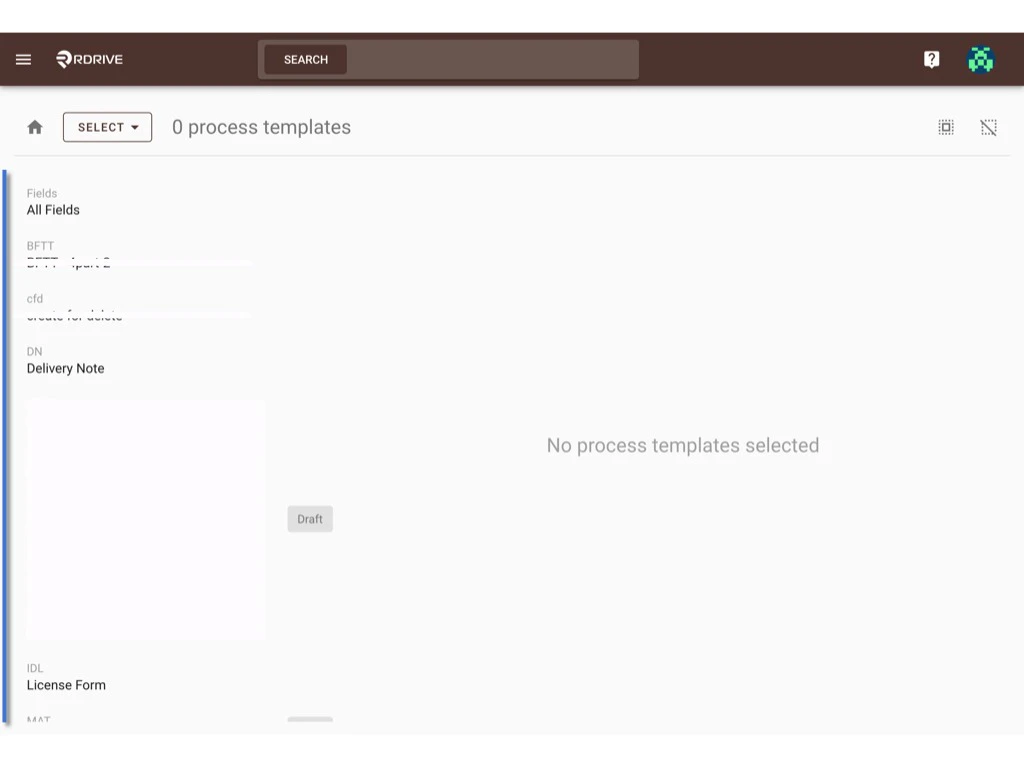
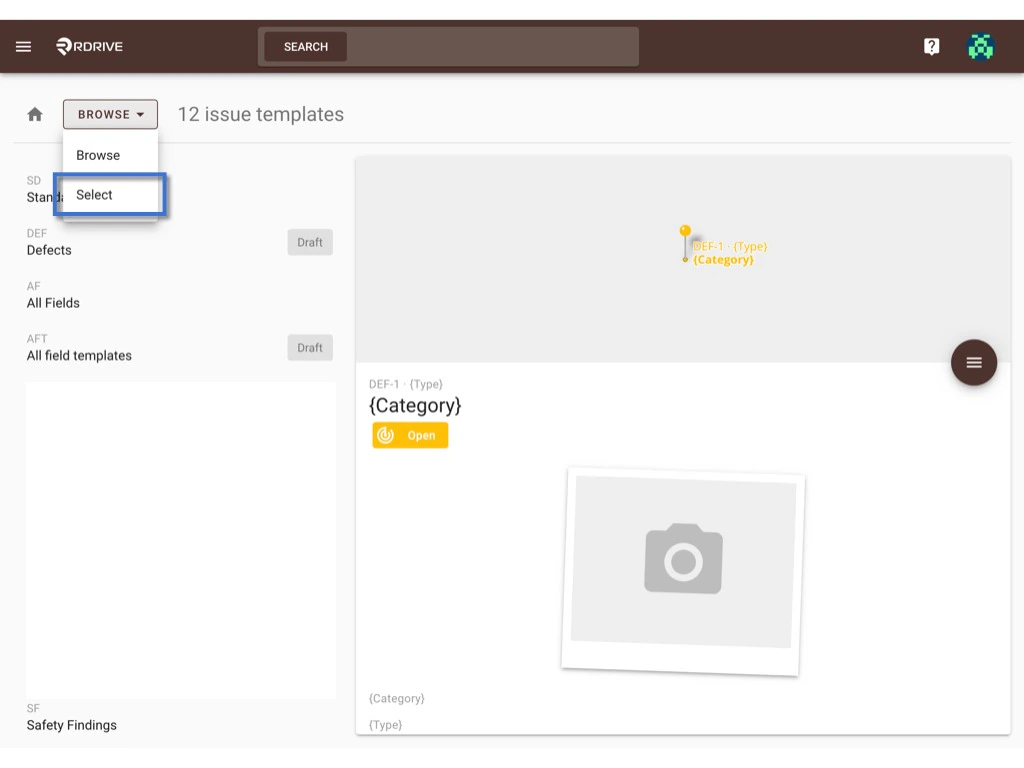
Similar step with how do we do at issue/record.\
Switch the mode from **Browse** to **Select**.
<img src="https://mintcdn.com/rdrive/V_uzWi_QxVGWCG1G/images/kb/103000035083/az0RiNExJDXYZcOHgJl0fZOQAdEJiuGogQ.jpeg?fit=max&auto=format&n=V_uzWi_QxVGWCG1G&q=85&s=4d75a50c6aad9bb071de1a48515b7814" alt="How to recategorize?" width="1024" height="768" data-path="images/kb/103000035083/az0RiNExJDXYZcOHgJl0fZOQAdEJiuGogQ.jpeg" />

<img src="https://mintcdn.com/rdrive/V_uzWi_QxVGWCG1G/images/kb/103000035083/2mLrNVMa4zubUGhFpghKbPG1VYNRBCb-AA.jpeg?fit=max&auto=format&n=V_uzWi_QxVGWCG1G&q=85&s=bbf5fafdbb3b3bc316473fb97e17ba83" alt="How to recategorize?" width="1024" height="768" data-path="images/kb/103000035083/2mLrNVMa4zubUGhFpghKbPG1VYNRBCb-AA.jpeg" />

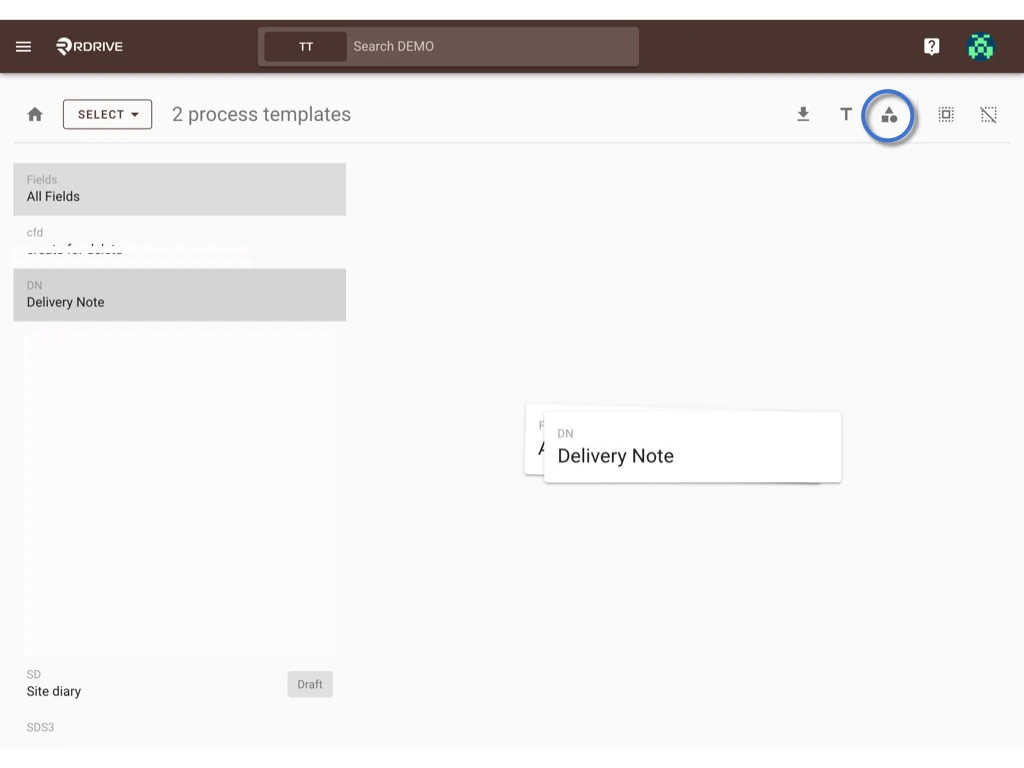
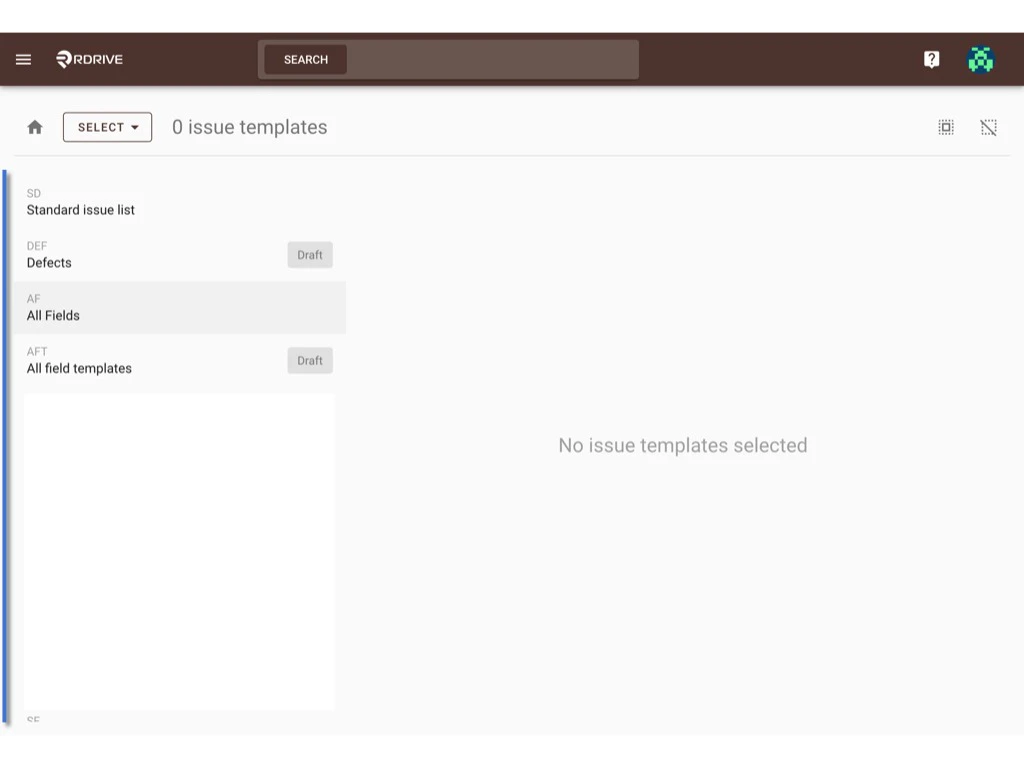
On the select, you can select multiple templates and click the recategorize icon.
<img src="https://mintcdn.com/rdrive/V_uzWi_QxVGWCG1G/images/kb/103000035083/DRsub62NLH3M2OW83GI0XKfG2TLhyFHGLg.jpeg?fit=max&auto=format&n=V_uzWi_QxVGWCG1G&q=85&s=4740e2693552080d88752312ff1bd99e" alt="How to recategorize?" width="1024" height="768" data-path="images/kb/103000035083/DRsub62NLH3M2OW83GI0XKfG2TLhyFHGLg.jpeg" />

<img src="https://mintcdn.com/rdrive/V_uzWi_QxVGWCG1G/images/kb/103000035083/Z2qINcifxfqKN_L7A7yIyDo4T5JNyH2dJw.jpeg?fit=max&auto=format&n=V_uzWi_QxVGWCG1G&q=85&s=ba55e67ccee67c3a26409c8fd5a0f283" alt="How to recategorize?" width="1024" height="768" data-path="images/kb/103000035083/Z2qINcifxfqKN_L7A7yIyDo4T5JNyH2dJw.jpeg" />

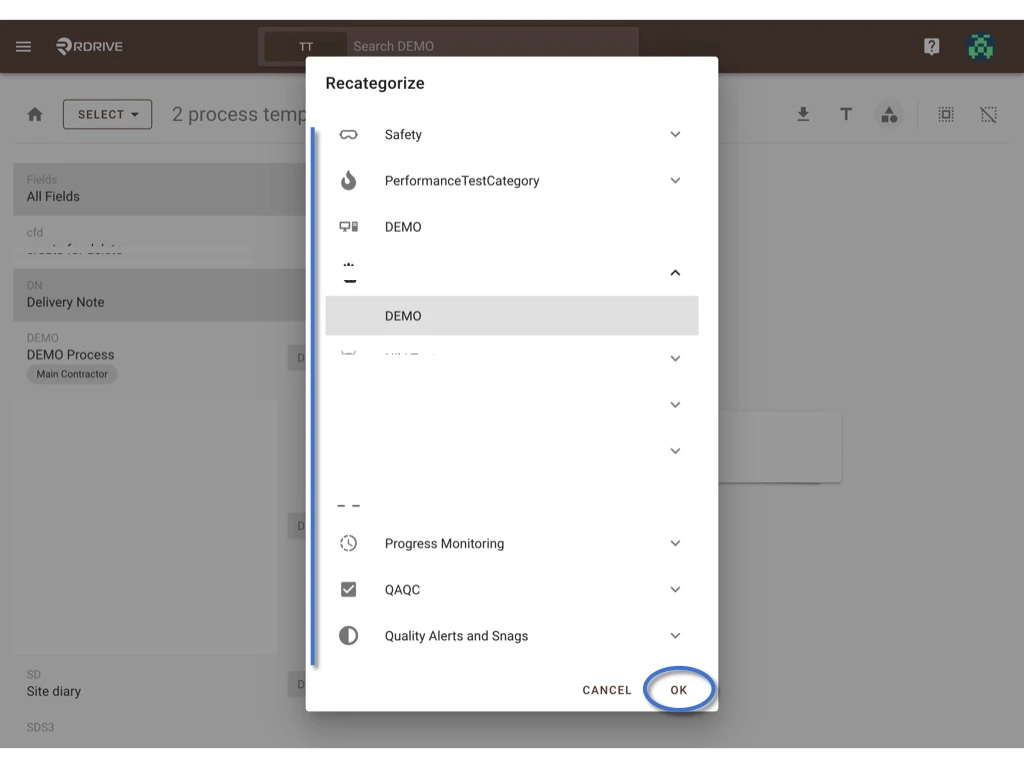
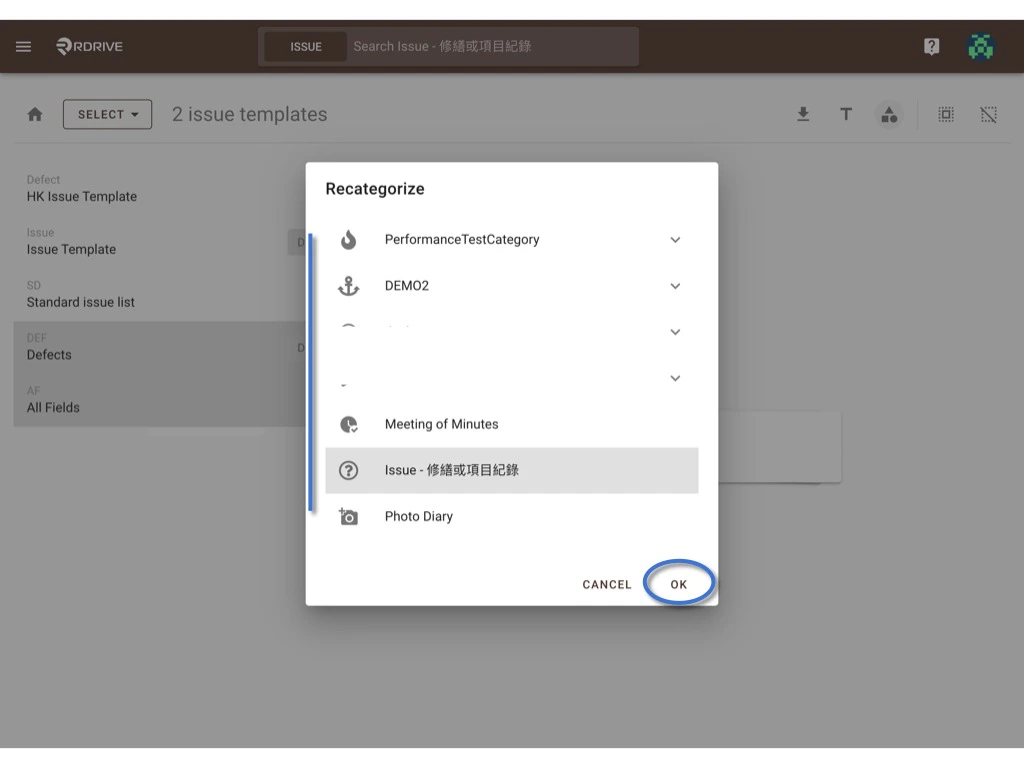
Choose one subcategory, **OK** to confirm the move.

Done.
<img src="https://mintcdn.com/rdrive/V_uzWi_QxVGWCG1G/images/kb/103000035083/WB6RM1KNOGoNbI-7e-RcuwxgE5gLFeo1Dw.jpeg?fit=max&auto=format&n=V_uzWi_QxVGWCG1G&q=85&s=dd313e97fc3f5e1513789162590b27b6" alt="How to recategorize?" width="1024" height="768" data-path="images/kb/103000035083/WB6RM1KNOGoNbI-7e-RcuwxgE5gLFeo1Dw.jpeg" />