> ## Documentation Index
> Fetch the complete documentation index at: https://docs.rdrive.io/llms.txt
> Use this file to discover all available pages before exploring further.

# Manage the cover templates

> This article shows you how to manage the created cover templates.

This article shows you how to manage the [created cover templates](https://docs.rdrive.io/setup/company/cover-templates/create-a-report-cover-template).

You may [Edit](#edit), [Download](#download---single-&-batch), and [Delete](#delete) from this page.

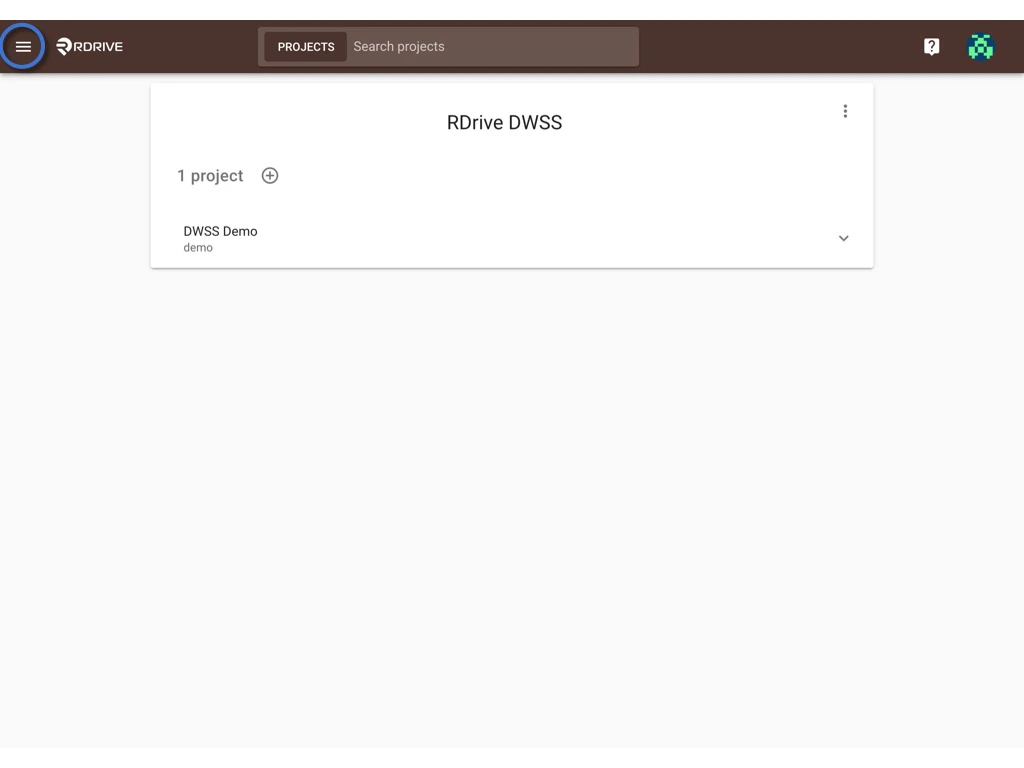
First, log in to **Company Area**.

<Info>
  Only the company admin can access this page.
</Info>

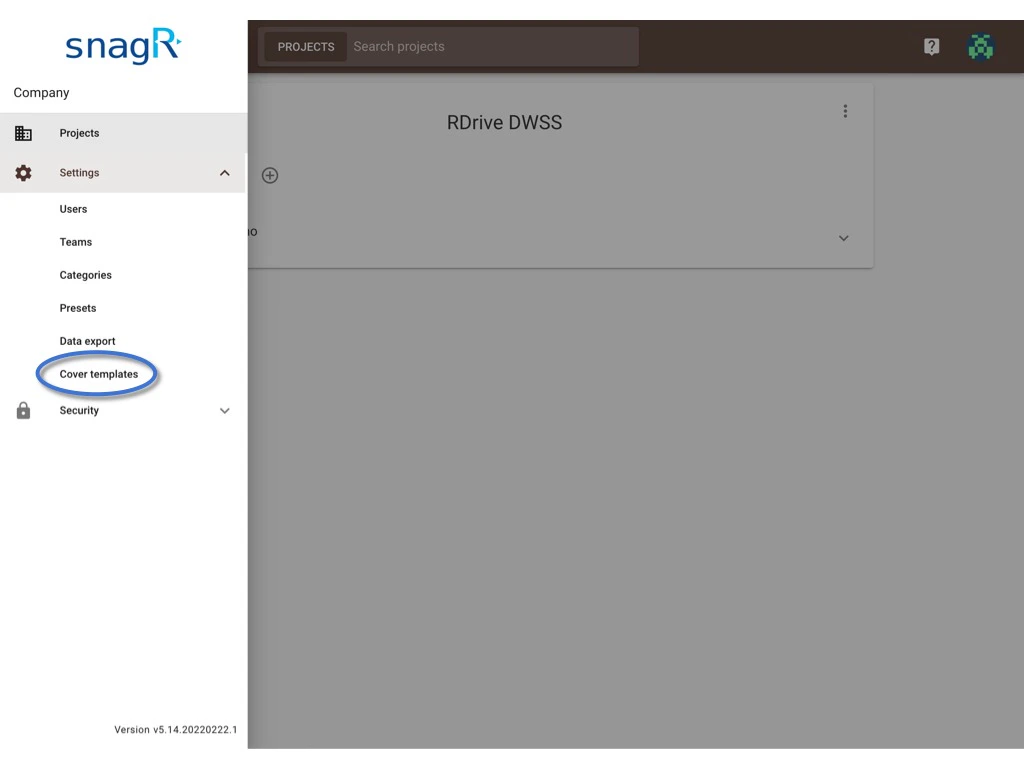
Click **Settings** and select **Cover templates**.
<img src="https://mintcdn.com/rdrive/rBkPb72V7fth7zAn/images/kb/103000035041/eiaPKydwM4qRXYE-c1FqCaa0AdhVs6Ppng.jpeg?fit=max&auto=format&n=rBkPb72V7fth7zAn&q=85&s=403f3cbe398eb3f078b6bb317b425d78" alt="Manage the cover templates" width="1024" height="768" data-path="images/kb/103000035041/eiaPKydwM4qRXYE-c1FqCaa0AdhVs6Ppng.jpeg" />

<img src="https://mintcdn.com/rdrive/rBkPb72V7fth7zAn/images/kb/103000035041/Xk7abjylvIN-XSRyPpGkqWlvXKhzNpLN1w.jpeg?fit=max&auto=format&n=rBkPb72V7fth7zAn&q=85&s=aeb4b1f0206c5c9016619950a51c00c6" alt="Manage the cover templates" width="1024" height="768" data-path="images/kb/103000035041/Xk7abjylvIN-XSRyPpGkqWlvXKhzNpLN1w.jpeg" />

***

## **Edit**

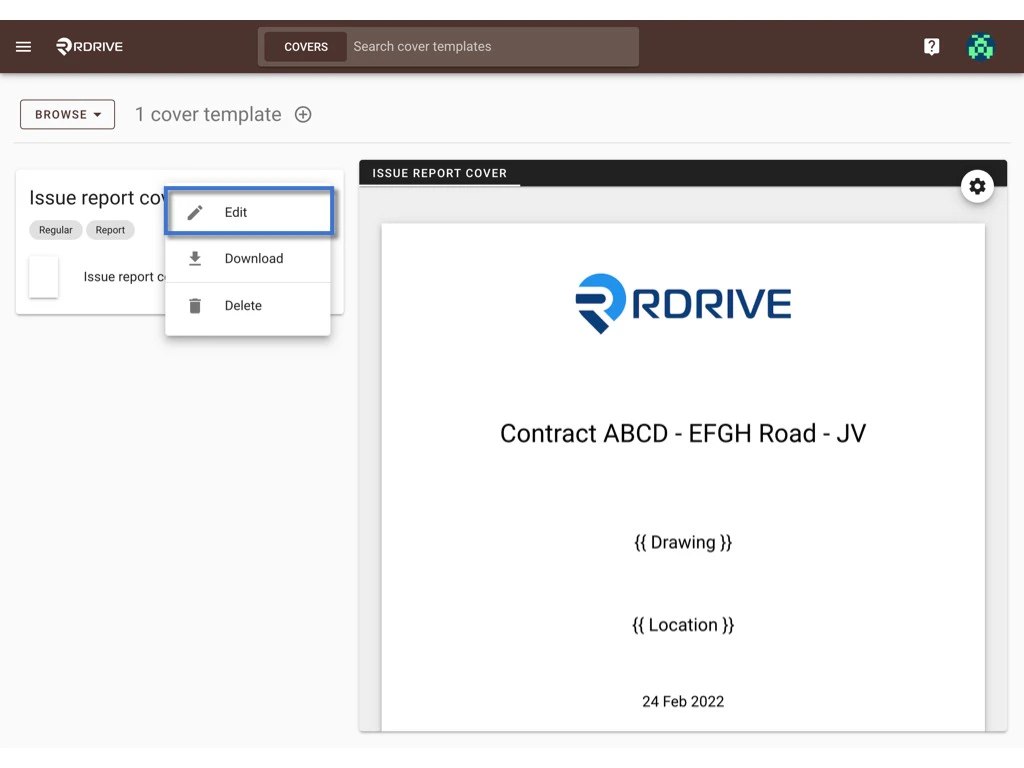
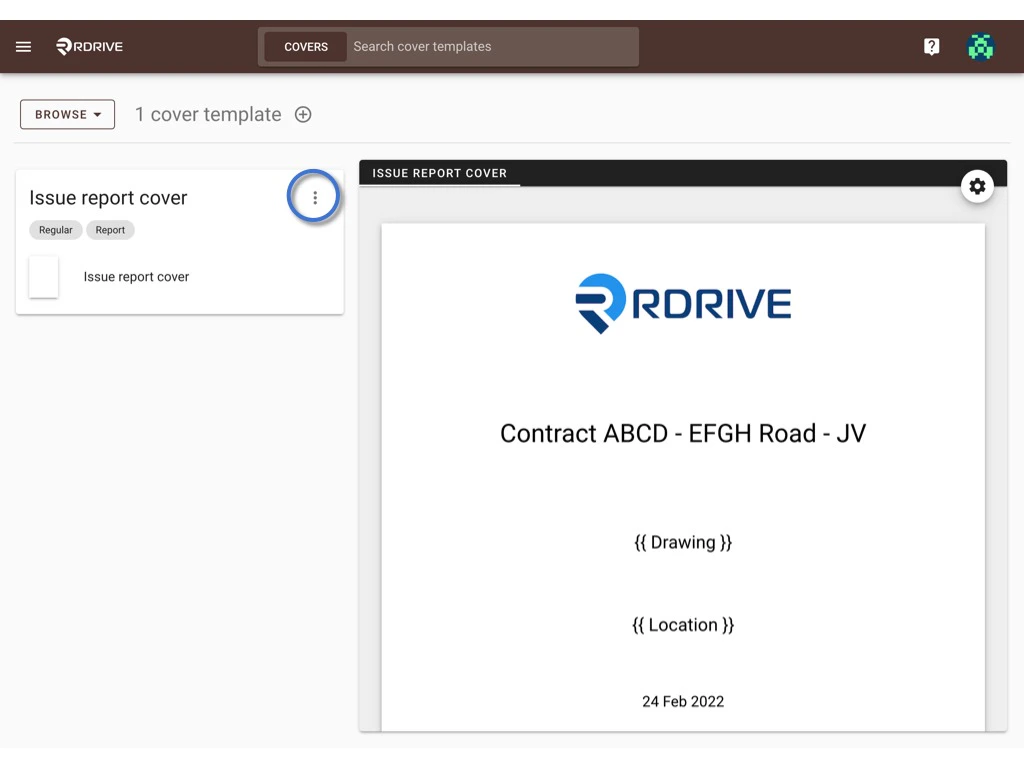
Click the **⋮** button and select **Edit**.
<img src="https://mintcdn.com/rdrive/rBkPb72V7fth7zAn/images/kb/103000035041/UIN7yvgnztXa1LiJoNmCtWS3XSZX3hcP7A.jpeg?fit=max&auto=format&n=rBkPb72V7fth7zAn&q=85&s=caaca40520fc2e4cac3ebac5e75c382f" alt="Manage the cover templates" width="1024" height="768" data-path="images/kb/103000035041/UIN7yvgnztXa1LiJoNmCtWS3XSZX3hcP7A.jpeg" />

<img src="https://mintcdn.com/rdrive/rBkPb72V7fth7zAn/images/kb/103000035041/l7iswXuYCFAJB3Mfs3B8i5wTGjUFljAGsw.jpeg?fit=max&auto=format&n=rBkPb72V7fth7zAn&q=85&s=5a544621a331b8a57868149e330bee63" alt="Manage the cover templates" width="1024" height="768" data-path="images/kb/103000035041/l7iswXuYCFAJB3Mfs3B8i5wTGjUFljAGsw.jpeg" />

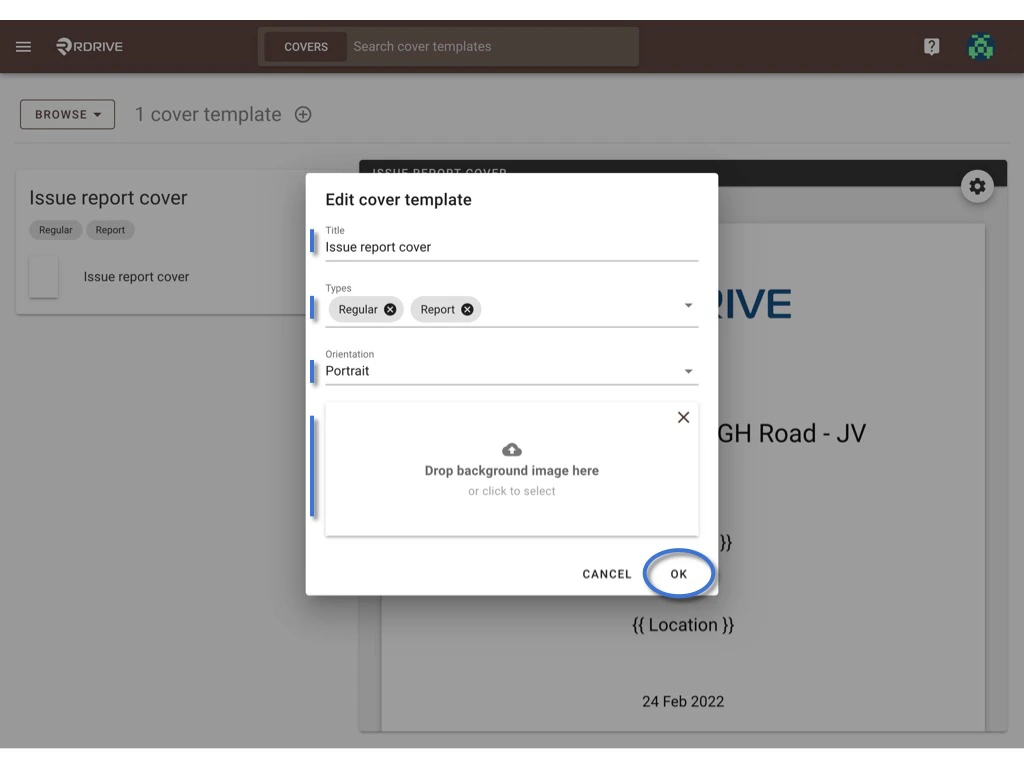
In this dialog, you may edit the title, type, orientation, and background image of this template.\
Press **OK** to confirm the change.
<img src="https://mintcdn.com/rdrive/rBkPb72V7fth7zAn/images/kb/103000035041/ADsPDRRvRQBlLtSOJeQY4KmsiiMEr1_GJw.jpeg?fit=max&auto=format&n=rBkPb72V7fth7zAn&q=85&s=e696be9ff7d776ba43ce574be7172082" alt="Manage the cover templates" width="1024" height="768" data-path="images/kb/103000035041/ADsPDRRvRQBlLtSOJeQY4KmsiiMEr1_GJw.jpeg" />

***

## Download - [single](#single-download) & [batch](#batch-download)

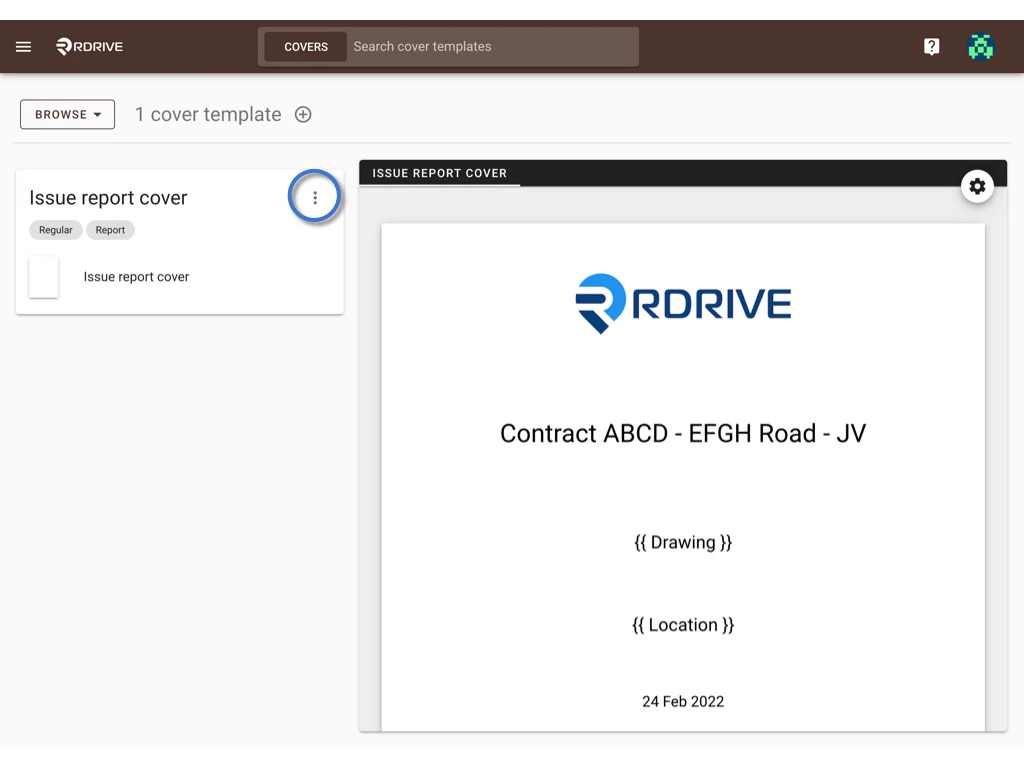
* **Single download**

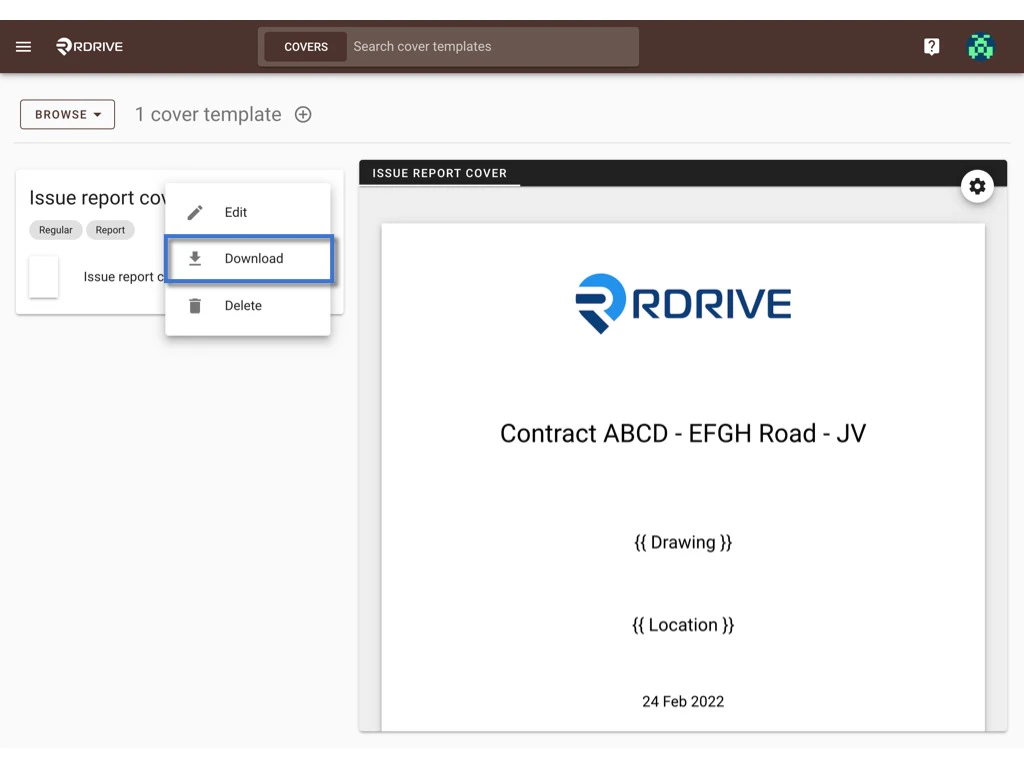
Click the **⋮** button and select **Download**.
<img src="https://mintcdn.com/rdrive/rBkPb72V7fth7zAn/images/kb/103000035041/4M6AXNLjlyZZL4EaXqCi6Zw4-TdfDrgRog.jpeg?fit=max&auto=format&n=rBkPb72V7fth7zAn&q=85&s=6e08bcba7b18c8592c44eebcfd3deee2" alt="Manage the cover templates" width="1024" height="768" data-path="images/kb/103000035041/4M6AXNLjlyZZL4EaXqCi6Zw4-TdfDrgRog.jpeg" />

<img src="https://mintcdn.com/rdrive/rBkPb72V7fth7zAn/images/kb/103000035041/pVqtvMLNw2ToHMcQzTm83OiSALWUkL31PQ.jpeg?fit=max&auto=format&n=rBkPb72V7fth7zAn&q=85&s=0bc32a8cddea0f4d6545f64bf42aa2e0" alt="Manage the cover templates" width="1024" height="768" data-path="images/kb/103000035041/pVqtvMLNw2ToHMcQzTm83OiSALWUkL31PQ.jpeg" />

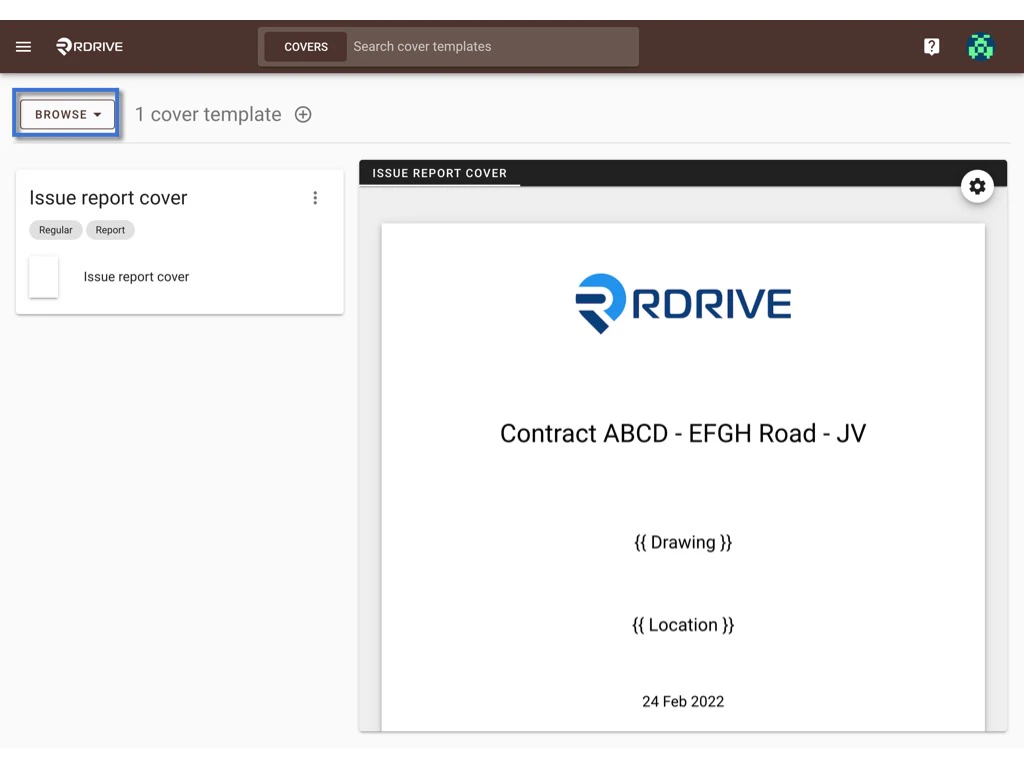
* **Batch download**

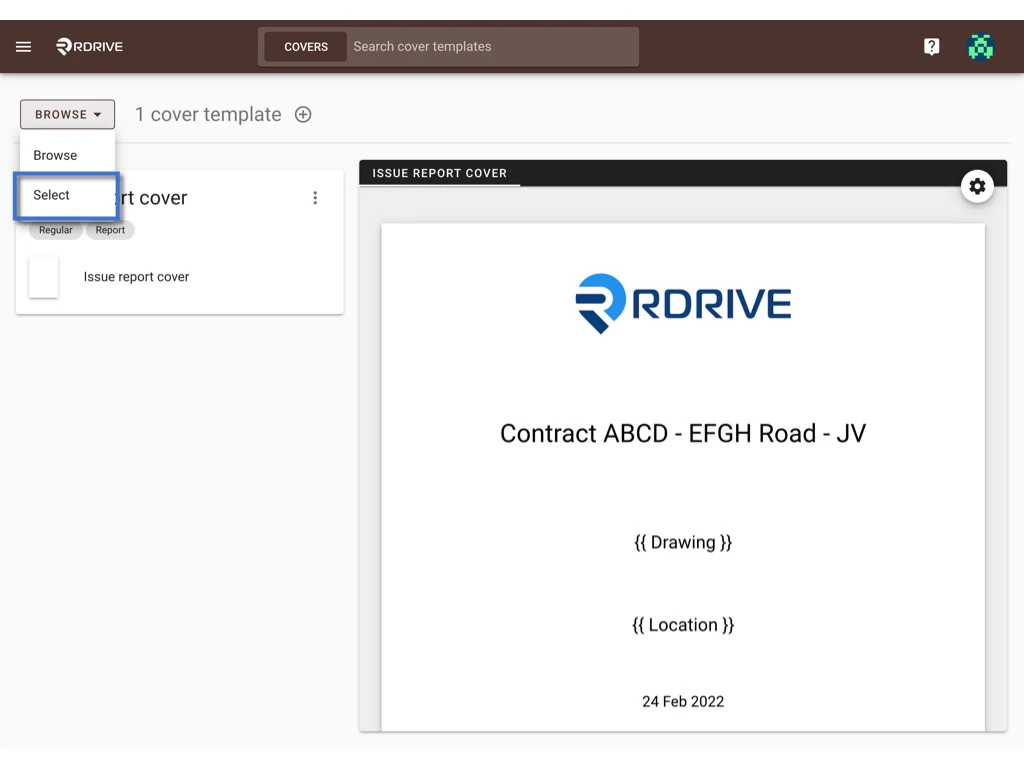
Switch the mode from **BROWSE** to **SELECT**.
<img src="https://mintcdn.com/rdrive/rBkPb72V7fth7zAn/images/kb/103000035041/2CtWv1w2fcTzw2htJK0xoMdQY6KxdN09vA.jpeg?fit=max&auto=format&n=rBkPb72V7fth7zAn&q=85&s=4104060a8fffcb44f42633b0fcd91241" alt="Manage the cover templates" width="1024" height="768" data-path="images/kb/103000035041/2CtWv1w2fcTzw2htJK0xoMdQY6KxdN09vA.jpeg" />

<img src="https://mintcdn.com/rdrive/rBkPb72V7fth7zAn/images/kb/103000035041/ZIZWWNQlhs7uSXLbVWj28C-PVW_bRfj8gg.jpeg?fit=max&auto=format&n=rBkPb72V7fth7zAn&q=85&s=b567f63f4f06d0710b966f2bc85c2999" alt="Manage the cover templates" width="1024" height="768" data-path="images/kb/103000035041/ZIZWWNQlhs7uSXLbVWj28C-PVW_bRfj8gg.jpeg" />

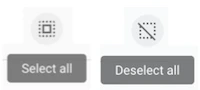
On the SELECT, you can click on the template or press the **select all** / **deselect all** button to select item(s).\
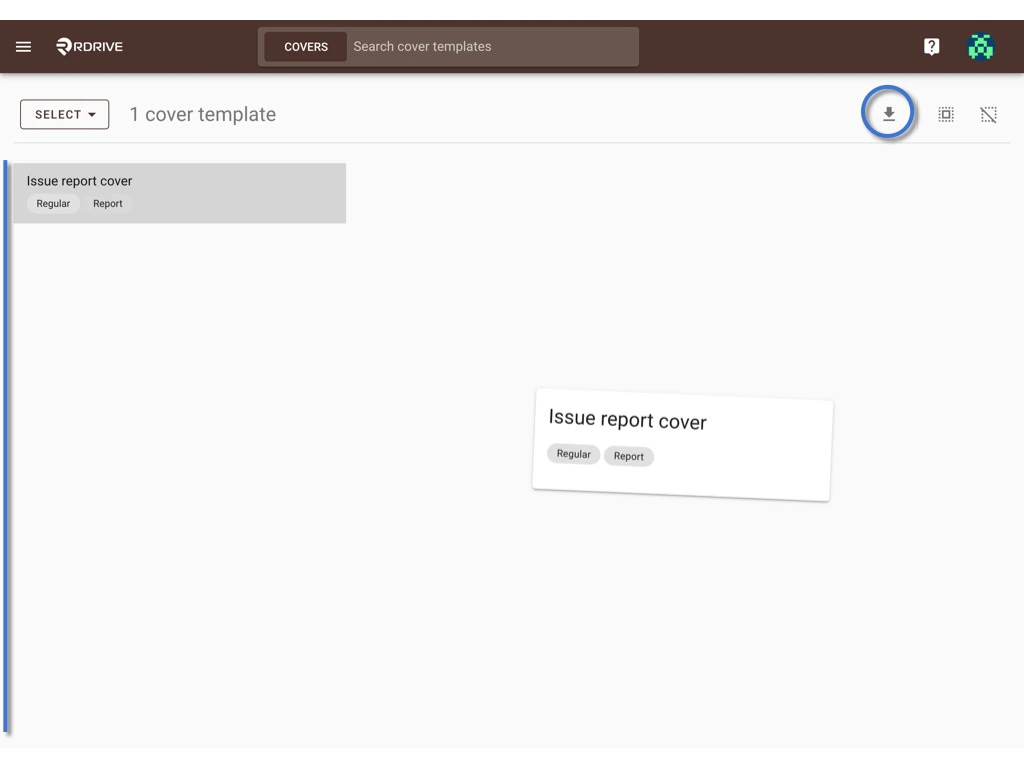
The selected item will be highlighted in grey.
<img src="https://mintcdn.com/rdrive/rBkPb72V7fth7zAn/images/kb/103000035041/ITBrnFnAKV49Gyl4qZhwGISvJcQTey21HQ.png?fit=max&auto=format&n=rBkPb72V7fth7zAn&q=85&s=8b516d773f355bde9a35e91187b1590a" alt="Manage the cover templates" width="200" height="90" data-path="images/kb/103000035041/ITBrnFnAKV49Gyl4qZhwGISvJcQTey21HQ.png" />

Press the **Download** icon to start batch download.
<img src="https://mintcdn.com/rdrive/rBkPb72V7fth7zAn/images/kb/103000035041/orOzQJHRB_Ur8YzC9clacFcemeR26khhGw.jpeg?fit=max&auto=format&n=rBkPb72V7fth7zAn&q=85&s=cbaf9100e6a5c575efd8c9aa0d1d0f70" alt="Manage the cover templates" width="1024" height="768" data-path="images/kb/103000035041/orOzQJHRB_Ur8YzC9clacFcemeR26khhGw.jpeg" />

***

## Delete

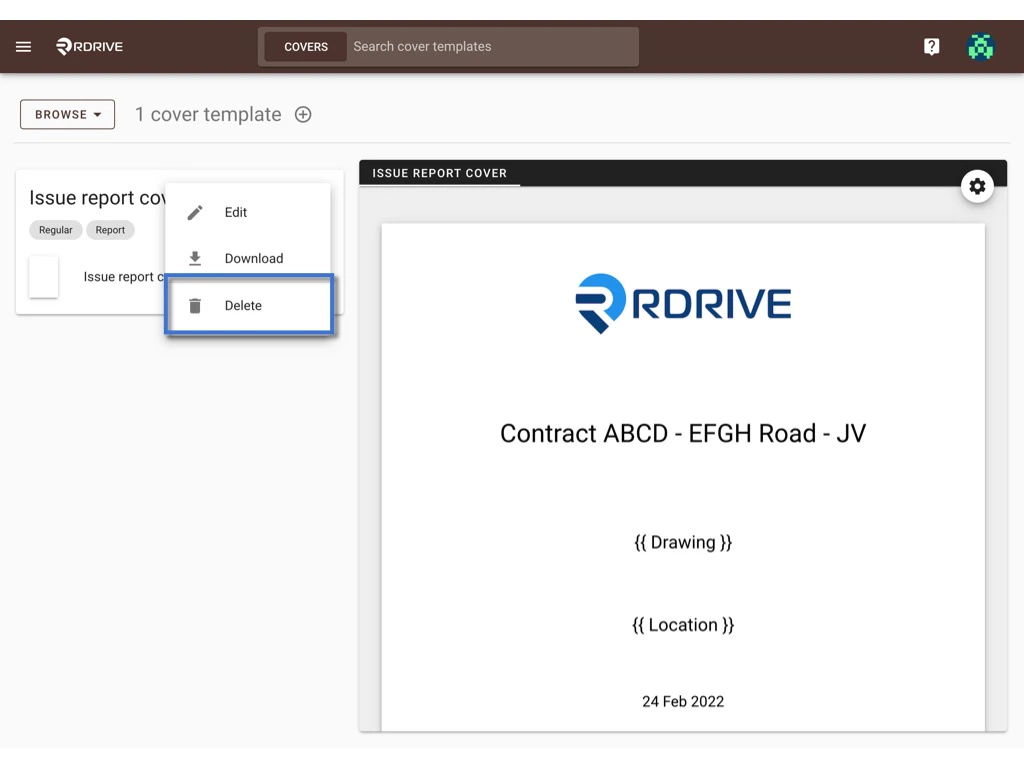
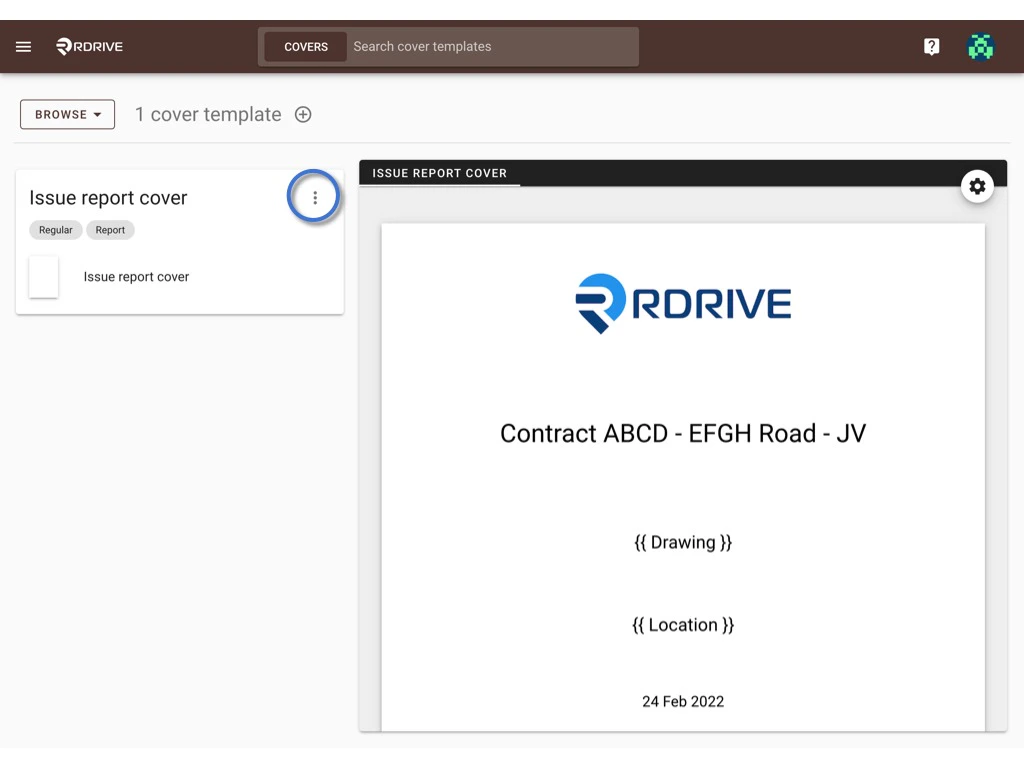
Click the **⋮** button, click **Delete** to request delete template.
<img src="https://mintcdn.com/rdrive/rBkPb72V7fth7zAn/images/kb/103000035041/AhxtVAr9h8jGIoacIfmUClqpBXUN57ijSQ.jpeg?fit=max&auto=format&n=rBkPb72V7fth7zAn&q=85&s=48bab0f7be5ef682cf6a0ac587366b6e" alt="Manage the cover templates" width="1024" height="768" data-path="images/kb/103000035041/AhxtVAr9h8jGIoacIfmUClqpBXUN57ijSQ.jpeg" />

<img src="https://mintcdn.com/rdrive/rBkPb72V7fth7zAn/images/kb/103000035041/4EJmbaOaKEJJku6pvhMTseluUSvQi7i8PQ.jpeg?fit=max&auto=format&n=rBkPb72V7fth7zAn&q=85&s=d95e0f60f37735c7d678e32e99c86ce9" alt="Manage the cover templates" width="1024" height="768" data-path="images/kb/103000035041/4EJmbaOaKEJJku6pvhMTseluUSvQi7i8PQ.jpeg" />

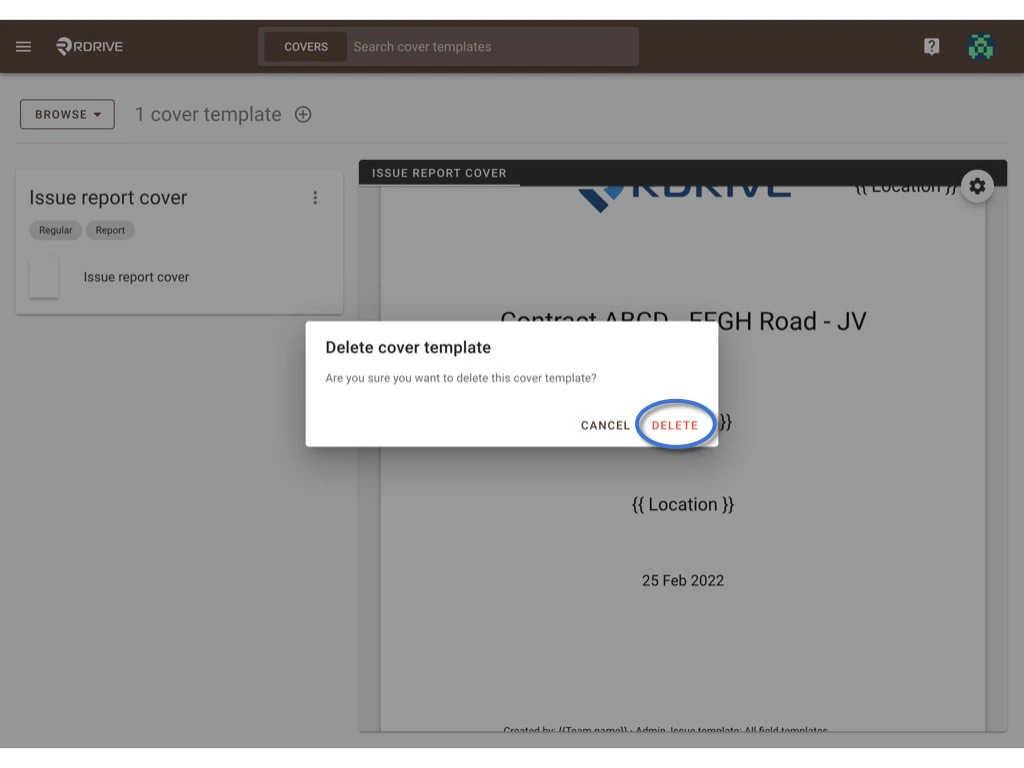
**DELETE** again to confirm the delete.
<img src="https://mintcdn.com/rdrive/rBkPb72V7fth7zAn/images/kb/103000035041/qlkoWgIGSHY7u4koJkQBcbh2Li9kFQzgwA.jpeg?fit=max&auto=format&n=rBkPb72V7fth7zAn&q=85&s=3b096684826cc508348067791ee2bfc8" alt="Manage the cover templates" width="1024" height="768" data-path="images/kb/103000035041/qlkoWgIGSHY7u4koJkQBcbh2Li9kFQzgwA.jpeg" />