> ## Documentation Index
> Fetch the complete documentation index at: https://docs.rdrive.io/llms.txt
> Use this file to discover all available pages before exploring further.

# How to create a Data export template?

> Data export is a tool for general users to extract data to a CSV file for any purpose.

Data export is a tool for general users to extract data to a CSV file for any purpose.

You can also set up the PDF title here.

Only the company admin can help to create a template as needed.

It is fully customised.

Let see how it work.

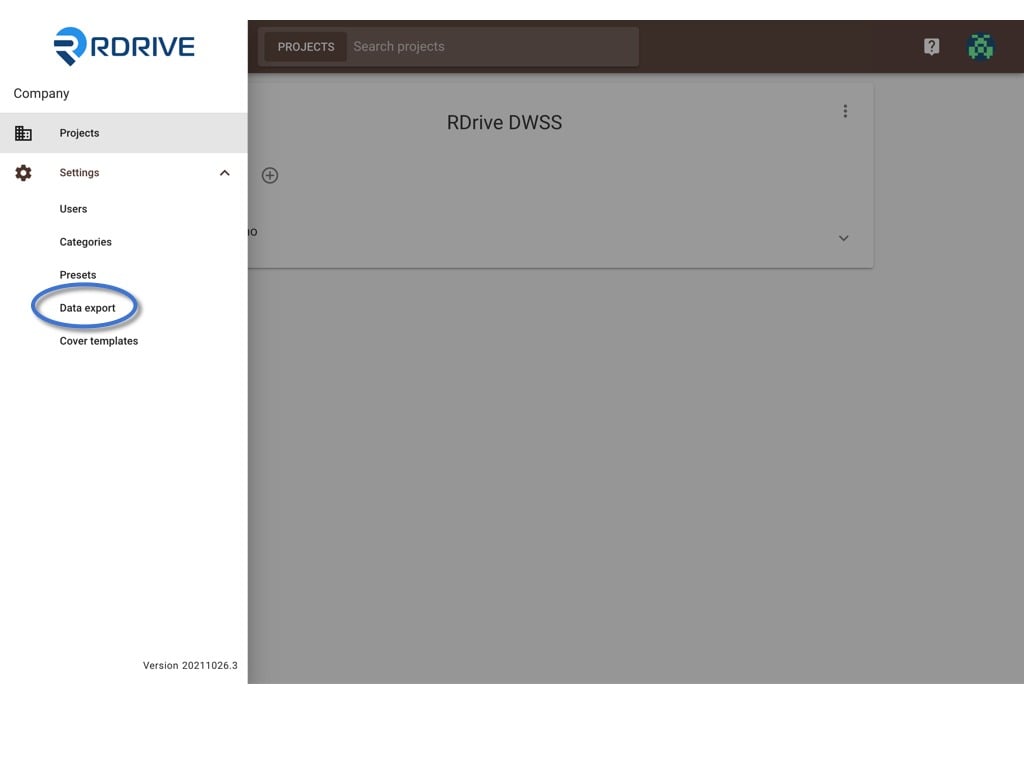
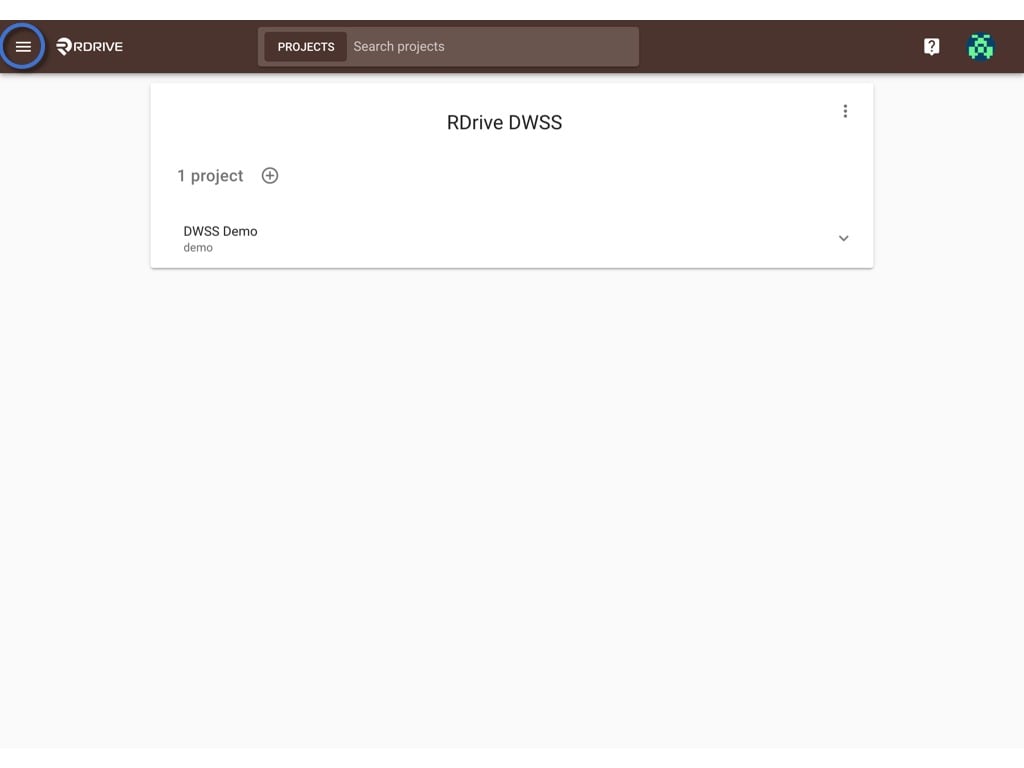
First, log in to **Company Area**. *Only the company admin can access this page.*

Click **Settings** and select **Data export**.
<img src="https://mintcdn.com/rdrive/V_uzWi_QxVGWCG1G/images/kb/103000035084/kZSOE1NwEklS1NigL6eXl85UwcN2ni1FmA.jpeg?fit=max&auto=format&n=V_uzWi_QxVGWCG1G&q=85&s=c5965ec2b20bac635d13788b58f3971e" alt="How to create a Data export template?" width="1024" height="768" data-path="images/kb/103000035084/kZSOE1NwEklS1NigL6eXl85UwcN2ni1FmA.jpeg" />

<img src="https://mintcdn.com/rdrive/V_uzWi_QxVGWCG1G/images/kb/103000035084/FUnRRl_q9foJqOUdGQgM7VnXyoGCoW5E3w.jpeg?fit=max&auto=format&n=V_uzWi_QxVGWCG1G&q=85&s=c0646150830138f013397d5b2f11615d" alt="How to create a Data export template?" width="1024" height="768" data-path="images/kb/103000035084/FUnRRl_q9foJqOUdGQgM7VnXyoGCoW5E3w.jpeg" />

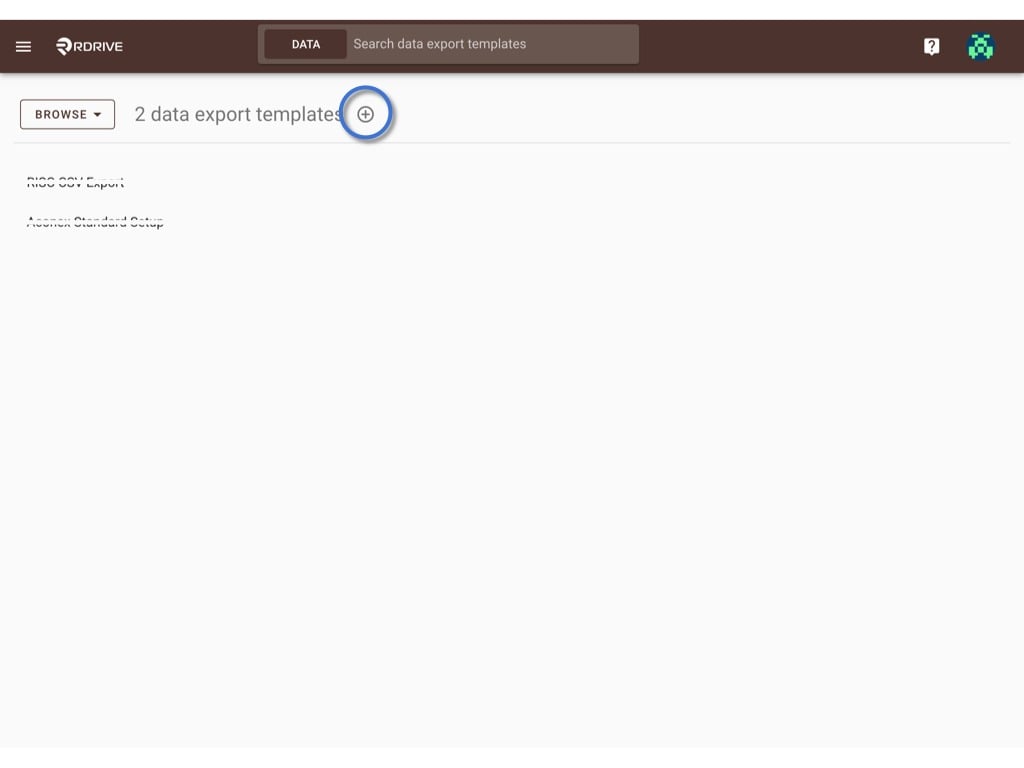
Click the **+** button to add a template
<img src="https://mintcdn.com/rdrive/V_uzWi_QxVGWCG1G/images/kb/103000035084/oOt3vSyLmmzfgHE2JiTL1KXfF-dk1VbjjA.jpeg?fit=max&auto=format&n=V_uzWi_QxVGWCG1G&q=85&s=ea0ff587a9adf83299d74d869be8d8e4" alt="How to create a Data export template?" width="1024" height="768" data-path="images/kb/103000035084/oOt3vSyLmmzfgHE2JiTL1KXfF-dk1VbjjA.jpeg" />

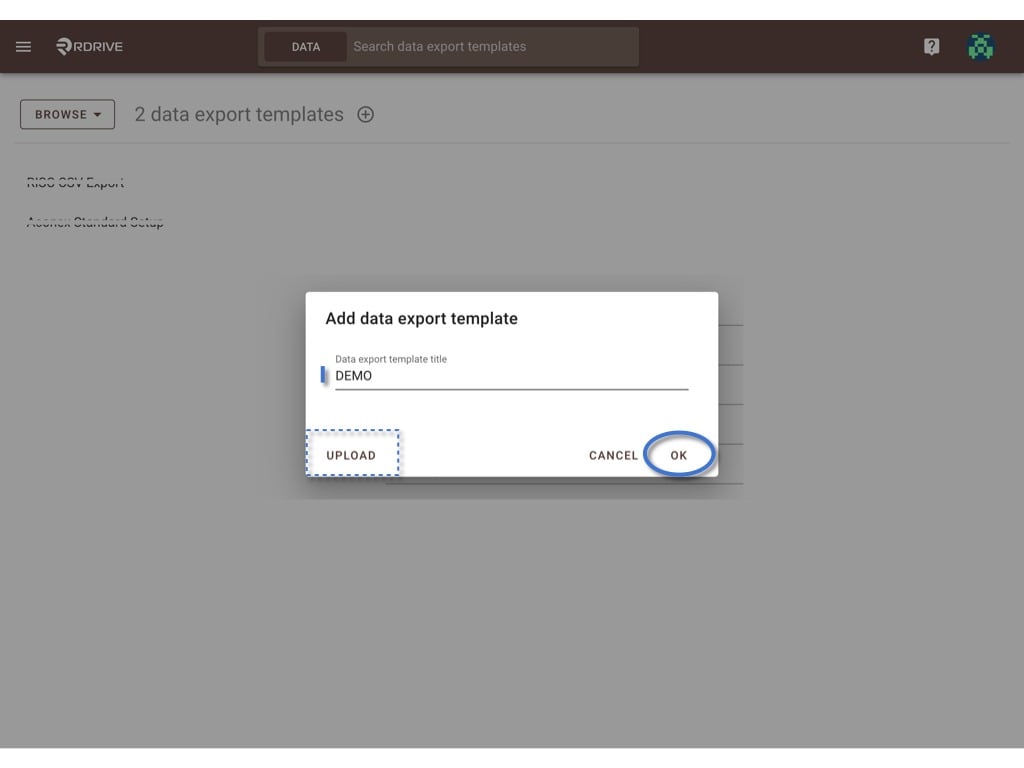
Enter the template title and click **OK** to create.

**UPLOAD** if you have a downloaded JSON file.
<img src="https://mintcdn.com/rdrive/V_uzWi_QxVGWCG1G/images/kb/103000035084/p2cMreilJiJaGEFJj7FRGr0DWqOaEUFH4w.jpeg?fit=max&auto=format&n=V_uzWi_QxVGWCG1G&q=85&s=bc26870040d0a3e19f776d9c9320552c" alt="How to create a Data export template?" width="1024" height="768" data-path="images/kb/103000035084/p2cMreilJiJaGEFJj7FRGr0DWqOaEUFH4w.jpeg" />

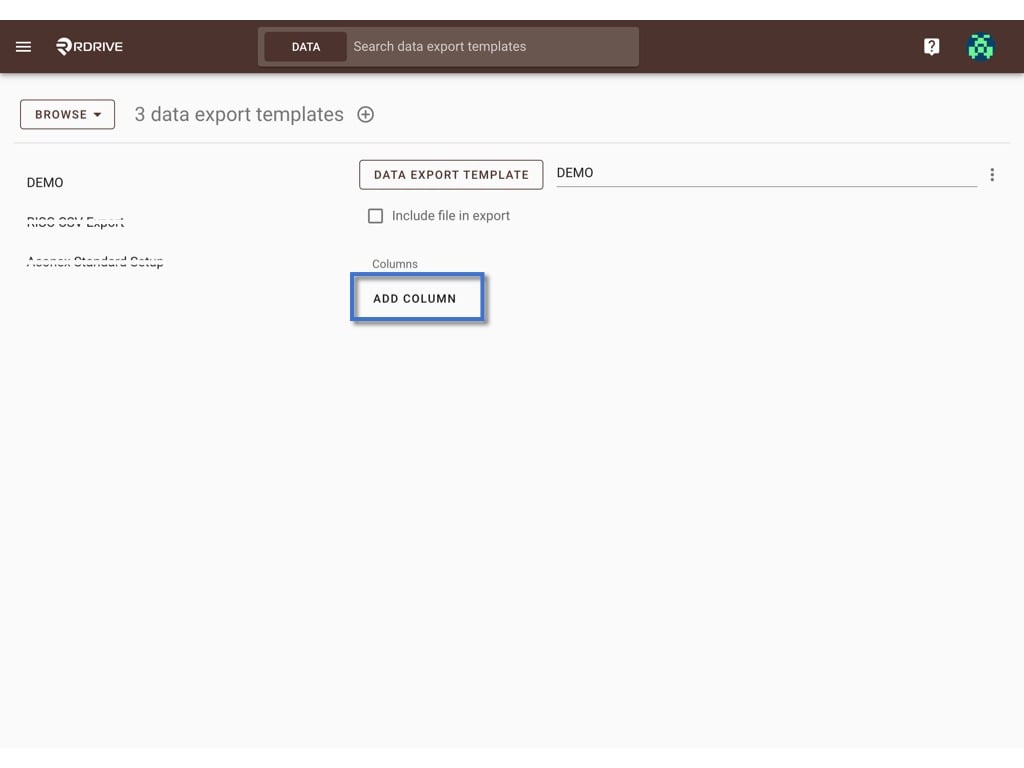
**ADD COLUMN** based on your design, how many columns you would like to have at the CSV file.

and input the column title.
<img src="https://mintcdn.com/rdrive/V_uzWi_QxVGWCG1G/images/kb/103000035084/GRzrY2ZTSb9oys7lKQ2IrIQMGvAcQbF-8Q.jpeg?fit=max&auto=format&n=V_uzWi_QxVGWCG1G&q=85&s=f868551c355dee28fc3ee339536218bd" alt="How to create a Data export template?" width="1024" height="768" data-path="images/kb/103000035084/GRzrY2ZTSb9oys7lKQ2IrIQMGvAcQbF-8Q.jpeg" />

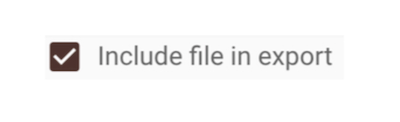
Checked the **Include file in export** box if you need to include PDF during download.
<img src="https://mintcdn.com/rdrive/V_uzWi_QxVGWCG1G/images/kb/103000035084/DyFgl3qYsHqEtAFOFGtqBOOppa0gFCo-vg.png?fit=max&auto=format&n=V_uzWi_QxVGWCG1G&q=85&s=91981117b3a89444e459fa1e0638d1d8" alt="How to create a Data export template?" width="400" height="122" data-path="images/kb/103000035084/DyFgl3qYsHqEtAFOFGtqBOOppa0gFCo-vg.png" />

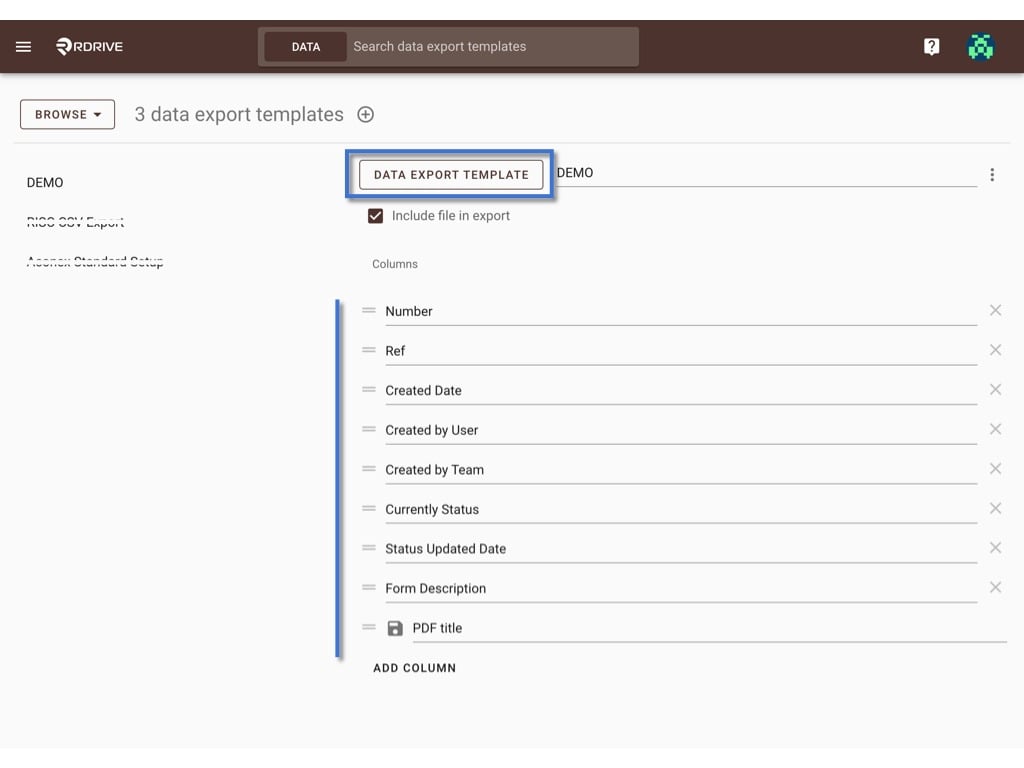
Click **DATA EXPORT TEMPLATE** to map data when ready.
<img src="https://mintcdn.com/rdrive/V_uzWi_QxVGWCG1G/images/kb/103000035084/IGt0luF6LKGZMASVD8tSFehkCQc4Km6QeQ.jpeg?fit=max&auto=format&n=V_uzWi_QxVGWCG1G&q=85&s=78a85cce0c5acc70af7e54a0000ed7a9" alt="How to create a Data export template?" width="1024" height="768" data-path="images/kb/103000035084/IGt0luF6LKGZMASVD8tSFehkCQc4Km6QeQ.jpeg" />

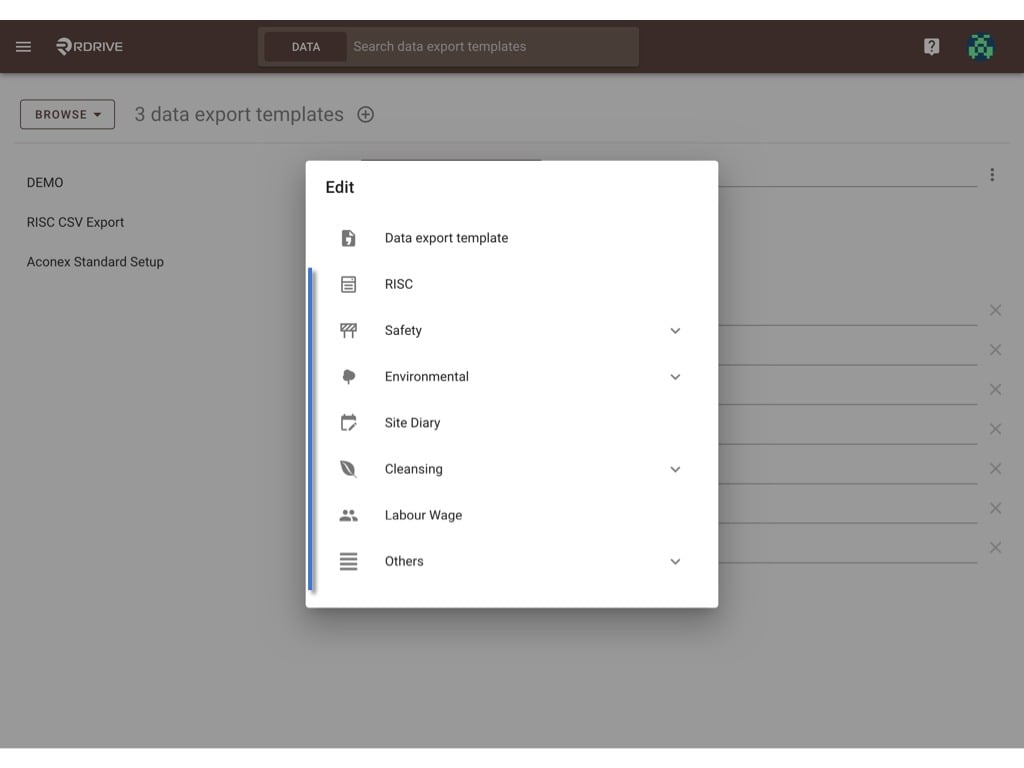
Select process template or issue template under the category.
<img src="https://mintcdn.com/rdrive/V_uzWi_QxVGWCG1G/images/kb/103000035084/OHLdRDUWc33flSzQW8yyqGi3_4BwPLCmNw.jpeg?fit=max&auto=format&n=V_uzWi_QxVGWCG1G&q=85&s=0cef3ec7e9aced5ff0892d9363285aa7" alt="How to create a Data export template?" width="1024" height="768" data-path="images/kb/103000035084/OHLdRDUWc33flSzQW8yyqGi3_4BwPLCmNw.jpeg" />

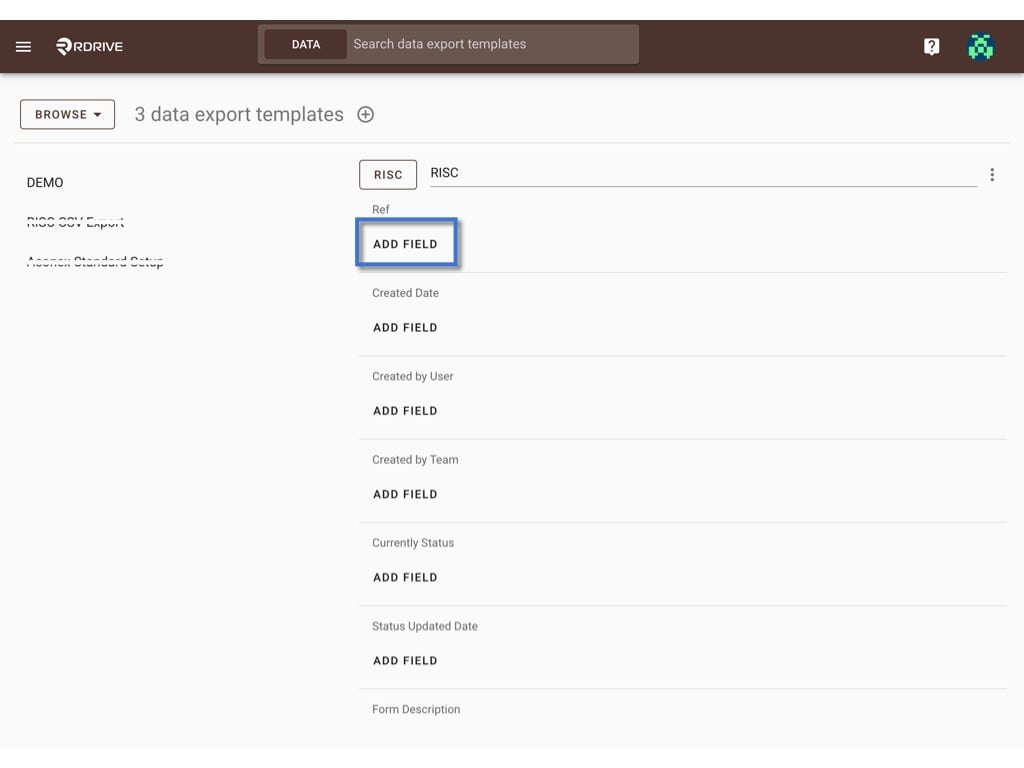
**ADD FIELD** to map data

<img src="https://mintcdn.com/rdrive/V_uzWi_QxVGWCG1G/images/kb/103000035084/7emwVaGZi5_hdkvaZPi7zndtP27K6ZjQ-A.jpeg?fit=max&auto=format&n=V_uzWi_QxVGWCG1G&q=85&s=40ce5da8ac2bb9c1c30f7a2d15f770b4" alt="How to create a Data export template?" width="1024" height="768" data-path="images/kb/103000035084/7emwVaGZi5_hdkvaZPi7zndtP27K6ZjQ-A.jpeg" />

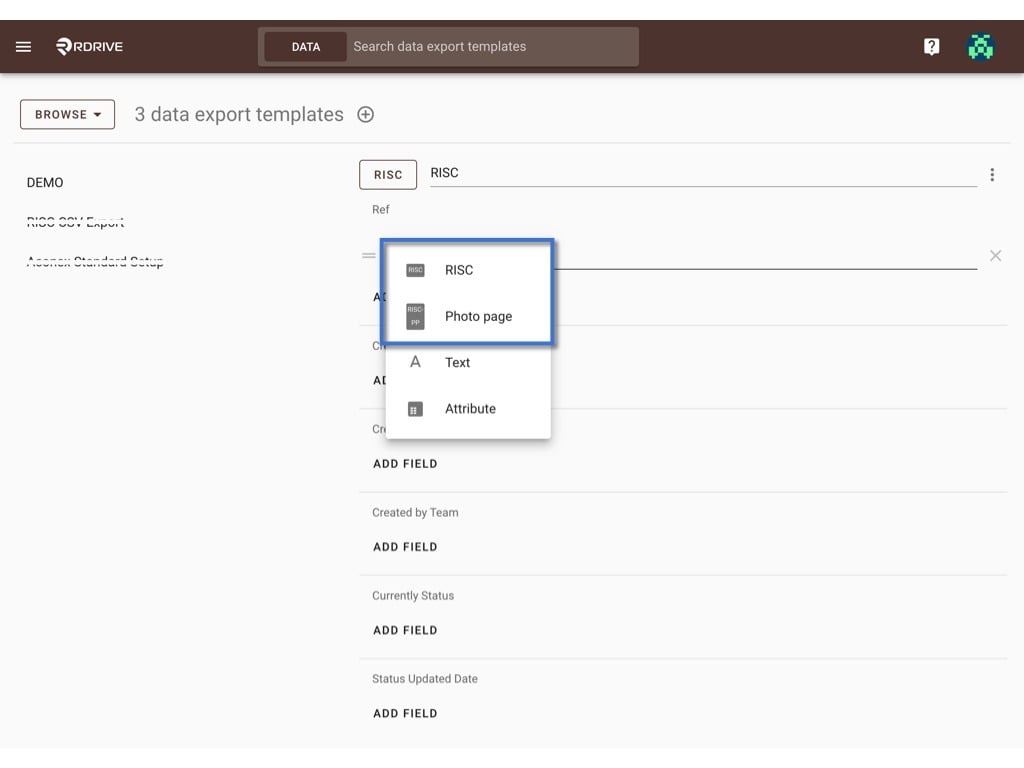
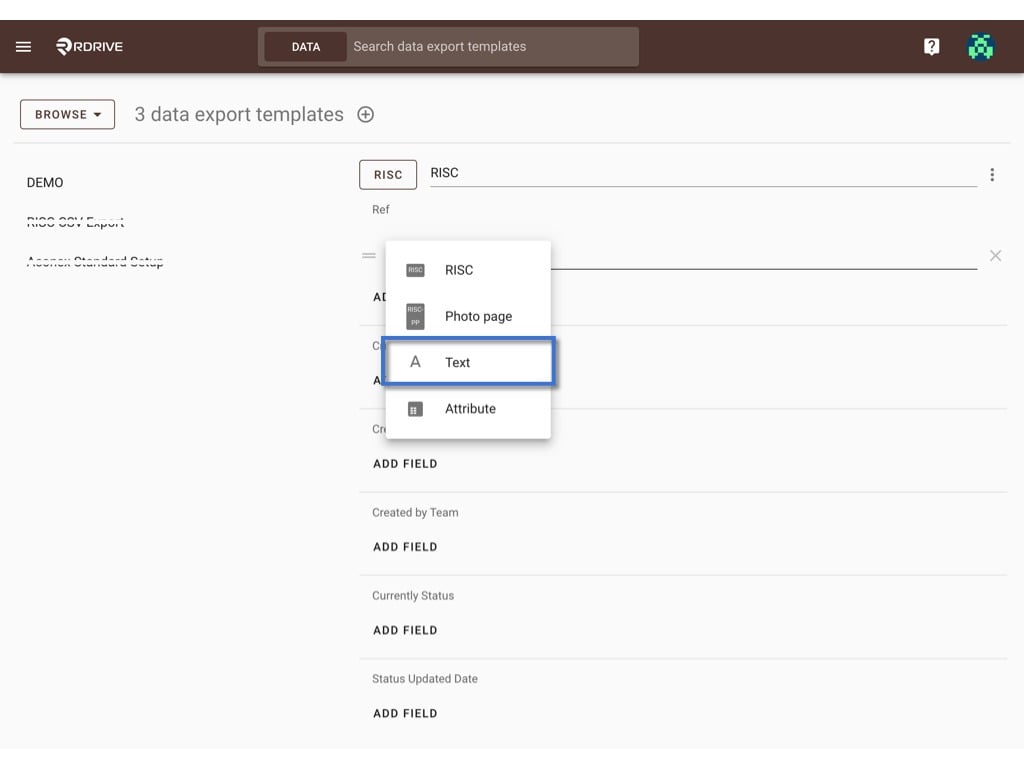
3 types of data can be selected to add as a field-

1. [Template Field](#template-field)[](#text)
2. [Text](#text)[](#attribute)[](#attribute)[](#attribute)
3. [Attribute](#attribute)

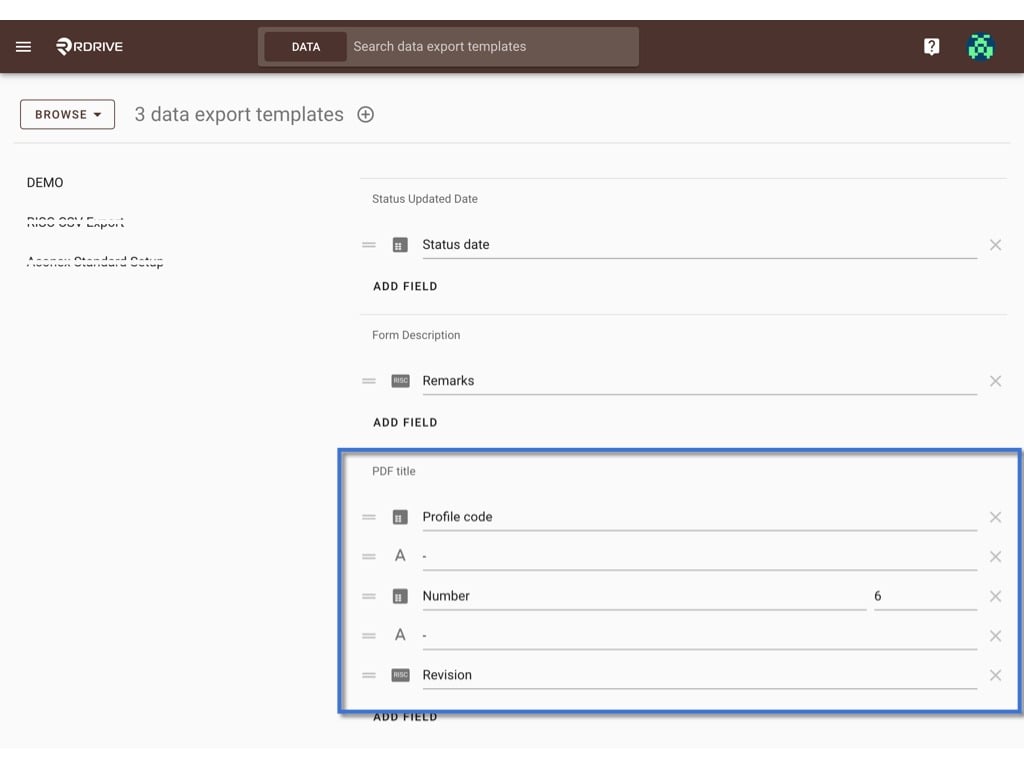
You may combine those for one column.

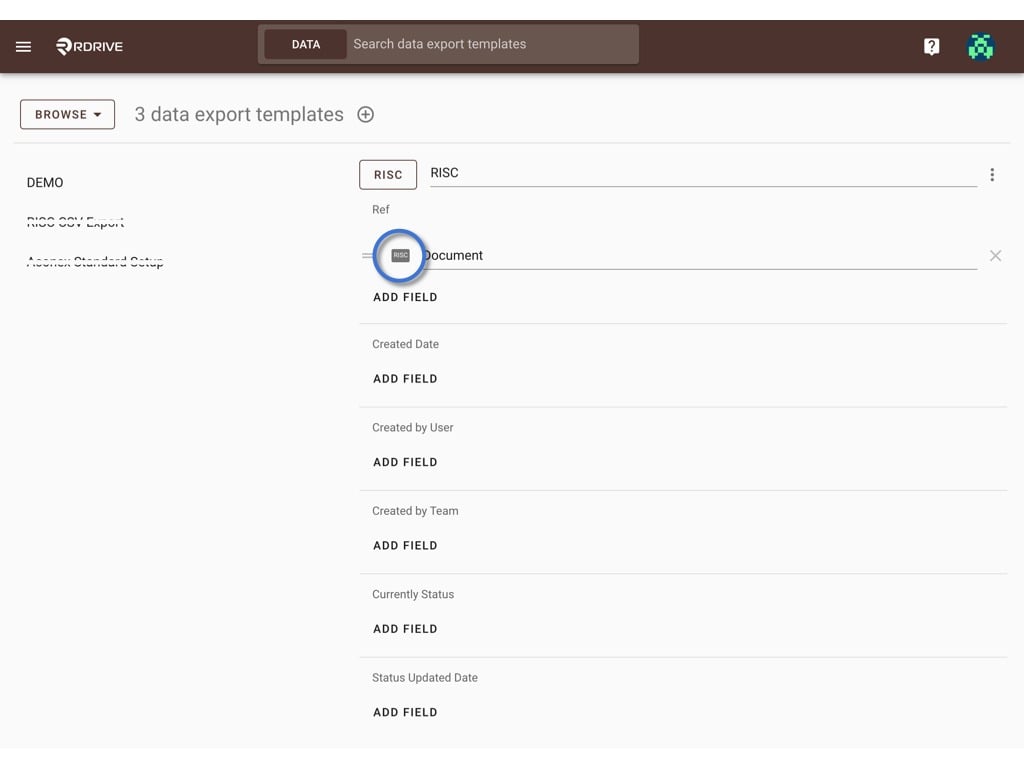
Click on the logo to select.
<img src="https://mintcdn.com/rdrive/V_uzWi_QxVGWCG1G/images/kb/103000035084/iNsKZSGLs-p73uyMhPu6bp_LGJAFIS8diQ.jpeg?fit=max&auto=format&n=V_uzWi_QxVGWCG1G&q=85&s=434aa13af6dcca8f3c8b09ff3f5b6c7b" alt="How to create a Data export template?" width="1024" height="768" data-path="images/kb/103000035084/iNsKZSGLs-p73uyMhPu6bp_LGJAFIS8diQ.jpeg" />

***

## **Template Field**

<img src="https://mintcdn.com/rdrive/V_uzWi_QxVGWCG1G/images/kb/103000035084/VbVc8inKKwPGtzbxpKueqp8ag_uRfOO5vg.jpeg?fit=max&auto=format&n=V_uzWi_QxVGWCG1G&q=85&s=9c3d25eb41e5323b526f915367eb1f0a" alt="How to create a Data export template?" width="1024" height="768" data-path="images/kb/103000035084/VbVc8inKKwPGtzbxpKueqp8ag_uRfOO5vg.jpeg" />

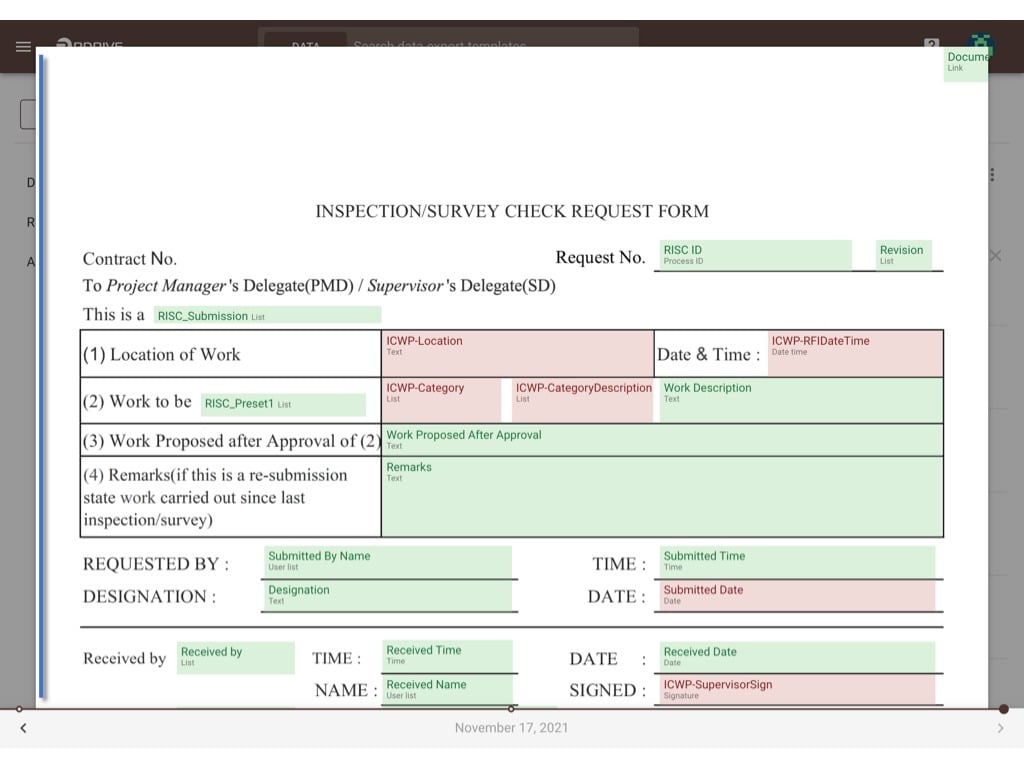
select the field from the template.

<img src="https://mintcdn.com/rdrive/V_uzWi_QxVGWCG1G/images/kb/103000035084/LzRN6kp37rykmlGoZc5k8Vw4ujDPVg02aA.jpeg?fit=max&auto=format&n=V_uzWi_QxVGWCG1G&q=85&s=7c668d68cecc65f1aa67dd4a0953e158" alt="How to create a Data export template?" width="1024" height="768" data-path="images/kb/103000035084/LzRN6kp37rykmlGoZc5k8Vw4ujDPVg02aA.jpeg" />

***

## **Text**

<img src="https://mintcdn.com/rdrive/V_uzWi_QxVGWCG1G/images/kb/103000035084/BawFCw5xWeY7J3KPZl0JR1By7meQzc5Uow.jpeg?fit=max&auto=format&n=V_uzWi_QxVGWCG1G&q=85&s=393d88c7b1c9c6642a6fcfa4b48cbb40" alt="How to create a Data export template?" width="1024" height="768" data-path="images/kb/103000035084/BawFCw5xWeY7J3KPZl0JR1By7meQzc5Uow.jpeg" />

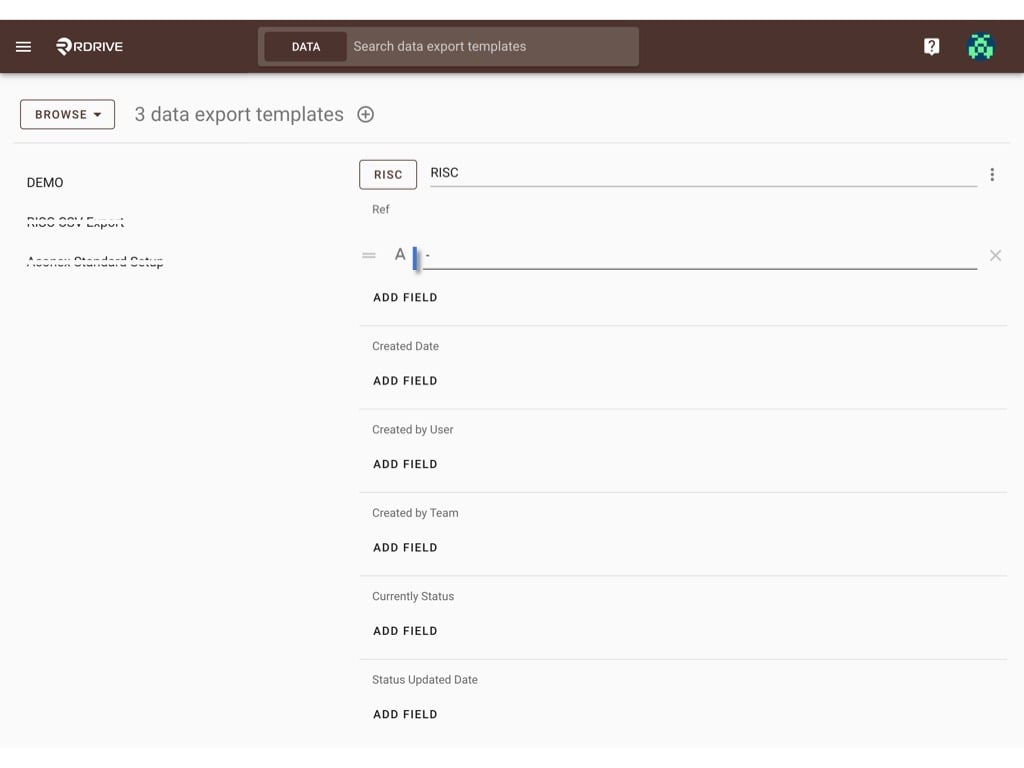
Enter any text as a field, normally it will be used for a [combination](#combination-sample---).
<img src="https://mintcdn.com/rdrive/V_uzWi_QxVGWCG1G/images/kb/103000035084/XIiUFXj2fJuYZoJX7_Hu8jgU-6p1RYIqBQ.jpeg?fit=max&auto=format&n=V_uzWi_QxVGWCG1G&q=85&s=228d5a96d8bb564bc3cba458f1f81072" alt="How to create a Data export template?" width="1024" height="768" data-path="images/kb/103000035084/XIiUFXj2fJuYZoJX7_Hu8jgU-6p1RYIqBQ.jpeg" />

***

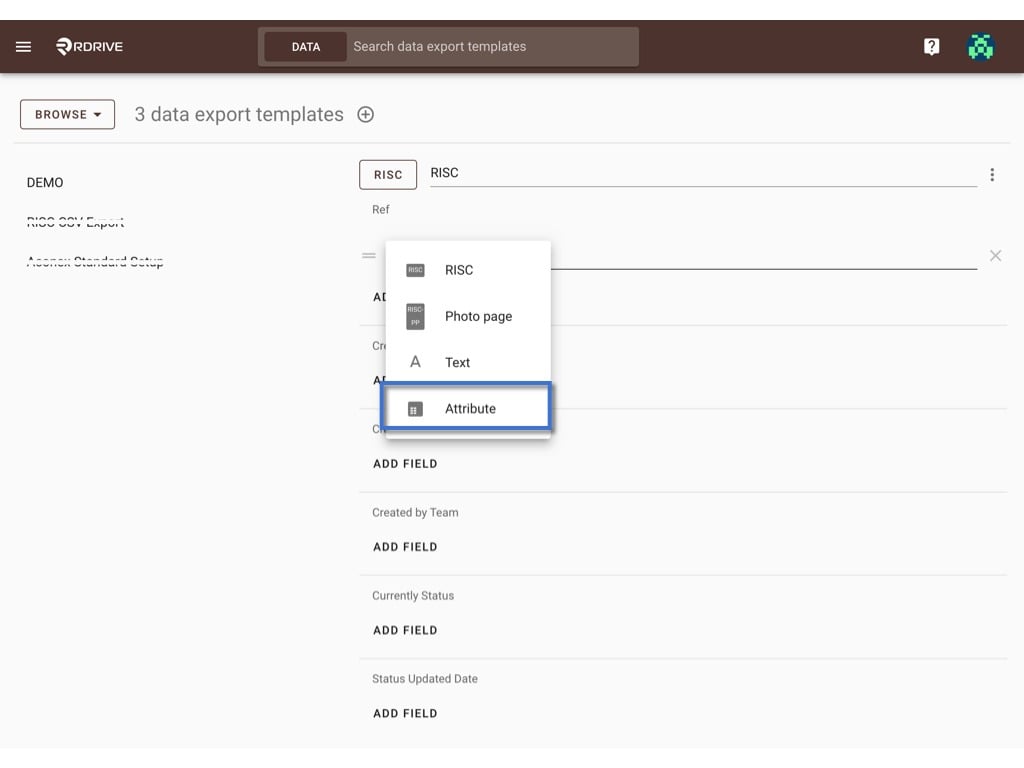
## **Attribute**

<img src="https://mintcdn.com/rdrive/V_uzWi_QxVGWCG1G/images/kb/103000035084/P6uf7FKc9VCP5DPvWtvCYWITToEzu3b8IA.jpeg?fit=max&auto=format&n=V_uzWi_QxVGWCG1G&q=85&s=0589a9655f3dafb6b7ebbcdfe2e07f19" alt="How to create a Data export template?" width="1024" height="768" data-path="images/kb/103000035084/P6uf7FKc9VCP5DPvWtvCYWITToEzu3b8IA.jpeg" />

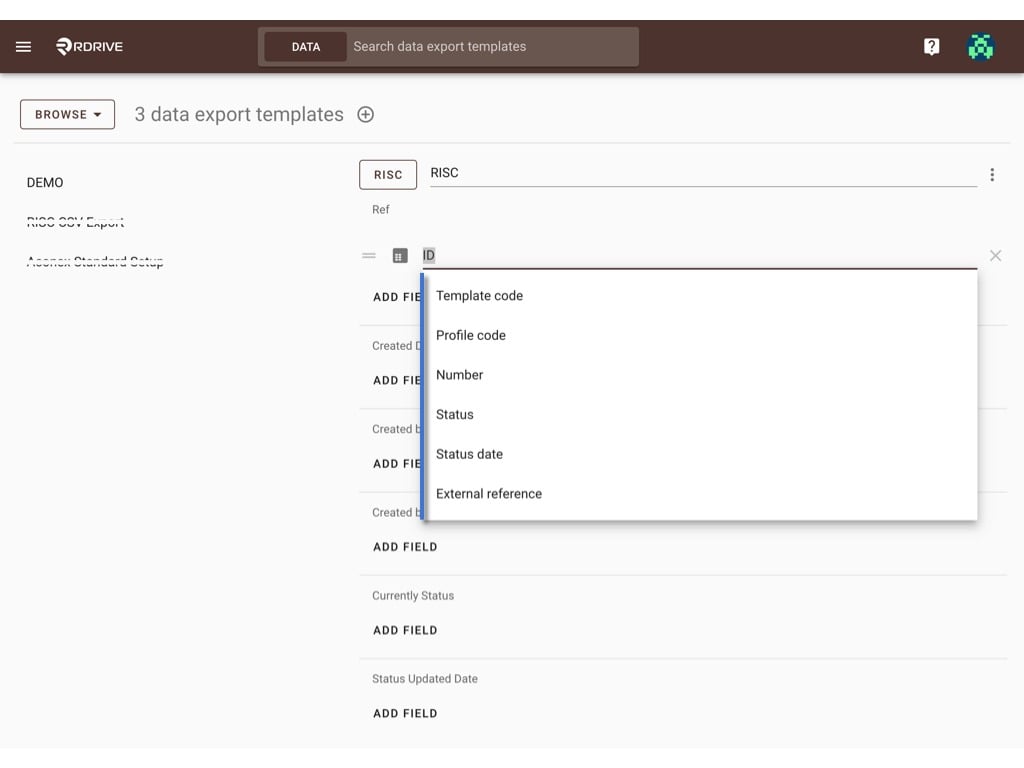
Can choose the attribute data of the process/issue template. Such as ID, Current Status, Status updated Date etc.
<img src="https://mintcdn.com/rdrive/V_uzWi_QxVGWCG1G/images/kb/103000035084/jy6nhuMiCIXKJ7sRVR1uesWzWOHlDwNHUw.jpeg?fit=max&auto=format&n=V_uzWi_QxVGWCG1G&q=85&s=86e544ffd89378e355368e675813c45b" alt="How to create a Data export template?" width="1024" height="768" data-path="images/kb/103000035084/jy6nhuMiCIXKJ7sRVR1uesWzWOHlDwNHUw.jpeg" />

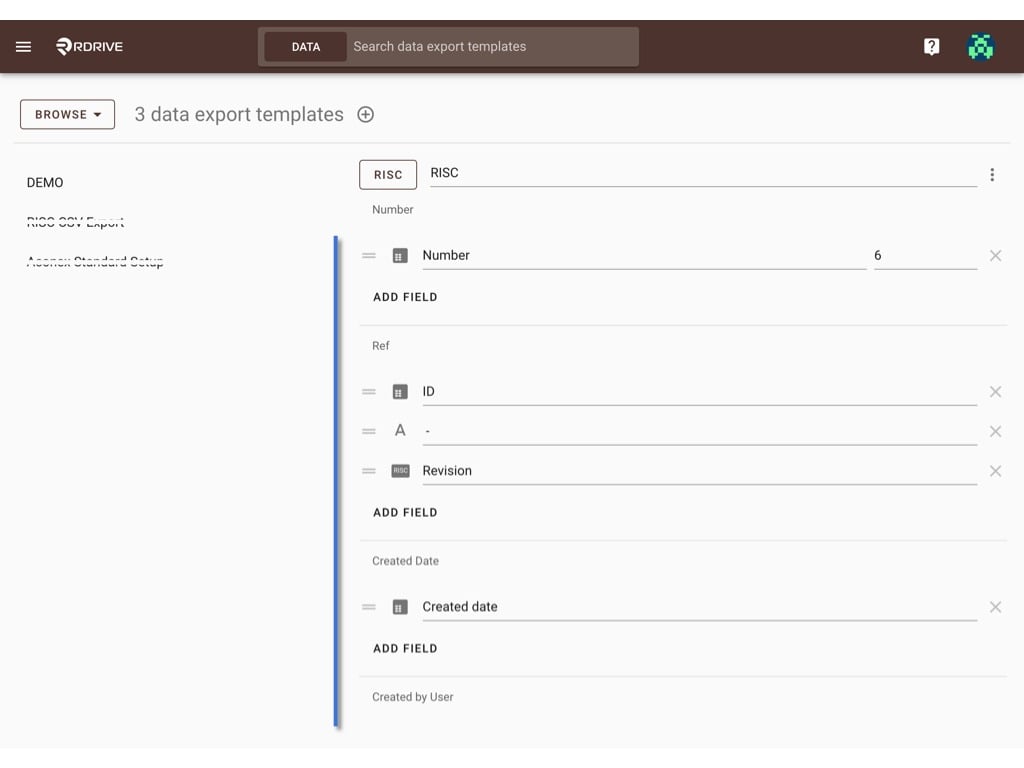
The update will be saved automatically, you may exit the page when you complete the setup, or you may select another process/issue template to continue setup.
<img src="https://mintcdn.com/rdrive/V_uzWi_QxVGWCG1G/images/kb/103000035084/jhQW6kk-i20S-U0QmS167DAuSrSHE33vIQ.jpeg?fit=max&auto=format&n=V_uzWi_QxVGWCG1G&q=85&s=d41389b7ff1bb945993a38a274752eed" alt="How to create a Data export template?" width="1024" height="768" data-path="images/kb/103000035084/jhQW6kk-i20S-U0QmS167DAuSrSHE33vIQ.jpeg" />

***

## **Combination sample -** 

<img src="https://mintcdn.com/rdrive/V_uzWi_QxVGWCG1G/images/kb/103000035084/uVqZPDQHZZWbv-B4z0RF_12-Rm4X-bZ38Q.jpeg?fit=max&auto=format&n=V_uzWi_QxVGWCG1G&q=85&s=169de69c4dae7554eba0f356aaa84177" alt="How to create a Data export template?" width="1024" height="768" data-path="images/kb/103000035084/uVqZPDQHZZWbv-B4z0RF_12-Rm4X-bZ38Q.jpeg" />

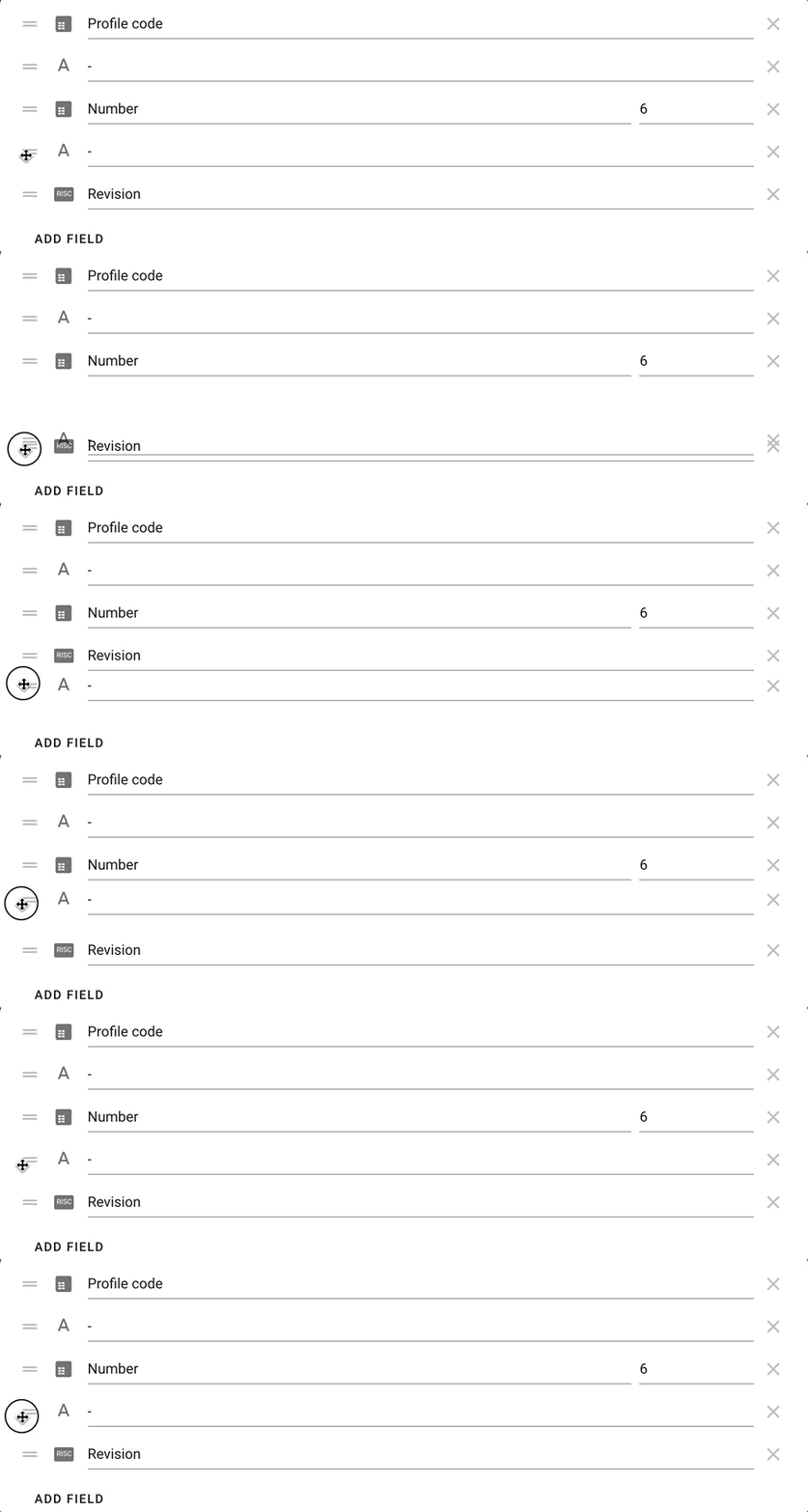
❌ to remove and ＝ to reorder.

<img src="https://mintcdn.com/rdrive/V_uzWi_QxVGWCG1G/images/kb/103000035084/KM5UNiSJBxDILhkljtN7ICMh6LTCKx6Oww.gif?s=292f6cded40b8755d14c143bf27ce2e1" alt="How to create a Data export template?" width="910" height="284" data-path="images/kb/103000035084/KM5UNiSJBxDILhkljtN7ICMh6LTCKx6Oww.gif" />

Done. ?

Users can now use this CSV data export template to export data.

[Check this to know how it works at the project level.](https://docs.rdrive.io/web/forms/export/download-a-csv-export-file-for-processes)