> ## Documentation Index
> Fetch the complete documentation index at: https://docs.rdrive.io/llms.txt
> Use this file to discover all available pages before exploring further.

# How to add user(s) to the Company Level

> User list is the list of people who will be able to access RDrive.

**User list** is the list of people who will be able to access RDrive.

## **What is required to set up a user? -** **Display name and email address**

The email address of a user will be used for account login and notifications. If the email address is invalid, the user will fail to receive email notifications from RDrive.

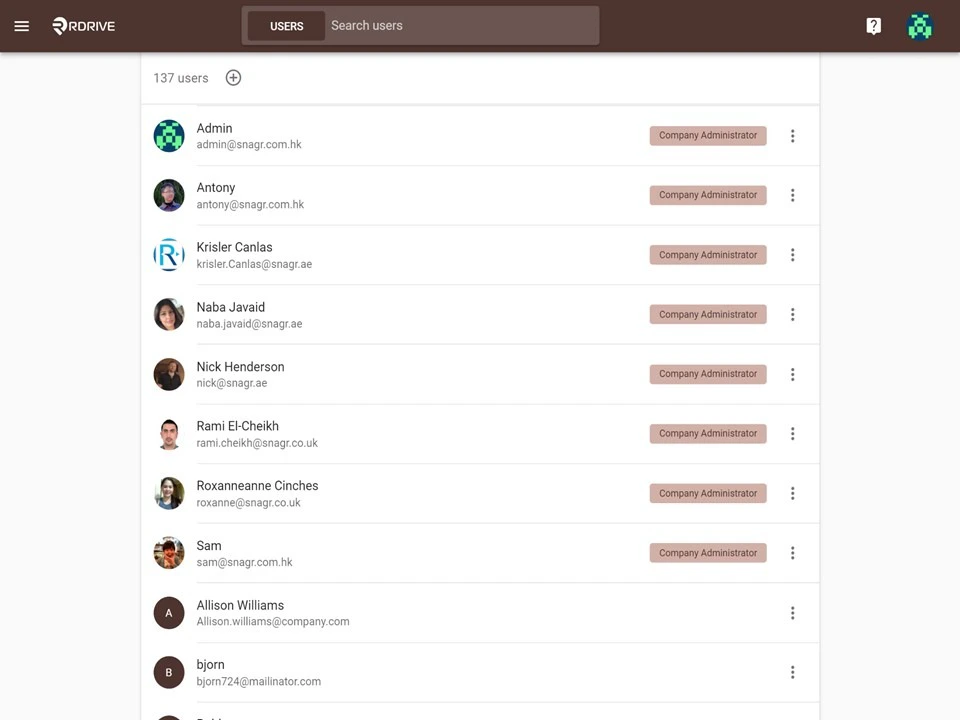
Once everything is ready, click the **≡** Menu icon at the top left corner to unfold the Menu, go to the **Settings** > **Users** page.

<img src="https://mintcdn.com/rdrive/V_uzWi_QxVGWCG1G/images/kb/103000035088/-IEJ2yYNASkH-7xghQrQDcKcxFuTLWfVYw.JPG?fit=max&auto=format&n=V_uzWi_QxVGWCG1G&q=85&s=f64ea037158b1df4c70d84334da566e5" alt="How to add user(s) to the Company Level" width="960" height="720" data-path="images/kb/103000035088/-IEJ2yYNASkH-7xghQrQDcKcxFuTLWfVYw.JPG" />

<img src="https://mintcdn.com/rdrive/V_uzWi_QxVGWCG1G/images/kb/103000035088/aHujfGyd8pM6VxU81ZpB6XQe1mveGeuNQw.JPG?fit=max&auto=format&n=V_uzWi_QxVGWCG1G&q=85&s=1ea6a9683f5ca9f9d491cc6adbd1a93e" alt="How to add user(s) to the Company Level" width="960" height="720" data-path="images/kb/103000035088/aHujfGyd8pM6VxU81ZpB6XQe1mveGeuNQw.JPG" />

<img src="https://mintcdn.com/rdrive/V_uzWi_QxVGWCG1G/images/kb/103000035088/jpM9chHPN1rBTr2hDEIAzYq8C9_eCgKpCw.jpg?fit=max&auto=format&n=V_uzWi_QxVGWCG1G&q=85&s=afcef581a389a842111fb1600cea6b7e" alt="How to add user(s) to the Company Level" width="960" height="720" data-path="images/kb/103000035088/jpM9chHPN1rBTr2hDEIAzYq8C9_eCgKpCw.jpg" />

Basically, there are two ways to add a user to the Company Level- creating manually or importing a user Excel template.

Next you can choose to

* [1️⃣ Adding users manually](#1%ef%b8%8f%e2%83%a3-adding-users-manually)
* [2️⃣ Importing a user excel template](#2%ef%b8%8f%e2%83%a3-importing-a-user-excel-template)

***

## 1️⃣ **Adding users manually**

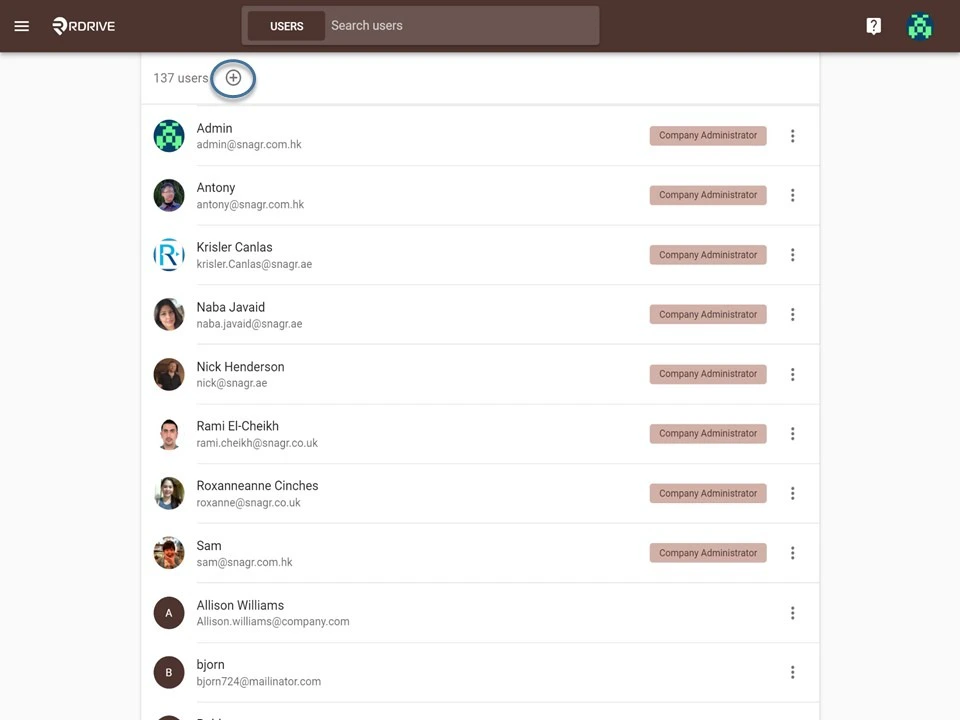
Click the + button.
<img src="https://mintcdn.com/rdrive/V_uzWi_QxVGWCG1G/images/kb/103000035088/4zLBo6XMSdSXjEibS9x3aSi7bvjrPqOjvg.jpg?fit=max&auto=format&n=V_uzWi_QxVGWCG1G&q=85&s=89341fc2ef543b1e6212ca390bc3e71e" alt="How to add user(s) to the Company Level" width="960" height="720" data-path="images/kb/103000035088/4zLBo6XMSdSXjEibS9x3aSi7bvjrPqOjvg.jpg" />

Enter the Email address, Display name, Password and Language of the new user.\
You may click the **+** button to add more user if needed, and click OK once done.

<img src="https://mintcdn.com/rdrive/V_uzWi_QxVGWCG1G/images/kb/103000035088/cWdVcpRFgxwUmNR2driIdva6Y3vab9QCTA.JPG?fit=max&auto=format&n=V_uzWi_QxVGWCG1G&q=85&s=166099b7453b990e20f5e5586b6c389f" alt="How to add user(s) to the Company Level" width="960" height="720" data-path="images/kb/103000035088/cWdVcpRFgxwUmNR2driIdva6Y3vab9QCTA.JPG" />

## [2️⃣](https://intercom.help/rdrive/en/articles/4679148-how-to-add-user-s-to-project#2-add-company-users-to-project) **Importing a user excel template**

**This is a quicker way to add multiple users.**

Click the + button.

<img src="https://mintcdn.com/rdrive/V_uzWi_QxVGWCG1G/images/kb/103000035088/4zLBo6XMSdSXjEibS9x3aSi7bvjrPqOjvg.jpg?fit=max&auto=format&n=V_uzWi_QxVGWCG1G&q=85&s=89341fc2ef543b1e6212ca390bc3e71e" alt="How to add user(s) to the Company Level" width="960" height="720" data-path="images/kb/103000035088/4zLBo6XMSdSXjEibS9x3aSi7bvjrPqOjvg.jpg" />

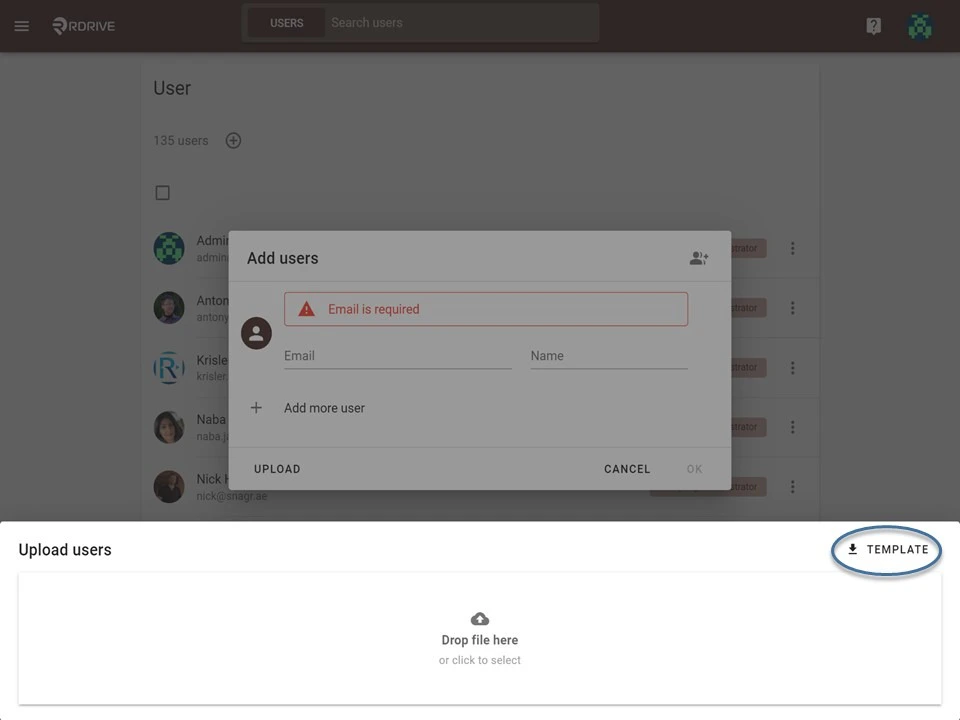
Click the **Upload** button at the bottom of the dialogue.

<img src="https://mintcdn.com/rdrive/V_uzWi_QxVGWCG1G/images/kb/103000035088/Lt3STQdZgBY4zJwrF1fHS80v3ET4rexdRA.JPG?fit=max&auto=format&n=V_uzWi_QxVGWCG1G&q=85&s=95b3c724e5fedf2acbac1decb2a59f03" alt="How to add user(s) to the Company Level" width="960" height="720" data-path="images/kb/103000035088/Lt3STQdZgBY4zJwrF1fHS80v3ET4rexdRA.JPG" />

Download the Excel **template**.

<img src="https://mintcdn.com/rdrive/V_uzWi_QxVGWCG1G/images/kb/103000035088/jCoH4xKwkExDxgJ8HfLmAE5c2StHVzgagg.jpg?fit=max&auto=format&n=V_uzWi_QxVGWCG1G&q=85&s=fe5587a7998be0b75d82384754b840ee" alt="How to add user(s) to the Company Level" width="960" height="720" data-path="images/kb/103000035088/jCoH4xKwkExDxgJ8HfLmAE5c2StHVzgagg.jpg" />

Enter the Email address, Display name, Password and Language (locale) then save.

<img src="https://mintcdn.com/rdrive/V_uzWi_QxVGWCG1G/images/kb/103000035088/5sdui5KMhE9bzUgama7Nct8p8McYRQ2ioQ.JPG?fit=max&auto=format&n=V_uzWi_QxVGWCG1G&q=85&s=c6012e2d7aca5cdb4f0f4746f8fb8cd0" alt="How to add user(s) to the Company Level" width="960" height="720" data-path="images/kb/103000035088/5sdui5KMhE9bzUgama7Nct8p8McYRQ2ioQ.JPG" />

Upload the completed template.

<img src="https://mintcdn.com/rdrive/V_uzWi_QxVGWCG1G/images/kb/103000035088/etAIvOLn6EO0ZZ6dJ22Umft0xci6OkuvPw.JPG?fit=max&auto=format&n=V_uzWi_QxVGWCG1G&q=85&s=a5149523b9f15bd90a87d274f1d81409" alt="How to add user(s) to the Company Level" width="960" height="720" data-path="images/kb/103000035088/etAIvOLn6EO0ZZ6dJ22Umft0xci6OkuvPw.JPG" />

Click **OK** to confirm.

<img src="https://mintcdn.com/rdrive/V_uzWi_QxVGWCG1G/images/kb/103000035088/DfT1WUyw8GSZPyYz8XchCQ6gf6Jgp69Xxg.JPG?fit=max&auto=format&n=V_uzWi_QxVGWCG1G&q=85&s=2ce4602eec78b9e1aad3edf74256cc91" alt="How to add user(s) to the Company Level" width="960" height="720" data-path="images/kb/103000035088/DfT1WUyw8GSZPyYz8XchCQ6gf6Jgp69Xxg.JPG" />