> ## Documentation Index
> Fetch the complete documentation index at: https://docs.rdrive.io/llms.txt
> Use this file to discover all available pages before exploring further.
# Prefill - Process profile
> The Prefill feature allows you to enter data before adding a new record. The entered data will remain editable, making it easier to input and adjust information
## **Prefill Functionality**
The **Prefill** feature allows you to enter data before adding a new record. The entered data will remain editable, making it easier to input and adjust information as needed.
***
## **How to Set Up Prefill**
To set up the **Prefill** feature in your project, follow these steps:
1. Access the project via the website.
2. Click the **≡** menu icon at the top left corner to open the menu. 3. Navigate to **Settings > Categories** and select the appropriate category and subcategory.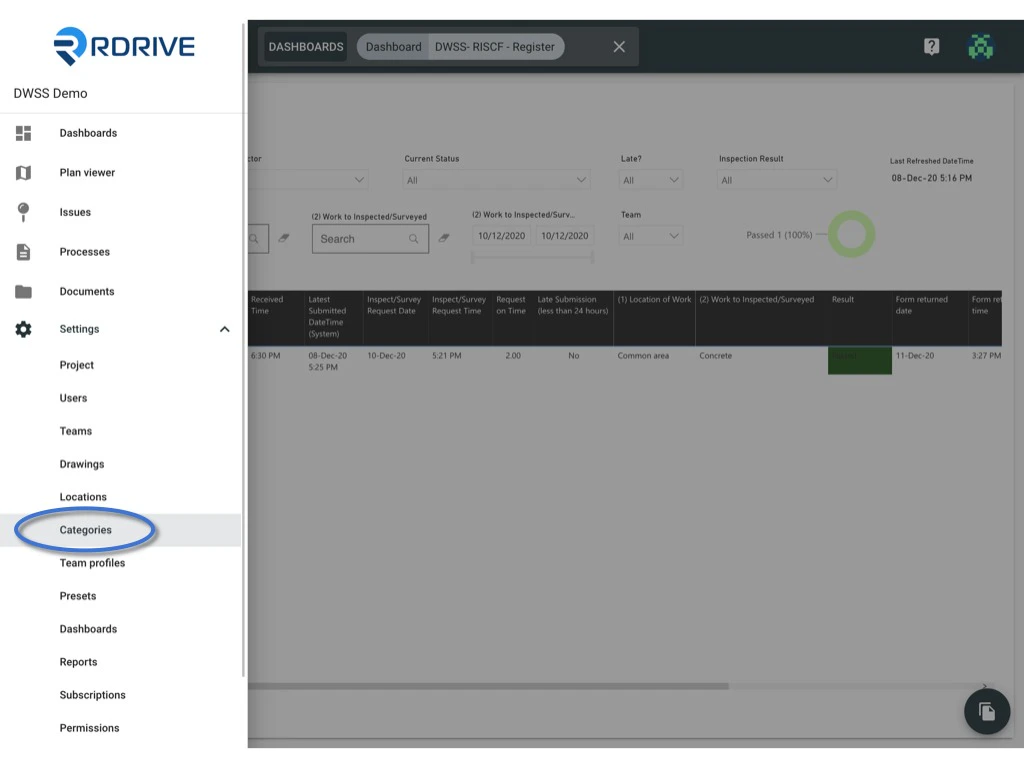
 4. Select the **Profile**, then either click on the form or click the **Settings** button to open the form viewer page.
 5. Enter the data in the fields as prefill values.
 6. The updates will be saved automatically.
***
***[](https://docs.rdrive.io/setup/project/category-issue-profiles/prefill-issue-profile)[](https://docs.rdrive.io/setup/project/category-issue-profiles/prefill-issue-profile)**[](https://docs.rdrive.io/setup/project/category-issue-profiles/prefill-issue-profile)[](https://docs.rdrive.io/setup/project/category-issue-profiles/prefill-issue-profile)[](https://docs.rdrive.io/setup/project/category-issue-profiles/prefill-issue-profile)[Looking to manage Issues? Click here to learn how.](https://docs.rdrive.io/setup/project/category-issue-profiles/prefill-issue-profile)[](https://docs.rdrive.io/setup/project/category-issue-profiles/prefill-issue-profile)**[](https://docs.rdrive.io/setup/project/category-issue-profiles/prefill-issue-profile)**[](https://docs.rdrive.io/setup/project/category-issue-profiles/prefill-issue-profile)*
6. The updates will be saved automatically.
***
***[](https://docs.rdrive.io/setup/project/category-issue-profiles/prefill-issue-profile)[](https://docs.rdrive.io/setup/project/category-issue-profiles/prefill-issue-profile)**[](https://docs.rdrive.io/setup/project/category-issue-profiles/prefill-issue-profile)[](https://docs.rdrive.io/setup/project/category-issue-profiles/prefill-issue-profile)[](https://docs.rdrive.io/setup/project/category-issue-profiles/prefill-issue-profile)[Looking to manage Issues? Click here to learn how.](https://docs.rdrive.io/setup/project/category-issue-profiles/prefill-issue-profile)[](https://docs.rdrive.io/setup/project/category-issue-profiles/prefill-issue-profile)**[](https://docs.rdrive.io/setup/project/category-issue-profiles/prefill-issue-profile)**[](https://docs.rdrive.io/setup/project/category-issue-profiles/prefill-issue-profile)*