> ## Documentation Index
> Fetch the complete documentation index at: https://docs.rdrive.io/llms.txt
> Use this file to discover all available pages before exploring further.
# How to Edit Drawing?
> To begin editing a drawing in RDrive, follow these steps:
# How to Edit Drawings in RDrive
To begin editing a drawing in RDrive, follow these steps:
**TABLE OF CONTENTS**
* [Access the Settings Page:](#access-the-settings-page%3a)[](#select-the-drawing-to-edit%3a)
* [Select the Drawing to Edit:](#select-the-drawing-to-edit%3a)[](#editing-options-for-a-drawing%3a-%c2%a0%c2%a0%c2%a0-%c2%a0-%c2%a0)
* [Editing Options for a Drawing:](#editing-options-for-a-drawing%3a-%c2%a0%c2%a0%c2%a0-%c2%a0-%c2%a0) [](#additional-menu-options%3ayou-might-be-curious-about-the-functions-of-other-options-in-the-menu.-here%e2%80%99s-a-brief-overview-of-what-you-can-do%3a)
* [Additional Menu Options:](#additional-menu-options%3ayou-might-be-curious-about-the-functions-of-other-options-in-the-menu.-here%e2%80%99s-a-brief-overview-of-what-you-can-do%3a)
* [Batch Editing Drawings](#batch-editing-drawings%3a)
***
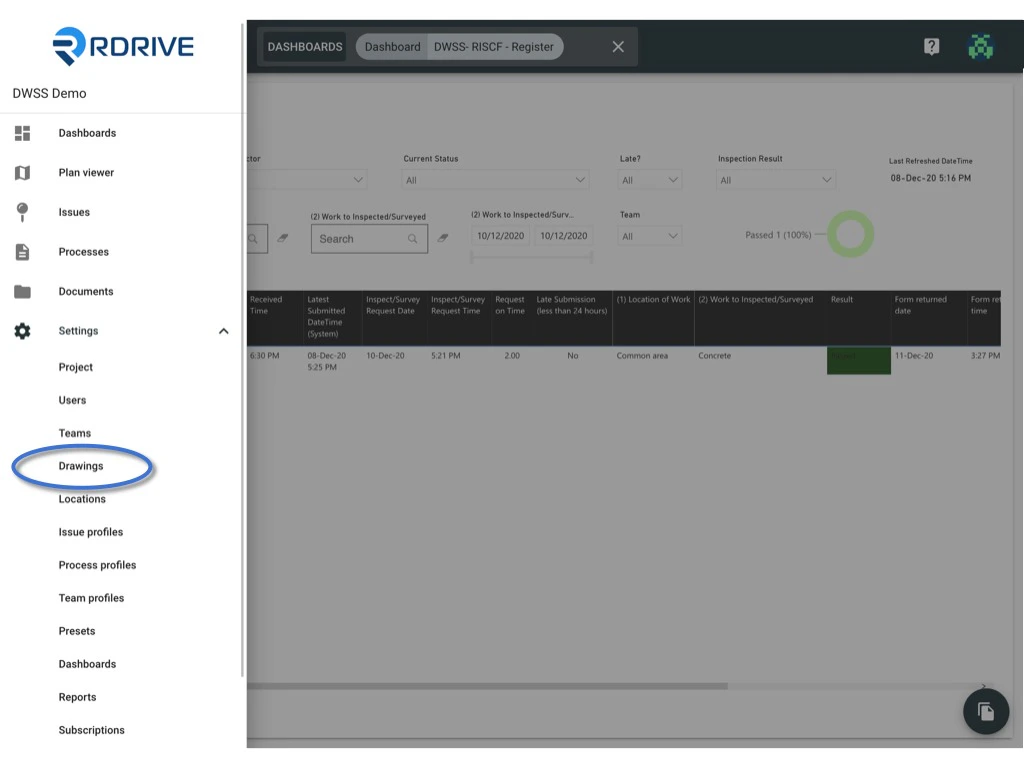
1. **Access the Settings Page:**
* Click the ≡ menu icon in the top left corner to unfold the Menu. Navigate to **Settings** and then select **Drawings**.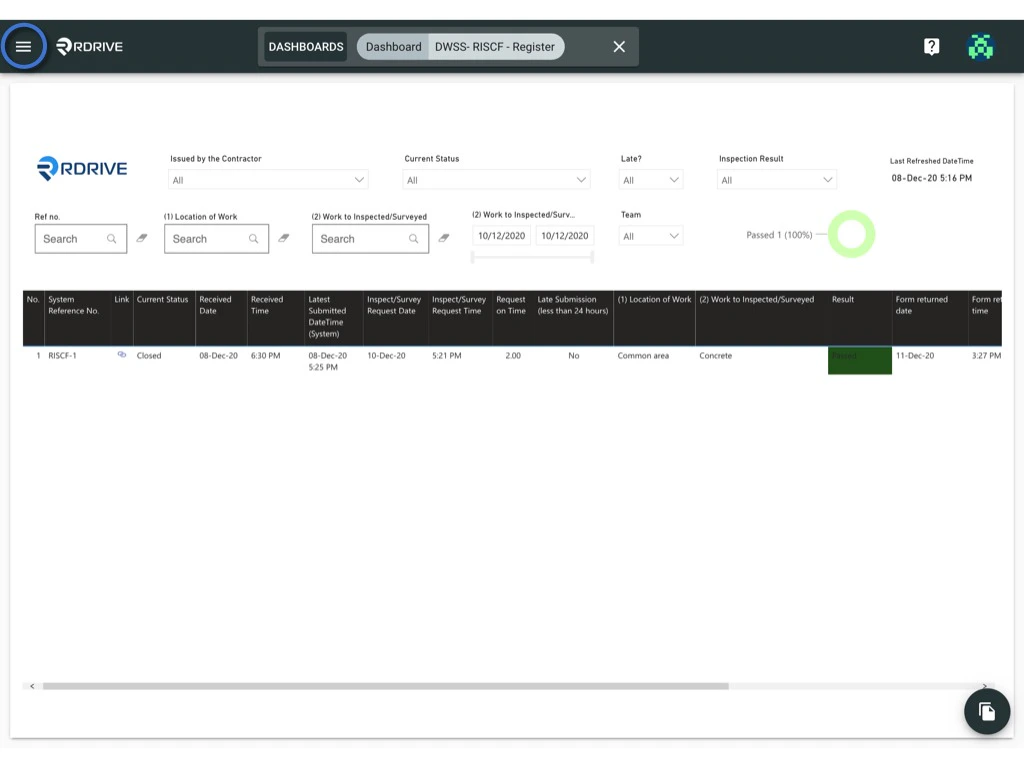
 2. **Select the Drawing to Edit:**
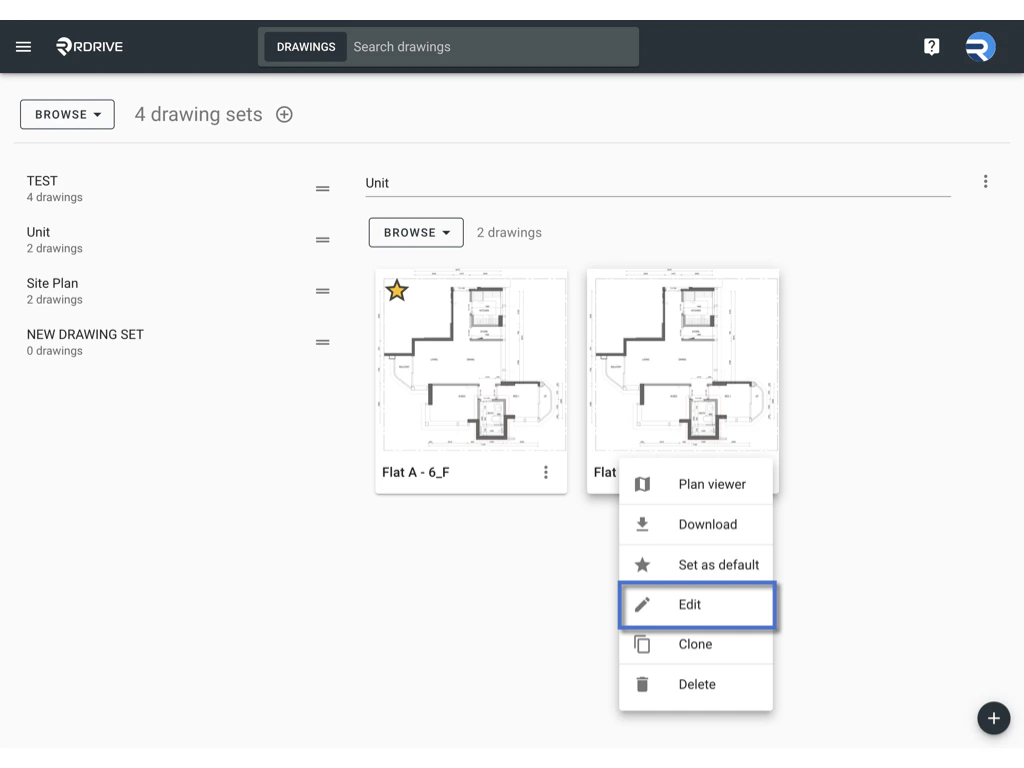
* Click the ⋮ button on the right-hand side of the drawing title, then choose **Edit**.
2. **Select the Drawing to Edit:**
* Click the ⋮ button on the right-hand side of the drawing title, then choose **Edit**.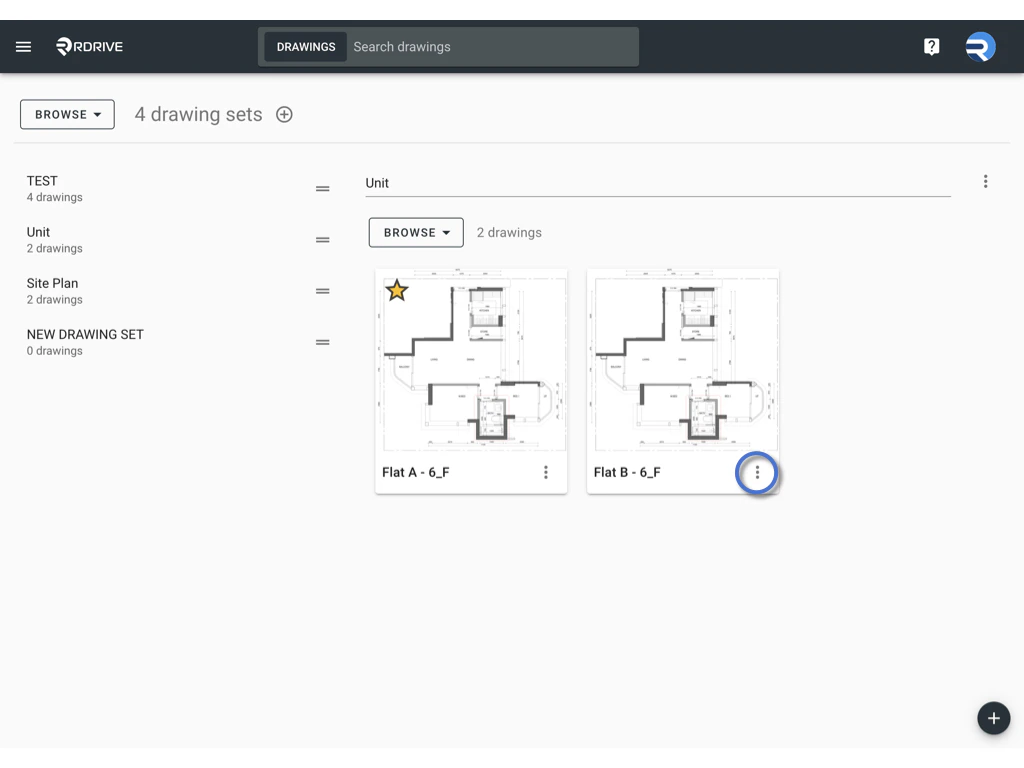
 3. **Editing Options for a Drawing:** **
 **
* **Title:** To change the title of the drawing displayed on your device, web, and reports, edit the **Title** field.
* **Drawing Set:** To change the drawing set that stores the drawing, edit the **Drawing Set** field.
* **Drawing Tag:** To update the drawing tag, enter or remove the tag as needed. Click **OK** to confirm your changes.
* **Drawing File:** To replace the existing drawing image, drag and drop a new file from the local drive or click to select a file from your device.
4. **Additional Menu Options:**You might be curious about the functions of other options in the menu. Here’s a brief overview of what you can do:**
**
* **Title:** To change the title of the drawing displayed on your device, web, and reports, edit the **Title** field.
* **Drawing Set:** To change the drawing set that stores the drawing, edit the **Drawing Set** field.
* **Drawing Tag:** To update the drawing tag, enter or remove the tag as needed. Click **OK** to confirm your changes.
* **Drawing File:** To replace the existing drawing image, drag and drop a new file from the local drive or click to select a file from your device.
4. **Additional Menu Options:**You might be curious about the functions of other options in the menu. Here’s a brief overview of what you can do:** **
* **Plan Viewer:** View the drawing in the Plan Viewer.
* **Download:** If you wish to change the drawing shown, it’s advisable to download the original drawing first. Click **Download** to save it locally as a backup.
* **Set as Default:** Make this drawing the default top-level drawing.
* **Clone:** Create a copy of the drawing.
* **Delete:** Remove the drawing from the project.
> **Note:** If there are existing issues linked to the drawing, be aware that any changes made must maintain the same positioning and scale as the original. Otherwise, previously added issues may appear to shift and will not display in the correct position. It’s recommended to consult with a RDrive representative before making any alterations.
5. **Batch Editing Drawings:**
* You can batch-edit drawings from this page by changing the mode to **SELECT.**
**
* **Plan Viewer:** View the drawing in the Plan Viewer.
* **Download:** If you wish to change the drawing shown, it’s advisable to download the original drawing first. Click **Download** to save it locally as a backup.
* **Set as Default:** Make this drawing the default top-level drawing.
* **Clone:** Create a copy of the drawing.
* **Delete:** Remove the drawing from the project.
> **Note:** If there are existing issues linked to the drawing, be aware that any changes made must maintain the same positioning and scale as the original. Otherwise, previously added issues may appear to shift and will not display in the correct position. It’s recommended to consult with a RDrive representative before making any alterations.
5. **Batch Editing Drawings:**
* You can batch-edit drawings from this page by changing the mode to **SELECT.**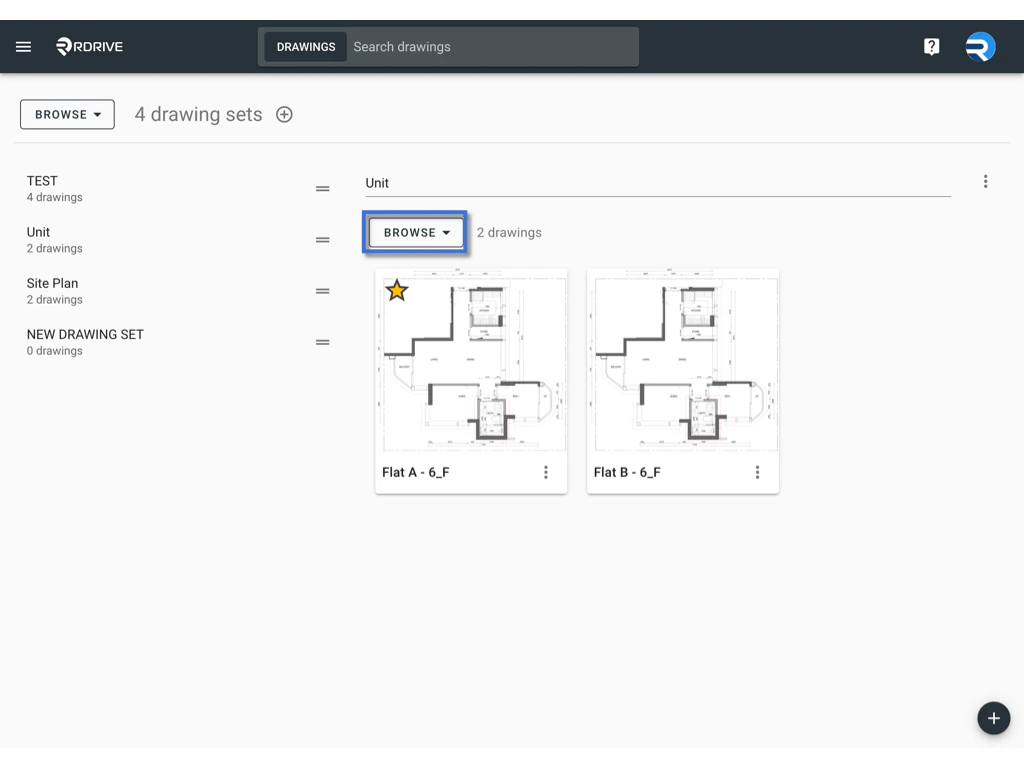
 * Click on the drawing you wish to select; the selected item will be highlighted in grey.
6. **The batch edit options will appear for your action:**\\
* Click on the drawing you wish to select; the selected item will be highlighted in grey.
6. **The batch edit options will appear for your action:**\\
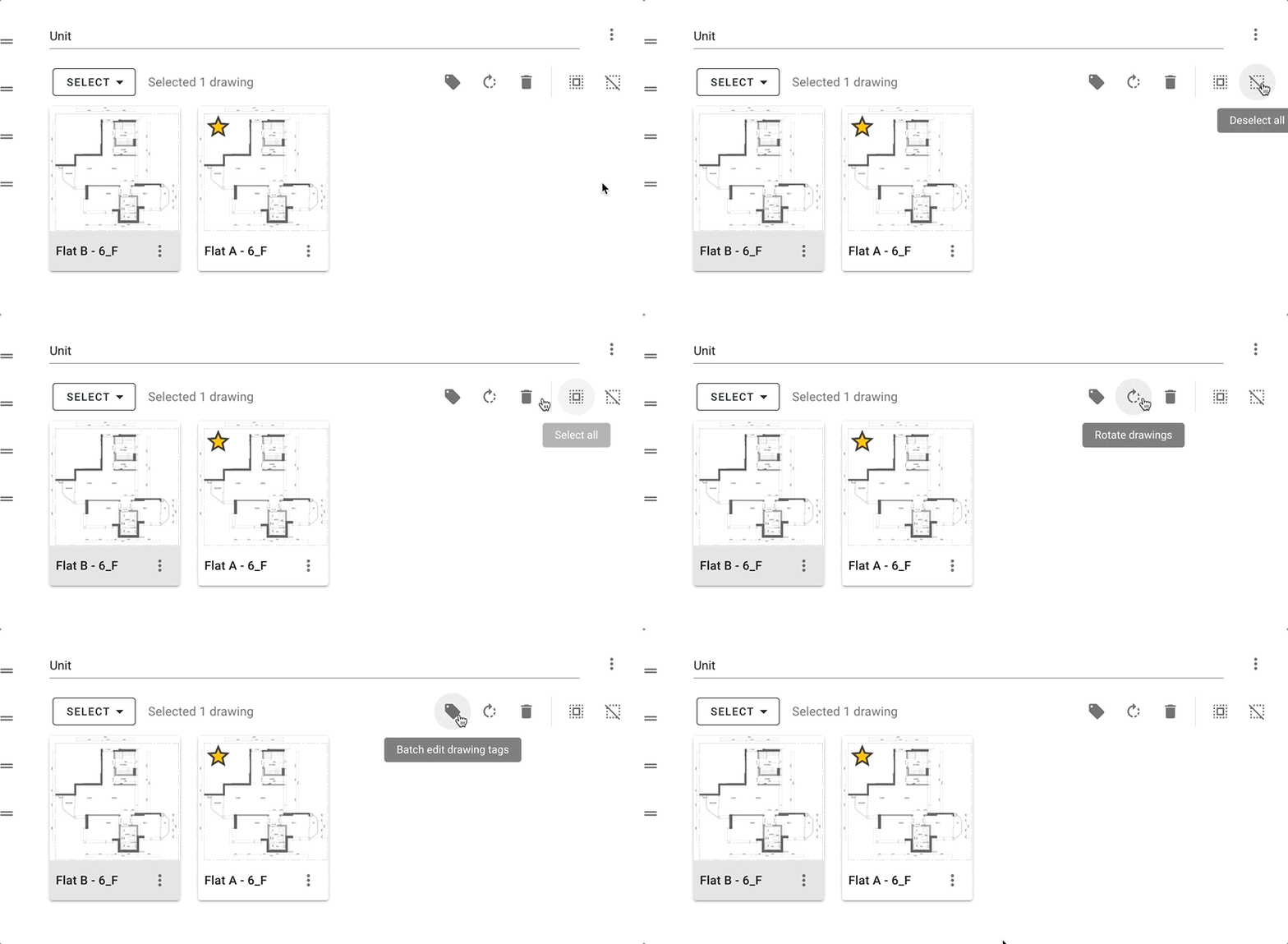 * **Deselect All: Deselect all drawings from the current drawing set.**
* **Select All:** Select all drawings from the current drawing set.
* **Delete Drawings:** Be cautious—deleted drawings cannot be restored.
* **Rotate:** To rotate a drawing, click the **Rotate** button. Each click rotates the drawing 90 degrees clockwise. Click twice for a 180-degree rotation or three times for a 90-degree counter-clockwise rotation.
* **Batch-Edit Drawing Tags:** Enter or remove tags for the selected drawings.
***
By following these steps, you can effectively manage and edit your drawings in RDrive to enhance your project organization.
* **Deselect All: Deselect all drawings from the current drawing set.**
* **Select All:** Select all drawings from the current drawing set.
* **Delete Drawings:** Be cautious—deleted drawings cannot be restored.
* **Rotate:** To rotate a drawing, click the **Rotate** button. Each click rotates the drawing 90 degrees clockwise. Click twice for a 180-degree rotation or three times for a 90-degree counter-clockwise rotation.
* **Batch-Edit Drawing Tags:** Enter or remove tags for the selected drawings.
***
By following these steps, you can effectively manage and edit your drawings in RDrive to enhance your project organization.