> ## Documentation Index
> Fetch the complete documentation index at: https://docs.rdrive.io/llms.txt
> Use this file to discover all available pages before exploring further.

# How to Clone a Drawing(s) / Drawing Set?

> You can easily clone individual drawings or an entire drawing set by following the steps below. There are two main methods to clone a drawing set: manually or b

You can easily clone individual drawings or an entire drawing set by following the steps below. There are two main methods to clone a drawing set: manually or by using a template.

* [Cloning a Drawing Set](#cloning-a-drawing-set)
  * [1. Manually Cloning a Drawing Set](#1.-manually-cloning-a-drawing-set)
  * [2. Cloning a Drawing Set Using a Template](#2.-cloning-a-drawing-set-using-a-template)
* [Cloning a Single Drawing](#cloning-a-single-drawing)

***

## **Cloning a Drawing Set**

There are two ways to clone a drawing set:

1. **Manually**
2. **Using a Template**

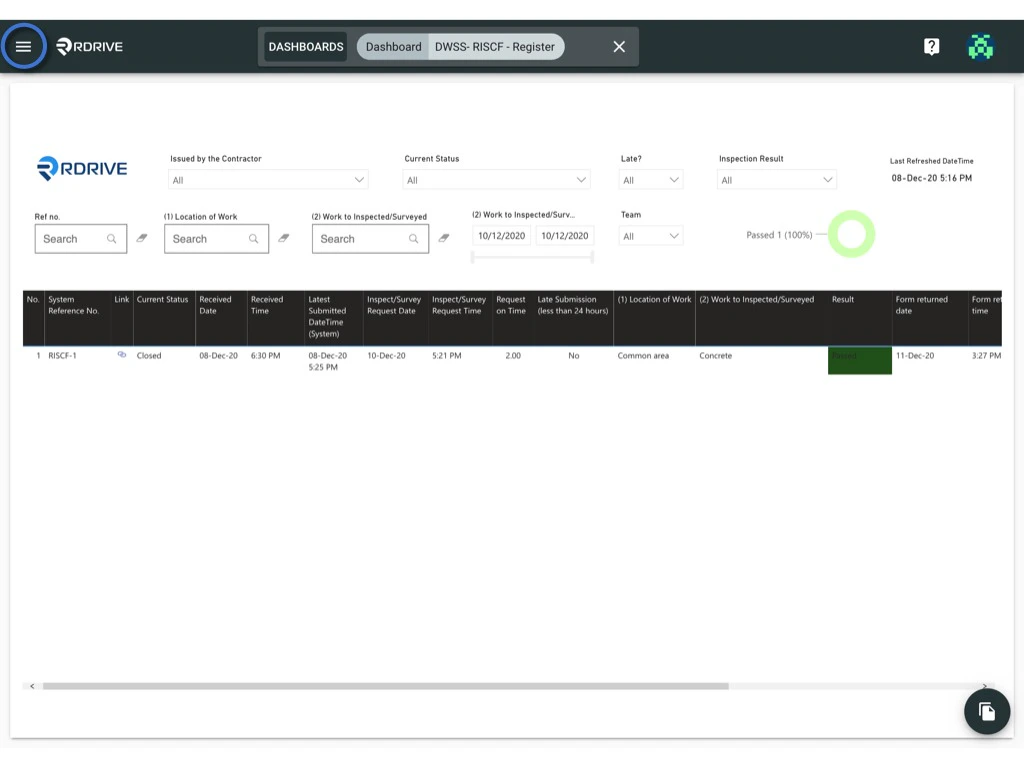
To begin, click on the **≡** menu icon at the top left corner to open the Menu, then navigate to **Settings > Drawings**.<img src="https://mintcdn.com/rdrive/HfD4shwK5DZwrXOQ/images/kb/103000035136/lZcGwAWq8U1ogBsKtxQVqpvwhVlI8mHFlA.png?fit=max&auto=format&n=HfD4shwK5DZwrXOQ&q=85&s=45d779e877ee471c273ae798fe91e787" alt="How to Clone a Drawing(s) / Drawing Set?" width="1024" height="768" data-path="images/kb/103000035136/lZcGwAWq8U1ogBsKtxQVqpvwhVlI8mHFlA.png" /><img src="https://mintcdn.com/rdrive/HfD4shwK5DZwrXOQ/images/kb/103000035136/qVMFXJnxEhf_MtgEcUK0CnX3VOPCRGu_WA.png?fit=max&auto=format&n=HfD4shwK5DZwrXOQ&q=85&s=3b8e459fe60f8aff4f900396ac18084c" alt="How to Clone a Drawing(s) / Drawing Set?" width="1024" height="768" data-path="images/kb/103000035136/qVMFXJnxEhf_MtgEcUK0CnX3VOPCRGu_WA.png" />
***

## **1. Manually Cloning a Drawing Set**

1. Select the desired drawing set.
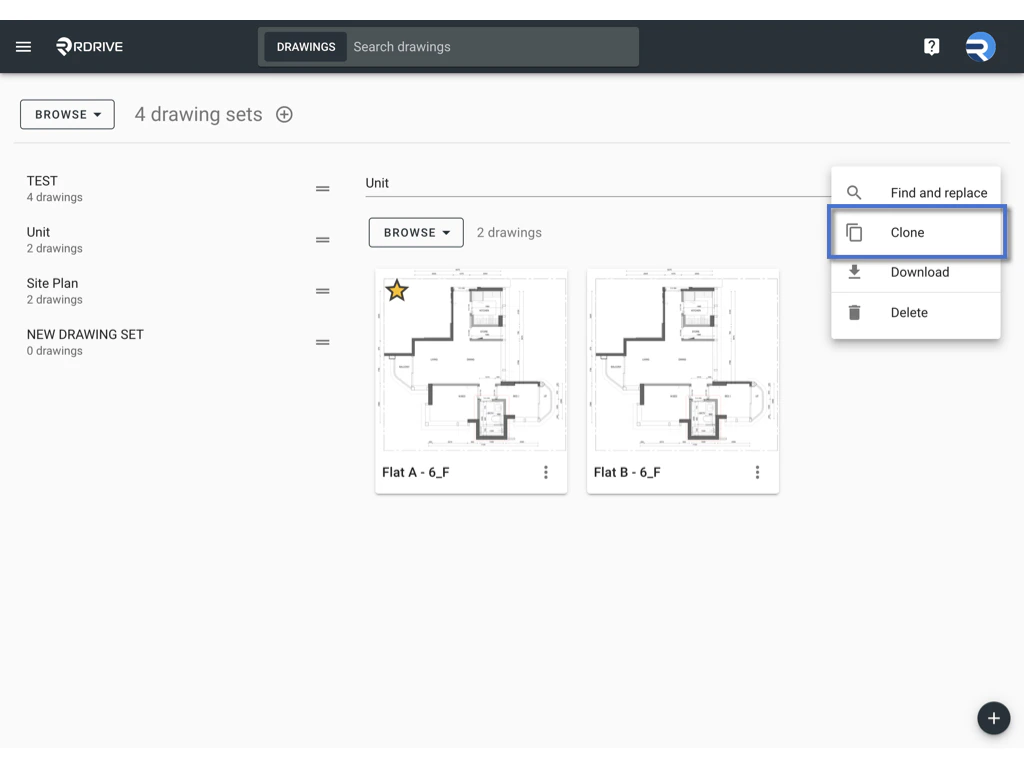
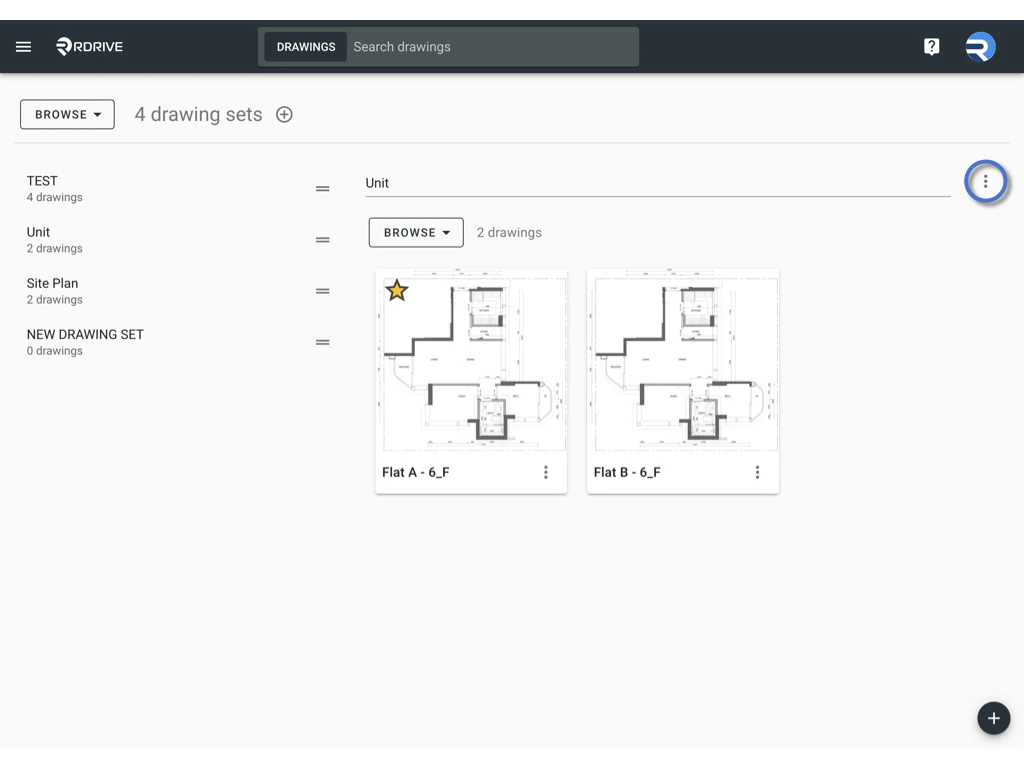
2. Click the **⋮** button on the right side of the drawing set title and select **Clone**.<img src="https://mintcdn.com/rdrive/HfD4shwK5DZwrXOQ/images/kb/103000035136/mFc_EqDks53E5rmQtHNbsTJL2_5_cQMgUQ.jpeg?fit=max&auto=format&n=HfD4shwK5DZwrXOQ&q=85&s=a23d250f6705494de778bc1abfaa1c37" alt="How to Clone a Drawing(s) / Drawing Set?" width="1024" height="768" data-path="images/kb/103000035136/mFc_EqDks53E5rmQtHNbsTJL2_5_cQMgUQ.jpeg" /><img src="https://mintcdn.com/rdrive/HfD4shwK5DZwrXOQ/images/kb/103000035136/y744NUpPD4FuQjKUrkPpD7mmtXMuseja1A.jpeg?fit=max&auto=format&n=HfD4shwK5DZwrXOQ&q=85&s=9d44413e531373c059fdf6aa79104e06" alt="How to Clone a Drawing(s) / Drawing Set?" width="1024" height="768" data-path="images/kb/103000035136/y744NUpPD4FuQjKUrkPpD7mmtXMuseja1A.jpeg" />
3. In the dialog box, input the number of copies you wish to create.<img src="https://mintcdn.com/rdrive/HfD4shwK5DZwrXOQ/images/kb/103000035136/0e743esn8TbPE8_PgFzI9uCAF-Z0naP00g.jpeg?fit=max&auto=format&n=HfD4shwK5DZwrXOQ&q=85&s=beeb9d01347709ab1c10b2e8b7100bca" alt="How to Clone a Drawing(s) / Drawing Set?" width="1024" height="768" data-path="images/kb/103000035136/0e743esn8TbPE8_PgFzI9uCAF-Z0naP00g.jpeg" />
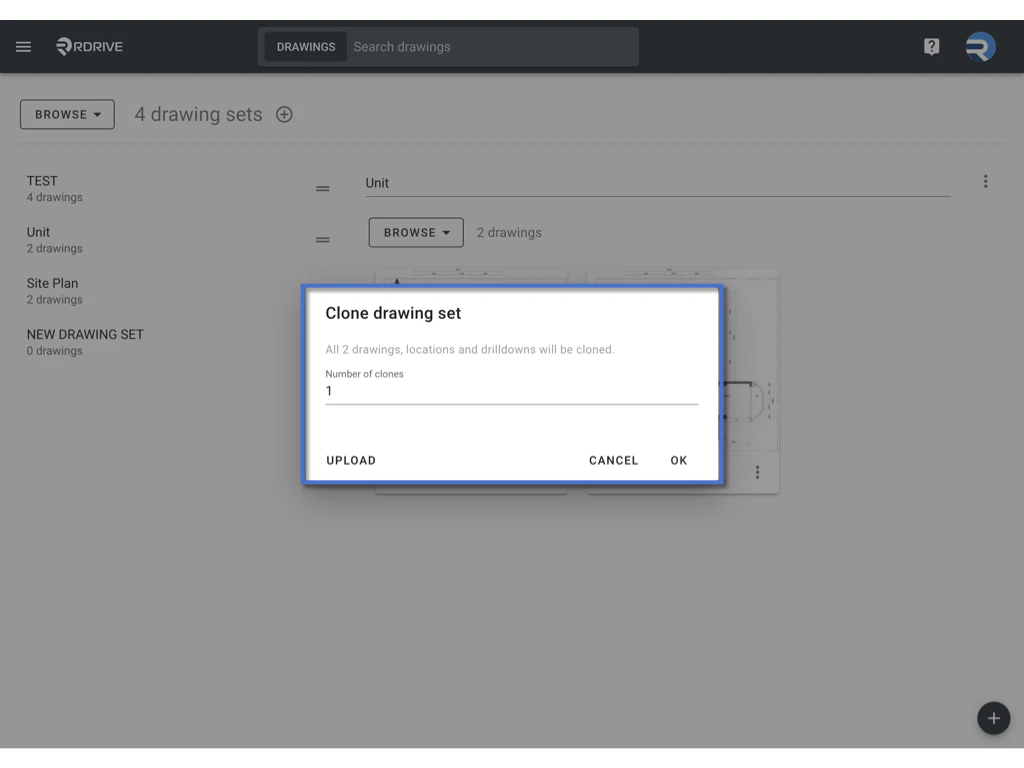
4. Click **OK** to start the process.

***

## **2. Cloning a Drawing Set Using a Template**

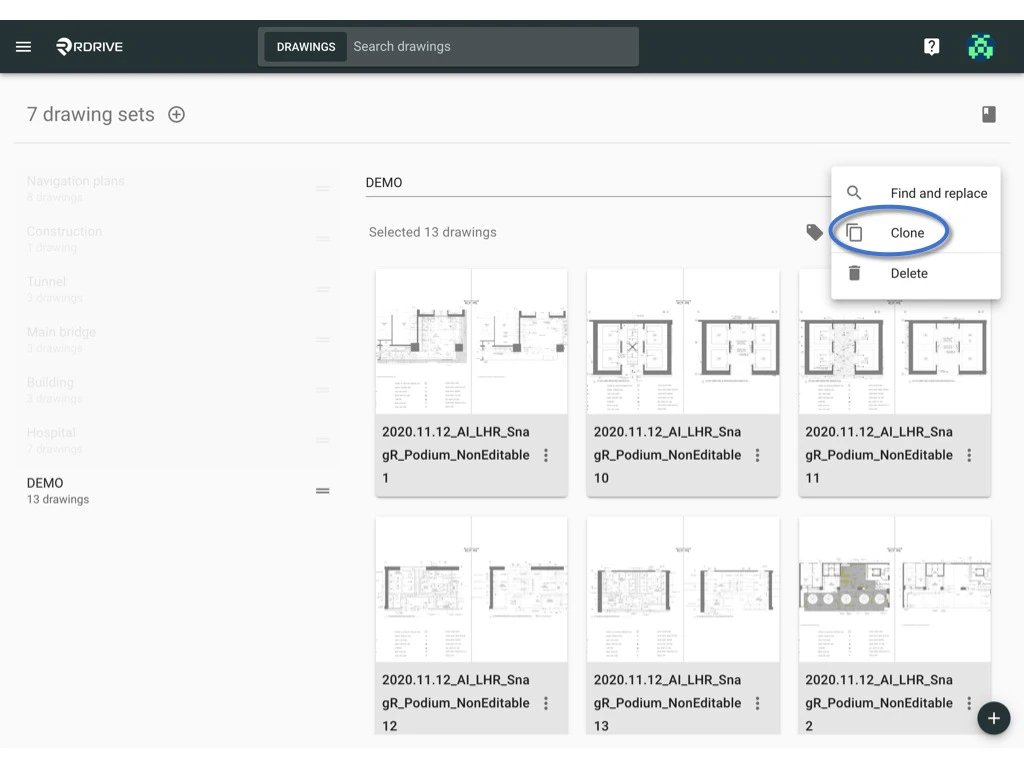
1. Select the drawing set and click the **⋮** button on the right side of the title, then choose **Clone**.<img src="https://mintcdn.com/rdrive/HfD4shwK5DZwrXOQ/images/kb/103000035136/3UK8KViQkhDYpJ_fe66rmJgRI0_pqjlkXA.png?fit=max&auto=format&n=HfD4shwK5DZwrXOQ&q=85&s=417df8563ecff3468221d069b55d5aa9" alt="How to Clone a Drawing(s) / Drawing Set?" width="1024" height="768" data-path="images/kb/103000035136/3UK8KViQkhDYpJ_fe66rmJgRI0_pqjlkXA.png" />
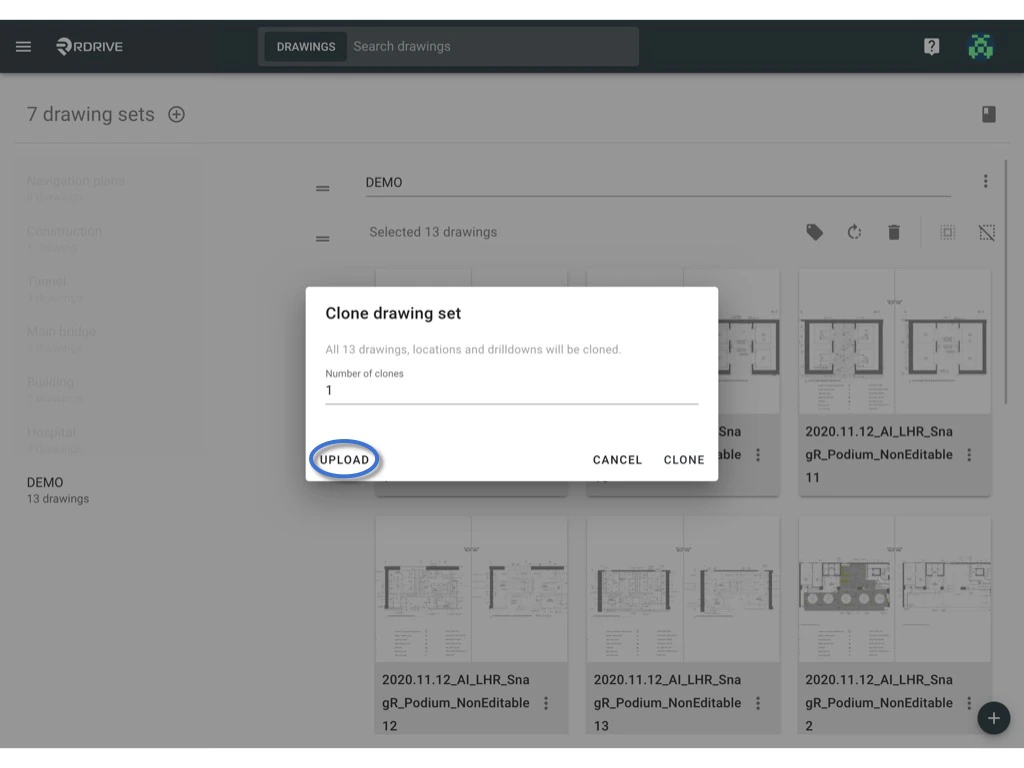
2. In the dialog box, click the **UPLOAD** button located at the bottom left corner.<img src="https://mintcdn.com/rdrive/HfD4shwK5DZwrXOQ/images/kb/103000035136/M2xdunDzd0AsnPuc2nBHUSZzRVgB3xEFCg.png?fit=max&auto=format&n=HfD4shwK5DZwrXOQ&q=85&s=8312b8ceaf1b9e7e6620777f1ec3c2c1" alt="How to Clone a Drawing(s) / Drawing Set?" width="1024" height="768" data-path="images/kb/103000035136/M2xdunDzd0AsnPuc2nBHUSZzRVgB3xEFCg.png" />
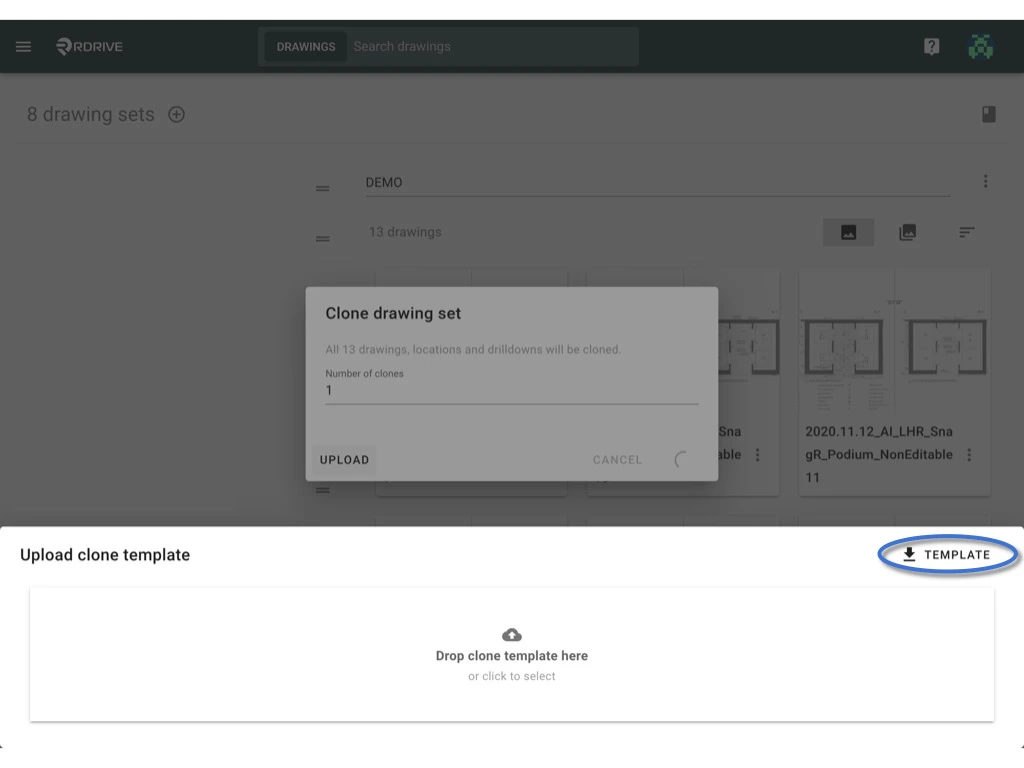
3. Download the provided template and fill it in with the necessary information (a sample is provided for reference).<img src="https://mintcdn.com/rdrive/HfD4shwK5DZwrXOQ/images/kb/103000035136/_HwgSbAMiO2rWAmAqKGBzBpfG6bz1RCcAQ.png?fit=max&auto=format&n=HfD4shwK5DZwrXOQ&q=85&s=74083468181d8053ecb1b73124e5b96f" alt="How to Clone a Drawing(s) / Drawing Set?" width="1024" height="768" data-path="images/kb/103000035136/_HwgSbAMiO2rWAmAqKGBzBpfG6bz1RCcAQ.png" /><img src="https://mintcdn.com/rdrive/HfD4shwK5DZwrXOQ/images/kb/103000035136/jBH_wJfNJYTsNBrqNDgtb0a5Cc4m98U1Xg.jpeg?fit=max&auto=format&n=HfD4shwK5DZwrXOQ&q=85&s=68ebc22e247feca22c589044dfc233e6" alt="How to Clone a Drawing(s) / Drawing Set?" width="10370" height="875" data-path="images/kb/103000035136/jBH_wJfNJYTsNBrqNDgtb0a5Cc4m98U1Xg.jpeg" />
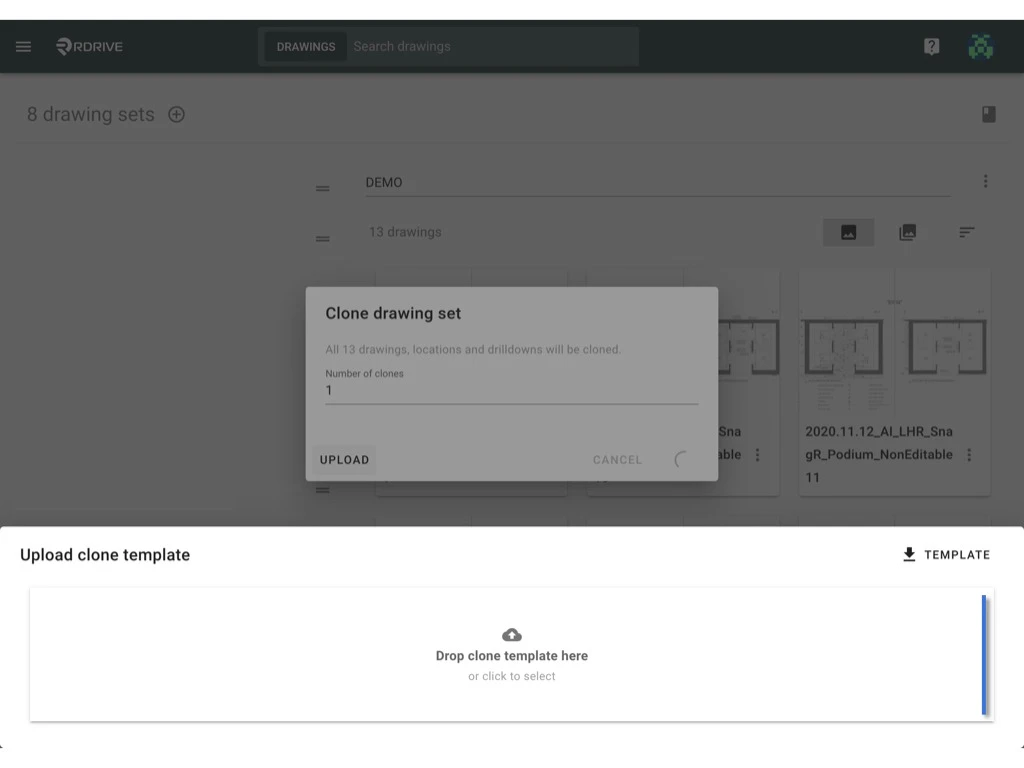
4. Once the template is complete, upload the file.<img src="https://mintcdn.com/rdrive/HfD4shwK5DZwrXOQ/images/kb/103000035136/gxZbuSsd76O9yUamCdDfTNxBIyy-MH6DeA.png?fit=max&auto=format&n=HfD4shwK5DZwrXOQ&q=85&s=2a62af32298a058a93c6372e48c6d7a4" alt="How to Clone a Drawing(s) / Drawing Set?" width="1024" height="768" data-path="images/kb/103000035136/gxZbuSsd76O9yUamCdDfTNxBIyy-MH6DeA.png" />
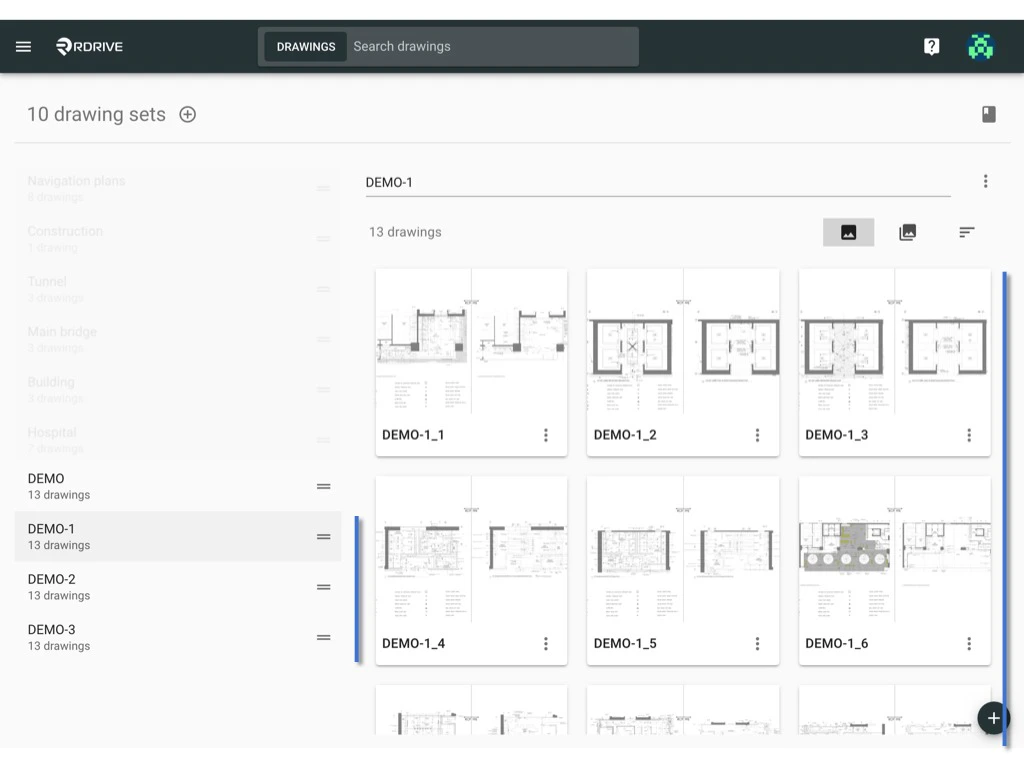
5. The system will clone the drawings based on the data you entered in the template.<img src="https://mintcdn.com/rdrive/HfD4shwK5DZwrXOQ/images/kb/103000035136/civNEsNlIhKgZmbfahC_1iJE8Oosa191gQ.png?fit=max&auto=format&n=HfD4shwK5DZwrXOQ&q=85&s=f1a64fa42311246be40110481be916f1" alt="How to Clone a Drawing(s) / Drawing Set?" width="1024" height="768" data-path="images/kb/103000035136/civNEsNlIhKgZmbfahC_1iJE8Oosa191gQ.png" />
***

## **Cloning a Single Drawing**

To clone a specific drawing within a set:

1. Locate the drawing you want to clone.
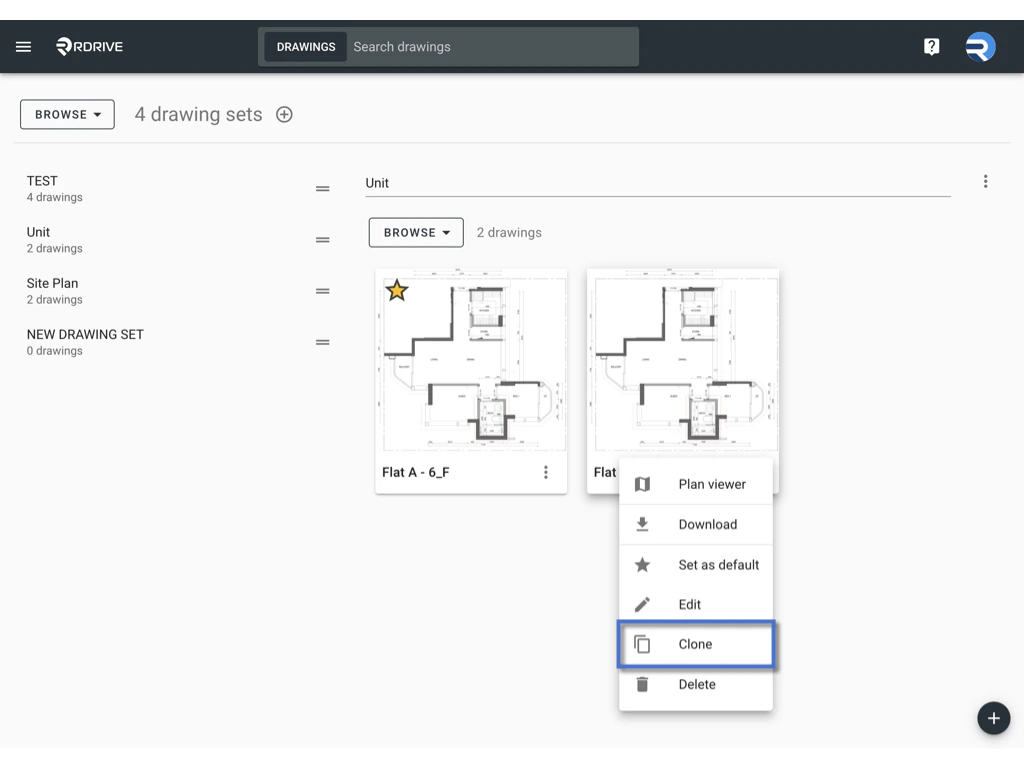
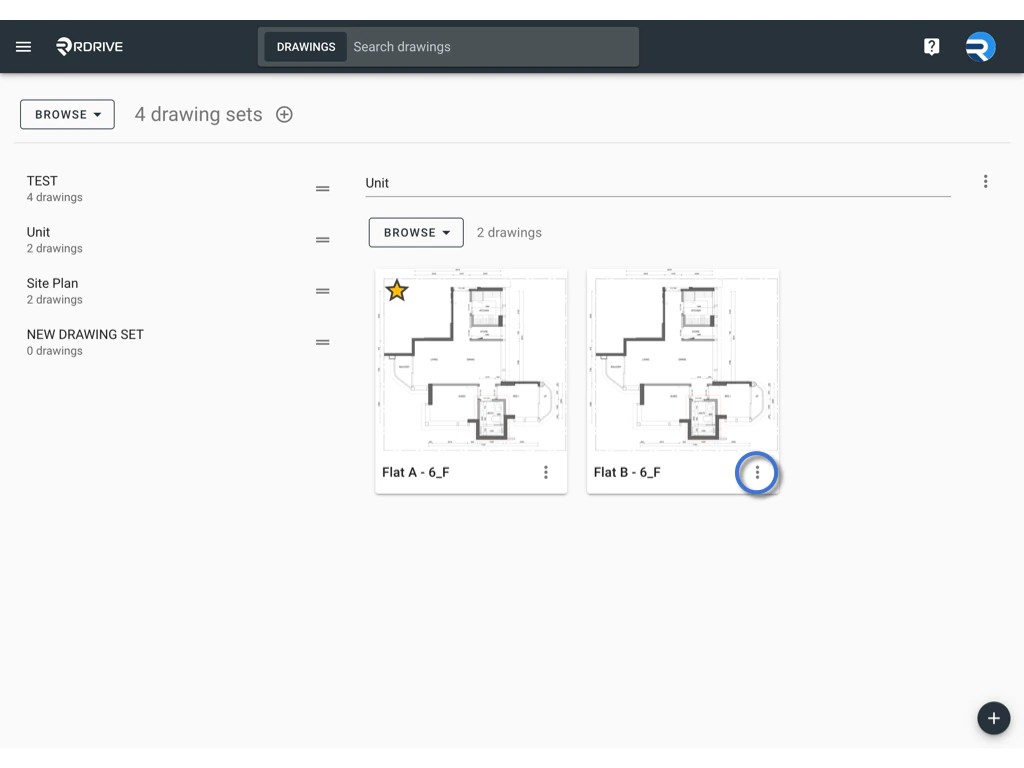
2. Click the **⋮** button on the right side of the drawing title and select **Clone**.<img src="https://mintcdn.com/rdrive/HfD4shwK5DZwrXOQ/images/kb/103000035136/NjM_zzdYoshwRWNCHqQt0H4jtyL-iyaTeA.png?fit=max&auto=format&n=HfD4shwK5DZwrXOQ&q=85&s=75245e9135c0f8e33f91559d9fd1d545" alt="How to Clone a Drawing(s) / Drawing Set?" width="1024" height="768" data-path="images/kb/103000035136/NjM_zzdYoshwRWNCHqQt0H4jtyL-iyaTeA.png" /><img src="https://mintcdn.com/rdrive/HfD4shwK5DZwrXOQ/images/kb/103000035136/VSG0lY2UKFqxVXpAOVBlM7vUuaJkYmWWEA.jpeg?fit=max&auto=format&n=HfD4shwK5DZwrXOQ&q=85&s=fa64cedde0145685ff55c438637e4f16" alt="How to Clone a Drawing(s) / Drawing Set?" width="1024" height="768" data-path="images/kb/103000035136/VSG0lY2UKFqxVXpAOVBlM7vUuaJkYmWWEA.jpeg" />
3. In the dialog box, click the **Add Clone** button if you need to increase the number of clones. Choose the drawing set, edit the drawing title, and click **OK** to confirm.<img src="https://mintcdn.com/rdrive/HfD4shwK5DZwrXOQ/images/kb/103000035136/vnlHHu5GfbIcEOVrWvU02qxKbbOf1Bjc2g.jpeg?fit=max&auto=format&n=HfD4shwK5DZwrXOQ&q=85&s=d36a3fdf02eafc098df6ad7c0445a43e" alt="How to Clone a Drawing(s) / Drawing Set?" width="1024" height="768" data-path="images/kb/103000035136/vnlHHu5GfbIcEOVrWvU02qxKbbOf1Bjc2g.jpeg" />
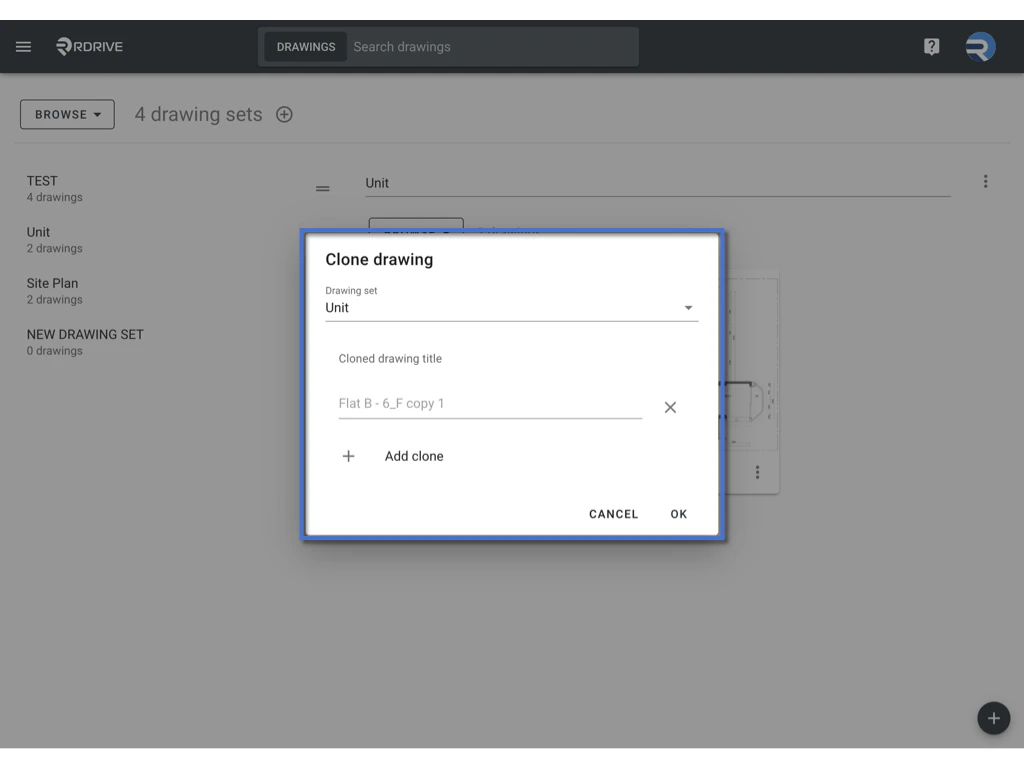
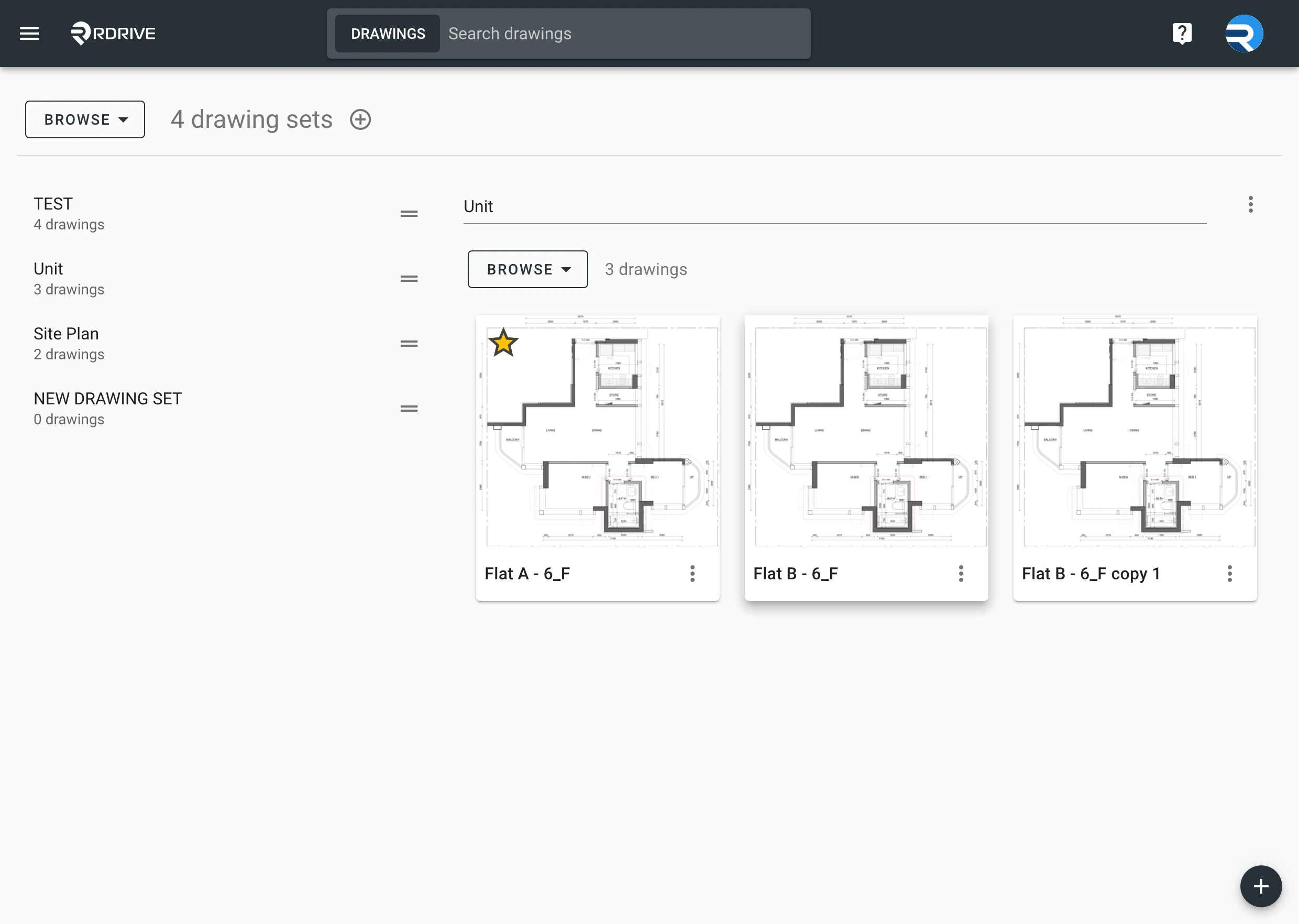
4. The drawing will be cloned.<img src="https://mintcdn.com/rdrive/HfD4shwK5DZwrXOQ/images/kb/103000035136/nOnAh9kQRkox1ik1tMDSBmPySox9r5lXYA.jpeg?fit=max&auto=format&n=HfD4shwK5DZwrXOQ&q=85&s=8b91a93fd3f19fab927314569bf067ec" alt="How to Clone a Drawing(s) / Drawing Set?" width="2480" height="1764" data-path="images/kb/103000035136/nOnAh9kQRkox1ik1tMDSBmPySox9r5lXYA.jpeg" />

***

This process helps streamline the duplication of drawings or drawing sets, making it easier to manage and maintain consistency across projects.