> ## Documentation Index
> Fetch the complete documentation index at: https://docs.rdrive.io/llms.txt
> Use this file to discover all available pages before exploring further.

# How to generate QR codes for locations?

> Using the QR code locator on the RDrive APP is a very efficient means to locate your exact position in a building immediately. Once locations have been added to

Using the QR code locator on the RDrive APP is a very efficient means to locate your exact position in a building immediately. Once locations have been added to a project the QR codes are very simple to produce.

You may download the QR code of the location one by one from the [Plan viewer](#%e2%80%8b%e2%80%8bvia-plan-viewer--) or [batch download](#via-location-page--) from the Location page - select mode.

##

**via Plan viewer -**

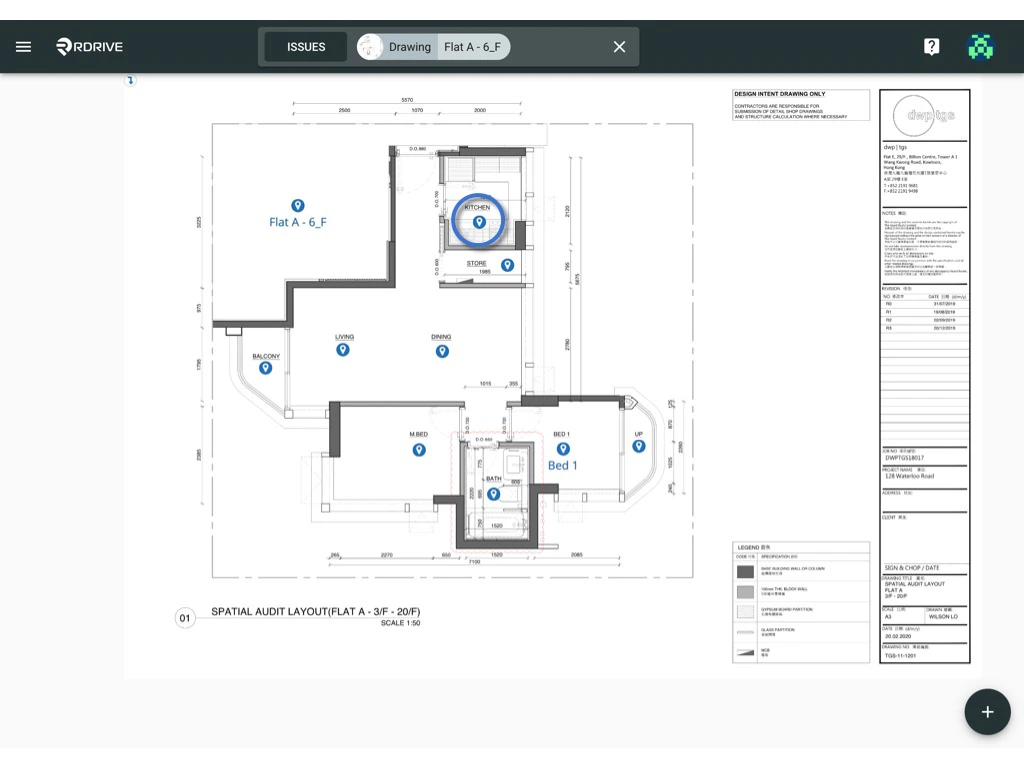
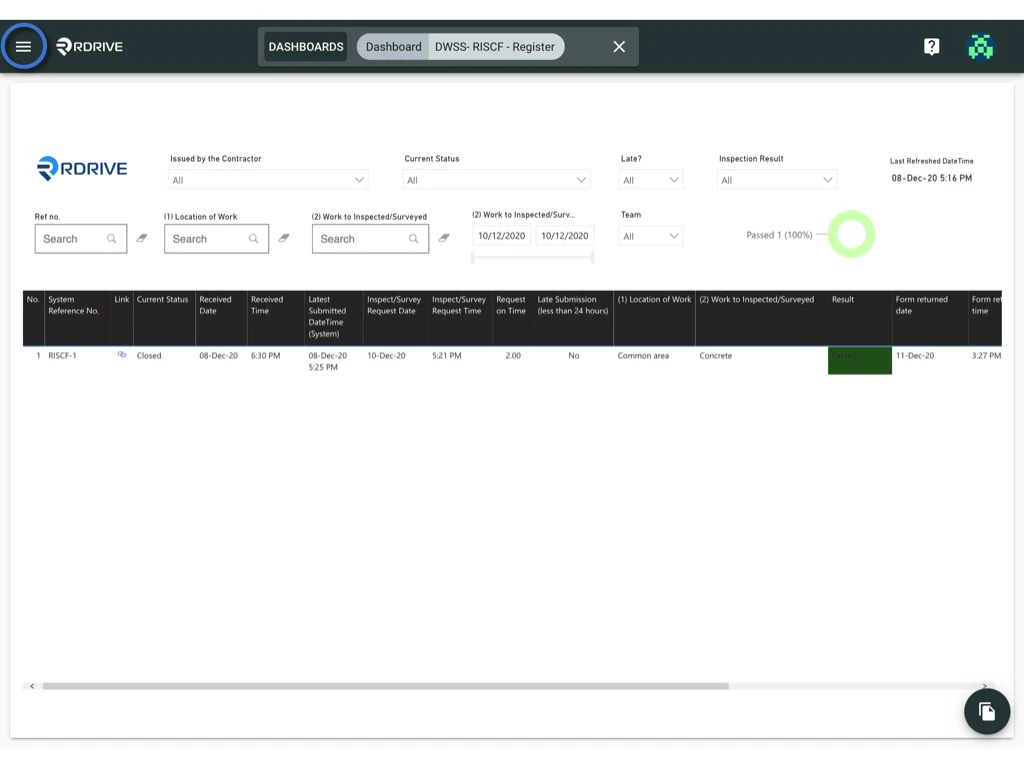
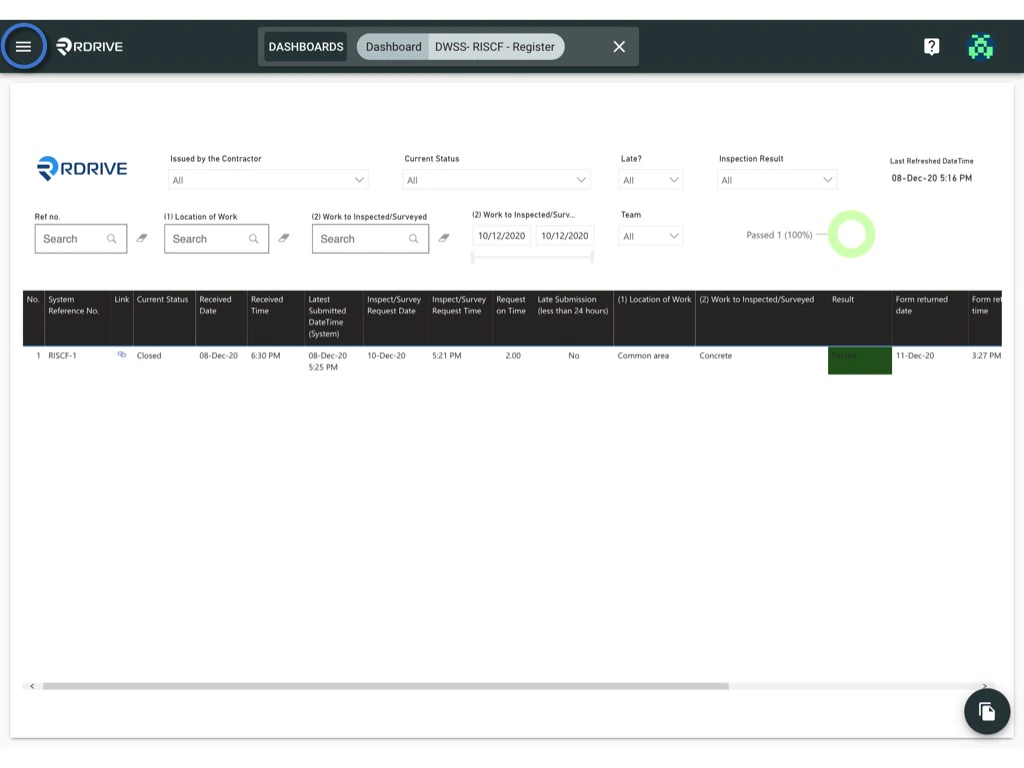
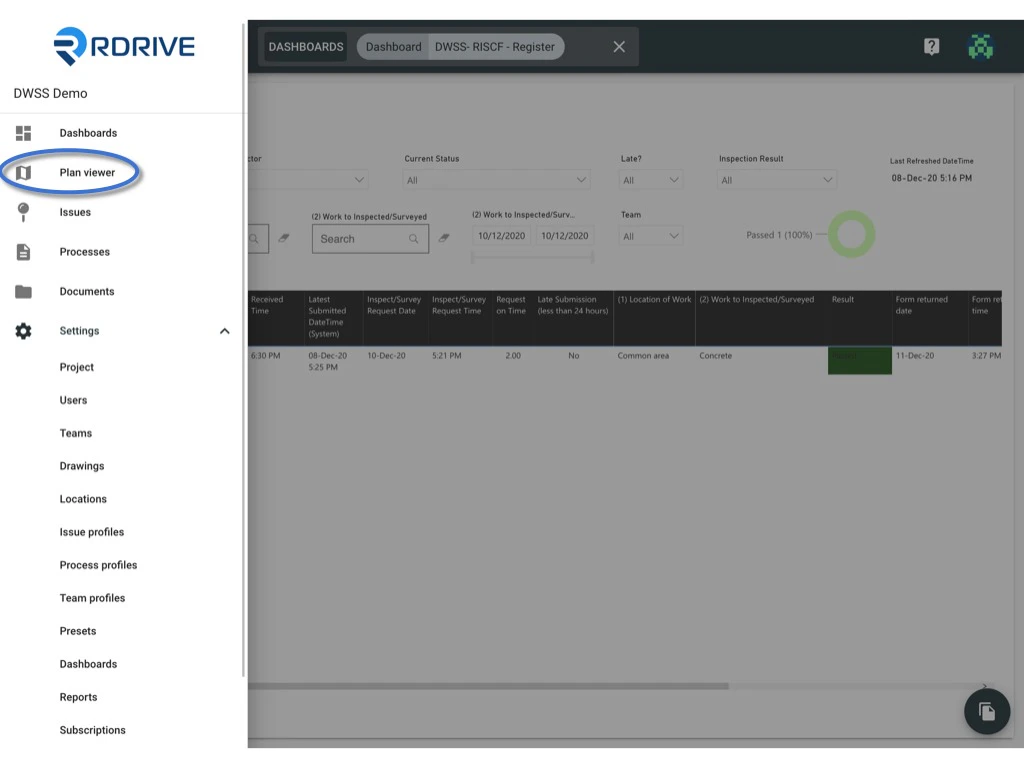
You will able to see the menu icon on the top left corner, please click it to unfold the Menu, access the Plan viewer, and select the correct drawing.
<img src="https://mintcdn.com/rdrive/HfD4shwK5DZwrXOQ/images/kb/103000035132/OW1-CQGd_NTf9uR8zwoH_OY5gszRDP9OtQ.jpeg?fit=max&auto=format&n=HfD4shwK5DZwrXOQ&q=85&s=5ca27d2598e3c14e54c3f99574d77935" alt="How to generate QR codes for locations?" width="1024" height="768" data-path="images/kb/103000035132/OW1-CQGd_NTf9uR8zwoH_OY5gszRDP9OtQ.jpeg" />

<img src="https://mintcdn.com/rdrive/HfD4shwK5DZwrXOQ/images/kb/103000035132/inE4o9ZU8gfAnAQ1ax7CsXC6Df8N-aYdvw.jpeg?fit=max&auto=format&n=HfD4shwK5DZwrXOQ&q=85&s=55187f6c142eb35b8ff4e5423eb94f9f" alt="How to generate QR codes for locations?" width="1024" height="768" data-path="images/kb/103000035132/inE4o9ZU8gfAnAQ1ax7CsXC6Df8N-aYdvw.jpeg" />

Select the location pin.

<img src="https://mintcdn.com/rdrive/HfD4shwK5DZwrXOQ/images/kb/103000035132/EQk5BEgdGh-3gI9ZBwEydBgpqzmD9Pe5pA.jpeg?fit=max&auto=format&n=HfD4shwK5DZwrXOQ&q=85&s=21775244ce81487935f6a08621dc6d41" alt="How to generate QR codes for locations?" width="1024" height="768" data-path="images/kb/103000035132/EQk5BEgdGh-3gI9ZBwEydBgpqzmD9Pe5pA.jpeg" />

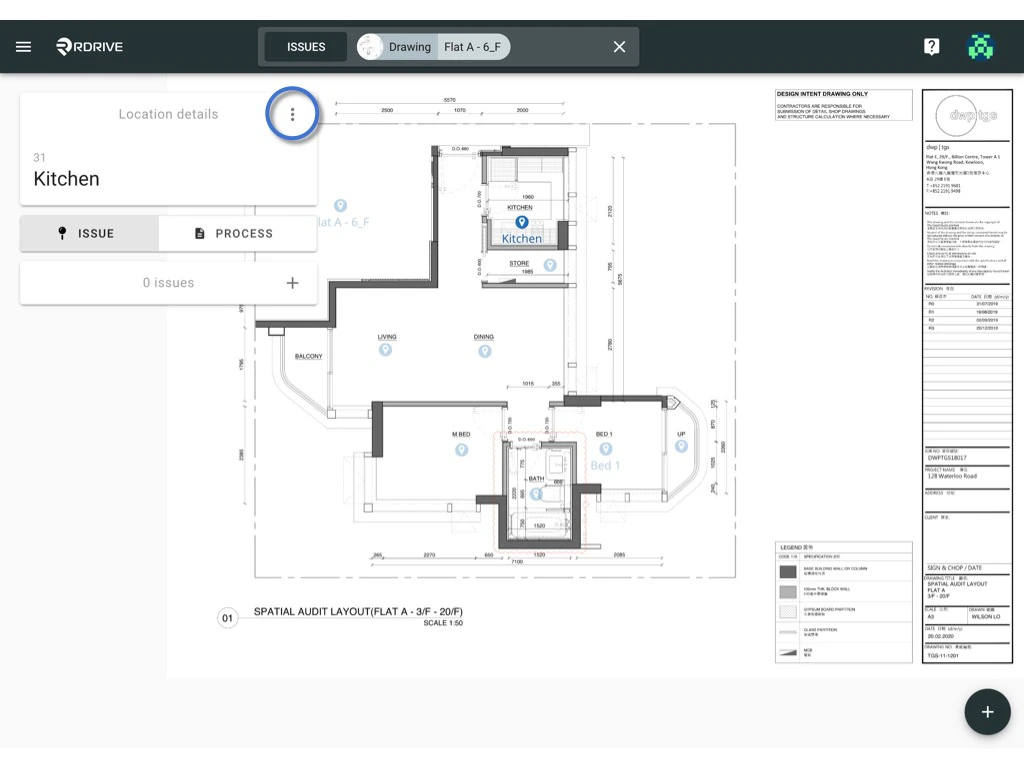
Click the **⋮** on the top right corner of the location dialogue.
<img src="https://mintcdn.com/rdrive/HfD4shwK5DZwrXOQ/images/kb/103000035132/3VsNejhbhCt5v0ZVaRF5asnAuVJHV48R6g.jpeg?fit=max&auto=format&n=HfD4shwK5DZwrXOQ&q=85&s=1af130b62e93cc0e284219aad67e2168" alt="How to generate QR codes for locations?" width="1024" height="768" data-path="images/kb/103000035132/3VsNejhbhCt5v0ZVaRF5asnAuVJHV48R6g.jpeg" />

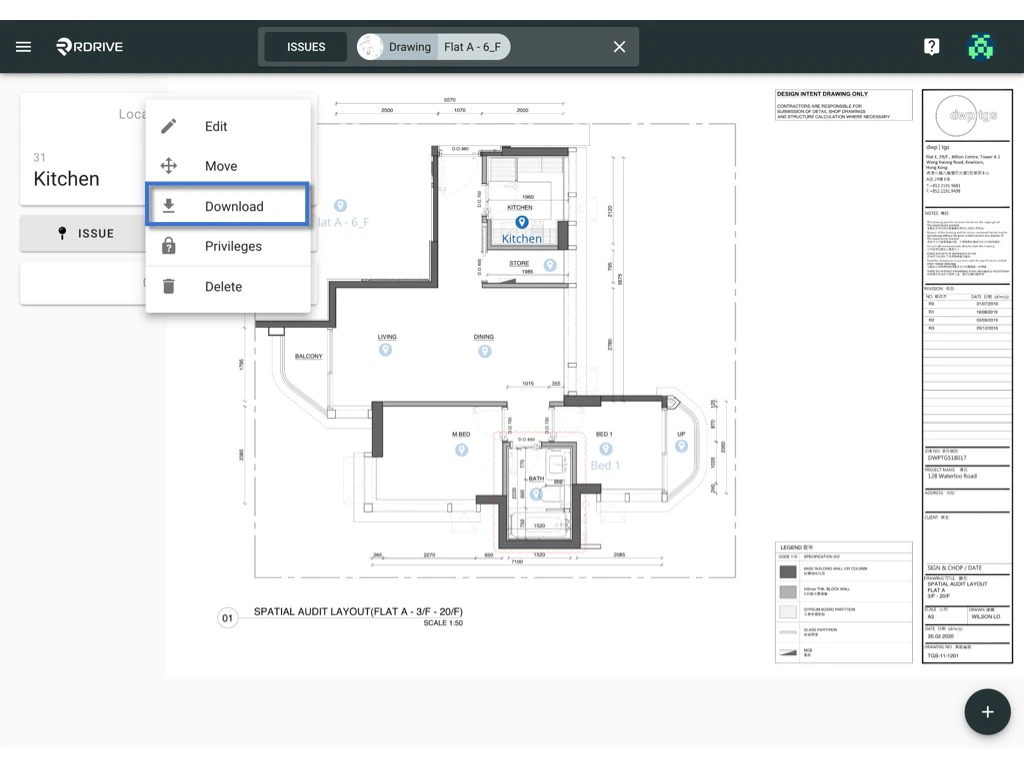
Press **Download**, select the layout option if needed.\
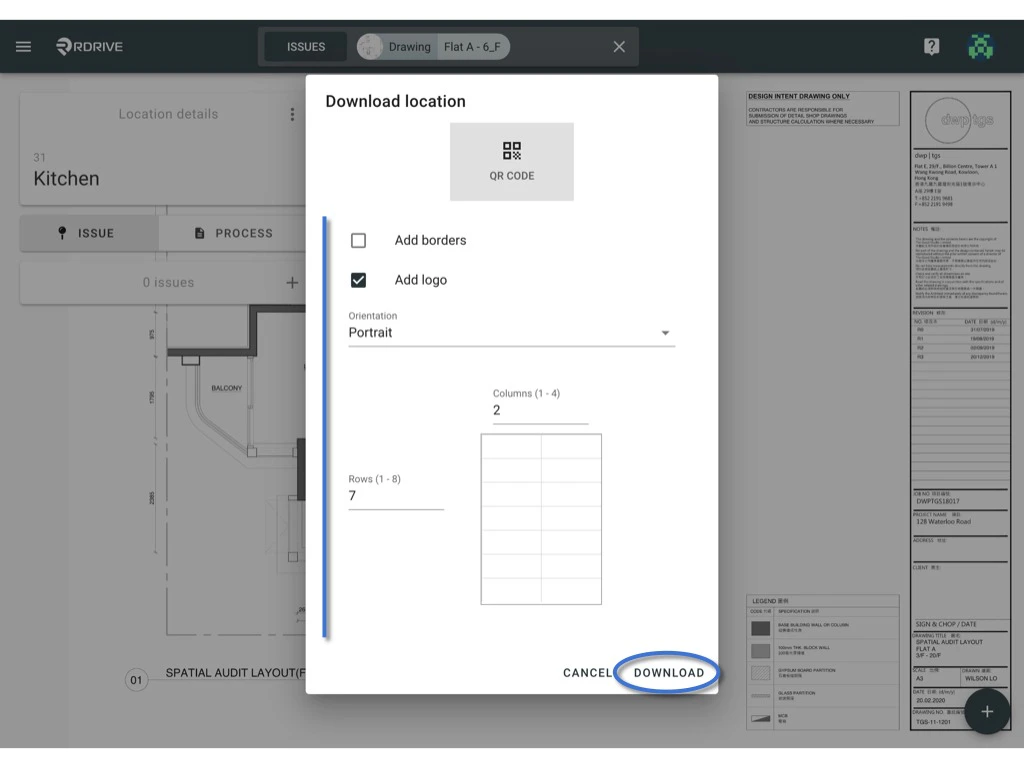
**Download** to generate.
<img src="https://mintcdn.com/rdrive/HfD4shwK5DZwrXOQ/images/kb/103000035132/eAE_KNc2403RrCko0pKq1zpy3Syree0Ktg.jpeg?fit=max&auto=format&n=HfD4shwK5DZwrXOQ&q=85&s=d64850c5fffbf6572d169e780f171ebe" alt="How to generate QR codes for locations?" width="1024" height="768" data-path="images/kb/103000035132/eAE_KNc2403RrCko0pKq1zpy3Syree0Ktg.jpeg" />

<img src="https://mintcdn.com/rdrive/HfD4shwK5DZwrXOQ/images/kb/103000035132/9CzE4YN7jldgN5vlaIbL5iPuTiGimx2Plw.jpeg?fit=max&auto=format&n=HfD4shwK5DZwrXOQ&q=85&s=bd3ac9e4990769b67c5e8650707a8a6c" alt="How to generate QR codes for locations?" width="1024" height="768" data-path="images/kb/103000035132/9CzE4YN7jldgN5vlaIbL5iPuTiGimx2Plw.jpeg" />

***

## **via Location page -**

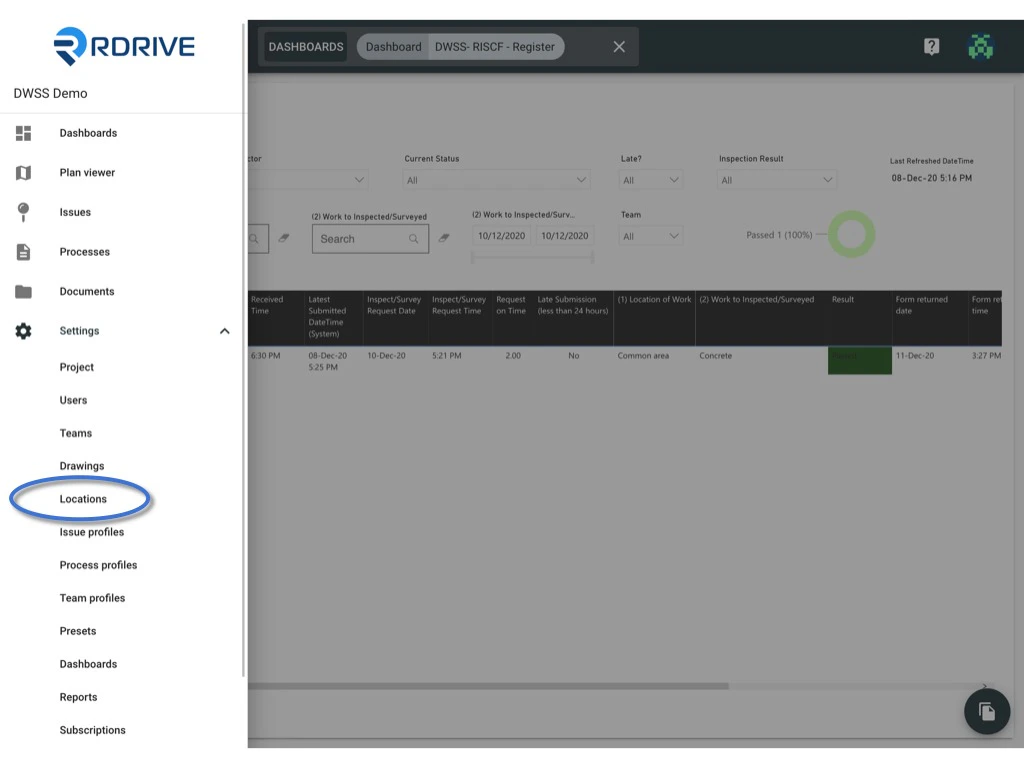
You will able to see the menu icon on the top left corner, please click it to unfold the menu, access the Settings > Locations.

<img src="https://mintcdn.com/rdrive/HfD4shwK5DZwrXOQ/images/kb/103000035132/z6o_hyriIZO9rHLE5PQrXDuFXnhLVwLMZg.jpeg?fit=max&auto=format&n=HfD4shwK5DZwrXOQ&q=85&s=b934a385cce11805157ad0bbcb8cb43d" alt="How to generate QR codes for locations?" width="1024" height="768" data-path="images/kb/103000035132/z6o_hyriIZO9rHLE5PQrXDuFXnhLVwLMZg.jpeg" />

<img src="https://mintcdn.com/rdrive/HfD4shwK5DZwrXOQ/images/kb/103000035132/0Pq-Adx-uv9-7kVGX41WHEiGfRofBSBbnw.jpeg?fit=max&auto=format&n=HfD4shwK5DZwrXOQ&q=85&s=f5878f55e34b692bfe2147277cf9a5bb" alt="How to generate QR codes for locations?" width="1024" height="768" data-path="images/kb/103000035132/0Pq-Adx-uv9-7kVGX41WHEiGfRofBSBbnw.jpeg" />

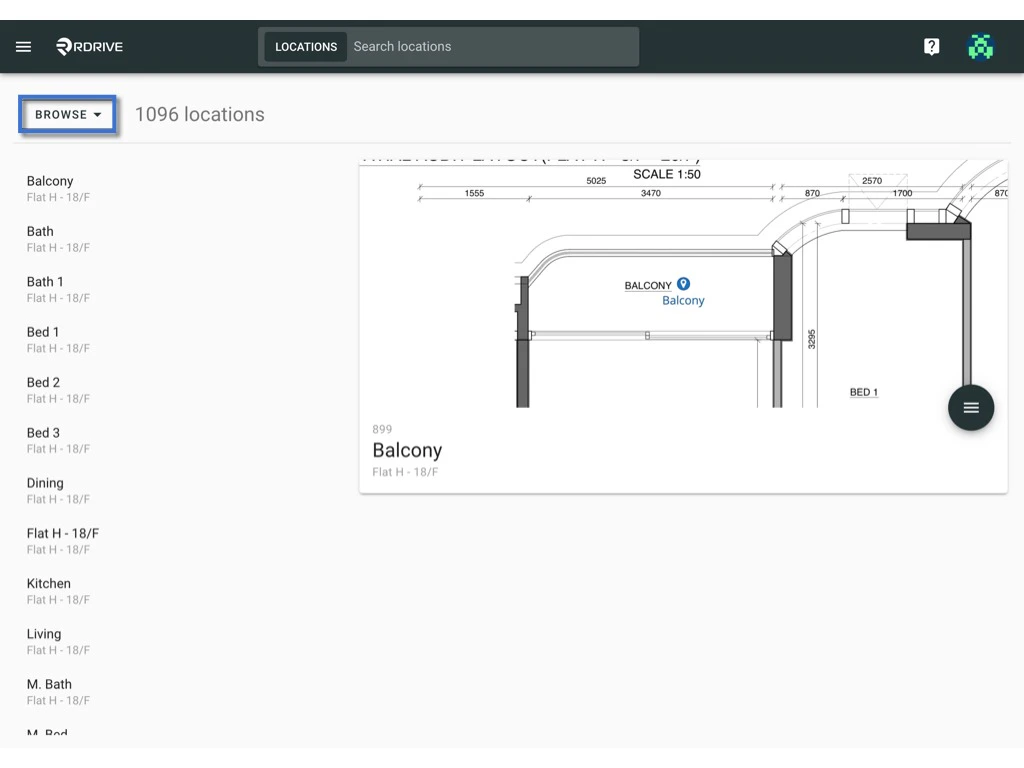
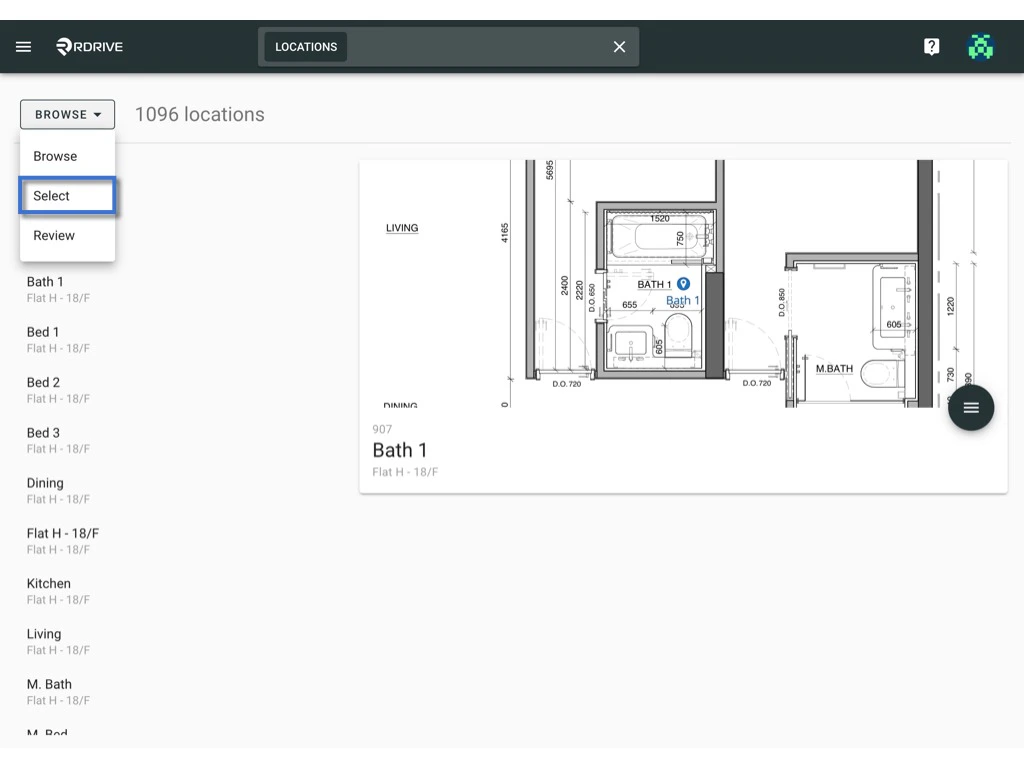
Switch mode from "**Browse**" to "**Select**".

<img src="https://mintcdn.com/rdrive/HfD4shwK5DZwrXOQ/images/kb/103000035132/Vsyh74s7qK69C389IOjSZmUxIdw5PLrFFw.jpeg?fit=max&auto=format&n=HfD4shwK5DZwrXOQ&q=85&s=8ec75e24e37a0d54a69730b2d36a69d3" alt="How to generate QR codes for locations?" width="1024" height="768" data-path="images/kb/103000035132/Vsyh74s7qK69C389IOjSZmUxIdw5PLrFFw.jpeg" />

<img src="https://mintcdn.com/rdrive/HfD4shwK5DZwrXOQ/images/kb/103000035132/2SOXNt7b9I233xV6f6TdX6fSeQFYPCapbA.jpeg?fit=max&auto=format&n=HfD4shwK5DZwrXOQ&q=85&s=6fbb8dc86d5f633ac84c3c0e7c41d814" alt="How to generate QR codes for locations?" width="1024" height="768" data-path="images/kb/103000035132/2SOXNt7b9I233xV6f6TdX6fSeQFYPCapbA.jpeg" />

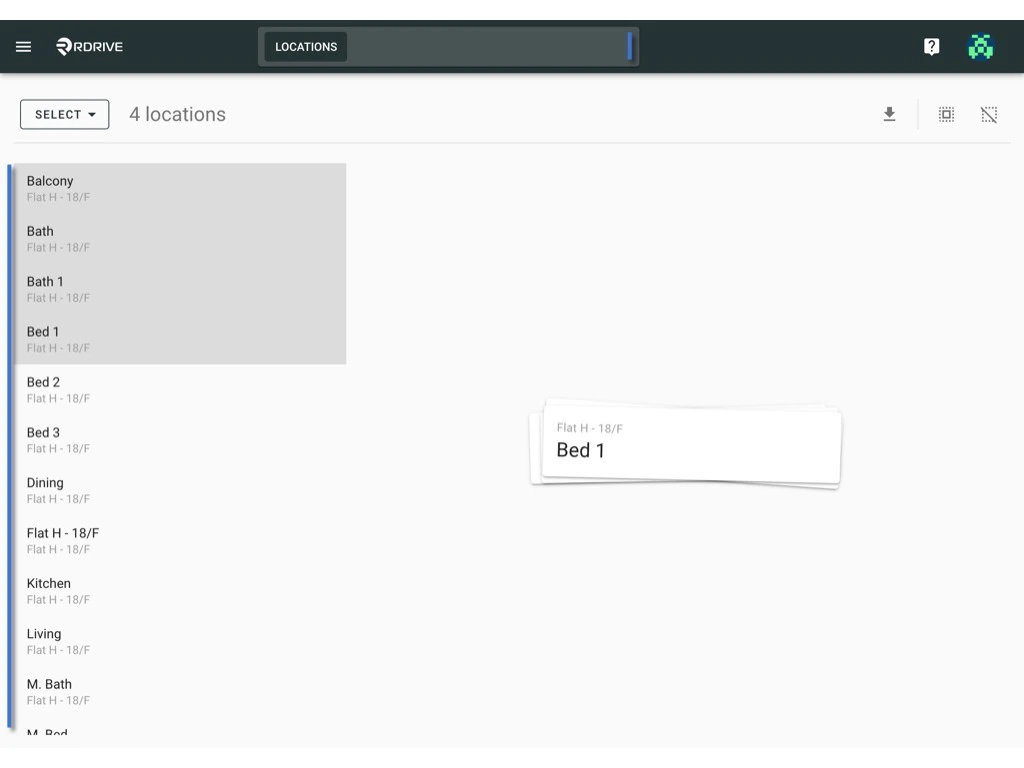
Click on the item to select, the selected item will be highlighted in grey.\
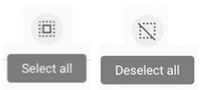
Or you can produce QR code for specific locations only by filtering locations from the search bar, clicking the button to **select all** / **deselect all**.

<img src="https://mintcdn.com/rdrive/HfD4shwK5DZwrXOQ/images/kb/103000035132/mK-mIVUwMPqEgqUVL811E2tSlMoheoinFw.png?fit=max&auto=format&n=HfD4shwK5DZwrXOQ&q=85&s=da4e4ebc6f2a86674d3eafa74ed20f78" alt="How to generate QR codes for locations?" width="200" height="90" data-path="images/kb/103000035132/mK-mIVUwMPqEgqUVL811E2tSlMoheoinFw.png" />

<img src="https://mintcdn.com/rdrive/HfD4shwK5DZwrXOQ/images/kb/103000035132/jMDeuk8kxevXFOXUL5DHTtg8fsn4JywBAA.jpeg?fit=max&auto=format&n=HfD4shwK5DZwrXOQ&q=85&s=c99a1628dbc89e709932214b981bf1c4" alt="How to generate QR codes for locations?" width="1024" height="768" data-path="images/kb/103000035132/jMDeuk8kxevXFOXUL5DHTtg8fsn4JywBAA.jpeg" />

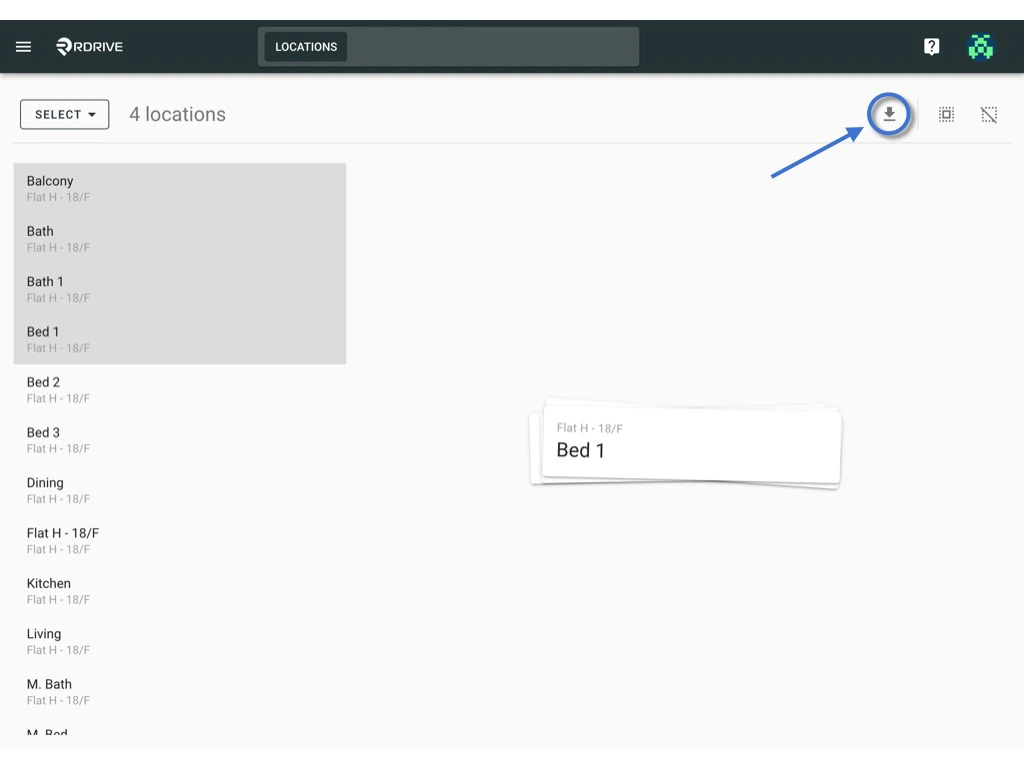
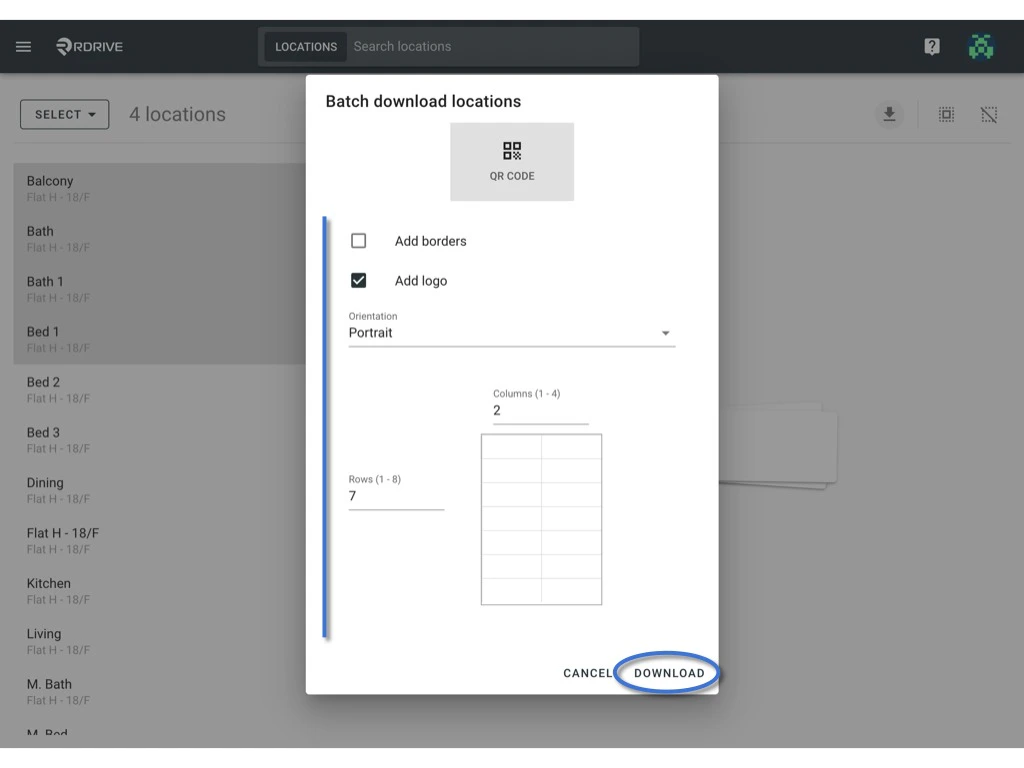
Press **Download** icon, select the layout option if needed.\
**Download** to generate.
<img src="https://mintcdn.com/rdrive/HfD4shwK5DZwrXOQ/images/kb/103000035132/cqArfIJyFdgQ8Vya5nG3Tqr0gEmtwZnpqw.jpeg?fit=max&auto=format&n=HfD4shwK5DZwrXOQ&q=85&s=ac4e27101711a085c8380217e4ca1fe1" alt="How to generate QR codes for locations?" width="1024" height="768" data-path="images/kb/103000035132/cqArfIJyFdgQ8Vya5nG3Tqr0gEmtwZnpqw.jpeg" />

<img src="https://mintcdn.com/rdrive/HfD4shwK5DZwrXOQ/images/kb/103000035132/HJ7rMBO8z--Vt1pg3fMUPPEoq9ZdBEZQDQ.jpeg?fit=max&auto=format&n=HfD4shwK5DZwrXOQ&q=85&s=67f4927a7ef82681507d24cf49a9fde9" alt="How to generate QR codes for locations?" width="1024" height="768" data-path="images/kb/103000035132/HJ7rMBO8z--Vt1pg3fMUPPEoq9ZdBEZQDQ.jpeg" />

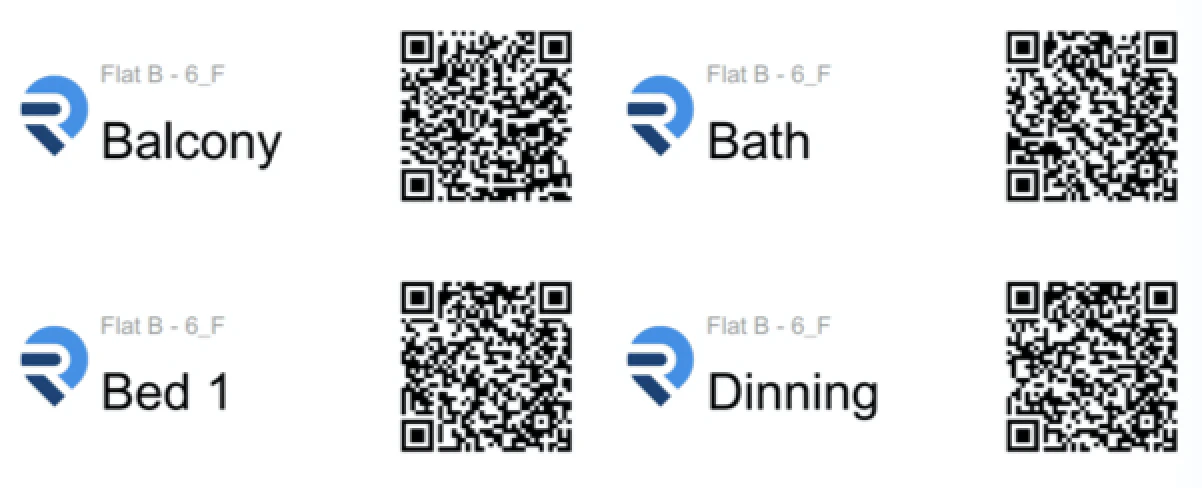
Example:

<img src="https://mintcdn.com/rdrive/HfD4shwK5DZwrXOQ/images/kb/103000035132/q4nPjEzWiHoTDeu5kS9x7cOVSia4Rqs4fg.png?fit=max&auto=format&n=HfD4shwK5DZwrXOQ&q=85&s=973c25fd877477e21509971e8ec06822" alt="How to generate QR codes for locations?" width="1202" height="488" data-path="images/kb/103000035132/q4nPjEzWiHoTDeu5kS9x7cOVSia4Rqs4fg.png" />