 ***
**TABLE OF CONTENTS**
* [Understanding the Relationship Between Process and Form](#understanding-the-relationship-between-process-and-form)
* [Common Actions](#common-actions)
* [Create](#create)
* [Read](#read)
* [Share](#share)
* [Unshare](#unshare)
* [Differences in Actions](#differences-in-actions)
* [Process-Specific Actions](#process-specific-actions)
* [Change Controller](#%e2%80%8bchange-controller)
* [Move](#%e2%80%8b%e2%80%8bmove)
* [Delete](#%e2%80%8b%e2%80%8bdelete)
* [Form-Specific Actions](#form-specific-actions)
* [Edit](#edit)
* [Change Status](#change-status)
* [Close](#close)
* [Reopen](#reopen)
* [Assign](#assign)
* [Assign](#assign-1)
***
## **Common Actions**
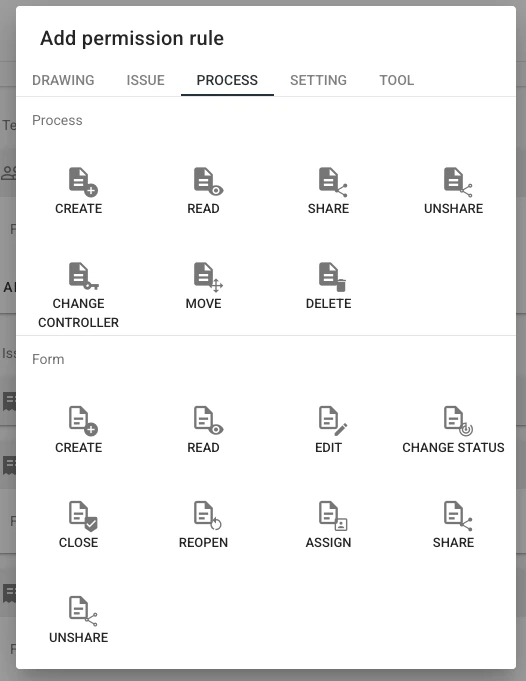
Both Process and Form permissions share the following common actions:
* **Create**
* **Read**
* **Share**
* **Unshare**
### Differences in Actions
| Action | Process Permission | Form Permission |
| ----------- | ------------------------------------------------------------------------------------------------------------------- | ------------------------------------------------------------------------------------------------------------------------------ |
| **Create** | Creating a Process automatically generates its associated Form(s). | Allows users to add additional Forms to an existing Process. By default, all Forms in the Process are available for selection. |
| **Read** | Grants permission to read the Process. | Grants permission to read the Form(s). |
| **Share** | Sharing a Process assigns **Read** permission for the entire Process. | Sharing a Form assigns **Read** permission only for that specific Form. |
| **Unshare** | Removing sharing revokes **Read** permission for the Process unless the user has explicit read permission assigned. | Removing sharing revokes **Read** permission for the Form unless the user has explicit read permission assigned. |
### Important Notes on Read Permission
* If a user has **Read Process** permission but lacks **Read Form** permission, they will not be able to view the Process. The process will only become visible if **at least one form is shared** with them, and the shared form will be displayed within the process.
* If a user has **Read Form** permission but lacks **Read Process** permission, they will also be unable to view any Process details. Only if a Form is shared with them **along with Read Process permission** will they gain access to the entire Process.
***
## **Process-Specific Actions**
The following actions apply **only to Processes**:
* **Change Controller**
* **Move**
* **Delete**
***
**TABLE OF CONTENTS**
* [Understanding the Relationship Between Process and Form](#understanding-the-relationship-between-process-and-form)
* [Common Actions](#common-actions)
* [Create](#create)
* [Read](#read)
* [Share](#share)
* [Unshare](#unshare)
* [Differences in Actions](#differences-in-actions)
* [Process-Specific Actions](#process-specific-actions)
* [Change Controller](#%e2%80%8bchange-controller)
* [Move](#%e2%80%8b%e2%80%8bmove)
* [Delete](#%e2%80%8b%e2%80%8bdelete)
* [Form-Specific Actions](#form-specific-actions)
* [Edit](#edit)
* [Change Status](#change-status)
* [Close](#close)
* [Reopen](#reopen)
* [Assign](#assign)
* [Assign](#assign-1)
***
## **Common Actions**
Both Process and Form permissions share the following common actions:
* **Create**
* **Read**
* **Share**
* **Unshare**
### Differences in Actions
| Action | Process Permission | Form Permission |
| ----------- | ------------------------------------------------------------------------------------------------------------------- | ------------------------------------------------------------------------------------------------------------------------------ |
| **Create** | Creating a Process automatically generates its associated Form(s). | Allows users to add additional Forms to an existing Process. By default, all Forms in the Process are available for selection. |
| **Read** | Grants permission to read the Process. | Grants permission to read the Form(s). |
| **Share** | Sharing a Process assigns **Read** permission for the entire Process. | Sharing a Form assigns **Read** permission only for that specific Form. |
| **Unshare** | Removing sharing revokes **Read** permission for the Process unless the user has explicit read permission assigned. | Removing sharing revokes **Read** permission for the Form unless the user has explicit read permission assigned. |
### Important Notes on Read Permission
* If a user has **Read Process** permission but lacks **Read Form** permission, they will not be able to view the Process. The process will only become visible if **at least one form is shared** with them, and the shared form will be displayed within the process.
* If a user has **Read Form** permission but lacks **Read Process** permission, they will also be unable to view any Process details. Only if a Form is shared with them **along with Read Process permission** will they gain access to the entire Process.
***
## **Process-Specific Actions**
The following actions apply **only to Processes**:
* **Change Controller**
* **Move**
* **Delete**
| Action | Description |
| Change Controller | Allows changing the Process controller. |
| Move | Enables moving the Process’s drawing/location and editing external references. |
| Delete | Deletes the entire Process. |
| Action | Description |
| Edit | Allows users to modify Form fields. |
| Change Status | Enables users to update the Form status. |
| Close | Changes the Form status to a terminal (closed) state. |
| Reopen | Moves the Form status from a terminal (closed) state back to an active state. |
Assign | Assigns the Form to a user or team for follow-up actions. Assignment also includes sharing the Form. |