> ## Documentation Index
> Fetch the complete documentation index at: https://docs.rdrive.io/llms.txt
> Use this file to discover all available pages before exploring further.
# Understanding Permission Policies and Rules
> A Permission Policy forms the cornerstone of defining user rights, working collaboratively with Team Profiles and Teams to establish access parameters.
A Permission Policy forms the cornerstone of defining user rights, working collaboratively with [Team Profiles and Teams](https://docs.rdrive.io/setup/project/permission-policies-and-team-profiles/what-is-team-profile-and-how-to-setup) to establish access parameters.
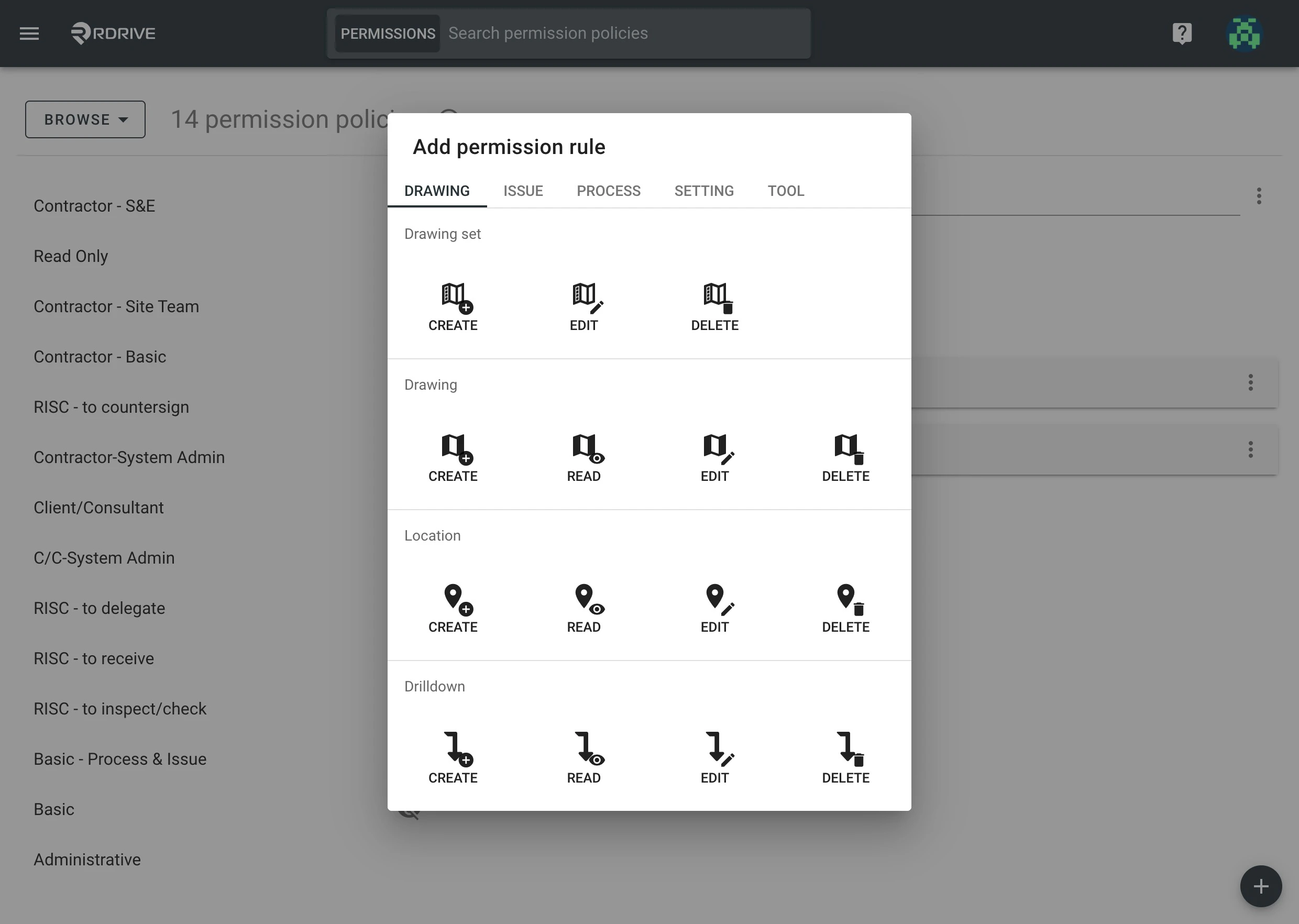
Customize Permission Policies to align with project requirements. Within each policy, multiple rules define specific actions within the system. For instance, adding the "Drawing" > "Create" rule enables users assigned to this policy to add new drawings to the project environment.
 Rules within a Permission Policy also include conditions and options:
* **Conditions:** Determine when a specific action is permissible.\
**Options:** Specify the details of allowed actions on specific objects.
* * [Implementing Rules with Conditions: OR and AND](#implementing-rules-with-conditions%3a-or-and-and)
* [Adding OR Conditions](#adding-or-conditions)[](#adding-and-conditions)
* [Adding AND Conditions](#adding-and-conditions)
Rules within a Permission Policy also include conditions and options:
* **Conditions:** Determine when a specific action is permissible.\
**Options:** Specify the details of allowed actions on specific objects.
* * [Implementing Rules with Conditions: OR and AND](#implementing-rules-with-conditions%3a-or-and-and)
* [Adding OR Conditions](#adding-or-conditions)[](#adding-and-conditions)
* [Adding AND Conditions](#adding-and-conditions)
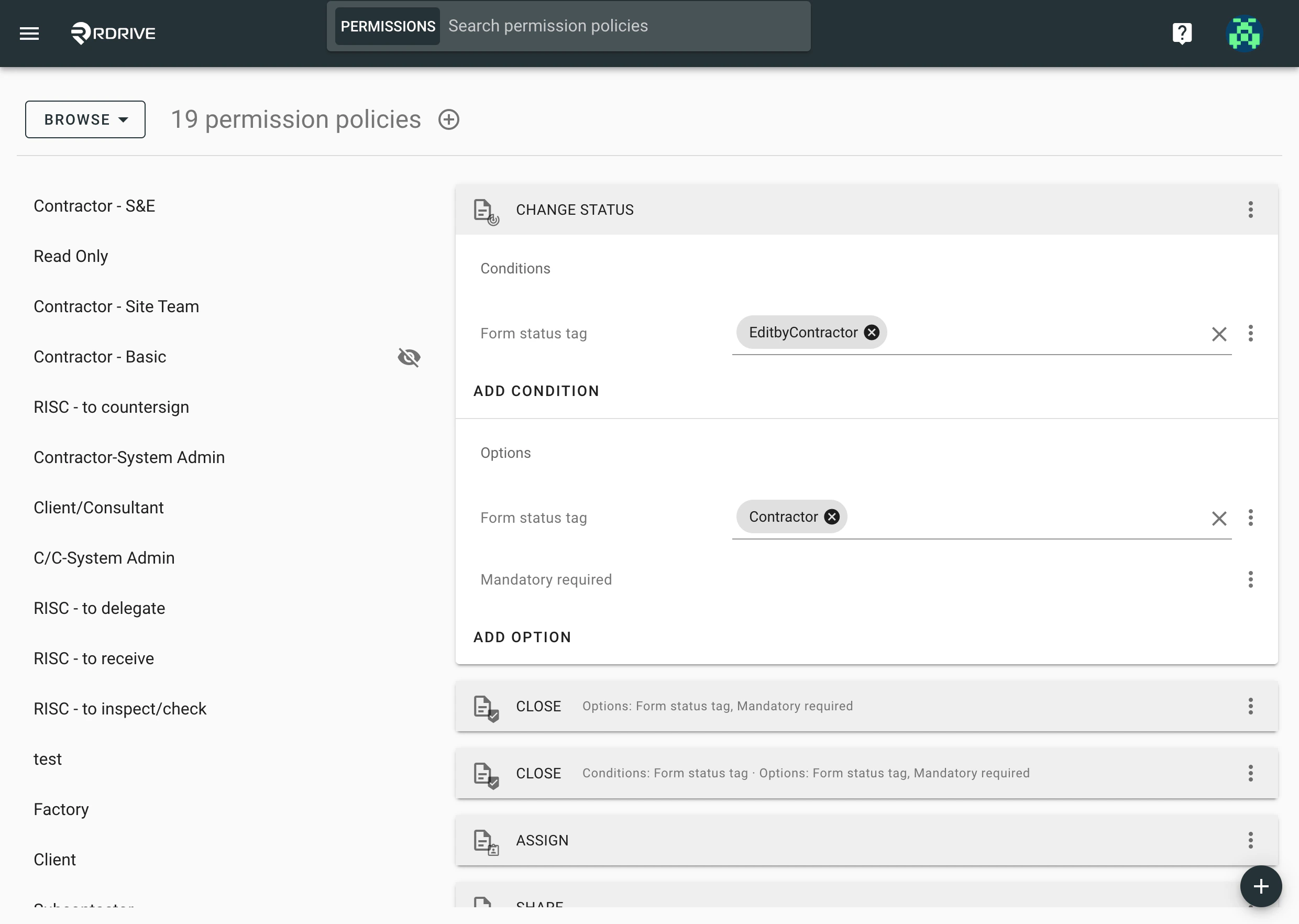 Note that this is a high-level function and it's optional to include conditions and/or options.
***
## Implementing Rules with Conditions: OR and AND
## **Adding OR Conditions**
Combine rules with the same attribute but different conditions using the **OR** logic, like:
**Read**; **Edit**; **Change Status** w/ condition & option (A); **Change Status** w/ condition & option (B)
This grants permission for both situations. Users can Read, Edit, and Change Status :
* A: When the status tag is **Draft**, it is allowed to update to Any status only if **Mandatory** fields are filled;
*
* **OR**
*
* B: From Any status when it is **Assigned to my team**, allowed to change status to Any if **Mandatory** fields are filled.
Note that this is a high-level function and it's optional to include conditions and/or options.
***
## Implementing Rules with Conditions: OR and AND
## **Adding OR Conditions**
Combine rules with the same attribute but different conditions using the **OR** logic, like:
**Read**; **Edit**; **Change Status** w/ condition & option (A); **Change Status** w/ condition & option (B)
This grants permission for both situations. Users can Read, Edit, and Change Status :
* A: When the status tag is **Draft**, it is allowed to update to Any status only if **Mandatory** fields are filled;
*
* **OR**
*
* B: From Any status when it is **Assigned to my team**, allowed to change status to Any if **Mandatory** fields are filled.
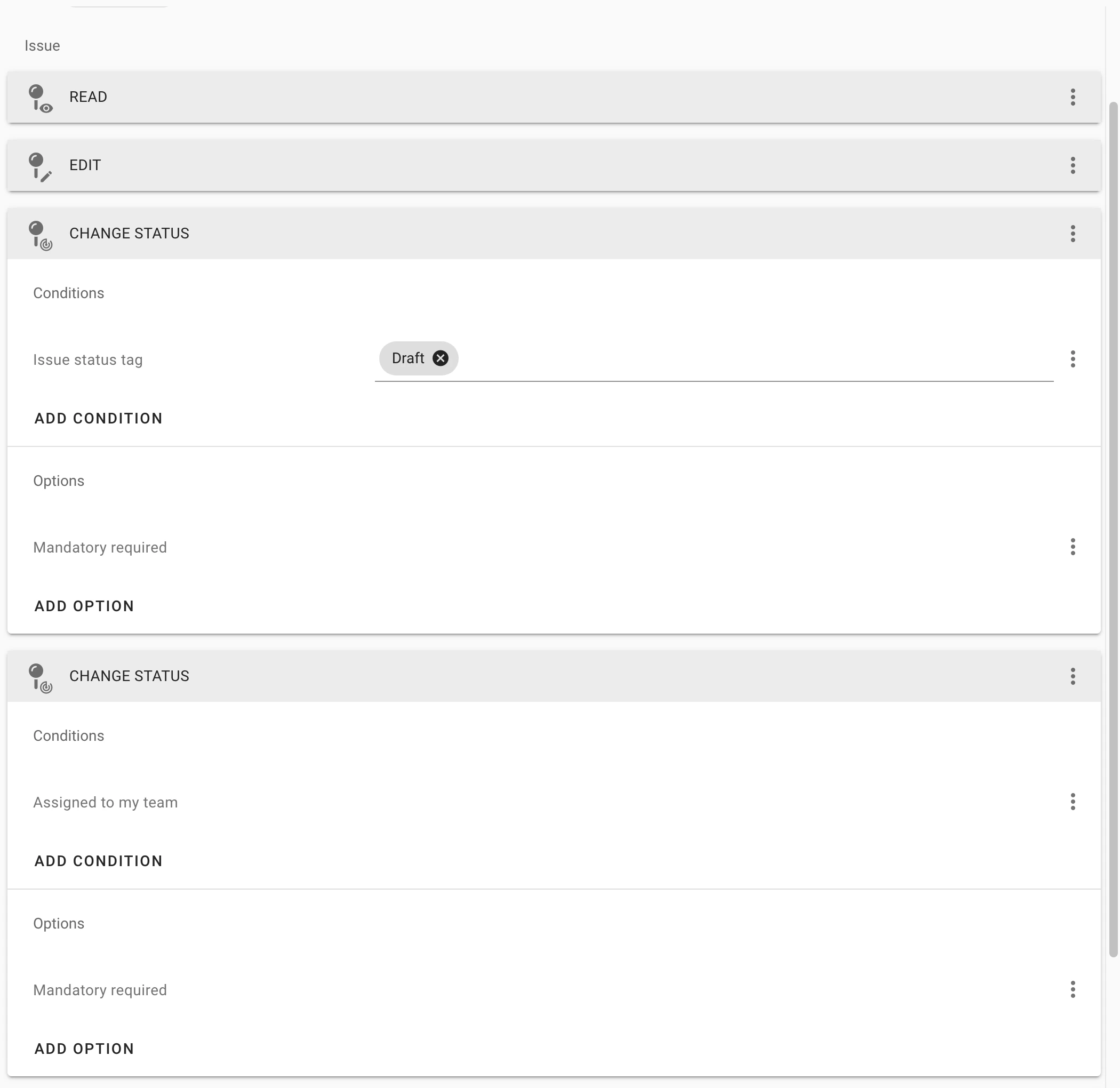 `OR` = Permission is granted in both situations
***
# **Adding AND Conditions**
A rule with different conditions applies permission using the AND logic, such as:
**Read**; **Edit**; **Change Status** w/ condition + condition & option
This grants limited permission. Users can Read, Edit, and Change Status only if:
The status tag is **Draft** **AND** it is also **Assigned to my team**, it will be allowed to change status to Any if **Mandatory** fields are filled
`OR` = Permission is granted in both situations
***
# **Adding AND Conditions**
A rule with different conditions applies permission using the AND logic, such as:
**Read**; **Edit**; **Change Status** w/ condition + condition & option
This grants limited permission. Users can Read, Edit, and Change Status only if:
The status tag is **Draft** **AND** it is also **Assigned to my team**, it will be allowed to change status to Any if **Mandatory** fields are filled
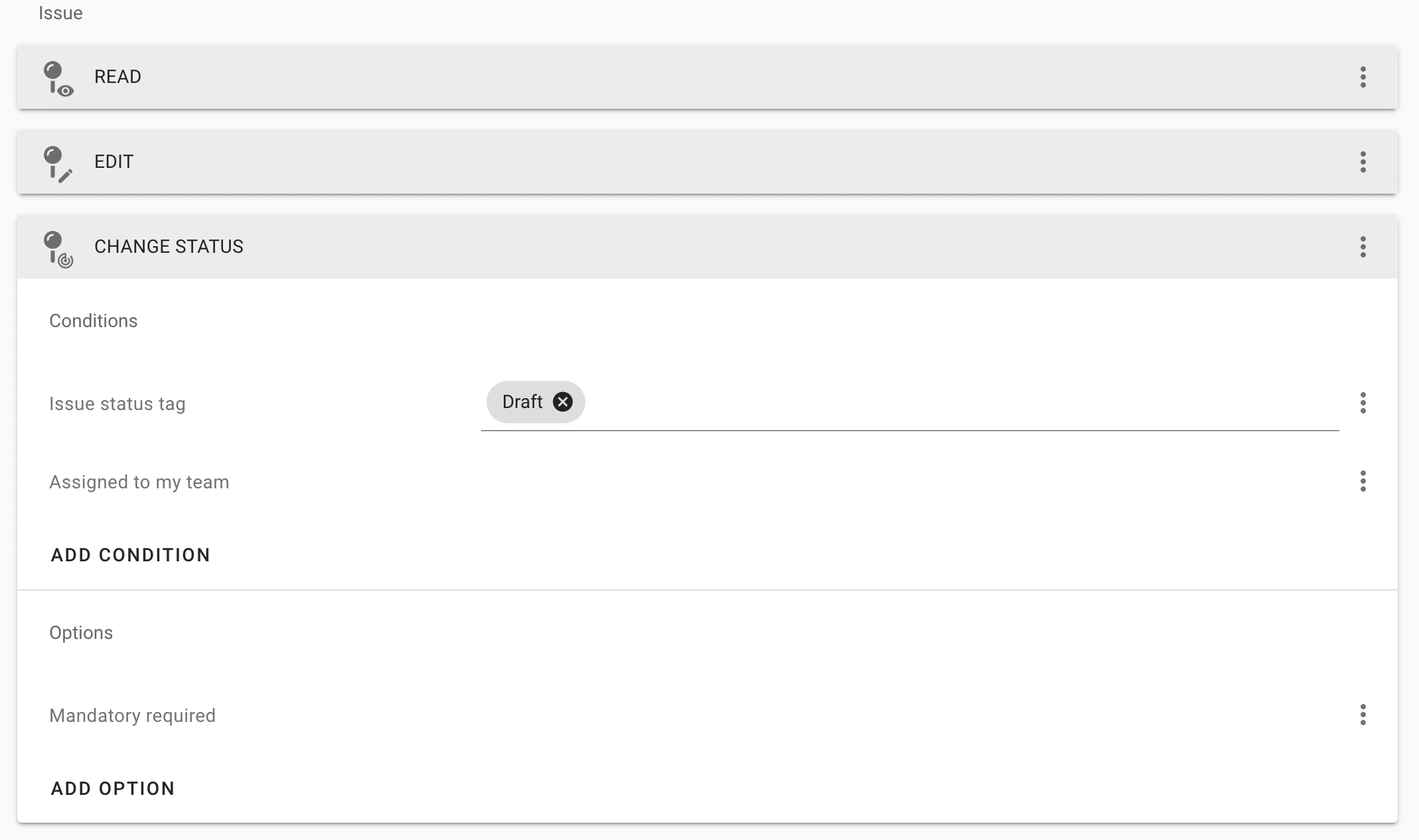 With an `AND`, compliance with all conditions and options is required
If you're unsure how to start setting up Permission Policies, find ideas and tips [**here**](https://docs.rdrive.io/setup/project/permission-policies-and-team-profiles/what-is-edit-usage-in-permission-policies).
For a detailed guide on designing organized Permission Policies, click [**here**](https://docs.rdrive.io/setup/project/permission-policies-and-team-profiles/manage-the-permission-policy).\
**[](https://docs.rdrive.io/setup/project/permission-policies-and-team-profiles/difference-between-process-and-form-permissions)**
Check the difference Between Process and Form Permissions, click **[here](https://docs.rdrive.io/setup/project/permission-policies-and-team-profiles/difference-between-process-and-form-permissions).**
With an `AND`, compliance with all conditions and options is required
If you're unsure how to start setting up Permission Policies, find ideas and tips [**here**](https://docs.rdrive.io/setup/project/permission-policies-and-team-profiles/what-is-edit-usage-in-permission-policies).
For a detailed guide on designing organized Permission Policies, click [**here**](https://docs.rdrive.io/setup/project/permission-policies-and-team-profiles/manage-the-permission-policy).\
**[](https://docs.rdrive.io/setup/project/permission-policies-and-team-profiles/difference-between-process-and-form-permissions)**
Check the difference Between Process and Form Permissions, click **[here](https://docs.rdrive.io/setup/project/permission-policies-and-team-profiles/difference-between-process-and-form-permissions).**