> ## Documentation Index
> Fetch the complete documentation index at: https://docs.rdrive.io/llms.txt
> Use this file to discover all available pages before exploring further.

# How to edit the items of a preset list?

> From time to time, there may be some updates on list items of a preset list.Editing the list items on project levelProject admin/users with edit Preset permissi

From time to time, there may be some updates on list items of a preset list.

**Editing the list items on project level**\
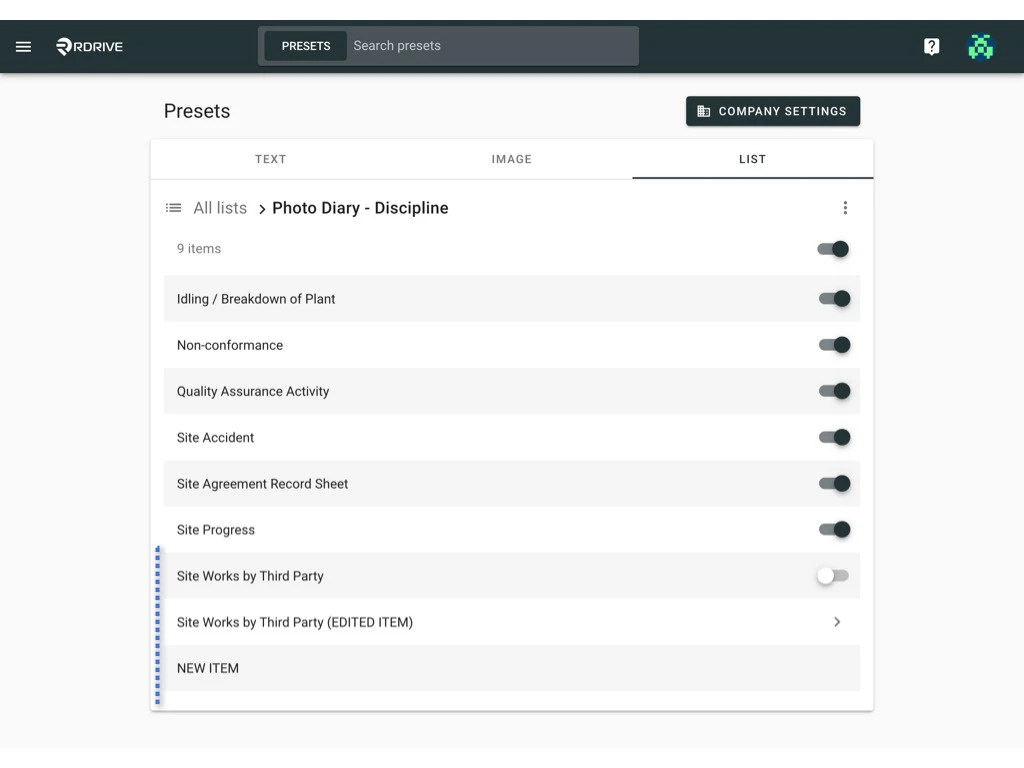
Project admin/users with edit Preset permission can [make changes on top of the preset list](#make-changes-on-top-of-the-preset-list) that are set on the company level or [reset values to default](#reset-to-the-default-value) to fit the project needs specifically.

***

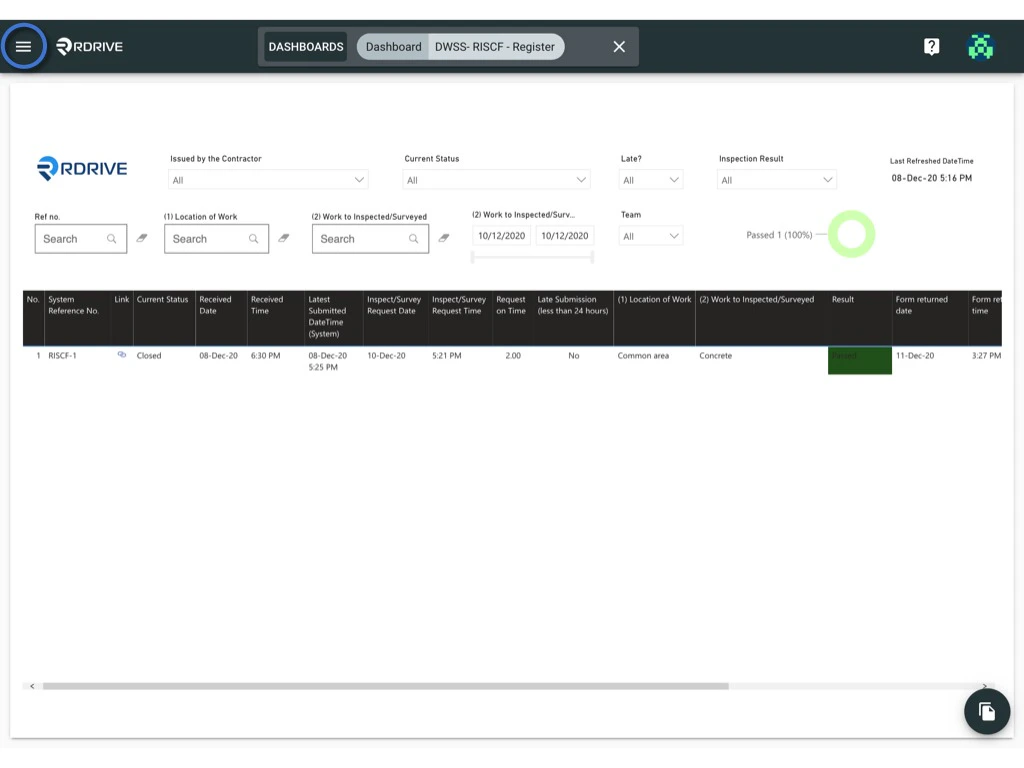
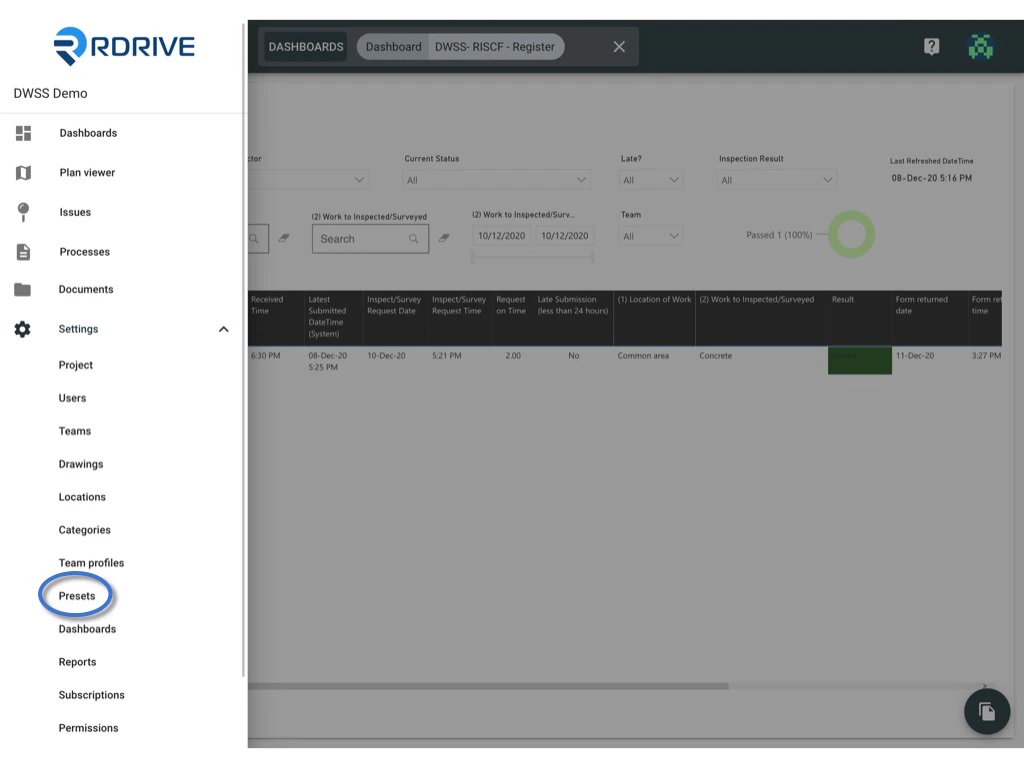
Click the **≡** menu icon on the top left corner to unfold the Menu, get entry to the **Setting** > **Presets** page.
<img src="https://mintcdn.com/rdrive/qQgQF7rykBpqQcBv/images/kb/103000035156/kvxi-tPNxVta4hoxiR80PrUEujsDwjbDBQ.jpeg?fit=max&auto=format&n=qQgQF7rykBpqQcBv&q=85&s=cac517615c759283611955bc0ef399c8" alt="How to edit the items of a preset list?" width="1024" height="768" data-path="images/kb/103000035156/kvxi-tPNxVta4hoxiR80PrUEujsDwjbDBQ.jpeg" />

<img src="https://mintcdn.com/rdrive/qQgQF7rykBpqQcBv/images/kb/103000035156/QpUMW8rgDO23s1yK3bn8RpnqbnK1C-mhQg.jpeg?fit=max&auto=format&n=qQgQF7rykBpqQcBv&q=85&s=7f608750266d90eb7b5c372311b9e885" alt="How to edit the items of a preset list?" width="1024" height="768" data-path="images/kb/103000035156/QpUMW8rgDO23s1yK3bn8RpnqbnK1C-mhQg.jpeg" />

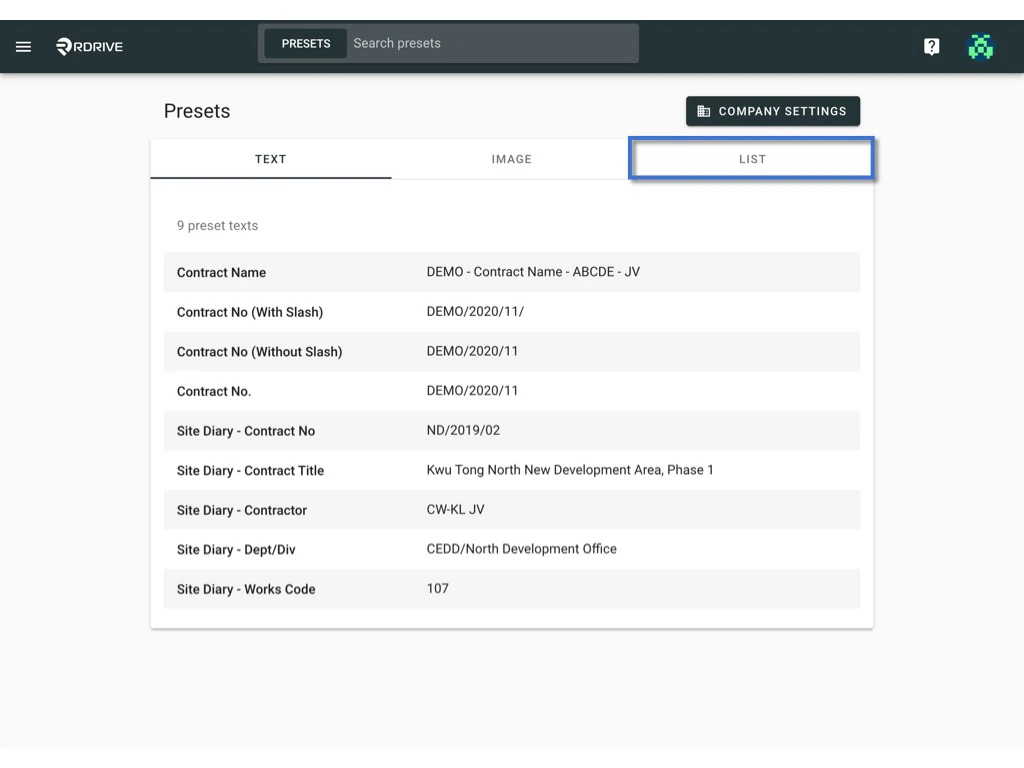
All items are shown under the **LIST** category.
<img src="https://mintcdn.com/rdrive/qQgQF7rykBpqQcBv/images/kb/103000035156/ladxAv4I1E48vO-bgfQ2IsVxJxAART4AcQ.jpeg?fit=max&auto=format&n=qQgQF7rykBpqQcBv&q=85&s=f309b6795be0b49ba8d0620de6cf1b5f" alt="How to edit the items of a preset list?" width="1024" height="768" data-path="images/kb/103000035156/ladxAv4I1E48vO-bgfQ2IsVxJxAART4AcQ.jpeg" />

***

## Make changes on top of the preset list

To make the change, you may\
[1️⃣ edit on the website directly](#1%ef%b8%8f%e2%83%a3-to-edit-on-the-website-directly.); or\
[2️⃣ edit by reuploading the template (single](#2%ef%b8%8f%e2%83%a3%ef%b9%921%ef%b8%8f%e2%83%a3-to-edit-by-reuploading-the-template.-\(single\)) / [multiple](#2%ef%b8%8f%e2%83%a3%ef%b9%922%ef%b8%8f%e2%83%a3-to-edit-by-reuploading-the-template.-\(multiple\))).

***

## 1️⃣ To edit on the website directly.

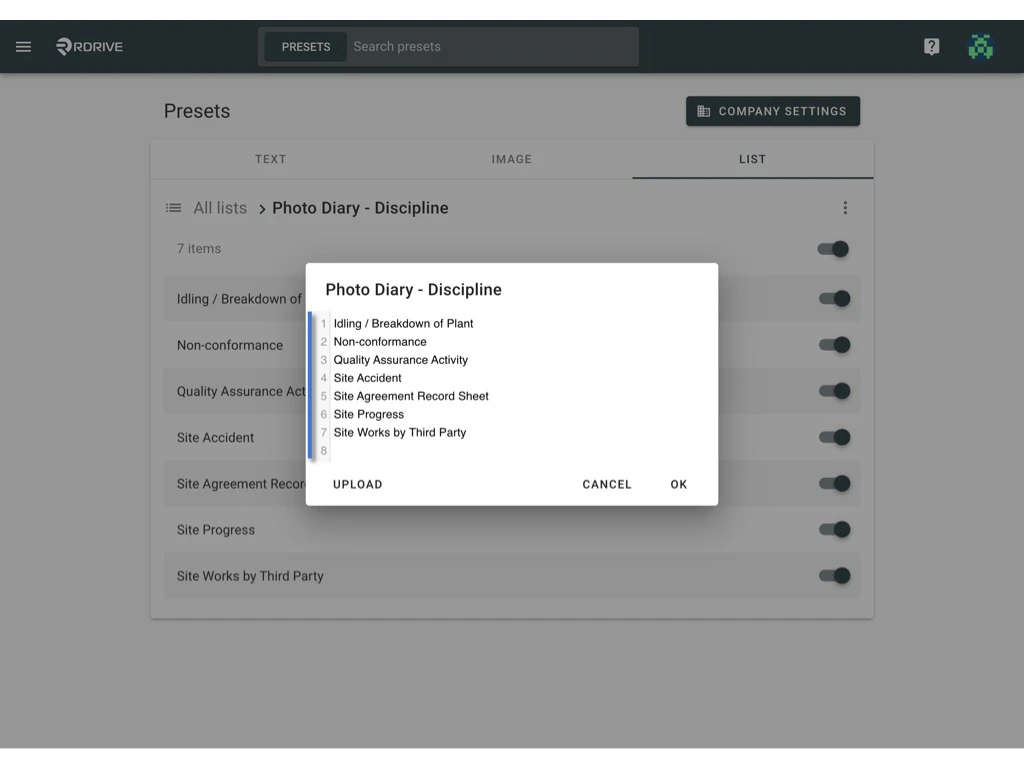
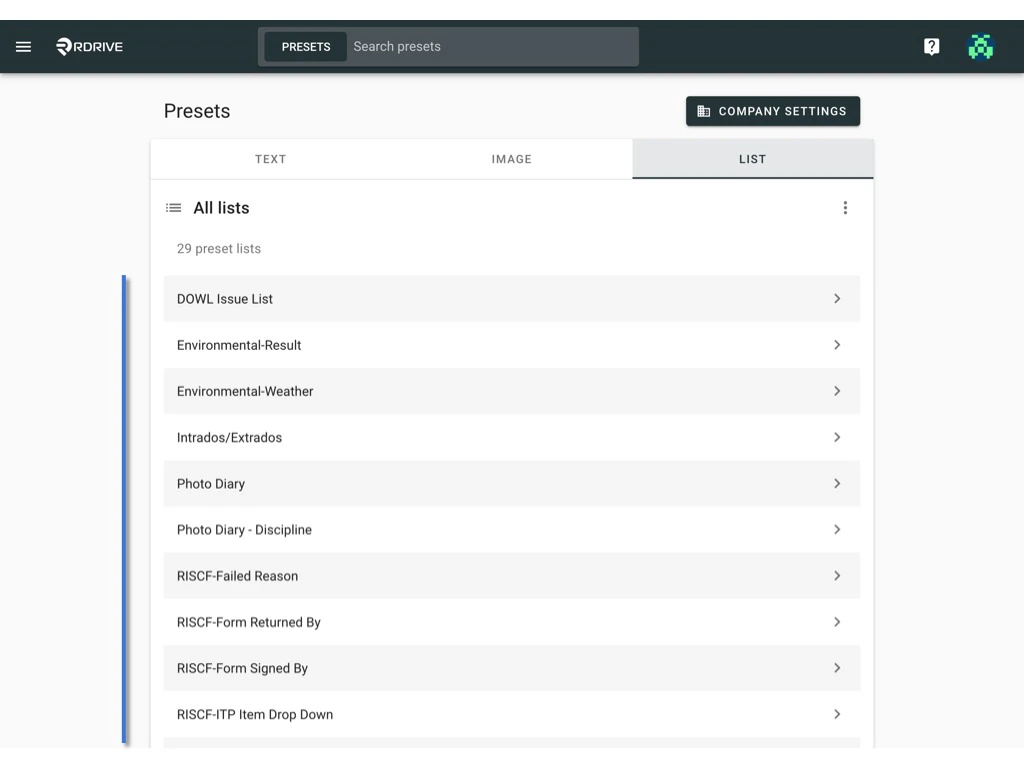
Select the list that you would like to edit.
<img src="https://mintcdn.com/rdrive/qQgQF7rykBpqQcBv/images/kb/103000035156/3jhom2pjcWa0a86RpmyeeRzi-tC4BISK1g.jpeg?fit=max&auto=format&n=qQgQF7rykBpqQcBv&q=85&s=ee1edc77d74dd8f5a7c98f65798537a0" alt="How to edit the items of a preset list?" width="1024" height="768" data-path="images/kb/103000035156/3jhom2pjcWa0a86RpmyeeRzi-tC4BISK1g.jpeg" />

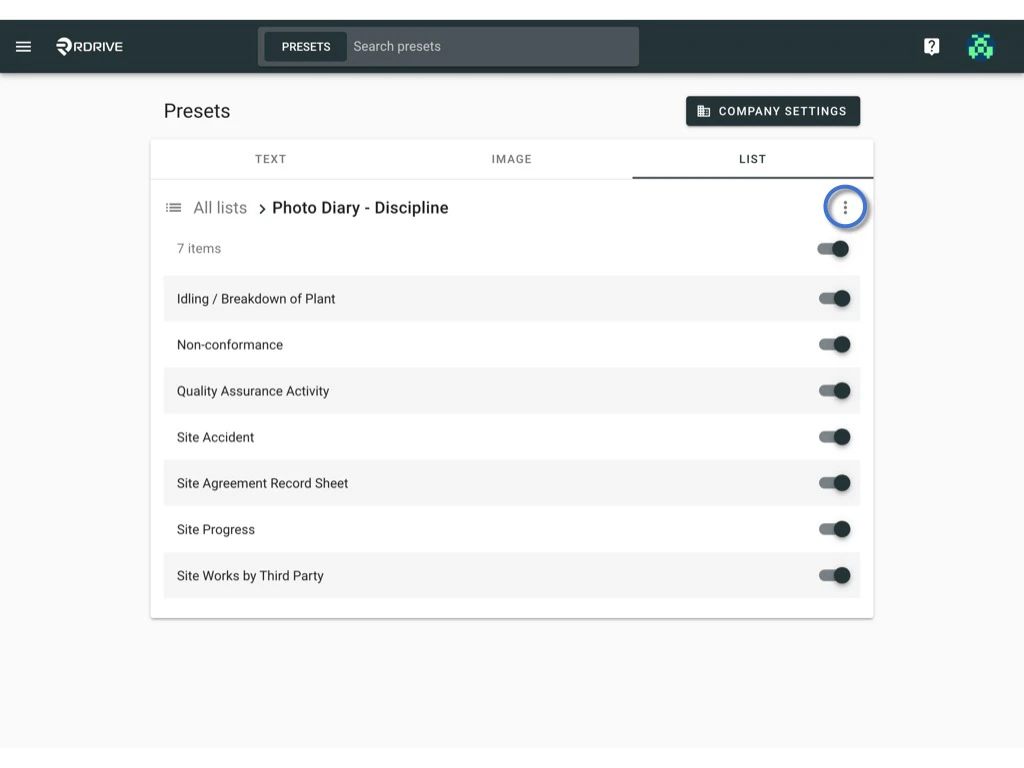
Click the ⋮ button on the right-hand side of the list title > **Edit**
<img src="https://mintcdn.com/rdrive/qQgQF7rykBpqQcBv/images/kb/103000035156/tZXsb55st5ZF4HO-yJGDgwVFqf_Qo7WK1w.jpeg?fit=max&auto=format&n=qQgQF7rykBpqQcBv&q=85&s=a92dbea70008ba8669fb925cbb927b62" alt="How to edit the items of a preset list?" width="1024" height="768" data-path="images/kb/103000035156/tZXsb55st5ZF4HO-yJGDgwVFqf_Qo7WK1w.jpeg" />

<img src="https://mintcdn.com/rdrive/qQgQF7rykBpqQcBv/images/kb/103000035156/kHiy0a14QJRH3gVfbntwG_uMVWDgG_LqZA.jpeg?fit=max&auto=format&n=qQgQF7rykBpqQcBv&q=85&s=dde0baa67153f96a01984bf67ece7a1b" alt="How to edit the items of a preset list?" width="1024" height="768" data-path="images/kb/103000035156/kHiy0a14QJRH3gVfbntwG_uMVWDgG_LqZA.jpeg" />

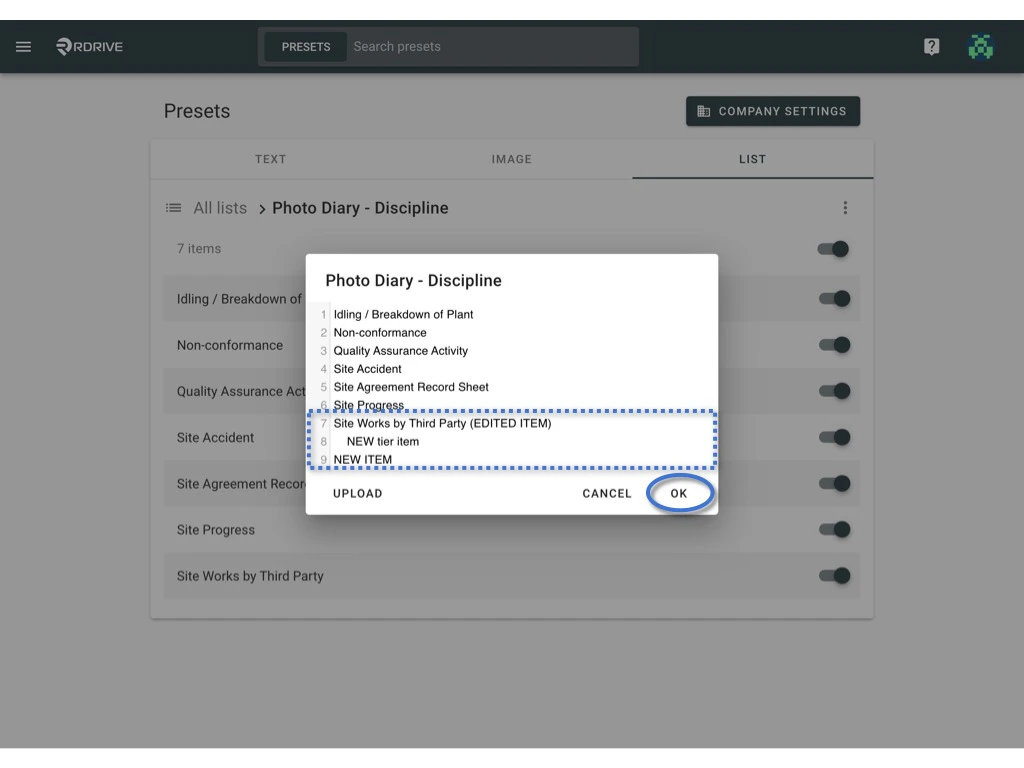
Add a new item / new tier or edit the existing list value, click "**OK**" to save

<img src="https://mintcdn.com/rdrive/qQgQF7rykBpqQcBv/images/kb/103000035156/82LFvyWr83FTFQ4jHD6rJTFE83X73G5b2g.jpeg?fit=max&auto=format&n=qQgQF7rykBpqQcBv&q=85&s=41ca10676a17ab3beeecdd3f760ae1bb" alt="How to edit the items of a preset list?" width="1024" height="768" data-path="images/kb/103000035156/82LFvyWr83FTFQ4jHD6rJTFE83X73G5b2g.jpeg" />

<img src="https://mintcdn.com/rdrive/qQgQF7rykBpqQcBv/images/kb/103000035156/uN6G54LkrvjM_S6ejnp2X9mxy0vA-o6nWg.jpeg?fit=max&auto=format&n=qQgQF7rykBpqQcBv&q=85&s=6760679d666d9dca5e02fd4ee2c270c4" alt="How to edit the items of a preset list?" width="1024" height="768" data-path="images/kb/103000035156/uN6G54LkrvjM_S6ejnp2X9mxy0vA-o6nWg.jpeg" />

*⭐️ Tips:* \
*New Line with same align = Item of that tier;* \
*New Line with Tab ↹ = Item of next tier.*

***

## 2️⃣﹒1️⃣ To edit by reuploading the template. (single)

[`Download`](#%e2%ac%87-download) `to edit, [Upload](#%e2%ac%86-upload)`.

Select the list that you would like to edit.

<img src="https://mintcdn.com/rdrive/qQgQF7rykBpqQcBv/images/kb/103000035156/3jhom2pjcWa0a86RpmyeeRzi-tC4BISK1g.jpeg?fit=max&auto=format&n=qQgQF7rykBpqQcBv&q=85&s=ee1edc77d74dd8f5a7c98f65798537a0" alt="How to edit the items of a preset list?" width="1024" height="768" data-path="images/kb/103000035156/3jhom2pjcWa0a86RpmyeeRzi-tC4BISK1g.jpeg" />

## **⬇ Download**

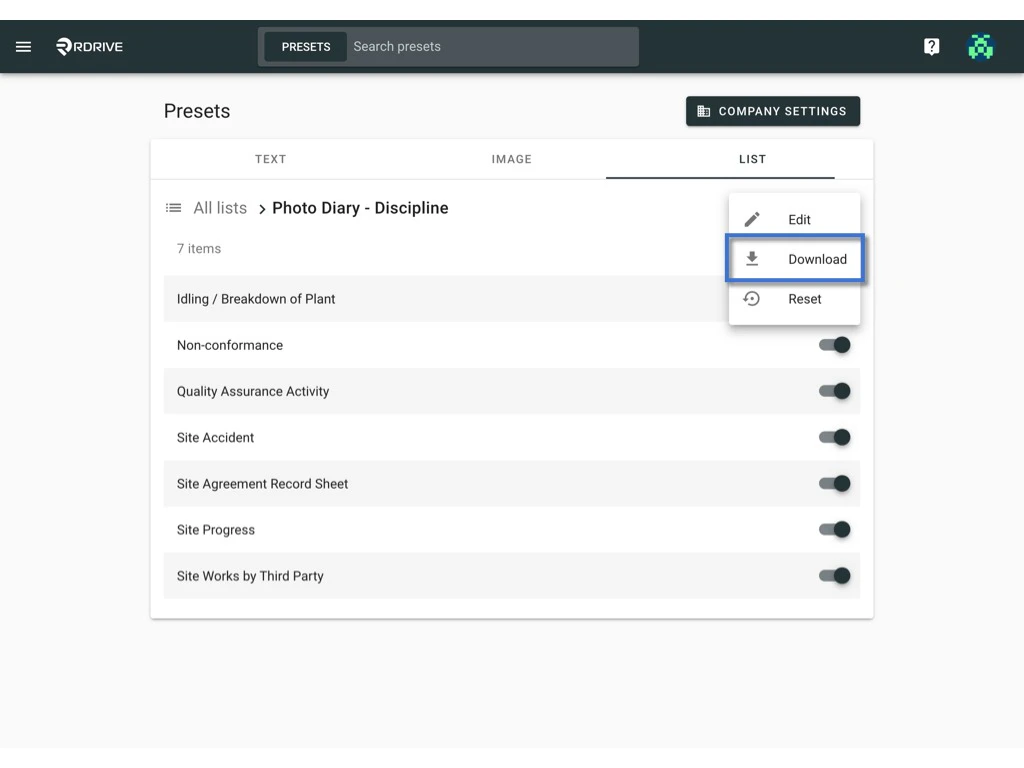
Click the ⋮ button on the right-hand side of the list title > **Download**\
to download the list in Excel format.

<img src="https://mintcdn.com/rdrive/qQgQF7rykBpqQcBv/images/kb/103000035156/tZXsb55st5ZF4HO-yJGDgwVFqf_Qo7WK1w.jpeg?fit=max&auto=format&n=qQgQF7rykBpqQcBv&q=85&s=a92dbea70008ba8669fb925cbb927b62" alt="How to edit the items of a preset list?" width="1024" height="768" data-path="images/kb/103000035156/tZXsb55st5ZF4HO-yJGDgwVFqf_Qo7WK1w.jpeg" />

<img src="https://mintcdn.com/rdrive/qQgQF7rykBpqQcBv/images/kb/103000035156/dvRBTAVRK82BCpaACcT_VjxXeaw4mRRveQ.jpeg?fit=max&auto=format&n=qQgQF7rykBpqQcBv&q=85&s=f6ad92ce9a8e0595f8e69244c801a4d4" alt="How to edit the items of a preset list?" width="1024" height="768" data-path="images/kb/103000035156/dvRBTAVRK82BCpaACcT_VjxXeaw4mRRveQ.jpeg" />

Column A is the name of the custom list.\
Columns B,C,D,E and etc. are the list items in the custom list.

Edit/update the excel, **save** it to upload.

## **⬆ Upload**

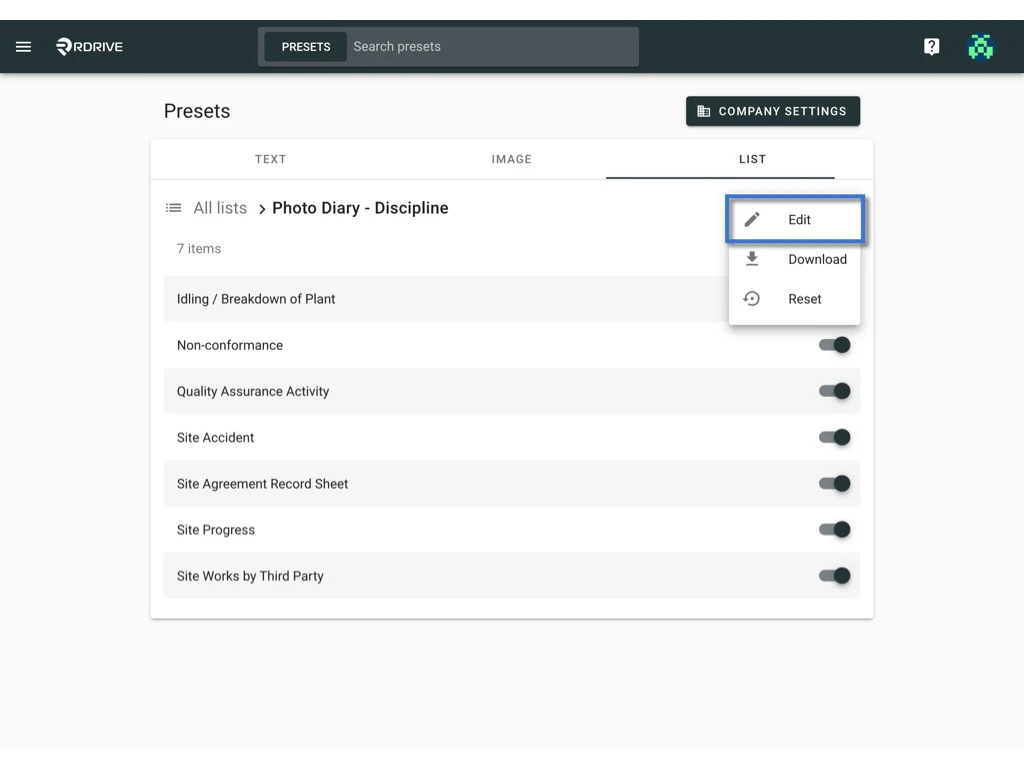
Click the ⋮ button on the right-hand side of the list title > **Edit**
<img src="https://mintcdn.com/rdrive/qQgQF7rykBpqQcBv/images/kb/103000035156/tZXsb55st5ZF4HO-yJGDgwVFqf_Qo7WK1w.jpeg?fit=max&auto=format&n=qQgQF7rykBpqQcBv&q=85&s=a92dbea70008ba8669fb925cbb927b62" alt="How to edit the items of a preset list?" width="1024" height="768" data-path="images/kb/103000035156/tZXsb55st5ZF4HO-yJGDgwVFqf_Qo7WK1w.jpeg" />

<img src="https://mintcdn.com/rdrive/qQgQF7rykBpqQcBv/images/kb/103000035156/kHiy0a14QJRH3gVfbntwG_uMVWDgG_LqZA.jpeg?fit=max&auto=format&n=qQgQF7rykBpqQcBv&q=85&s=dde0baa67153f96a01984bf67ece7a1b" alt="How to edit the items of a preset list?" width="1024" height="768" data-path="images/kb/103000035156/kHiy0a14QJRH3gVfbntwG_uMVWDgG_LqZA.jpeg" />

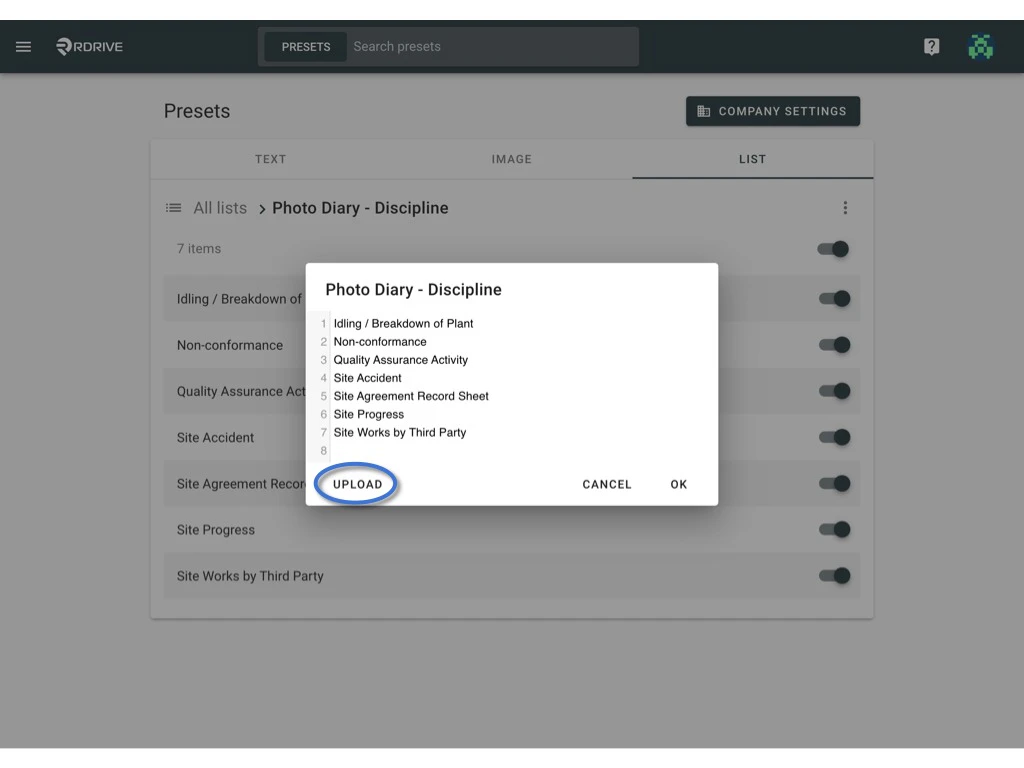
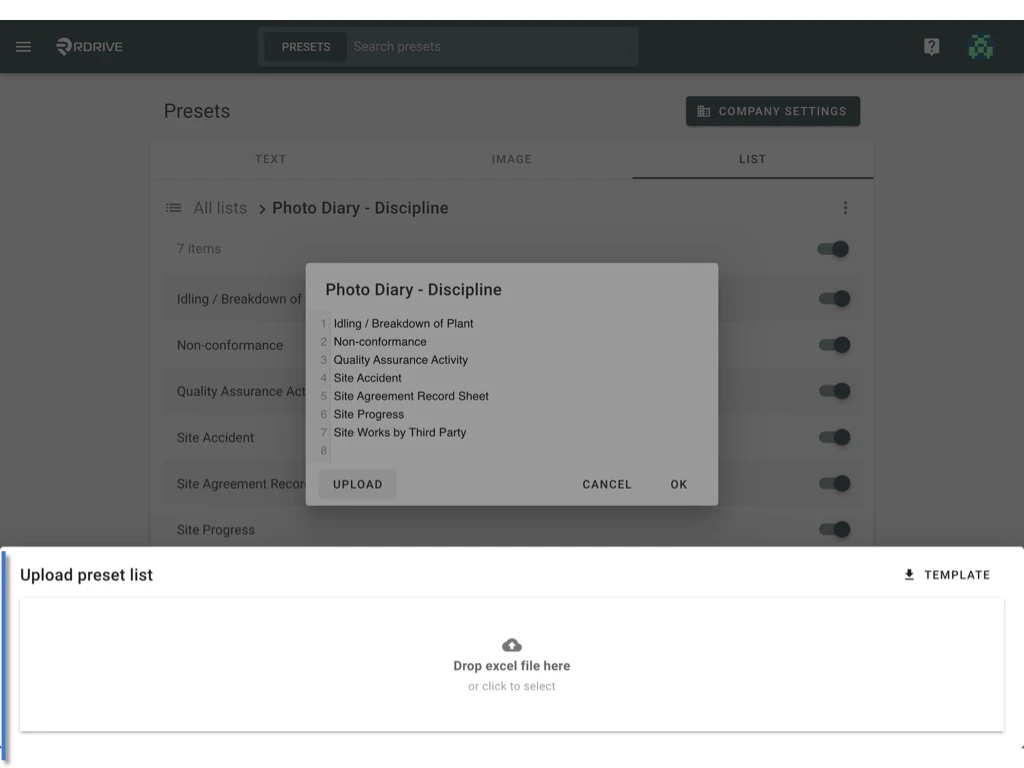
Click **UPLOAD** button

<img src="https://mintcdn.com/rdrive/qQgQF7rykBpqQcBv/images/kb/103000035156/Gw3DL6014mFMY9RGhfrdFVItrXUHNPexzg.jpeg?fit=max&auto=format&n=qQgQF7rykBpqQcBv&q=85&s=016c7968f9f3467606dc365f16425bba" alt="How to edit the items of a preset list?" width="1024" height="768" data-path="images/kb/103000035156/Gw3DL6014mFMY9RGhfrdFVItrXUHNPexzg.jpeg" />

Drop or select the save excel template to upload the file to the system.
<img src="https://mintcdn.com/rdrive/qQgQF7rykBpqQcBv/images/kb/103000035156/7RMf2l-rMNFc0J7ho3csrlqVM7cZOOVOUQ.jpeg?fit=max&auto=format&n=qQgQF7rykBpqQcBv&q=85&s=e5c34ed878196946218e797a1824dab9" alt="How to edit the items of a preset list?" width="1024" height="768" data-path="images/kb/103000035156/7RMf2l-rMNFc0J7ho3csrlqVM7cZOOVOUQ.jpeg" />

List updated.

<img src="https://mintcdn.com/rdrive/qQgQF7rykBpqQcBv/images/kb/103000035156/LbvFqsyN_-5rw_tKnQpcbtEwGPBWYk6sjg.jpeg?fit=max&auto=format&n=qQgQF7rykBpqQcBv&q=85&s=efd5878e24328a09c6b025e25b195da2" alt="How to edit the items of a preset list?" width="1024" height="768" data-path="images/kb/103000035156/LbvFqsyN_-5rw_tKnQpcbtEwGPBWYk6sjg.jpeg" />

***

## 2️⃣﹒2️⃣ To edit by reuploading the template. (multiple)

[`Download`](#%e2%ac%87-download-1) `to edit, [Upload](#%e2%ac%86-upload-2)`.

***

## **⬇ Download**

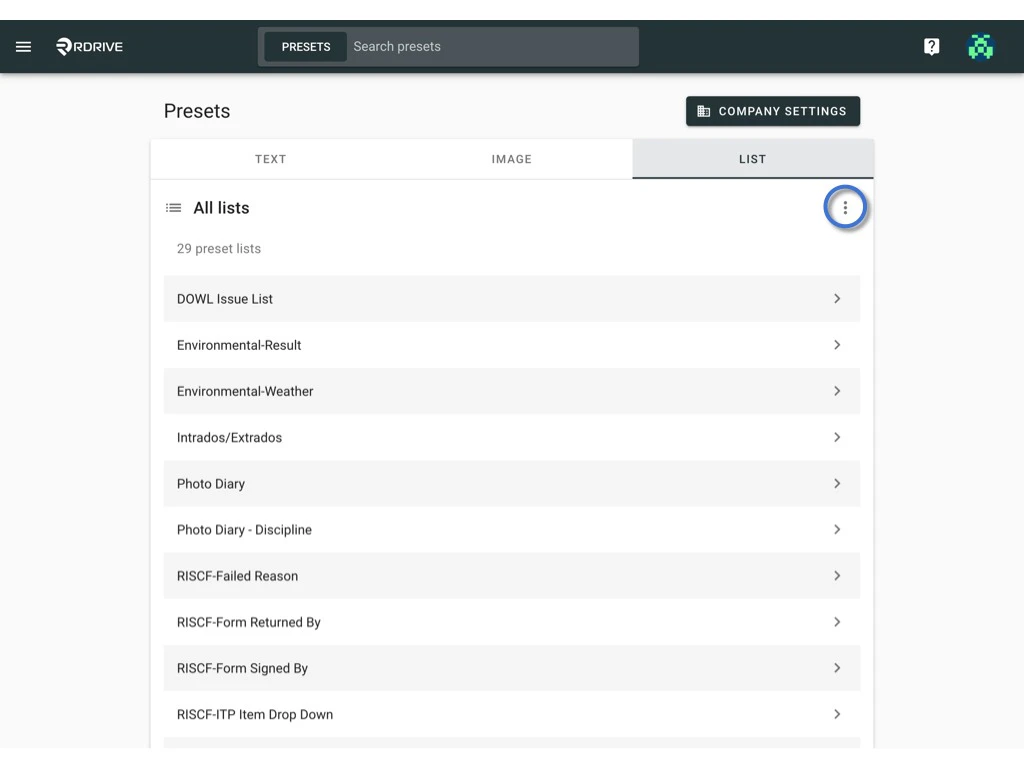
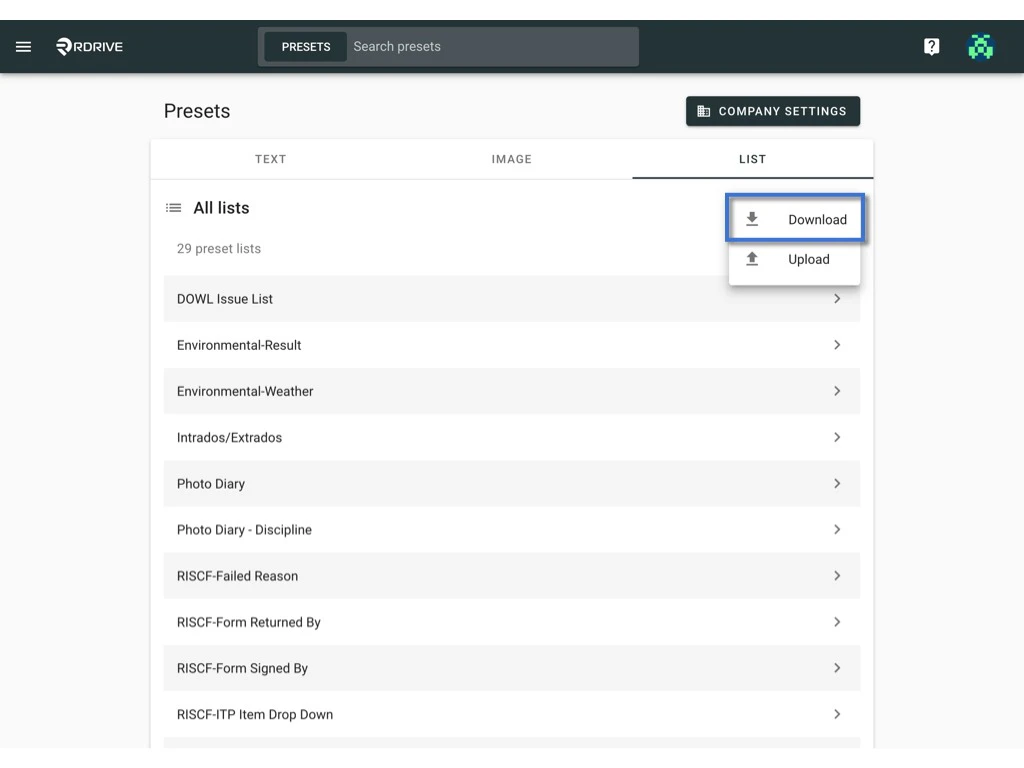
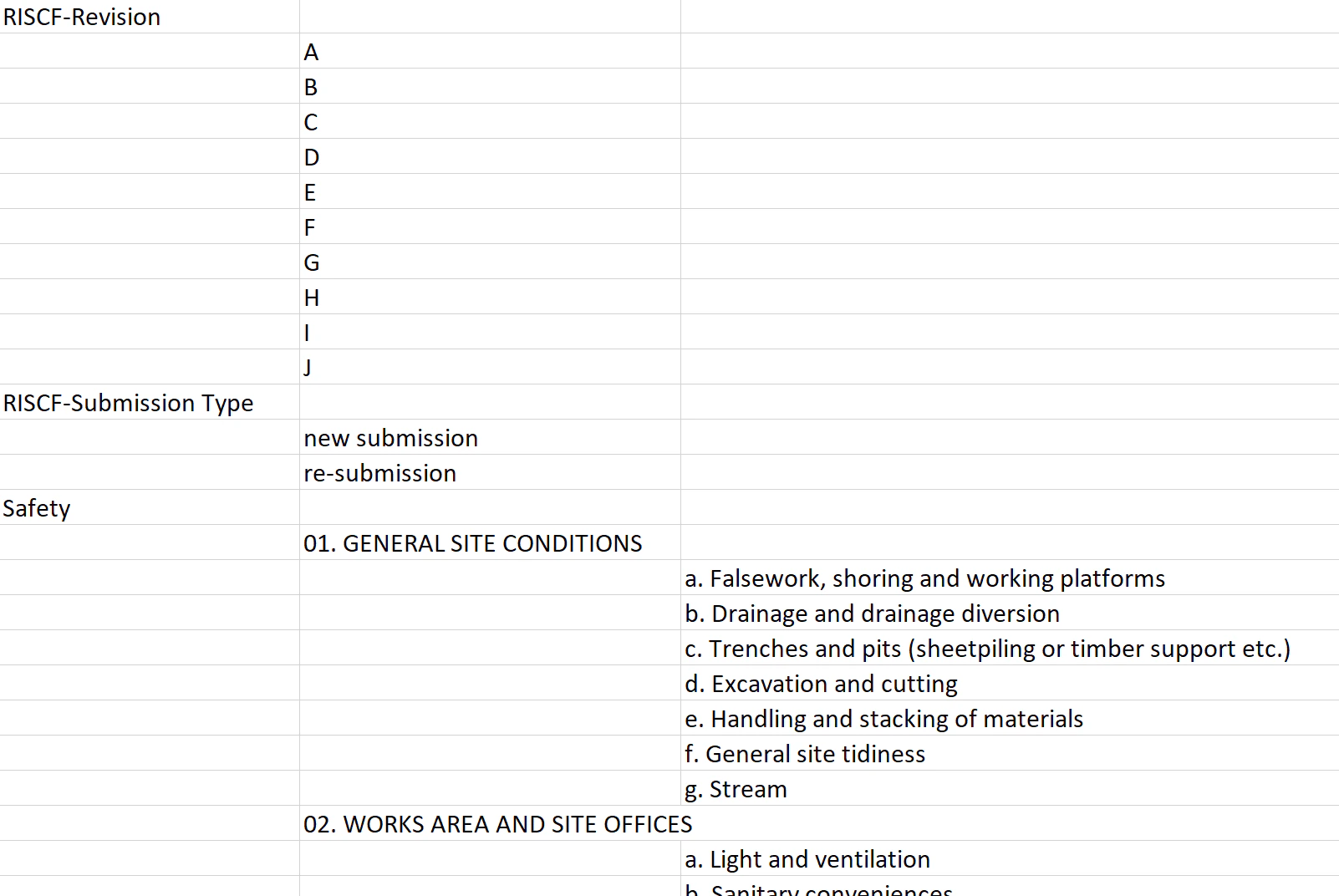
Click the ⋮ button on the right-hand side of All lists > **Download**\
to download all lists in Excel format.
<img src="https://mintcdn.com/rdrive/qQgQF7rykBpqQcBv/images/kb/103000035156/meVxlCEGkT9SzYVRSFzf0YLs2shb4nQmxg.jpeg?fit=max&auto=format&n=qQgQF7rykBpqQcBv&q=85&s=e037f8f1568d569441d755348c67a425" alt="How to edit the items of a preset list?" width="1024" height="768" data-path="images/kb/103000035156/meVxlCEGkT9SzYVRSFzf0YLs2shb4nQmxg.jpeg" />

<img src="https://mintcdn.com/rdrive/qQgQF7rykBpqQcBv/images/kb/103000035156/VRW5g-19UX2T2k3P4Jwn-nTRuxrK0176rA.jpeg?fit=max&auto=format&n=qQgQF7rykBpqQcBv&q=85&s=3221d309d39576b54a1f2065ee3d6d62" alt="How to edit the items of a preset list?" width="1024" height="768" data-path="images/kb/103000035156/VRW5g-19UX2T2k3P4Jwn-nTRuxrK0176rA.jpeg" />

Column A is the name of the custom list.\
Columns B,C,D,E and etc. are the list items in the custom list.
<img src="https://mintcdn.com/rdrive/qQgQF7rykBpqQcBv/images/kb/103000035156/JNVg69Y_gtlWgrFMETW65ANvb0GGWxwXuQ.png?fit=max&auto=format&n=qQgQF7rykBpqQcBv&q=85&s=5e0833df1539fde0fcef5b41b99d43cb" alt="How to edit the items of a preset list?" width="1602" height="1072" data-path="images/kb/103000035156/JNVg69Y_gtlWgrFMETW65ANvb0GGWxwXuQ.png" />

Edit/update the excel, **save** it to upload.

## **⬆ Upload**

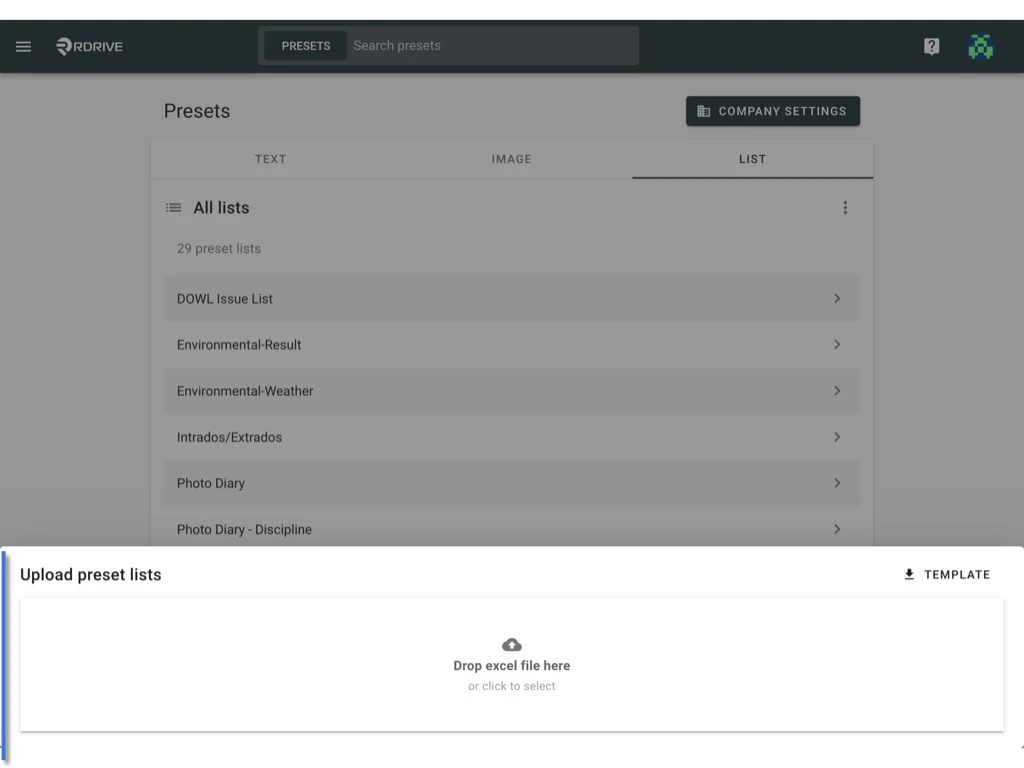
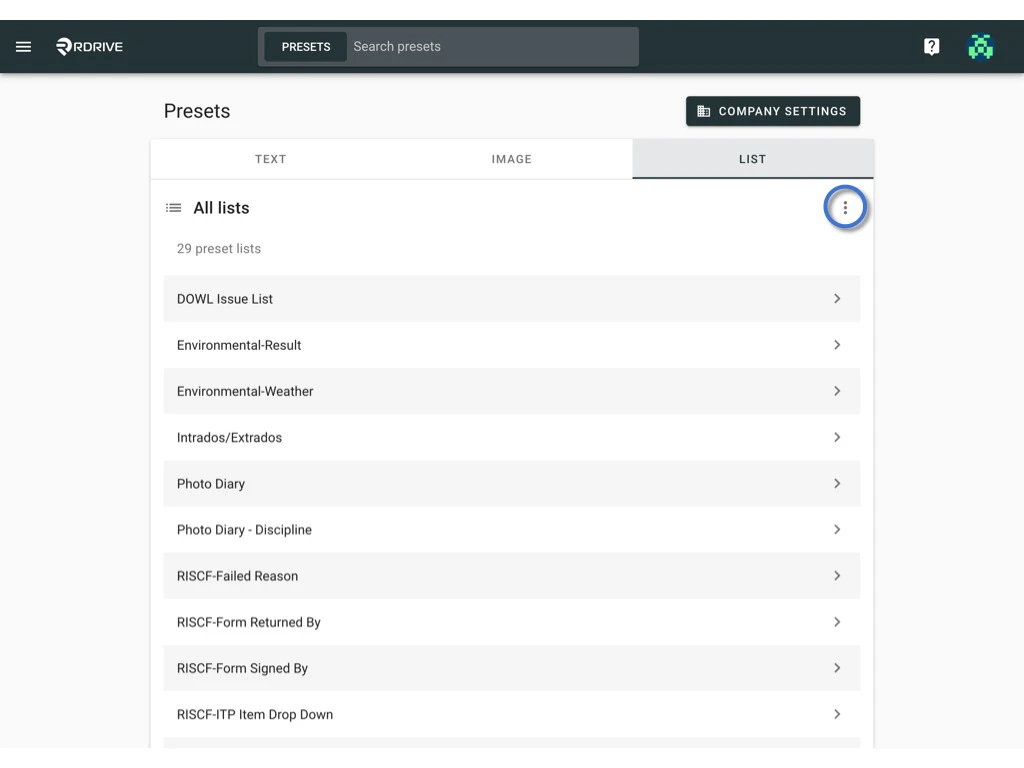
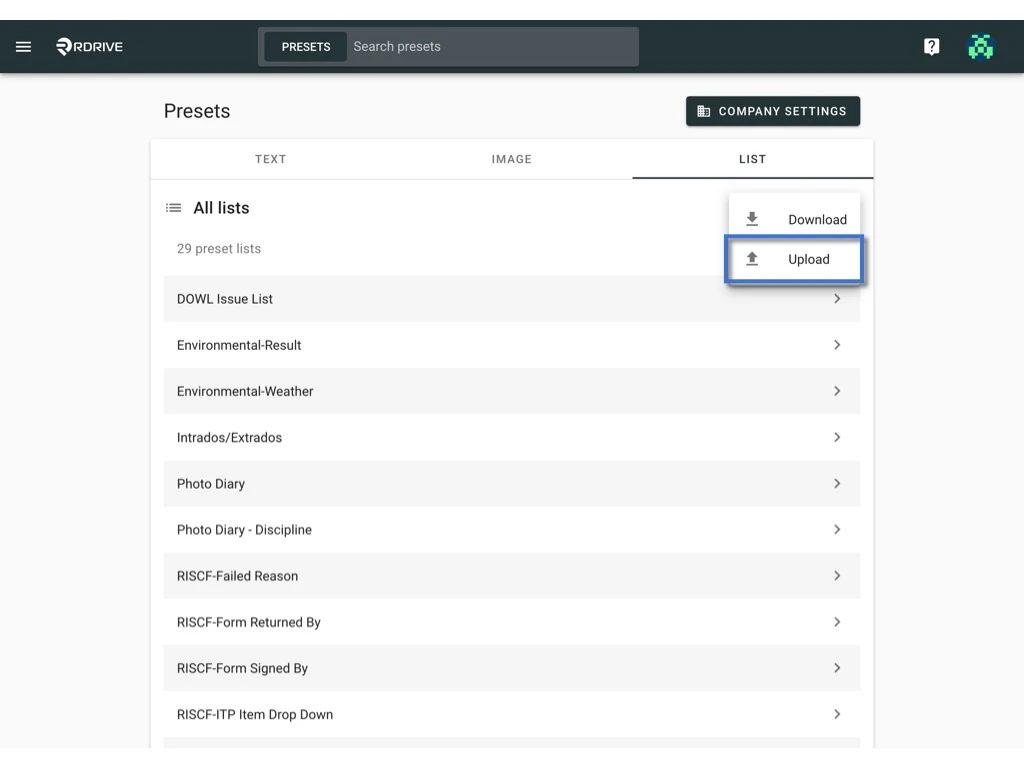
Click the ⋮ button on the right-hand side of All lists > **UPLOAD.**\
Drop or select the save excel template to upload the file to the system.
<img src="https://mintcdn.com/rdrive/qQgQF7rykBpqQcBv/images/kb/103000035156/tMlsxXJhkJgEsi0CdANl4IX8AqyZYMyQ4g.jpeg?fit=max&auto=format&n=qQgQF7rykBpqQcBv&q=85&s=7525c58dd62fafd2db9a03ba3bff3c8d" alt="How to edit the items of a preset list?" width="1024" height="768" data-path="images/kb/103000035156/tMlsxXJhkJgEsi0CdANl4IX8AqyZYMyQ4g.jpeg" />

<img src="https://mintcdn.com/rdrive/qQgQF7rykBpqQcBv/images/kb/103000035156/bKUI2RRqowTMf_ypX_4WrYf3GLtFCw_lCg.jpeg?fit=max&auto=format&n=qQgQF7rykBpqQcBv&q=85&s=b56a4841baa43d084ce1a01c00fed28e" alt="How to edit the items of a preset list?" width="1024" height="768" data-path="images/kb/103000035156/bKUI2RRqowTMf_ypX_4WrYf3GLtFCw_lCg.jpeg" />

<img src="https://mintcdn.com/rdrive/qQgQF7rykBpqQcBv/images/kb/103000035156/5oVC6pX2zwhfGOXJiknAqXEhUJdrhV2Zag.jpeg?fit=max&auto=format&n=qQgQF7rykBpqQcBv&q=85&s=2e985df85f878a892c9d6f4c0f1577c4" alt="How to edit the items of a preset list?" width="1024" height="768" data-path="images/kb/103000035156/5oVC6pX2zwhfGOXJiknAqXEhUJdrhV2Zag.jpeg" />

***

## Reset to the default value

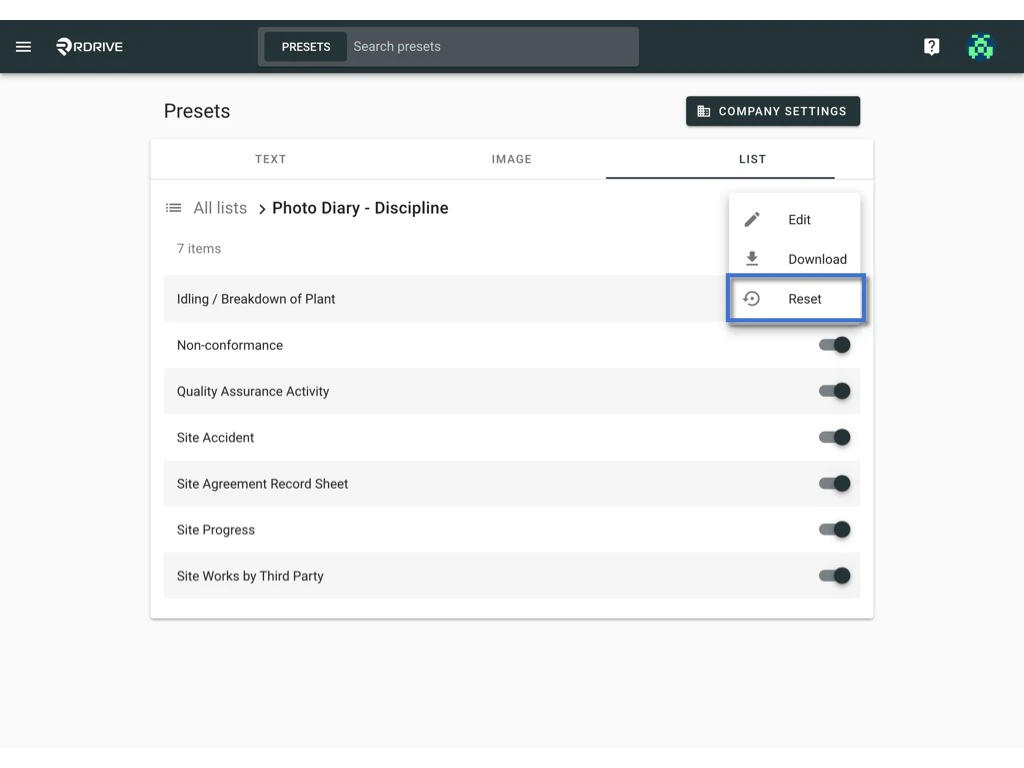
?*Can I reset the preset list to the company level setting?*\
Yes, you can.\
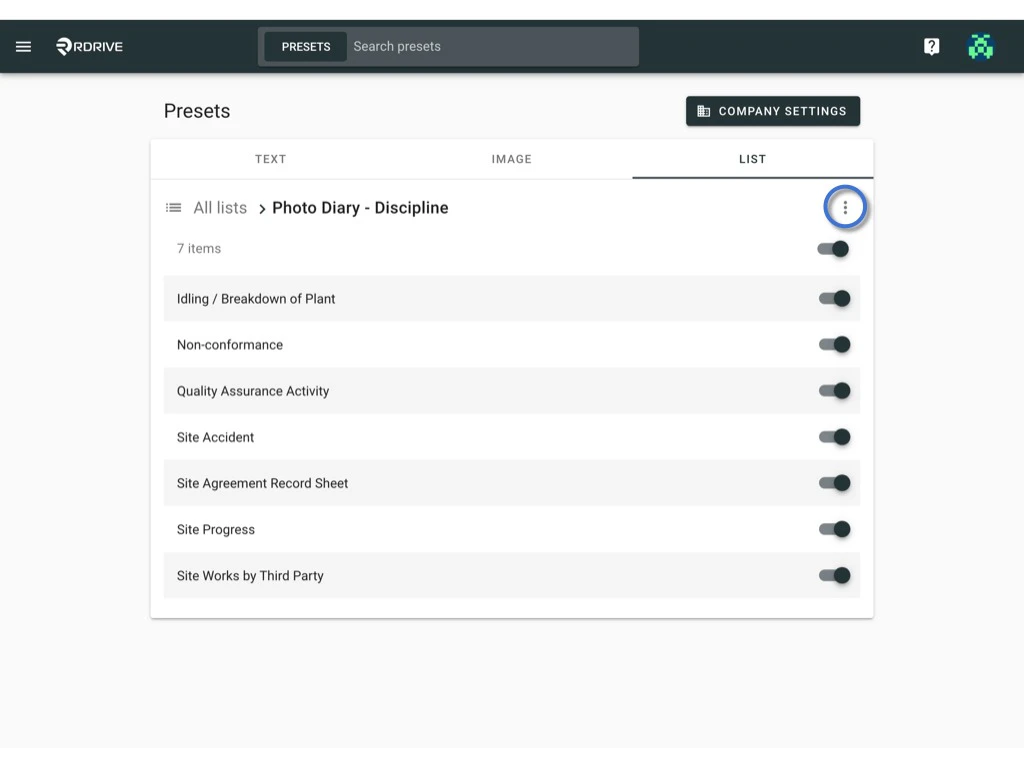
Simply click **RESET** from the ⋮ button at the right-hand side of the list title.
<img src="https://mintcdn.com/rdrive/qQgQF7rykBpqQcBv/images/kb/103000035156/vhiUEcJ1tDwjuPChmTpybUN775beyveINQ.jpeg?fit=max&auto=format&n=qQgQF7rykBpqQcBv&q=85&s=9da4bec36e0683539de0e53ac7ee84d6" alt="How to edit the items of a preset list?" width="1024" height="768" data-path="images/kb/103000035156/vhiUEcJ1tDwjuPChmTpybUN775beyveINQ.jpeg" />

<img src="https://mintcdn.com/rdrive/qQgQF7rykBpqQcBv/images/kb/103000035156/IgRJ8nWzHMf57ILuNp8Aigli0QVqoPclxQ.jpeg?fit=max&auto=format&n=qQgQF7rykBpqQcBv&q=85&s=678e5af3f4b03b5928586978d8a115bb" alt="How to edit the items of a preset list?" width="1024" height="768" data-path="images/kb/103000035156/IgRJ8nWzHMf57ILuNp8Aigli0QVqoPclxQ.jpeg" />

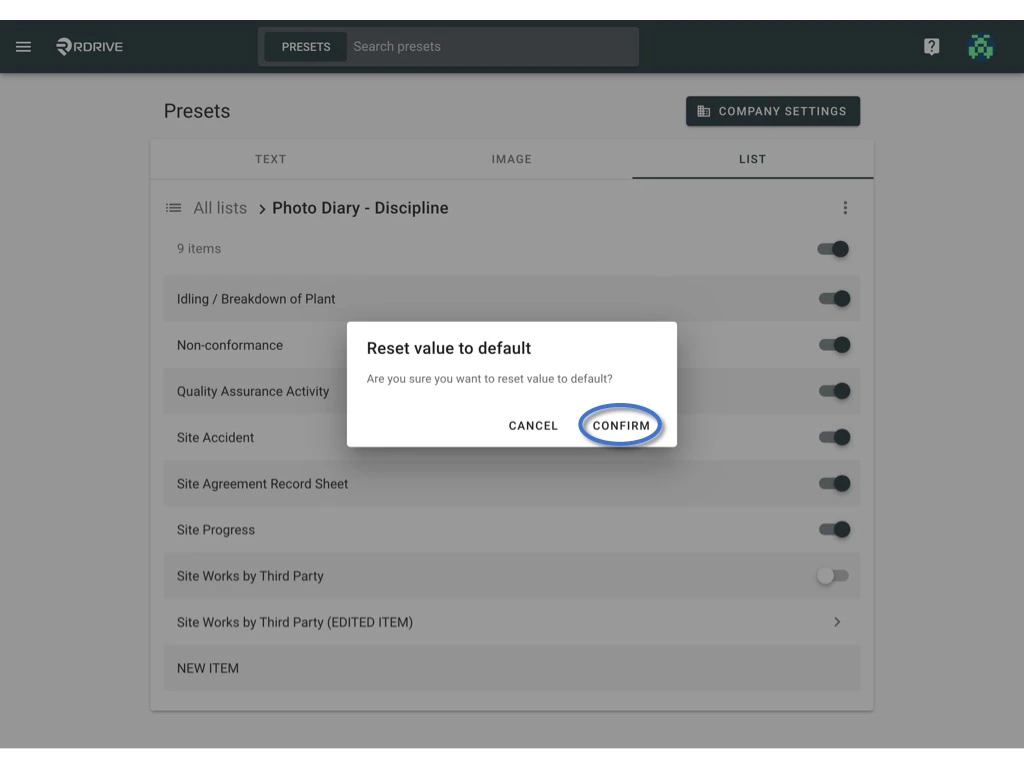
**CONFIRM** to reset to default

<img src="https://mintcdn.com/rdrive/qQgQF7rykBpqQcBv/images/kb/103000035156/6VJv4o2EJkDWZC578Y_w1ws74jN9XObD6g.jpeg?fit=max&auto=format&n=qQgQF7rykBpqQcBv&q=85&s=a2aa77e35f66199284c7952a53d5a26b" alt="How to edit the items of a preset list?" width="1024" height="768" data-path="images/kb/103000035156/6VJv4o2EJkDWZC578Y_w1ws74jN9XObD6g.jpeg" />

***

## *The additional information you may want to know*

**Disable Unwanted list items**\
You can disable the items that are not applicable to the project.\
Simply switch on and off to enable and disable the item or whole tier.

*(ON)*

<img src="https://mintcdn.com/rdrive/qQgQF7rykBpqQcBv/images/kb/103000035156/0UrDhG0yUot8lrqvdsofRli95R4P9MZmKA.png?fit=max&auto=format&n=qQgQF7rykBpqQcBv&q=85&s=6c8762b98ba1add5cb03494e43637f02" alt="How to edit the items of a preset list?" width="1600" height="116" data-path="images/kb/103000035156/0UrDhG0yUot8lrqvdsofRli95R4P9MZmKA.png" />

*(OFF)*

<img src="https://mintcdn.com/rdrive/qQgQF7rykBpqQcBv/images/kb/103000035156/7qyz2cNfoOaSumDjCMtg-AQvrYaxu6mCPQ.png?fit=max&auto=format&n=qQgQF7rykBpqQcBv&q=85&s=993986707f85ffba3e11171f4a03c14c" alt="How to edit the items of a preset list?" width="1606" height="106" data-path="images/kb/103000035156/7qyz2cNfoOaSumDjCMtg-AQvrYaxu6mCPQ.png" />

**What is** > **mean?**

*Click to drill down for the next tier.*

<img src="https://mintcdn.com/rdrive/qQgQF7rykBpqQcBv/images/kb/103000035156/t8SrhnavstB_6vXcNCmlRfcHkMxodnOr4A.png?fit=max&auto=format&n=qQgQF7rykBpqQcBv&q=85&s=7455993e2274a9a2b325c29225dbb69c" alt="How to edit the items of a preset list?" width="1586" height="84" data-path="images/kb/103000035156/t8SrhnavstB_6vXcNCmlRfcHkMxodnOr4A.png" />