> ## Documentation Index
> Fetch the complete documentation index at: https://docs.rdrive.io/llms.txt
> Use this file to discover all available pages before exploring further.

# How to manage the team member(s)?

> Adding a user to the team is related to the permission settings.

Adding a user to the team is related to the **permission** settings.

Permission settings are an important topic because not only does it ensure data security but it also **defines a clear process** for your team, which is a **critical success factor** in rolling out any systems and RDrive is no exception. When everyone knows **who needs to do what at when**, people adapt to new systems easier.

**TABLE OF CONTENTS**

* [ADD USER](#add-user-%e2%9e%95)
* [ASSIGN/EDIT ROLE](#assign/edit-role-?)
* [REMOVE USER](#remove-user-?)

***

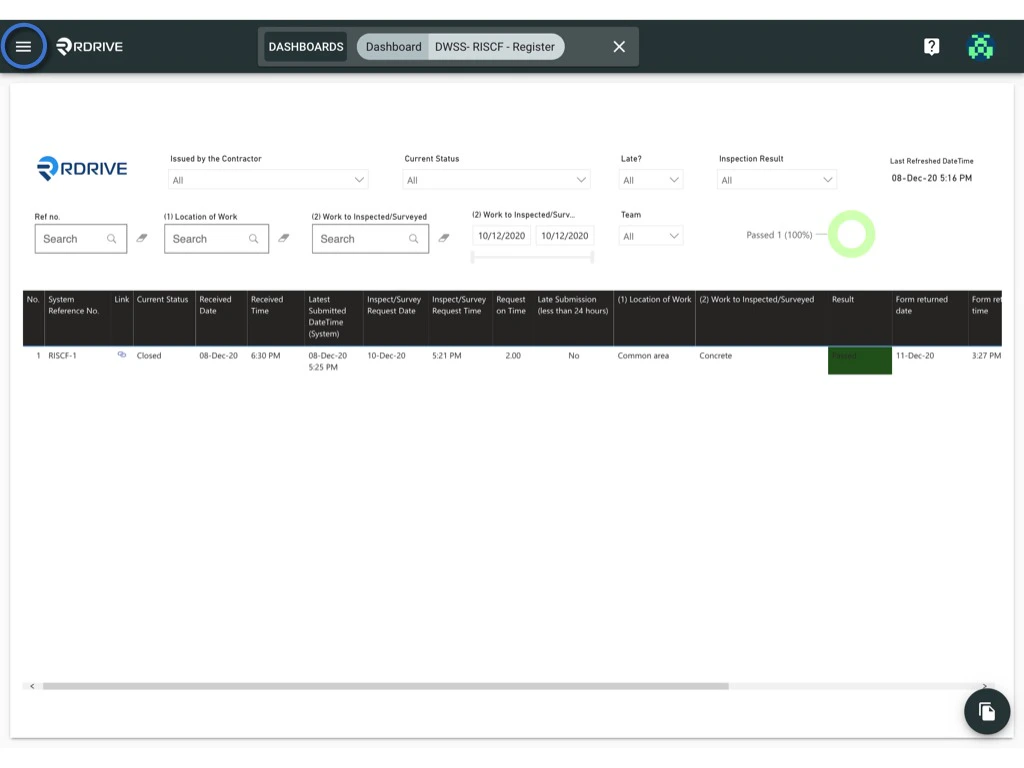
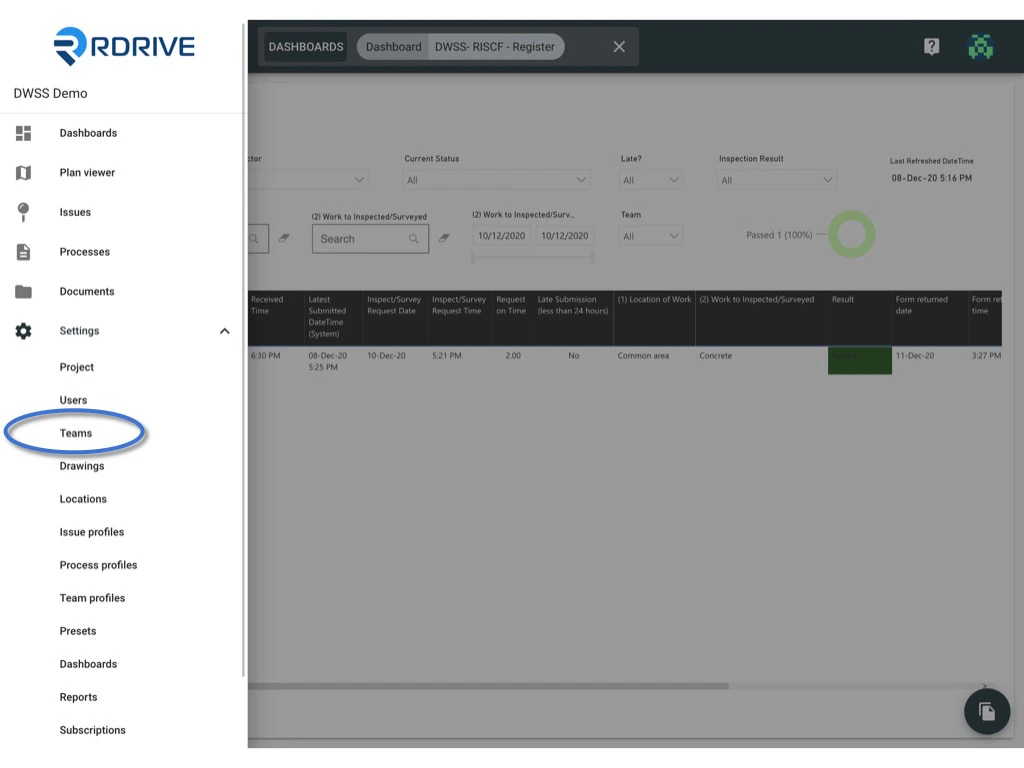
Click the **≡** menu icon on the top left corner to unfold the Menu, get entry to the **Setting** > **Teams** page.
<img src="https://mintcdn.com/rdrive/hmdjAtzAV1Xti41C/images/kb/103000035158/VGvu1o2NqnrZwdYwdSNoADJ-6nIQGuHPsg.jpeg?fit=max&auto=format&n=hmdjAtzAV1Xti41C&q=85&s=aa1ed2fe974781ea942a554cf59a0a55" alt="How to manage the team member(s)?" width="1024" height="768" data-path="images/kb/103000035158/VGvu1o2NqnrZwdYwdSNoADJ-6nIQGuHPsg.jpeg" />

<img src="https://mintcdn.com/rdrive/hmdjAtzAV1Xti41C/images/kb/103000035158/cYnGbp5dRdkh9bbIlm2oBHBB4vi9UZY95A.jpeg?fit=max&auto=format&n=hmdjAtzAV1Xti41C&q=85&s=a18b111a27540c65824ed88348955457" alt="How to manage the team member(s)?" width="1024" height="768" data-path="images/kb/103000035158/cYnGbp5dRdkh9bbIlm2oBHBB4vi9UZY95A.jpeg" />

***

## **ADD USER ➕**

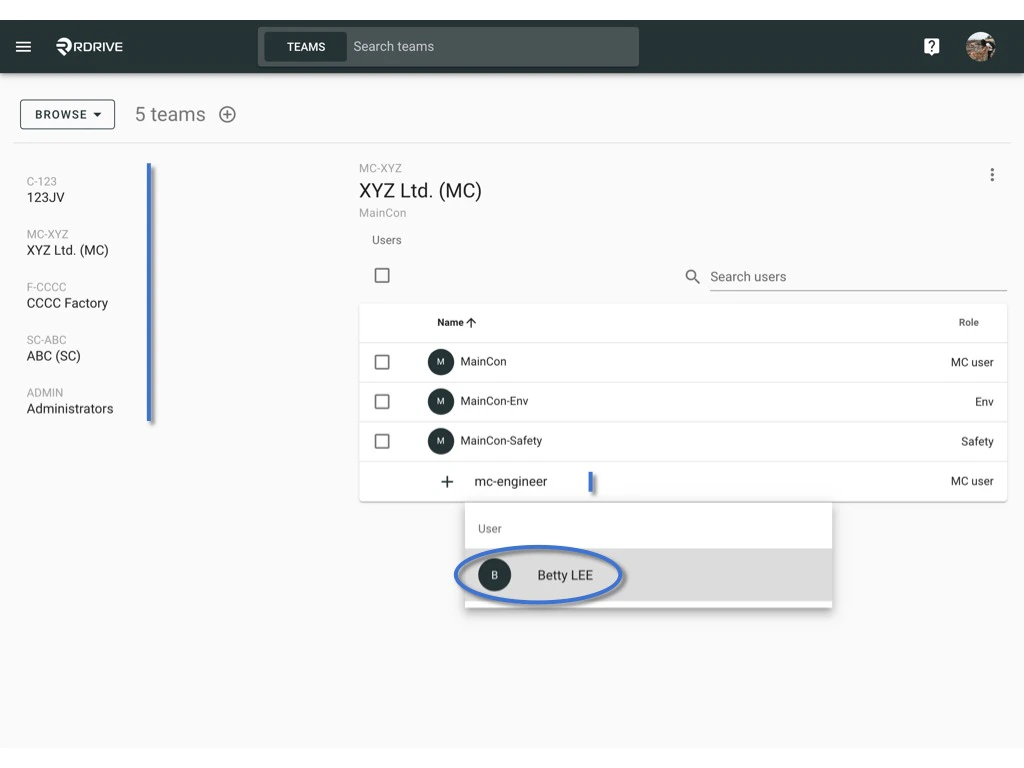
Select the team you need to add user to.\
You may search by the display name or email address and add from the bottom of the team member listed below.
<img src="https://mintcdn.com/rdrive/hmdjAtzAV1Xti41C/images/kb/103000035158/ZXMS9itO_xhRLZeZdWTJS6d68CxS4nJxQw.jpeg?fit=max&auto=format&n=hmdjAtzAV1Xti41C&q=85&s=598cb59697aa584e288bdd377edffa6d" alt="How to manage the team member(s)?" width="1024" height="768" data-path="images/kb/103000035158/ZXMS9itO_xhRLZeZdWTJS6d68CxS4nJxQw.jpeg" />

***

## **ASSIGN/EDIT ROLE**

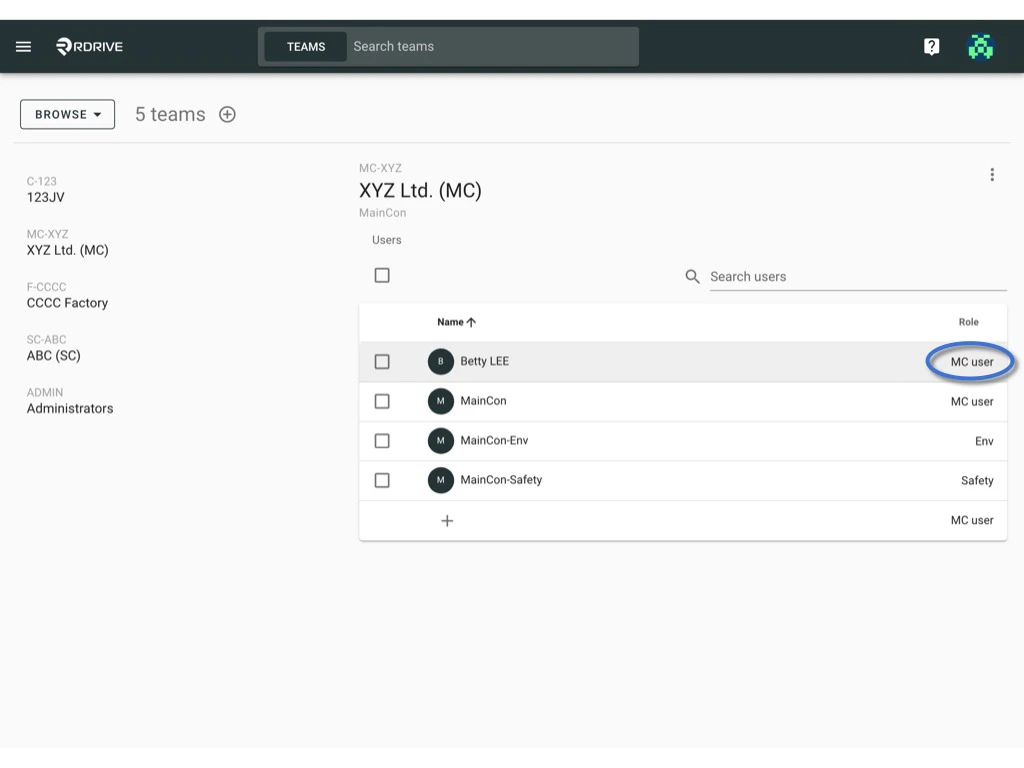
Remember to assign the correct role for the team member ?
<img src="https://mintcdn.com/rdrive/hmdjAtzAV1Xti41C/images/kb/103000035158/xV2szw8Ne01g642IkC7zlrW4HPtAyGQ0xg.jpeg?fit=max&auto=format&n=hmdjAtzAV1Xti41C&q=85&s=06d68e3b371c9626d13e4942820c84d4" alt="How to manage the team member(s)?" width="1024" height="768" data-path="images/kb/103000035158/xV2szw8Ne01g642IkC7zlrW4HPtAyGQ0xg.jpeg" />

<img src="https://mintcdn.com/rdrive/hmdjAtzAV1Xti41C/images/kb/103000035158/HGj-Cdqg_i4koOW6HvO7g5YguRRxeElpAA.jpeg?fit=max&auto=format&n=hmdjAtzAV1Xti41C&q=85&s=86a2a26d710a47035c9718b6305c6cbc" alt="How to manage the team member(s)?" width="1024" height="768" data-path="images/kb/103000035158/HGj-Cdqg_i4koOW6HvO7g5YguRRxeElpAA.jpeg" />

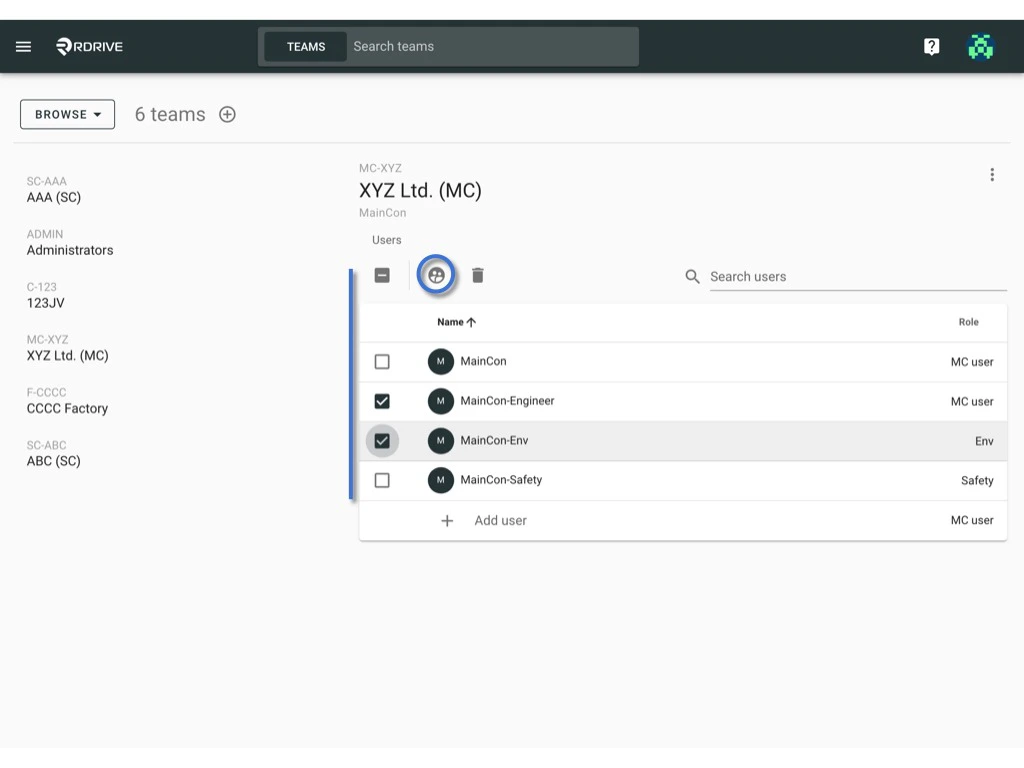
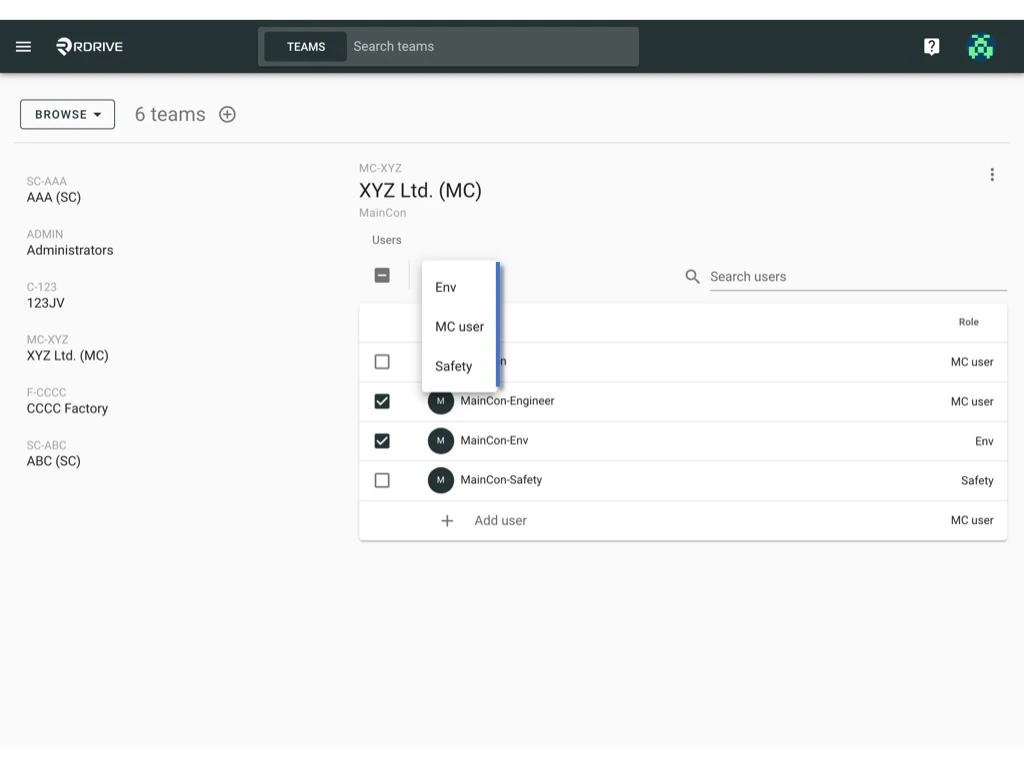
**Batch assign role by**

Checked the box on the left-hand side of the user name to select users.\
And click on the **role** button to assign the correct role for the team members.
<img src="https://mintcdn.com/rdrive/hmdjAtzAV1Xti41C/images/kb/103000035158/Uu_2ZxTJfVnRujN1No10QurJed96YVe7YA.jpeg?fit=max&auto=format&n=hmdjAtzAV1Xti41C&q=85&s=1136ea1c69957d9e4679788b566690f8" alt="How to manage the team member(s)?" width="1024" height="768" data-path="images/kb/103000035158/Uu_2ZxTJfVnRujN1No10QurJed96YVe7YA.jpeg" />

<img src="https://mintcdn.com/rdrive/hmdjAtzAV1Xti41C/images/kb/103000035158/8ZeVlGqO0B73PKVEYtoaNS-pA3REFVUX0A.jpeg?fit=max&auto=format&n=hmdjAtzAV1Xti41C&q=85&s=e34c8ac840cb7a1d4b4795a183fdf8d2" alt="How to manage the team member(s)?" width="1024" height="768" data-path="images/kb/103000035158/8ZeVlGqO0B73PKVEYtoaNS-pA3REFVUX0A.jpeg" />

***

## **REMOVE USER** 

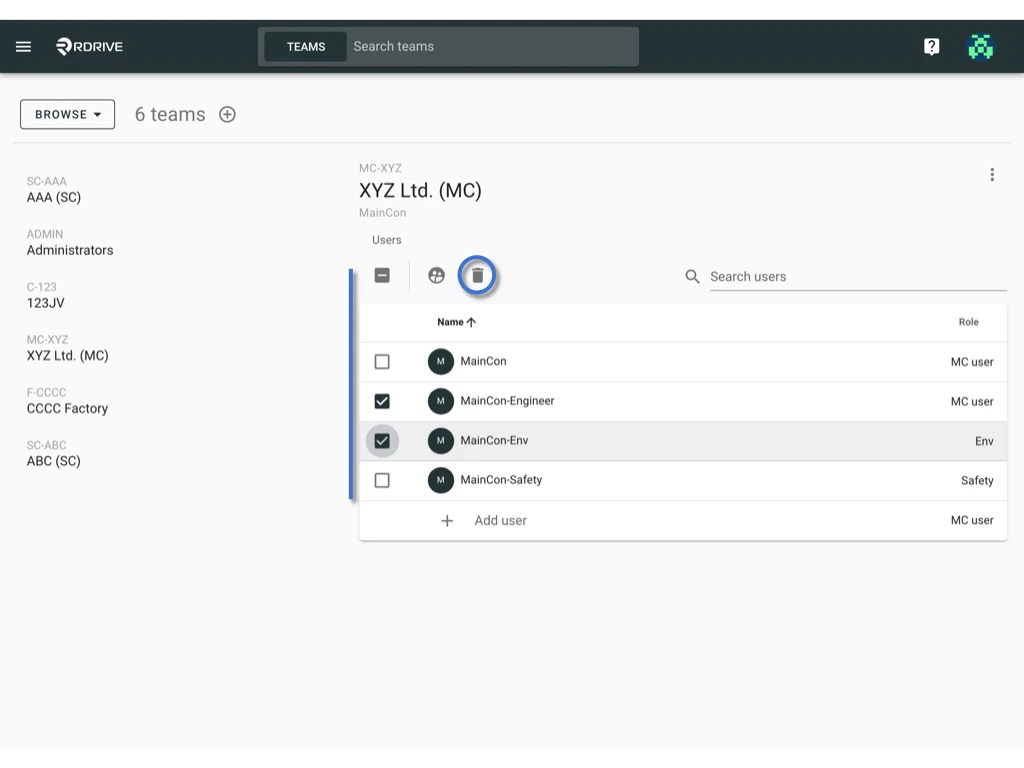
Checked the box on the left-hand side of the user name to select users.\
And click on the **trash** button to remove users from the team.
<img src="https://mintcdn.com/rdrive/hmdjAtzAV1Xti41C/images/kb/103000035158/Ww9OQk89r-LQoJ-T5C3chzSoypY7_qMqNg.jpeg?fit=max&auto=format&n=hmdjAtzAV1Xti41C&q=85&s=a17bbe167b3a06553acb305a524501f5" alt="How to manage the team member(s)?" width="1024" height="768" data-path="images/kb/103000035158/Ww9OQk89r-LQoJ-T5C3chzSoypY7_qMqNg.jpeg" />