> ## Documentation Index
> Fetch the complete documentation index at: https://docs.rdrive.io/llms.txt
> Use this file to discover all available pages before exploring further.
# How to add a Process/Checklist Form from the Finder? (Category)
> This guide explains how to add a new Process or Checklist Form in RDrive directly from the Finder (Category Page). By navigating through categories and subcateg
### **Overview**
*This guide explains how to add a new Process or Checklist Form in RDrive directly from the Finder (Category Page). By navigating through categories and subcategories, users can easily select, create, and assign new forms related to their project workflows.*
* **Purpose:** To guide users on how to create a new Process or Checklist Form via the Finder (Form Category Page).
* **Who It’s For:** General Users
Prerequisites: Access to the RDrive Planviewer. Permissions to create process.
***
**TABLE OF CONTENTS**
* [Step-by-Step Instructions](#step-by-step-instructions)
* [Step 1: Open the Menu](#step-1%3a-open-the-menu)
* [Step 2: Access the Process/Checklist Category Page](#step-2%3a-access-the-%e2%80%8bprocess/checklist%c2%a0category-page)
* [Step 3: Add a New Process](#step-3%3a-add-a-new-process)
* [Step 4: Select the Related Location](#step-4%3a-select-the-related-location)
* [Step 5: Confirm the New Form](#step-5%3a-confirm-the-new-form)
* [Step 6: Start Editing the Form](#step-6%3a-start-editing-the-form)
* [Tips](#tips)
* [FAQs & Troubleshooting](#faqs-&-troubleshooting)
* [Q: I can’t find the "+" button to add a form. Why?](#q%3a-i-can%e2%80%99t-find-the-)[](#q%3a-i-don%e2%80%99t-see-the-form-type-i-need.)
* [Q: I don’t see the form type I need.](#q%3a-i-don%e2%80%99t-see-the-form-type-i-need.)[](#q%3a-can-i-change-the-location-after-the-form-is-created?)
* [Q: Can I change the location after the form is created?](#q%3a-can-i-change-the-location-after-the-form-is-created?)
***
## **Step-by-Step Instructions**
###
**Step 1: Open the Menu**
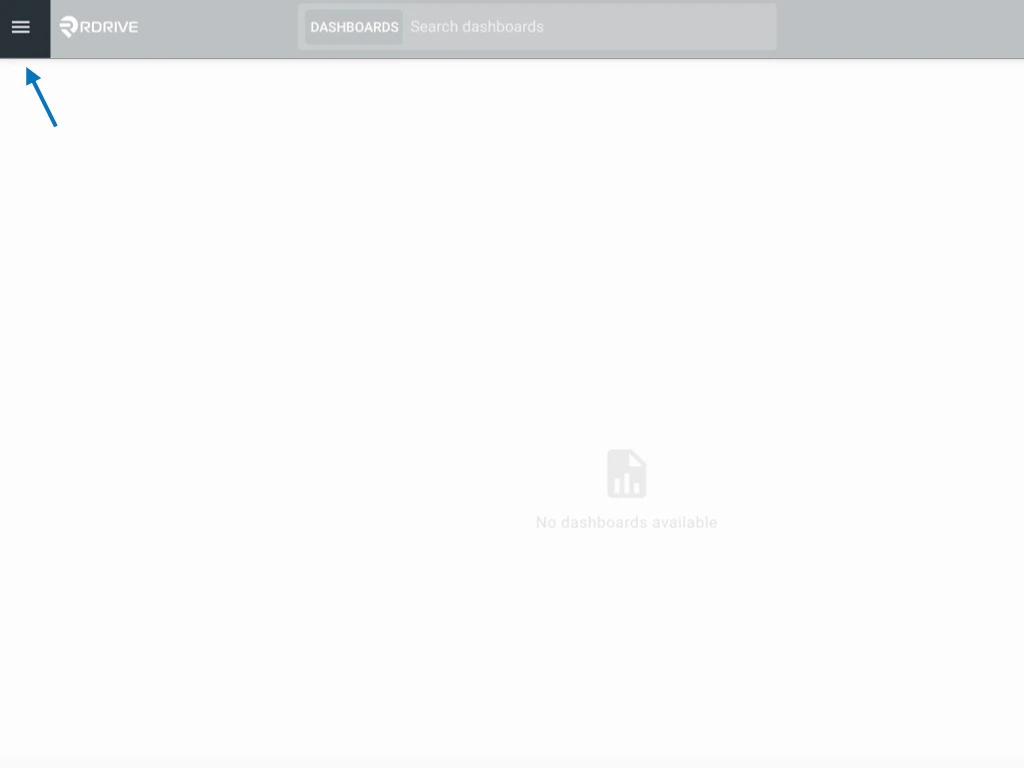
Click the **Menu icon (≡)** located at the top left corner of your screen to unfold the main menu.
 ***
## **Step 2: Access the** **Process/Checklist** **Category Page**
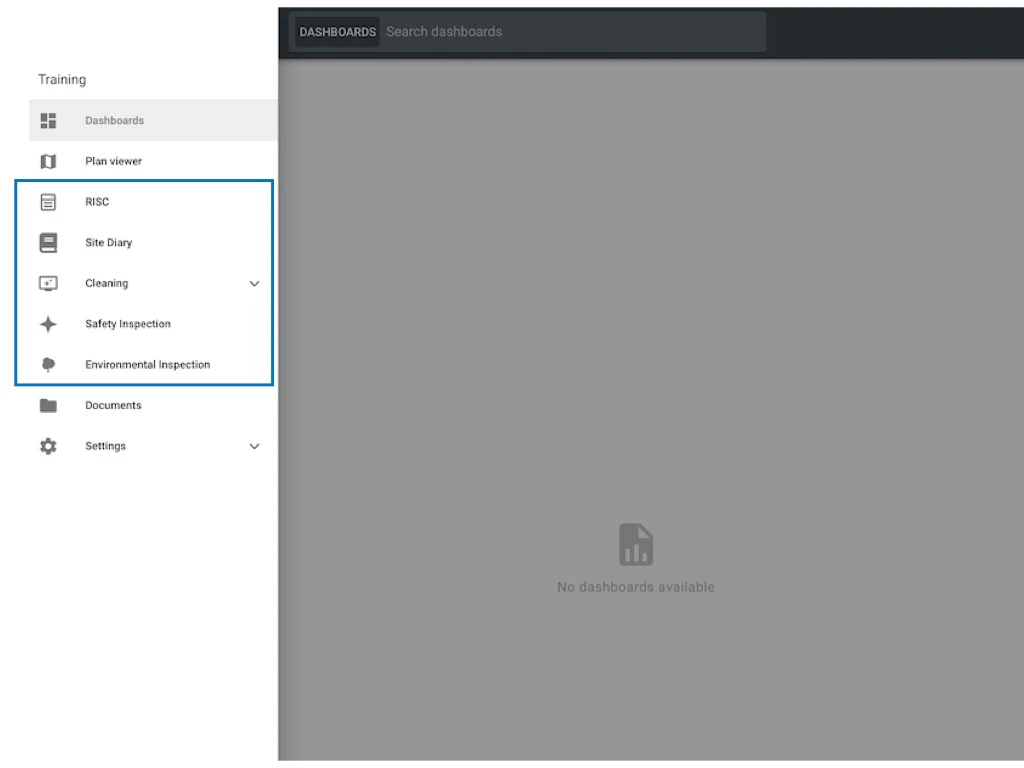
From the menu, navigate to the **Process Category** page.
* Select the **relevant Category and Subcategory** to locate the type of process form you want to add.\
*(Note: Process categories shown will vary based on the company and project setup.)*
* Choose the correct Process or Checklist category that matches your intended form.
***
## **Step 2: Access the** **Process/Checklist** **Category Page**
From the menu, navigate to the **Process Category** page.
* Select the **relevant Category and Subcategory** to locate the type of process form you want to add.\
*(Note: Process categories shown will vary based on the company and project setup.)*
* Choose the correct Process or Checklist category that matches your intended form.
 ***
### **Step 3: Add a New Process**
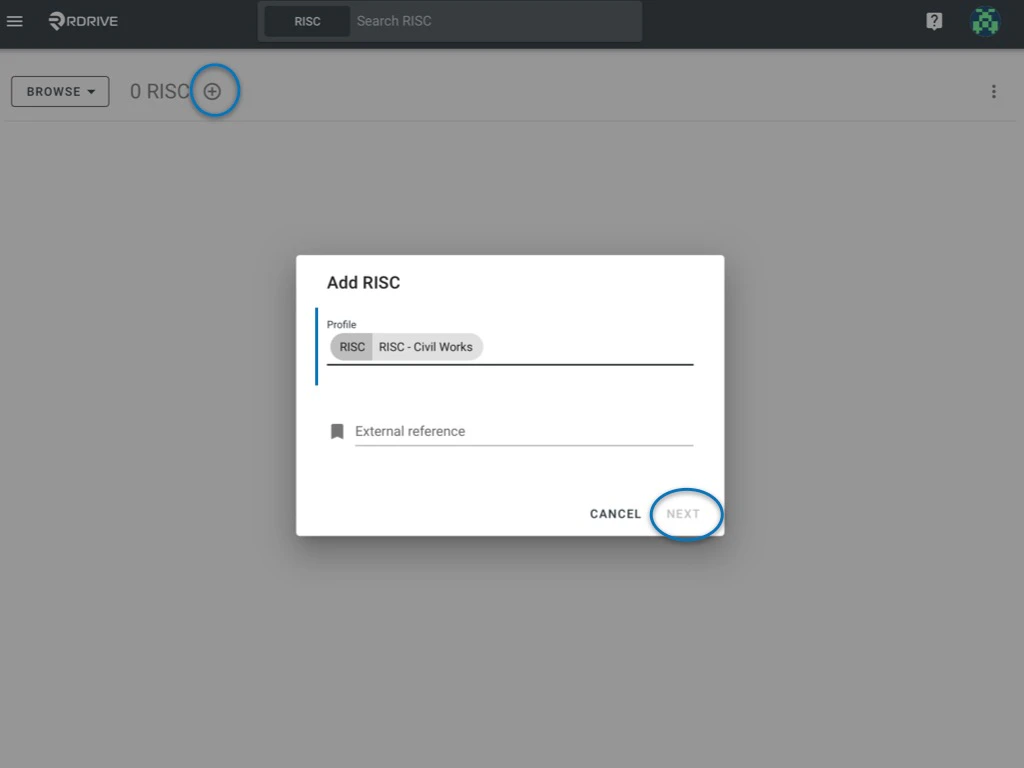
* Click the **"+" icon** (plus button) within the selected Process/Checklist category to initiate the creation of a new process.
* A window will pop up in the center of your screen.
* Select the **profile** you want to use.
* Click **Next** to continue.
***
### **Step 3: Add a New Process**
* Click the **"+" icon** (plus button) within the selected Process/Checklist category to initiate the creation of a new process.
* A window will pop up in the center of your screen.
* Select the **profile** you want to use.
* Click **Next** to continue.
 ***
### **Step 4: Select the Related Location**
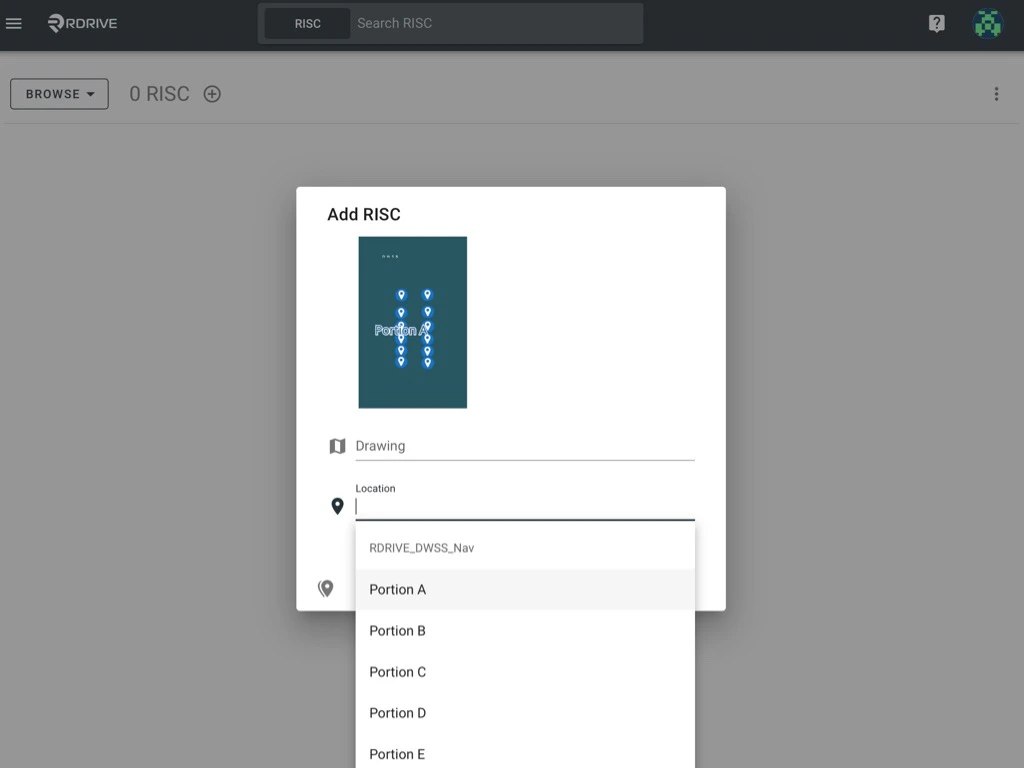
* After selecting the profile, a second window will appear.
* Choose the **d\*\*\*\*rawing** and **location** related to your process or checklist.
***
### **Step 4: Select the Related Location**
* After selecting the profile, a second window will appear.
* Choose the **d\*\*\*\*rawing** and **location** related to your process or checklist.
 ***
### **Step 5: Confirm the New Form**
The form is now added to your project and linked to the chosen location.
***
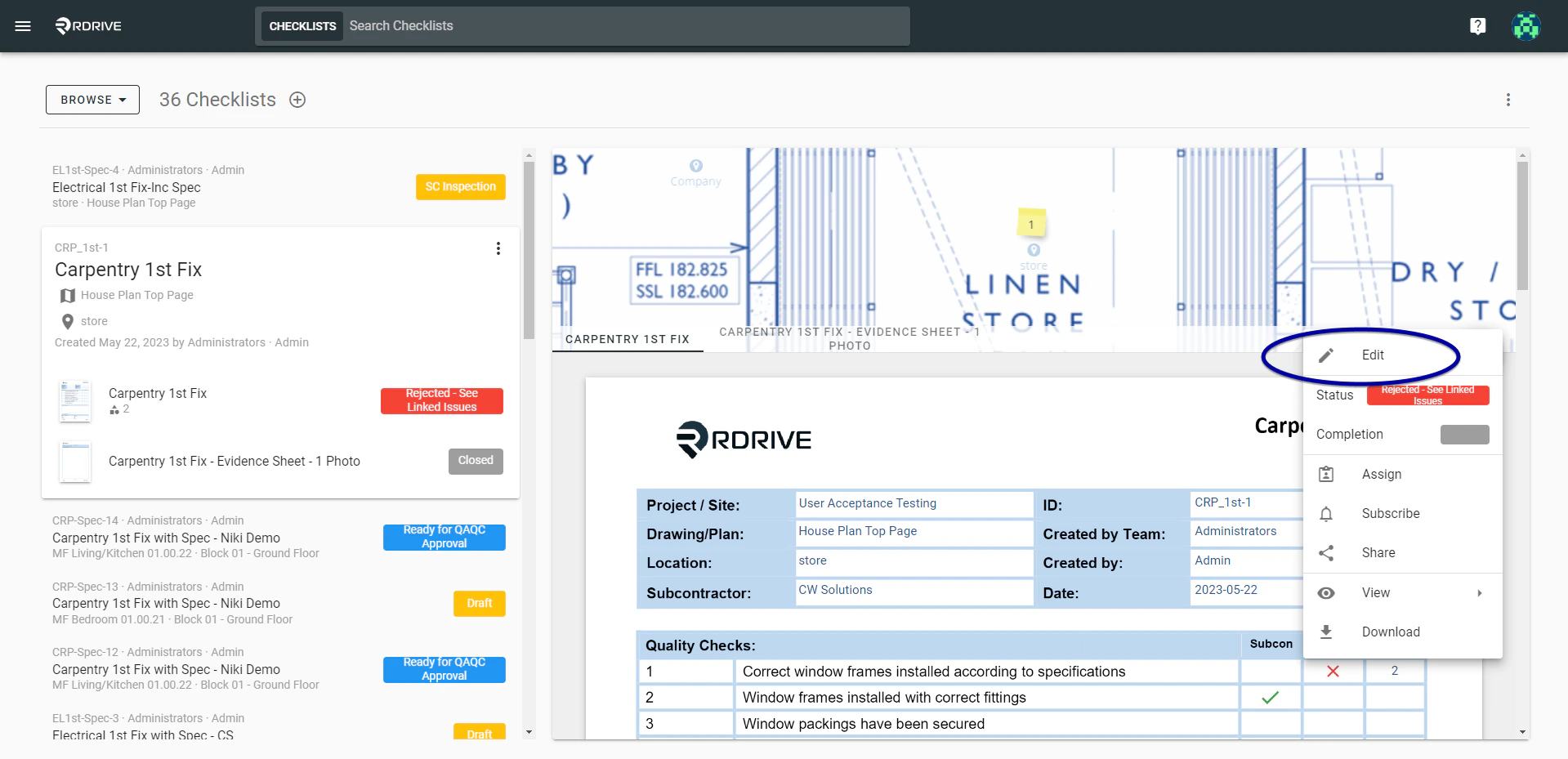
### **Step 6: Start Editing the Form**
You can access and start editing the form by:
* Finding your form and selecting the **Edit** option, or
* Double-clicking on the form to access the form viewer.
***
### **Step 5: Confirm the New Form**
The form is now added to your project and linked to the chosen location.
***
### **Step 6: Start Editing the Form**
You can access and start editing the form by:
* Finding your form and selecting the **Edit** option, or
* Double-clicking on the form to access the form viewer.
 \\
\\
 ***
## **Tips**
* Always double-check the selected Profile and Location before proceeding.
* Form options are customized by project settings. If you do not see the expected forms, contact your Project Admin.
***
# **FAQs & Troubleshooting**
### **Q: I can’t find the "+" button to add a form. Why?**
A: You may not have permission to create new forms. Please contact your Project Admin.
***
### **Q: I don’t see the form type I need.**
A: The available form types depend on what has been set up for your project. Reach out to your Admin to confirm setup.
***
### **Q: Can I change the location after the form is created?**
A: No, once a form is linked to a location, it cannot be changed. You would need to create a new form if needed.
***
## **Tips**
* Always double-check the selected Profile and Location before proceeding.
* Form options are customized by project settings. If you do not see the expected forms, contact your Project Admin.
***
# **FAQs & Troubleshooting**
### **Q: I can’t find the "+" button to add a form. Why?**
A: You may not have permission to create new forms. Please contact your Project Admin.
***
### **Q: I don’t see the form type I need.**
A: The available form types depend on what has been set up for your project. Reach out to your Admin to confirm setup.
***
### **Q: Can I change the location after the form is created?**
A: No, once a form is linked to a location, it cannot be changed. You would need to create a new form if needed.