> ## Documentation Index
> Fetch the complete documentation index at: https://docs.rdrive.io/llms.txt
> Use this file to discover all available pages before exploring further.
# Can I change the location of a Process?
> You can change the location of a process in RDrive. Here’s how to do it:
### **Mov\*\*\*\*ing a Process in RDrive**
You can change the location of a process in RDrive. Here’s how to do it:
* [](#via-plan-viewer)[Via Plan Viewer](#via-plan-viewer)
* [Via Finder](#via-finder)
***Important:*** *Not everyone has the permission to move a process from one location to another. If you're unable to perform this action, please contact your project administrator for assistance.*
***
#### **Via Plan Viewer**
1. If the Plan Viewer is congested, use filters in the unified search bar at the top of your screen to find the process you need. 2. Once you’ve identified the correct location, click the memo/post-it icon to display the process details on the left side of your screen.
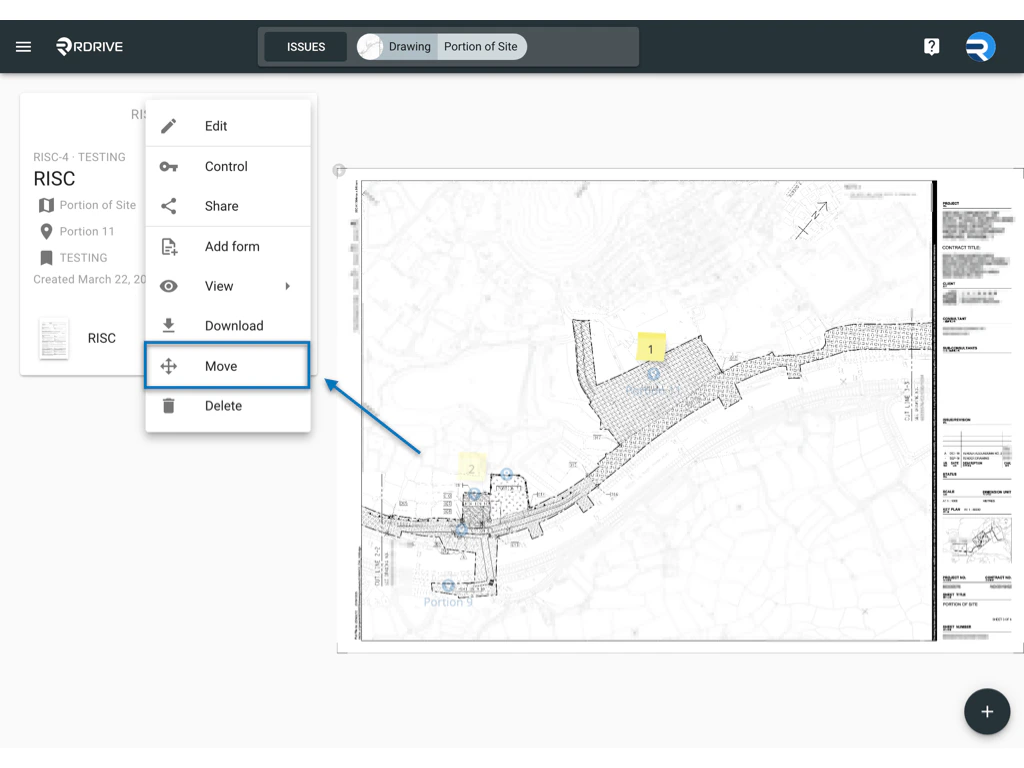
 3. Click the three dots (**⋮**) to open the dropdown menu, then select "**Move**."
 4. Choose the new location for the process and click "**OK**" to confirm.
 \_\
\_\
 Your process has been successfully moved to another location on the same drawing!\_
#### ***How about moving a Process to a Location on Another Drawing?***
RDrive allows you to relocate processes to different drawings as well.
1. Start by clicking the "**Move**" icon again.\\
Your process has been successfully moved to another location on the same drawing!\_
#### ***How about moving a Process to a Location on Another Drawing?***
RDrive allows you to relocate processes to different drawings as well.
1. Start by clicking the "**Move**" icon again.\\
 2. Use the unified search bar to find the desired drawing by typing "Drawing" and selecting the relevant option from the list.\
The chosen drawing will appear on your screen. Select the correct location and click "**OK**" to confirm.
2. Use the unified search bar to find the desired drawing by typing "Drawing" and selecting the relevant option from the list.\
The chosen drawing will appear on your screen. Select the correct location and click "**OK**" to confirm. *Your process has now been moved to another location on a different drawing!*
***
## **Via Finder**
1. To locate the relevant process, apply filters using the unified search bar at the top of your screen.
*Your process has now been moved to another location on a different drawing!*
***
## **Via Finder**
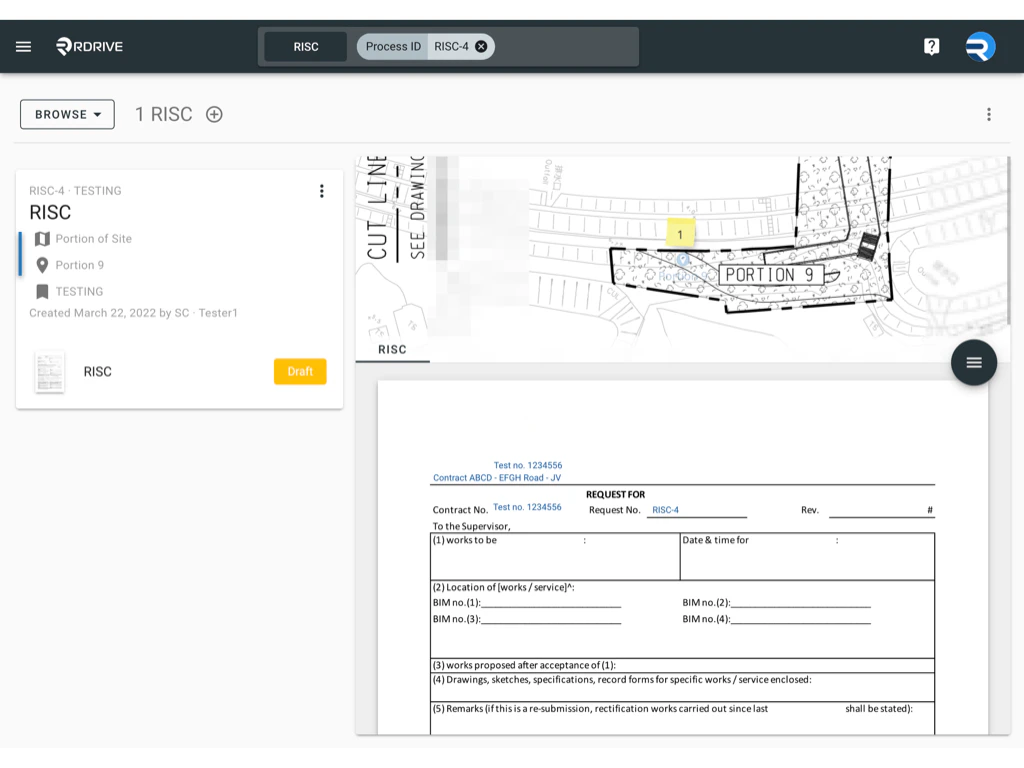
1. To locate the relevant process, apply filters using the unified search bar at the top of your screen. 2. Once you find the process, click the three dots (**⋮**) to open the dropdown menu.
 3. Click "**Move**" to reveal the options for changing the process's location.
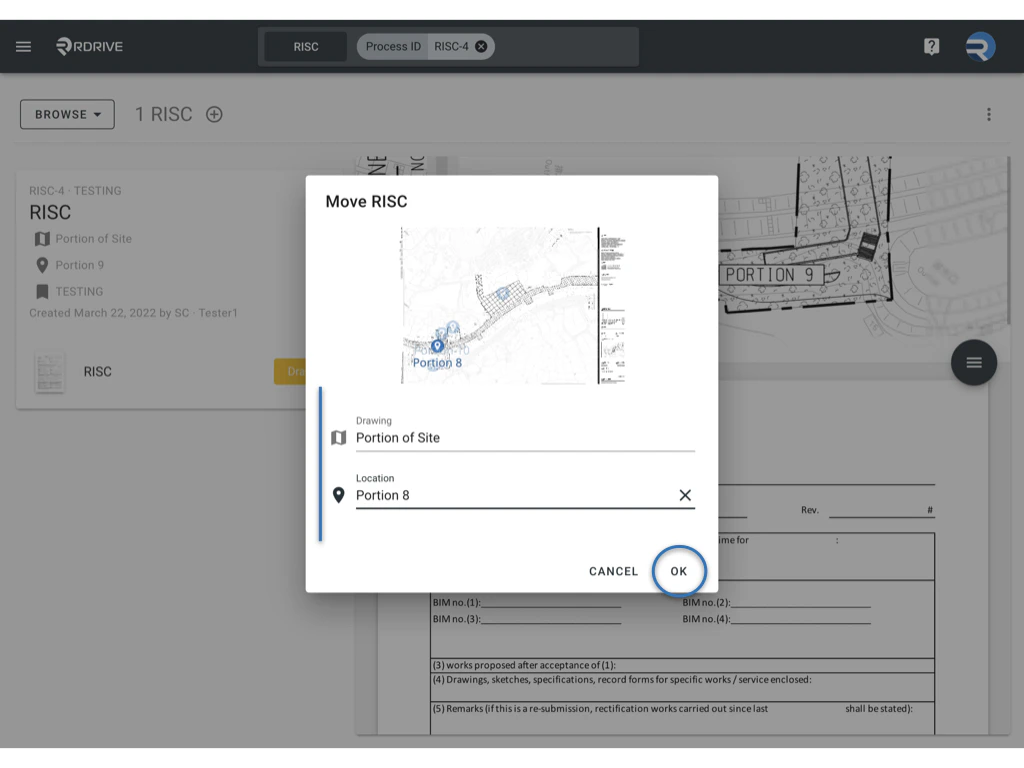
 4. In the expanded menu, select the new location.
***Note:*** *If you want to move the process to a location on a different drawing, make sure to change both the drawing and location options before clicking "OK" to confirm.*\\
4. In the expanded menu, select the new location.
***Note:*** *If you want to move the process to a location on a different drawing, make sure to change both the drawing and location options before clicking "OK" to confirm.*\\
 *Your process has now been successfully moved!*