> ## Documentation Index
> Fetch the complete documentation index at: https://docs.rdrive.io/llms.txt
> Use this file to discover all available pages before exploring further.

# Can I export the entire process as PDF?

> Do you need to export the completed process into PDF? Here is a guide to help you.

Do you need to export the completed process into PDF? Here is a guide to help you.

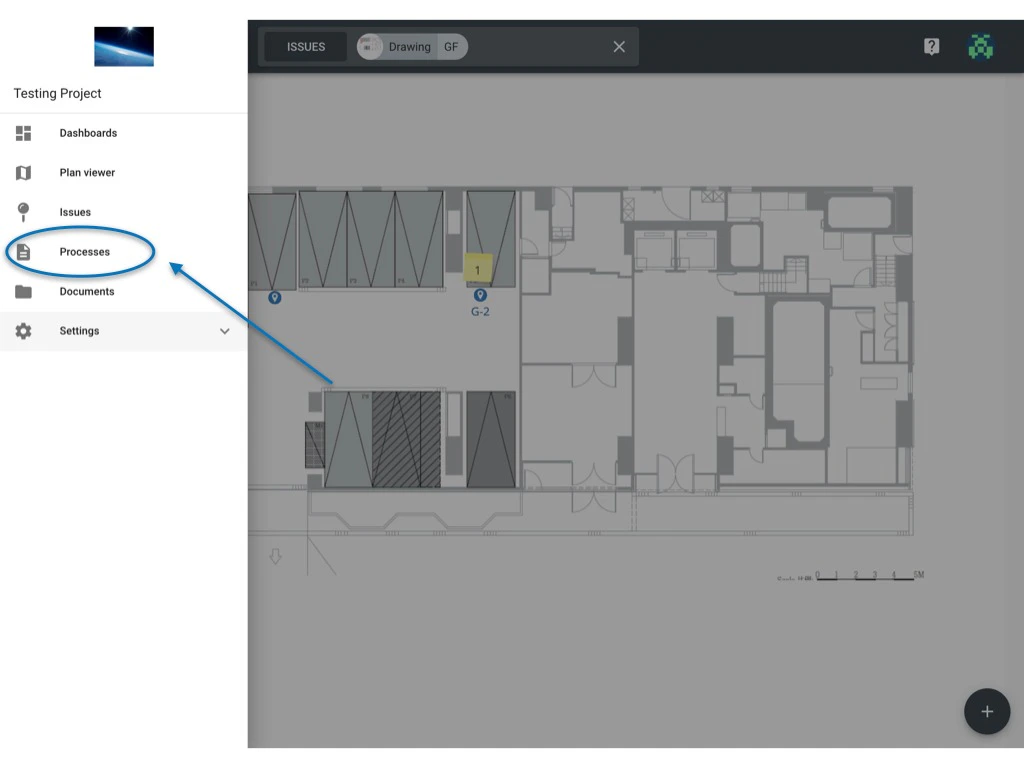
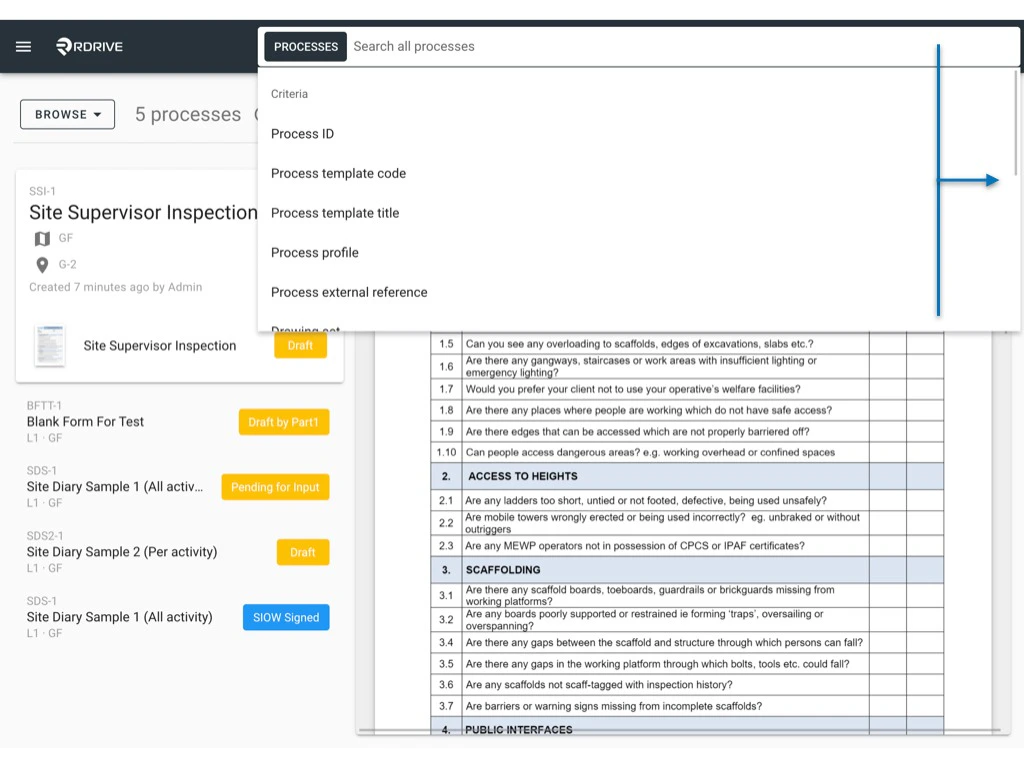
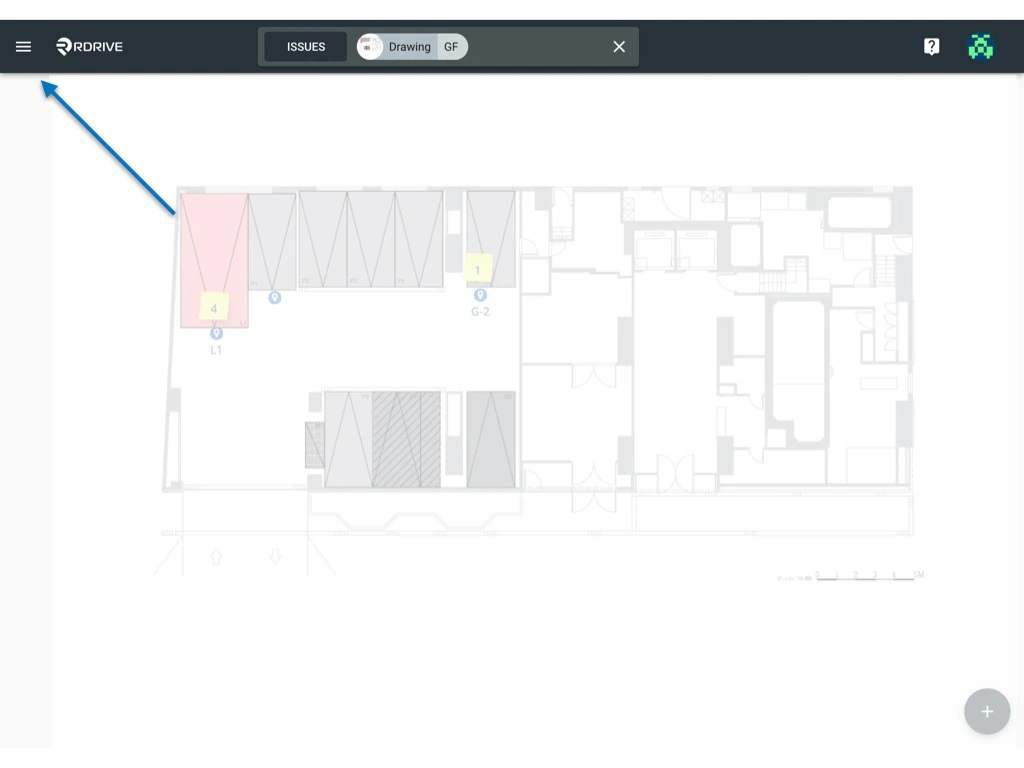
You can utilise the unified search bar at the top of your screen to filter the required process to be exported as shown below.

**TABLE OF CONTENTS**

* [Single download](#single-download)
* [Batch Download](#batch-download)

***
<img src="https://mintcdn.com/rdrive/SmEwcZ68fksIYiu-/images/kb/103000035211/lesxydB5dO7CraG6FwB5tseJothrZ7T3_A.jpeg?fit=max&auto=format&n=SmEwcZ68fksIYiu-&q=85&s=acb9280206c9268779d30fea14f2dc14" alt="Can I export the entire process as PDF?" width="1024" height="768" data-path="images/kb/103000035211/lesxydB5dO7CraG6FwB5tseJothrZ7T3_A.jpeg" />

<img src="https://mintcdn.com/rdrive/SmEwcZ68fksIYiu-/images/kb/103000035211/OqscuOBtHydLBDR9g_88Cf1F1YgswcR0NQ.jpeg?fit=max&auto=format&n=SmEwcZ68fksIYiu-&q=85&s=465eddde551f14d112ad2fe67026d13c" alt="Can I export the entire process as PDF?" width="1024" height="768" data-path="images/kb/103000035211/OqscuOBtHydLBDR9g_88Cf1F1YgswcR0NQ.jpeg" />

<img src="https://mintcdn.com/rdrive/SmEwcZ68fksIYiu-/images/kb/103000035211/HXi14LE_d4FZrcXOQEazzH9Dd4Bp9zUWIA.jpeg?fit=max&auto=format&n=SmEwcZ68fksIYiu-&q=85&s=aef4b9275a50060bcc569fa9a1411962" alt="Can I export the entire process as PDF?" width="1024" height="768" data-path="images/kb/103000035211/HXi14LE_d4FZrcXOQEazzH9Dd4Bp9zUWIA.jpeg" />

When you have filtered the process you are looking for, it's time to download the entire process.

***

## **Single download**

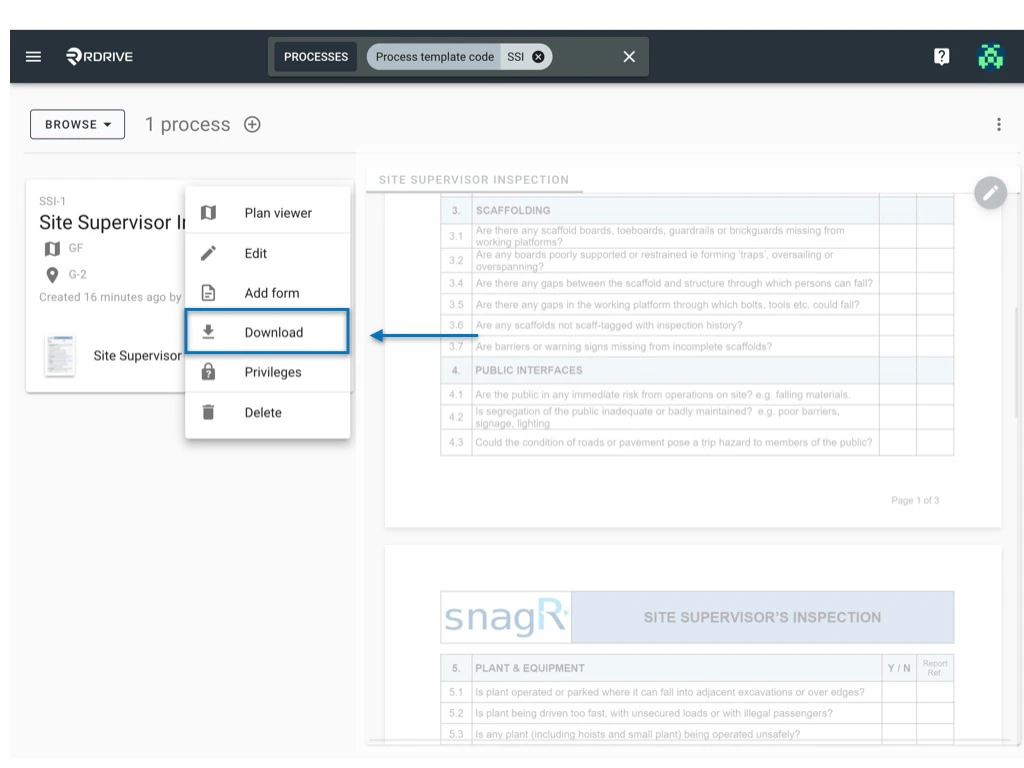
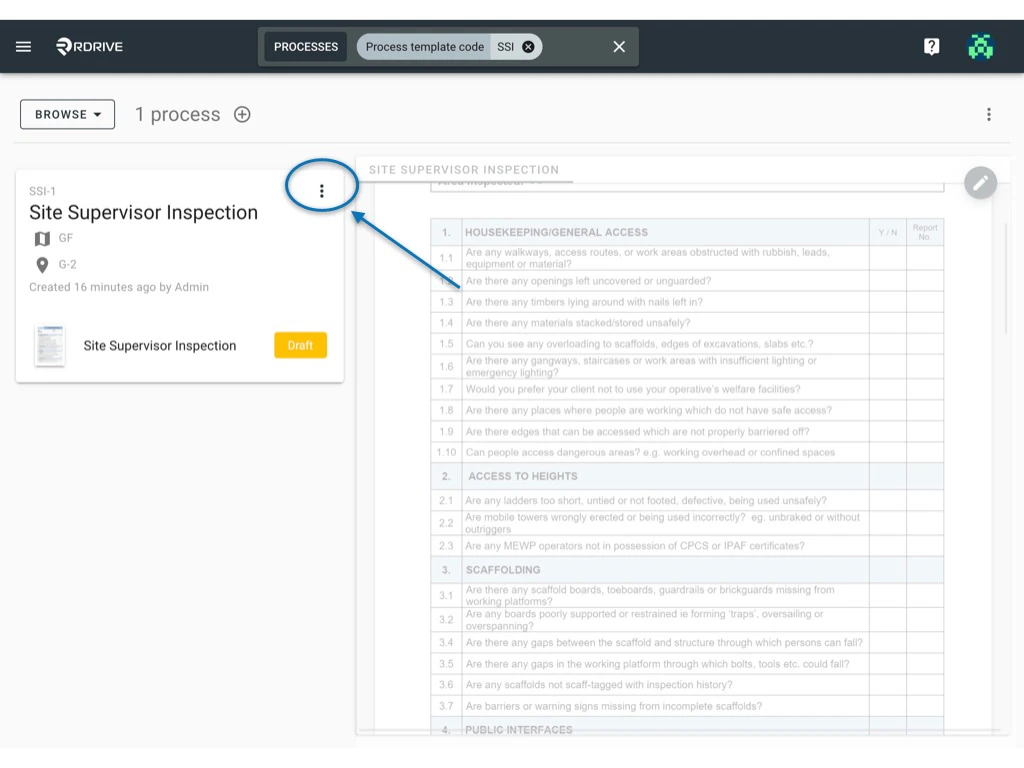
Click the 3 dots **⋮** icon on the upper-left hand side of your screen as circled below and select "**Download**" from the Menu options as shown below.
<img src="https://mintcdn.com/rdrive/SmEwcZ68fksIYiu-/images/kb/103000035211/fFg9eBhGqSedmIKMSvsWjTfKYg1PPT3xtg.jpeg?fit=max&auto=format&n=SmEwcZ68fksIYiu-&q=85&s=e239938bf0b43022037a3cce8f687fe1" alt="Can I export the entire process as PDF?" width="1024" height="768" data-path="images/kb/103000035211/fFg9eBhGqSedmIKMSvsWjTfKYg1PPT3xtg.jpeg" />

<img src="https://mintcdn.com/rdrive/SmEwcZ68fksIYiu-/images/kb/103000035211/iqksrPHa6_qtYLMwWg56_-y4TDlflM1QEQ.jpeg?fit=max&auto=format&n=SmEwcZ68fksIYiu-&q=85&s=bdedb233be7c6c1261c7bfb68e9953e9" alt="Can I export the entire process as PDF?" width="1024" height="768" data-path="images/kb/103000035211/iqksrPHa6_qtYLMwWg56_-y4TDlflM1QEQ.jpeg" />

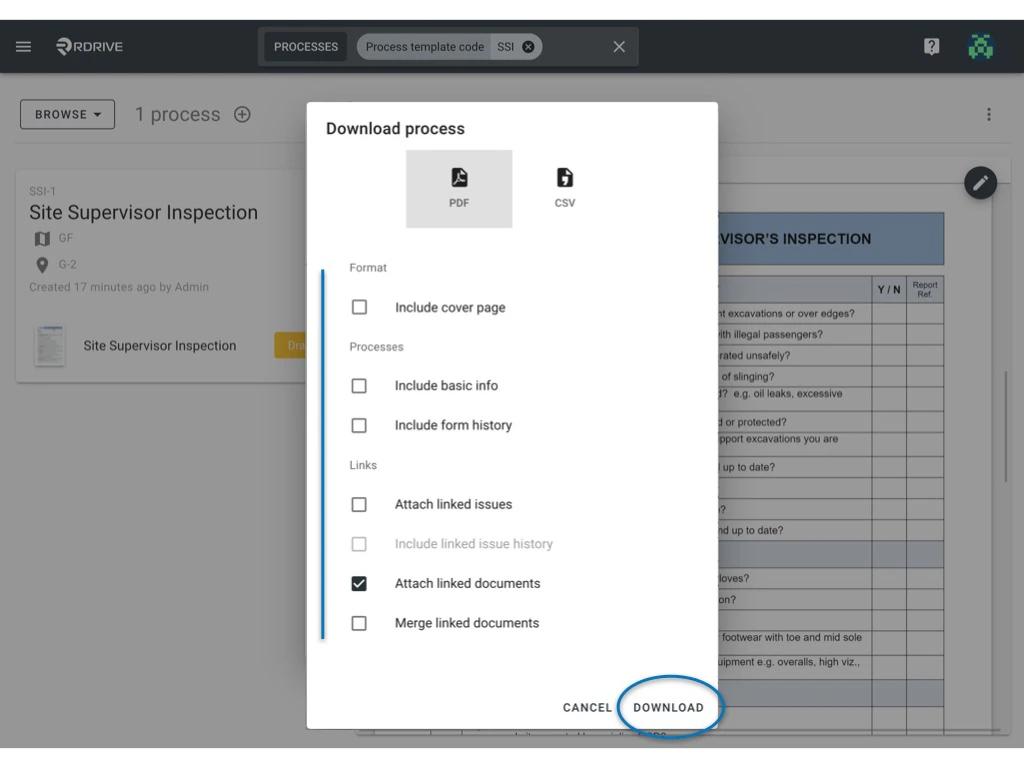
Select your download preference from the resulting list here and click "**DOWNLOAD**"
<img src="https://mintcdn.com/rdrive/SmEwcZ68fksIYiu-/images/kb/103000035211/61eRNWWQKOKLddmZYk-qKf9tSoWg_7OVFA.jpeg?fit=max&auto=format&n=SmEwcZ68fksIYiu-&q=85&s=88ae4d3fabe73470fbe5a9bfa4e5dad0" alt="Can I export the entire process as PDF?" width="1024" height="768" data-path="images/kb/103000035211/61eRNWWQKOKLddmZYk-qKf9tSoWg_7OVFA.jpeg" />

All done. Your process is downloaded!

**What if there are numerous processes that have to be downloaded?** 

Not to worry, in **RDrive** you can download processes by batch. Let's go through how to do this below.

## **Batch Download**

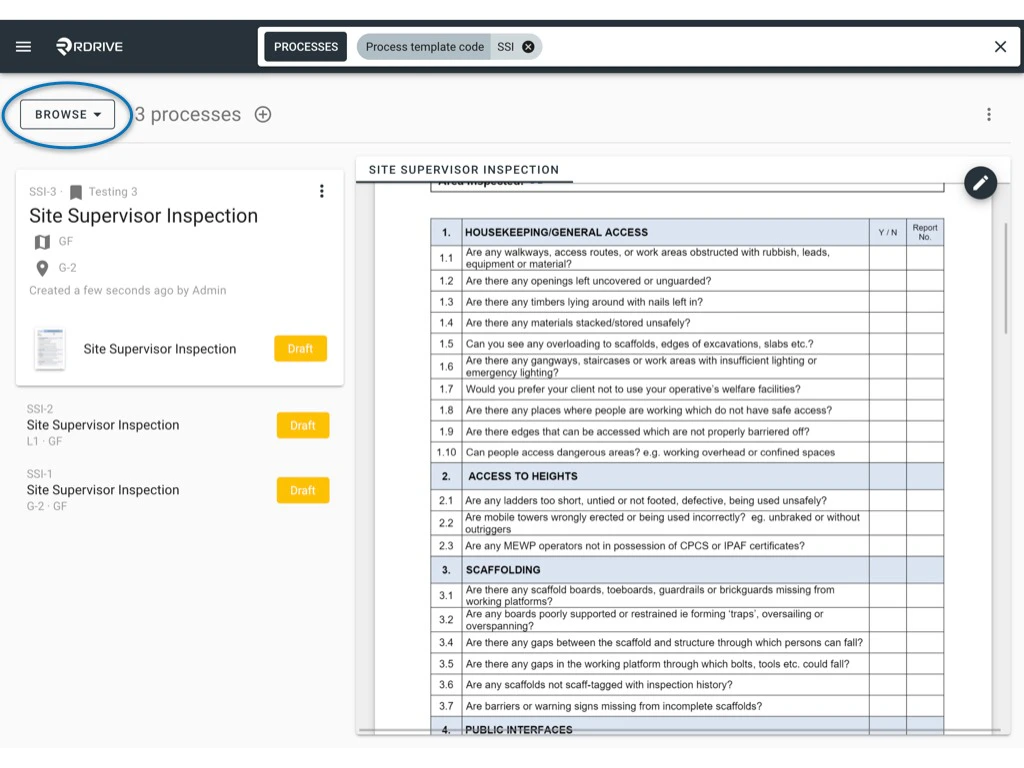
After filtering the required process you need to export as PDF, choose "**SELECT**" by pressing the circled drop-down shown below.
<img src="https://mintcdn.com/rdrive/SmEwcZ68fksIYiu-/images/kb/103000035211/ETNm2rCUn4j0_aLZri-bdfLMFfIbq3-34g.jpeg?fit=max&auto=format&n=SmEwcZ68fksIYiu-&q=85&s=b0f249e28a42540aaaa88d73babe8146" alt="Can I export the entire process as PDF?" width="1024" height="768" data-path="images/kb/103000035211/ETNm2rCUn4j0_aLZri-bdfLMFfIbq3-34g.jpeg" />

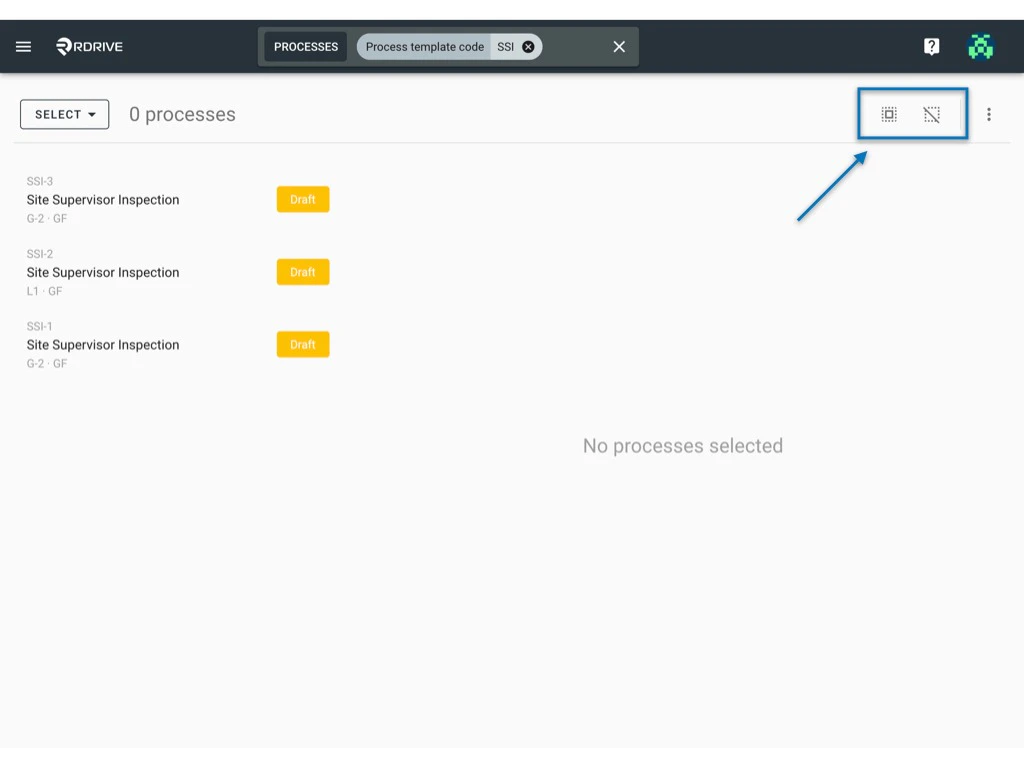
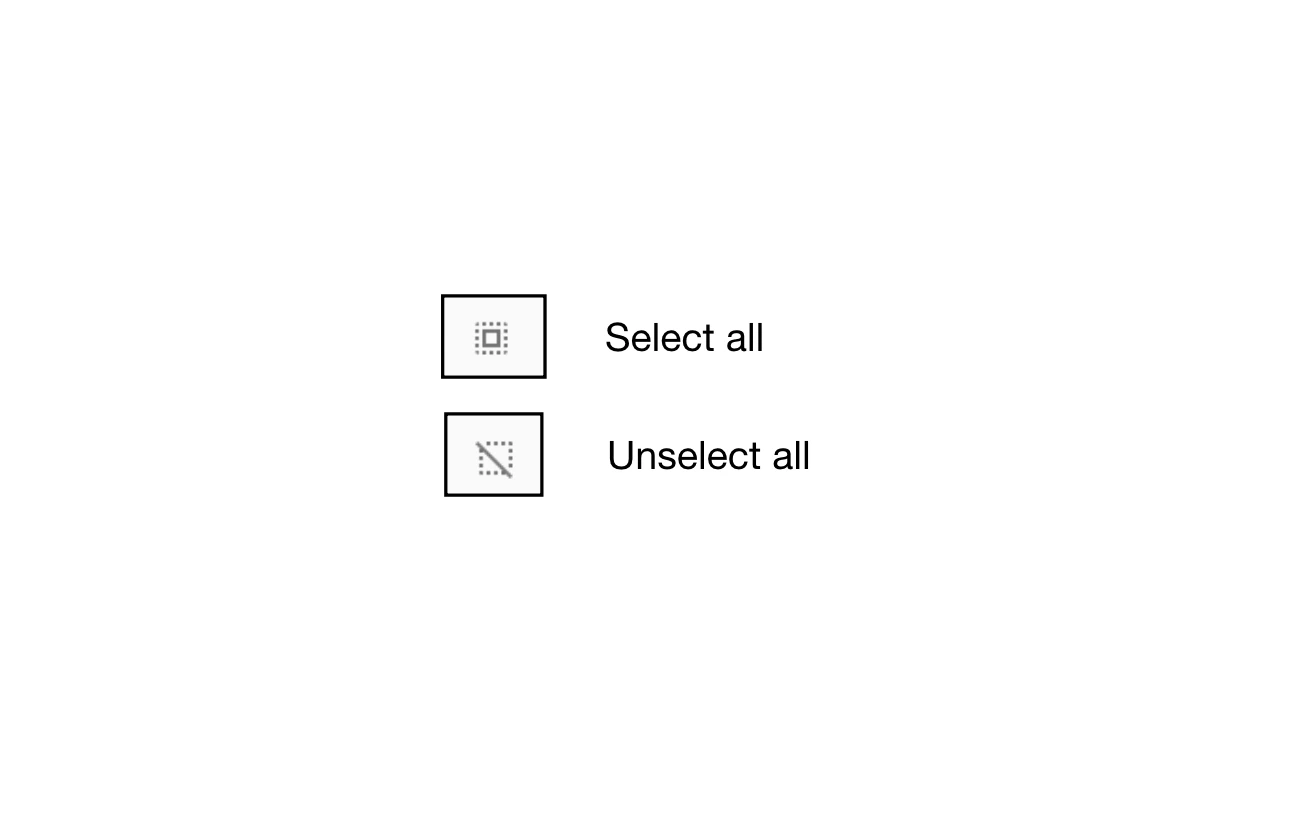
Once in "**SELECT**" mode, you will see there are two icons at the top right corner. These are shown below for clarity.
<img src="https://mintcdn.com/rdrive/SmEwcZ68fksIYiu-/images/kb/103000035211/tAv6YTIr0KUFd5rgJwovAhBLQ5-HHL4a_w.jpeg?fit=max&auto=format&n=SmEwcZ68fksIYiu-&q=85&s=143e305f6e1288f0e06fe4fc2b9a9cf0" alt="Can I export the entire process as PDF?" width="1024" height="768" data-path="images/kb/103000035211/tAv6YTIr0KUFd5rgJwovAhBLQ5-HHL4a_w.jpeg" />

<img src="https://mintcdn.com/rdrive/SmEwcZ68fksIYiu-/images/kb/103000035211/g5MfiKrw8M3Utc7ATjsXM1EAsu8FyWldZQ.png?fit=max&auto=format&n=SmEwcZ68fksIYiu-&q=85&s=04cb14172fdf469cbacb2cbebe3b26f3" alt="Can I export the entire process as PDF?" width="1316" height="830" data-path="images/kb/103000035211/g5MfiKrw8M3Utc7ATjsXM1EAsu8FyWldZQ.png" />

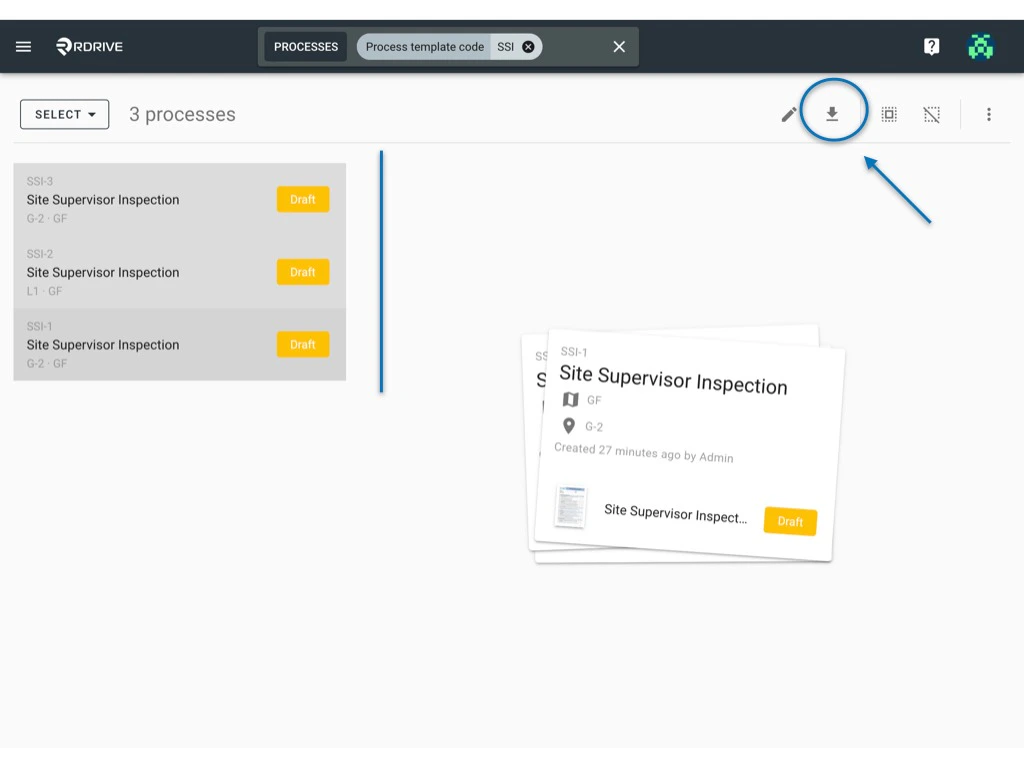
Click the "**Select all**" icon and then click the "**Download**"  button next to it (circled below).
<img src="https://mintcdn.com/rdrive/SmEwcZ68fksIYiu-/images/kb/103000035211/U2MqKxPr0Ws17EAzyJ8aNp0RwS_-pSWung.jpeg?fit=max&auto=format&n=SmEwcZ68fksIYiu-&q=85&s=f942cd3899db945183b2209c6938cb1a" alt="Can I export the entire process as PDF?" width="1024" height="768" data-path="images/kb/103000035211/U2MqKxPr0Ws17EAzyJ8aNp0RwS_-pSWung.jpeg" />

<img src="https://mintcdn.com/rdrive/SmEwcZ68fksIYiu-/images/kb/103000035211/bNfNcprQOcsV8cDL-bLkR-hzfLo8emXjFw.jpeg?fit=max&auto=format&n=SmEwcZ68fksIYiu-&q=85&s=749caa1b81326c8f64b8b5375cca455b" alt="Can I export the entire process as PDF?" width="1024" height="768" data-path="images/kb/103000035211/bNfNcprQOcsV8cDL-bLkR-hzfLo8emXjFw.jpeg" />

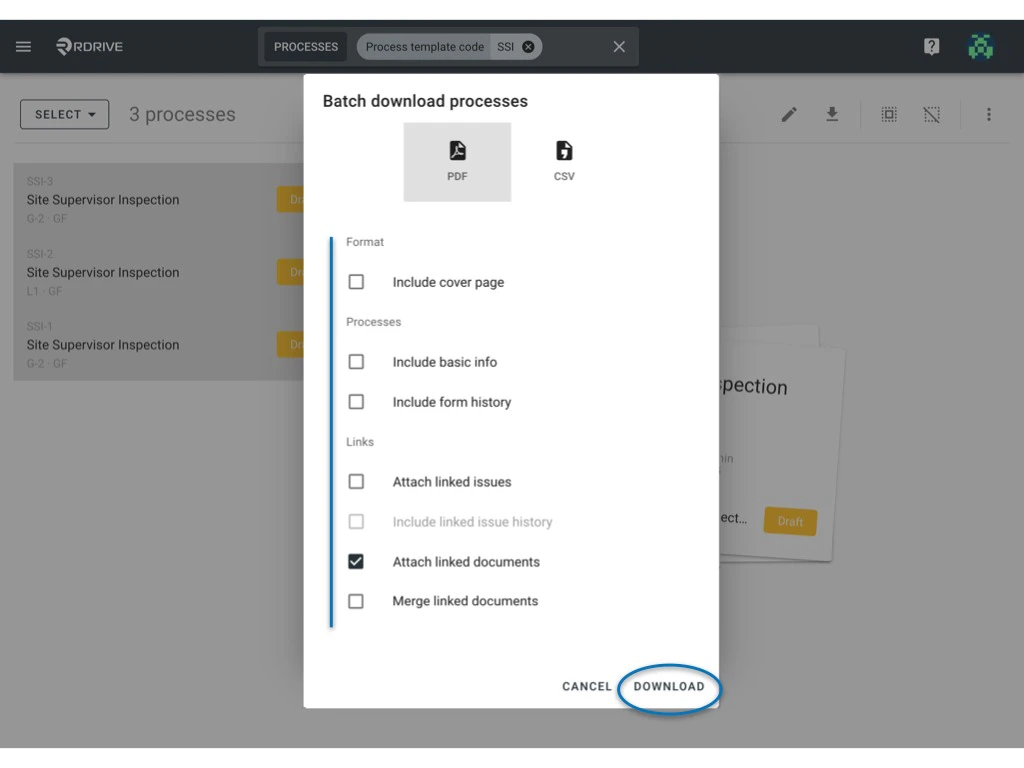
Select your download preference from the resulting list and press "**DOWNLOAD**". Your batch download is complete!