> ## Documentation Index
> Fetch the complete documentation index at: https://docs.rdrive.io/llms.txt
> Use this file to discover all available pages before exploring further.
# How to Download Process with Linked Content
> This guide explains how to export process forms as PDFs, including any linked documents or issues.
### **Overview**
*This guide explains how to export process forms as PDFs, including any linked documents or issues.*
* **Purpose:** To assist users in exporting process forms with their associated documents and item(s) as a single PDF.
* **Who It’s For:** General users
Prerequisites: Access to the system's process forms
***
**TABLE OF CONTENTS**
* [Step-by-Step Instructions](#step-by-step-instructions)
* [✅ Step 1: Access the Export Options](#%e2%9c%85-step-1%3a-access-the-export-options)
* [✅ Step 2: Configure Export Preferences](#%e2%9c%85-step-2%3a-configure-export-preferences)
* [✅ Step 3: Execute the Export](#%e2%9c%85-step-3%3a-execute-the-export)
* [FAQs & Troubleshooting](#faqs-&-troubleshooting)
***
## **Step-by-Step Instructions**
### ✅ **Step 1: Access the Export Options**
* Navigate to the desired process form or select multiple forms for batch exporting.
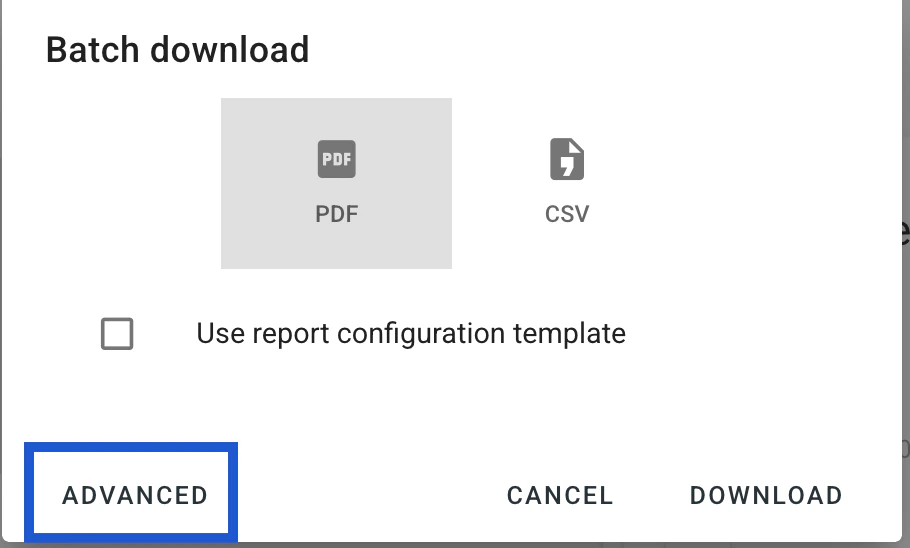
* **Click on the Advanced button** at the bottom left of the window to reveal additional export settings.
 ### ✅ **Step 2: Configure Export Preferences**
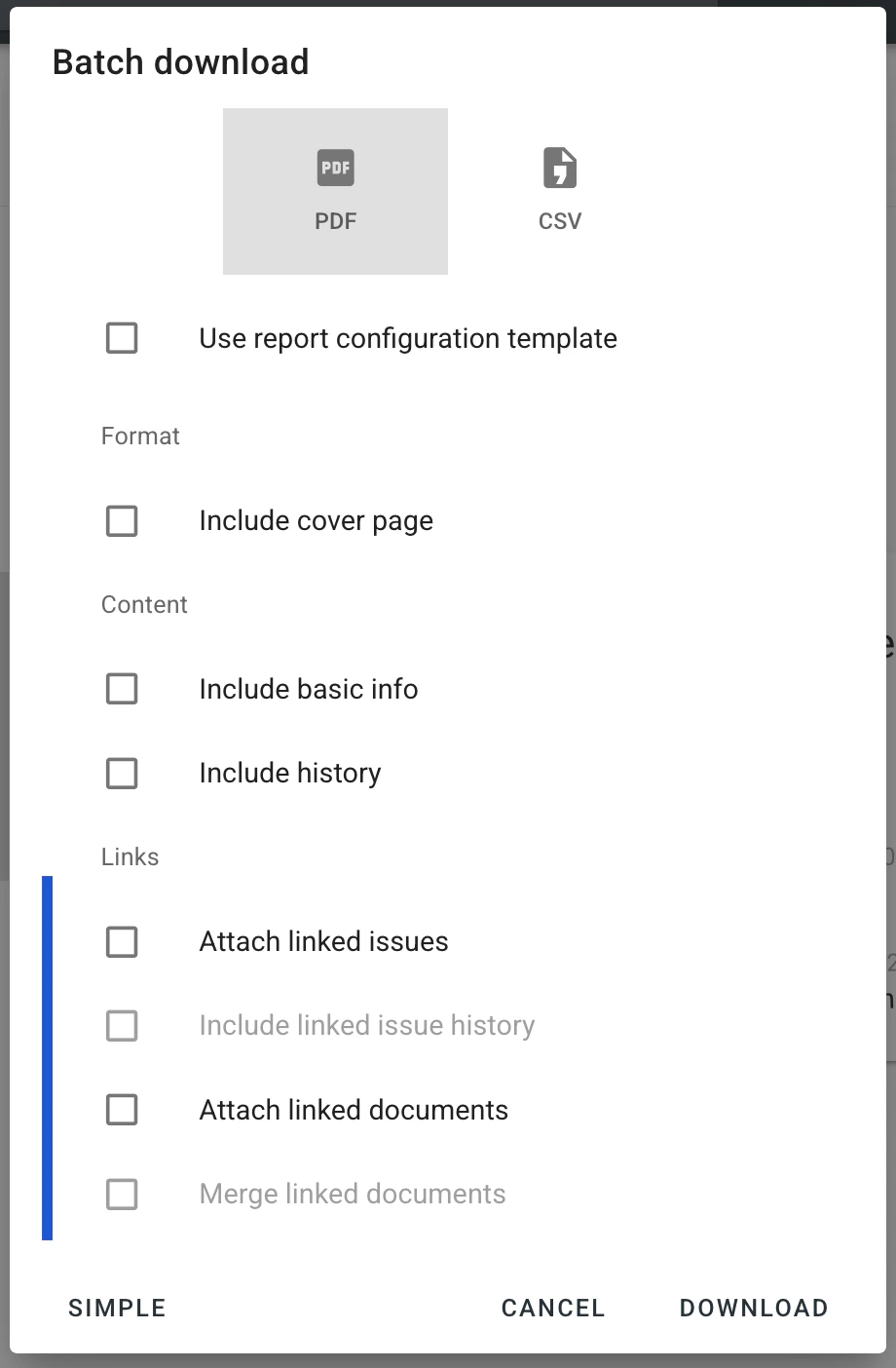
* In the Download Process menu, you'll find several options:
* **Attach documents:** Includes linked documents with the exported form.
* **Merge documents:** If linked documents are in PDF format, merges them with the form into a single PDF.
* **Attach issues:** Includes linked issues, merging their records with the form into one PDF.
* **Include issue history:** Includes linked issues along with their history records; the download will be in ZIP format.
* Select the desired checkboxes based on your export requirements.\\
### ✅ **Step 2: Configure Export Preferences**
* In the Download Process menu, you'll find several options:
* **Attach documents:** Includes linked documents with the exported form.
* **Merge documents:** If linked documents are in PDF format, merges them with the form into a single PDF.
* **Attach issues:** Includes linked issues, merging their records with the form into one PDF.
* **Include issue history:** Includes linked issues along with their history records; the download will be in ZIP format.
* Select the desired checkboxes based on your export requirements.\\
 ### ✅ **Step 3: Execute the Export**
* After configuring your preferences, proceed with the export by confirming or clicking the **DOWNLOAD** button.
* The system will generate the PDF (or ZIP file if including non-PDF linked documents) with the selected options.
***
## **FAQs & Troubleshooting**
❓ **Why are linked documents not appearing in the exported PDF?**
✔️ Ensure that the **Attach documents** option is selected before initiating the export.
❓ **Can I merge non-PDF documents with the process form into a single PDF?**
✔️ No, only linked documents in PDF format can be merged using the **Merge documents** option.
❓ **Why is the export resulting in a ZIP file instead of a PDF?**
✔️ If the **linked document** is not a PDF file type, the system exports the form and its linked non-PDF document in a ZIP file.
***
To learn more about download forms, click here:
[Can I export the entire process as a PDF?](https://docs.rdrive.io/web/forms/export/can-i-export-the-entire-process-as-pdf)
[Download a CSV export file for processes.](https://docs.rdrive.io/web/forms/export/download-a-csv-export-file-for-processes)
For further assistance, refer to the system's knowledge base or contact support.
### ✅ **Step 3: Execute the Export**
* After configuring your preferences, proceed with the export by confirming or clicking the **DOWNLOAD** button.
* The system will generate the PDF (or ZIP file if including non-PDF linked documents) with the selected options.
***
## **FAQs & Troubleshooting**
❓ **Why are linked documents not appearing in the exported PDF?**
✔️ Ensure that the **Attach documents** option is selected before initiating the export.
❓ **Can I merge non-PDF documents with the process form into a single PDF?**
✔️ No, only linked documents in PDF format can be merged using the **Merge documents** option.
❓ **Why is the export resulting in a ZIP file instead of a PDF?**
✔️ If the **linked document** is not a PDF file type, the system exports the form and its linked non-PDF document in a ZIP file.
***
To learn more about download forms, click here:
[Can I export the entire process as a PDF?](https://docs.rdrive.io/web/forms/export/can-i-export-the-entire-process-as-pdf)
[Download a CSV export file for processes.](https://docs.rdrive.io/web/forms/export/download-a-csv-export-file-for-processes)
For further assistance, refer to the system's knowledge base or contact support.