> ## Documentation Index
> Fetch the complete documentation index at: https://docs.rdrive.io/llms.txt
> Use this file to discover all available pages before exploring further.
# Can I comment and notify someone of a specific issue/defect/record?
> A brief introduction explaining the purpose of this guide.
### **Overview**
*A brief introduction explaining the purpose of this guide.*
* **Purpose:** How to comment and notify users to a specific issue/defect/record
* **Who It’s For:** General users
Prerequisites: RDrive access
You may want to direct a user to a specific issue, ask for more information or ask qualifying questions on issues from time to time, in this guide we will cover how to add comments and tag specific users or teams to notify them through email.
***
### **via Issue Finder**
**Press the Menu icon ≡ in the top left corner of your screen to access the side menu, then select the category for the issue/defect/record as shown below:**
 **In this example, Quality then Defects.**
 Choose the issue/defect/record in question and scroll down to the comments area once the details are shown.
Click on the person silhouette located beneath the comments section circled below. This is our "**User"** icon.
Once pressed a window will enlarge on your screen for you to select the User(s) to notify.
Choose the issue/defect/record in question and scroll down to the comments area once the details are shown.
Click on the person silhouette located beneath the comments section circled below. This is our "**User"** icon.
Once pressed a window will enlarge on your screen for you to select the User(s) to notify.
 Select the relevant user(s) to be notified. Once completed, press **"OK"** to confirm.
 After your User confirmation is complete, you can then type in your message/comment and click "**COMMENT**" to send.
You will then be able to view the comment on the screen as shown below.
After your User confirmation is complete, you can then type in your message/comment and click "**COMMENT**" to send.
You will then be able to view the comment on the screen as shown below.
 This will then show as below as a comment tagging the user(s) in the Issue/defect/record.
 The comment has been logged. Now your comment will be sent out via email to the mentioned User(s) to notify them.
Below is a sample of the User's email receipt.
The comment has been logged. Now your comment will be sent out via email to the mentioned User(s) to notify them.
Below is a sample of the User's email receipt.
 ***
### **via Plan Viewer**
**Press the Menu icon ≡ in the top left corner of your screen to access the side menu, then select the Plan Viewer t**hen navigate to the correct drawing.
***
### **via Plan Viewer**
**Press the Menu icon ≡ in the top left corner of your screen to access the side menu, then select the Plan Viewer t**hen navigate to the correct drawing.

 Select the relevant issue/defect/record pin as highlighted below. Once chosen, the details will display on the left-hand side of your screen. Scroll down the details display until you reach the comments area.
 Scroll down on the Issue/defect/record on the left panel to access the comment section.
 Click on the person silhouette located beneath the comments section circled below. This is our "**User"** icon.
Once pressed a window will enlarge on your screen for you to select the user(s) to notify.
Click on the person silhouette located beneath the comments section circled below. This is our "**User"** icon.
Once pressed a window will enlarge on your screen for you to select the user(s) to notify.
 After your User confirmation is complete, you can then type in your message/comment and click "**COMMENT**" to send.
You will then be able to view the comment as shown below.
After your User confirmation is complete, you can then type in your message/comment and click "**COMMENT**" to send.
You will then be able to view the comment as shown below.

 After your User confirmation is complete, you can then type in your message/comment and click "**COMMENT**" to send.
You will then be able to view the comment as shown below.
After your User confirmation is complete, you can then type in your message/comment and click "**COMMENT**" to send.
You will then be able to view the comment as shown below.
 **Made a mistake?**
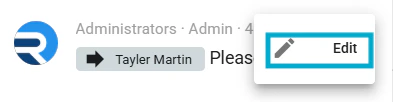
You can only edit the comment within the first 5 mins of it being added, if a mistake is noticed within 5 minutes, this can be edited by pressing the 3 dots circled below which will allow your comment to be edited.
**Made a mistake?**
You can only edit the comment within the first 5 mins of it being added, if a mistake is noticed within 5 minutes, this can be edited by pressing the 3 dots circled below which will allow your comment to be edited.