> ## Documentation Index
> Fetch the complete documentation index at: https://docs.rdrive.io/llms.txt
> Use this file to discover all available pages before exploring further.
# How do I generate an issue/defect/record report?
> A brief introduction explaining the purpose of this guide.
### **Overview**
*A brief introduction explaining the purpose of this guide.*
* **Purpose:** Generating issue/defect/record reports
* **Who It’s For:** General users
Prerequisites: Able to read issue/defect/record
The first thing you may want to know about RDrive issue reports is that we now fully support **[customised report layout](https://docs.rdrive.io/setup/company/categories/categories-issue-record-template/design-an-issue-record-report-template).**
This means that we not only provide a standard template, but also enables the capacity and flexibility to create multiple report templates to suit the specific needs of different stakeholders.
If you have your specific requirements/ideas for the report layout, please contact your company/project admin.
**TABLE OF CONTENTS**
* [Via Plan Viewer](#via-plan-viewer)
* [Via Issue Finder](#via-issue-finder)
* [To Batch Download](#to-batch-download)
***
## **Via Plan Viewer**
Simply press the Menu icon ≡ in the top left corner of your screen to unfold the Menu and gain access to the Plan Viewer. Then you select the correct drawing.

 Choose your issue/defect/record pin as circled below.
Once selected, the details will display on the upper left-hand side of your screen. You will then need to press the 3 dots ⋮ button at the top right corner of the detail display.
Choose your issue/defect/record pin as circled below.
Once selected, the details will display on the upper left-hand side of your screen. You will then need to press the 3 dots ⋮ button at the top right corner of the detail display.

 Once the Menu has unfolded, press "**Download**" and the download options for this issue/defect/record will be enlarged on your screen within the window as shown below.
Select your desired report template from the window options. All you need do now is click "**Download**" to download your report.
Once the Menu has unfolded, press "**Download**" and the download options for this issue/defect/record will be enlarged on your screen within the window as shown below.
Select your desired report template from the window options. All you need do now is click "**Download**" to download your report.
 From here this will display the download window, select **"Advanced"** to see additional download options and configuration.
 Make any selections required the click "Download".
 If you have a custom issue report template in place, you can select this as circled below to run your report.
 ***
## **Via Issue Finder**
Simply press the Menu icon ≡ in the top left corner of your screen to unfold the Menu and gain access to the Issue page by selecting the category and subcategory as shown below.
***
## **Via Issue Finder**
Simply press the Menu icon ≡ in the top left corner of your screen to unfold the Menu and gain access to the Issue page by selecting the category and subcategory as shown below.

 Select your issue/defect/record.
Click the Menu ≡ button on the right-hand side of your screen to unfold the Menu as shown below.
Select "**Download**" and the download options for this issue/defect/record will be enlarged on your screen within the window as shown below.
Select your desired report template from the window options. All you need do now is click "**Download**" to download your report.
Select your issue/defect/record.
Click the Menu ≡ button on the right-hand side of your screen to unfold the Menu as shown below.
Select "**Download**" and the download options for this issue/defect/record will be enlarged on your screen within the window as shown below.
Select your desired report template from the window options. All you need do now is click "**Download**" to download your report.


 If you have a custom issue report template in place, you can select this as circled below to run your report.
 ***
## **To Batch Download**
To download a batch of multiple issues/defects/records, you must first switch the mode from "**Browse**" to "**Select**" as shown below.
When in "**Select**" mode, you can select multiple issues to export the report as necessary.
***
## **To Batch Download**
To download a batch of multiple issues/defects/records, you must first switch the mode from "**Browse**" to "**Select**" as shown below.
When in "**Select**" mode, you can select multiple issues to export the report as necessary.

 You also have the option of refining your download whereby you can filter and search the relevant issues/defects/records.
This can be done via the search bar located at the top of your screen as shown below.
You also have the option of refining your download whereby you can filter and search the relevant issues/defects/records.
This can be done via the search bar located at the top of your screen as shown below.
 Press the desired issue(s)/defect(s)/record(s) on the left-hand side of your screen, the selected issue(s)/defect(s)/record(s) will be highlighted in grey as shown below. Once you are happy with the issues/defects/records selected, press the "**Download**" button highlighted in the image below.
If you wish to batch download all of the issues/defects/records listed on the left-hand side of your screen there is an even easier way to do this. This can be done by pressing the "**Select All**" button circled below (left) followed by the "**Download**" button highlighted below.
Pressing the "**Deselect All**" button circled below (right) will remove all chosen selections listed.
Press the desired issue(s)/defect(s)/record(s) on the left-hand side of your screen, the selected issue(s)/defect(s)/record(s) will be highlighted in grey as shown below. Once you are happy with the issues/defects/records selected, press the "**Download**" button highlighted in the image below.
If you wish to batch download all of the issues/defects/records listed on the left-hand side of your screen there is an even easier way to do this. This can be done by pressing the "**Select All**" button circled below (left) followed by the "**Download**" button highlighted below.
Pressing the "**Deselect All**" button circled below (right) will remove all chosen selections listed.


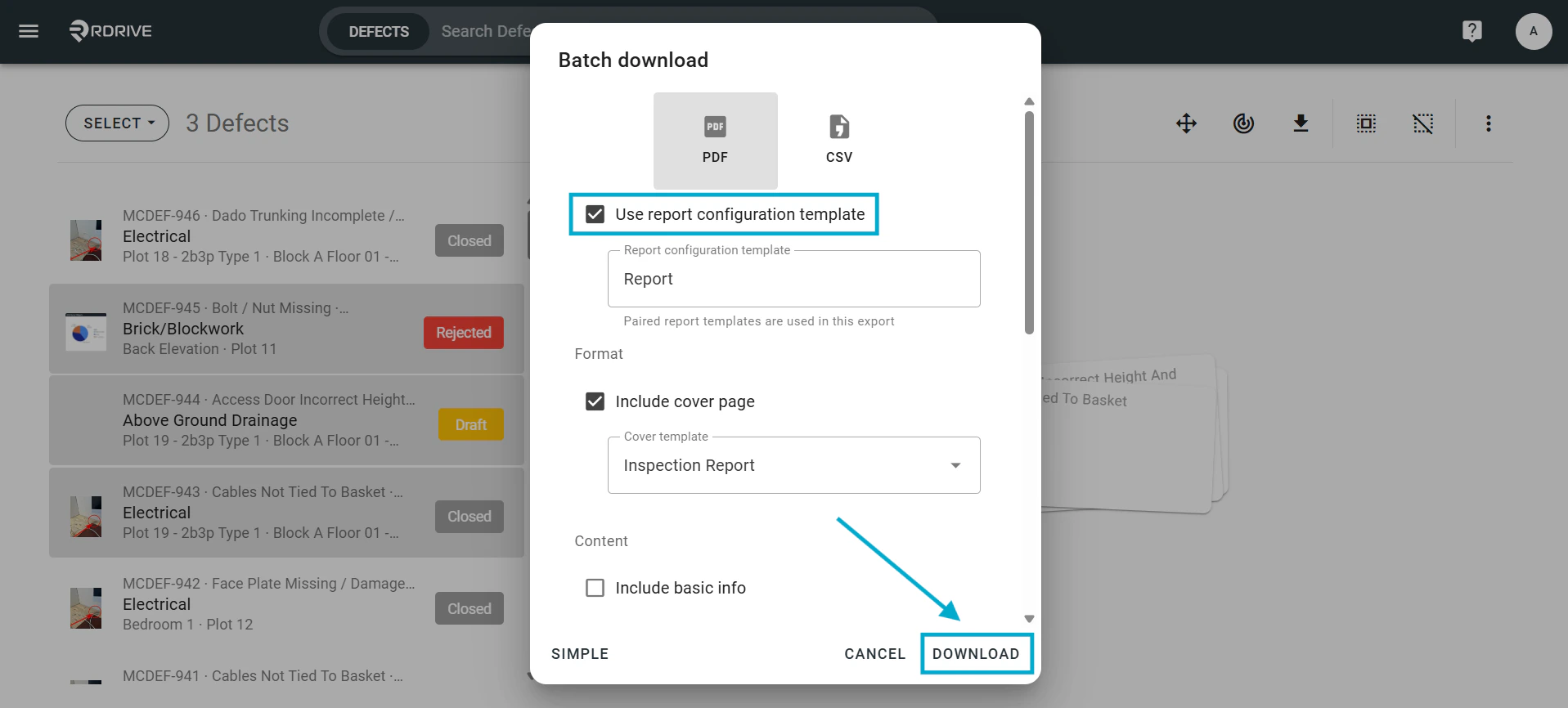
 As above, the option is available to use your custom issue report template if in place. You can select this as circled below to run your report.