

What does the Project Overview offer
The Project Overview Report provides a comprehensive, real-time view of project performance and activity. This powerful tool is included with every project, offering valuable insights to help teams monitor activities, identify trends, and make informed decisions. Designed for clarity and ease of use, the report ensures all users can access the data they need while maintaining strict permission controls.Key Features of the Report
- Permission-Based Access: Users only see the information they are authorized to view, ensuring data security and compliance.
- Included with Every Project: The report is a standard feature, provided to all customers at no additional cost.
- Data Export Options: Export data from any visual into formats like Excel, PDF, or Word, enabling offline analysis and reporting.
- Real-Time Updates: The report reflects the latest project activity, providing up-to-the-minute accuracy.
- Standardised Design: Ensuring consistency in reporting style across multiple projects
Project Overview Provides a high-level summary of your project, including total items, sub-items, and assignments. Drill down into specific categories to track the status and progress of key activities

- Tabbed Navigation - Switch seamlessly between pages like Teams, Drawings, Documents, Controllers, and Activity for holistic project management
- Tasks Assigned- View Total Items, Sub Items, and tasks Assigned to Teams or You in real-time
- Project Summary Breakdown -
- Categorised into your organisations key areas such as Quality, HSE, Permits, Firestopping, Damage and many more.
- Each category expands to display the number of items and their current status, indicated by color-coded groups for easy identification (e.g., Open, Draft, Ready for Signoff).
- Status-Based Navigation -
- Clicking on any status opens a detailed list in a new page, allowing you to deep-dive into specific items.
- This feature helps streamline workflows by directing focus to tasks needing immediate attention.
Teams (and Drawings)
Offers insights into team contributions, showing a breakdown of tasks assigned, in progress, and completed by each team. Use this page to monitor workload distribution and ensure balanced collaboration.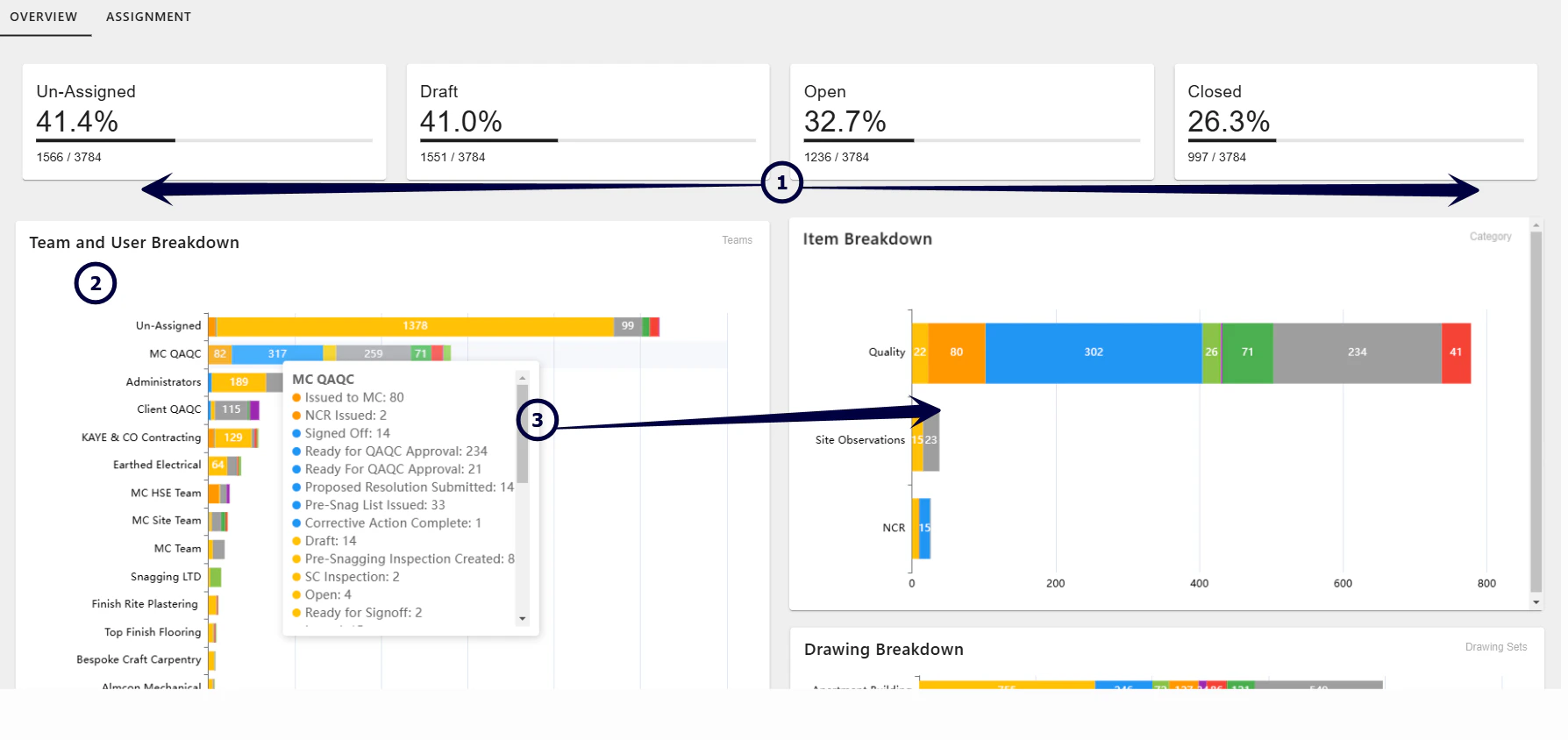
- Overview - showing a breakdown of activty that requires assigning and the progress of currently assigned activities
- Team and User Breakdown -
- Detailed bar charts showcase item distribution among teams and individual users.
- Easily spot unassigned tasks or review workloads to ensure balanced resource allocation
- Interactive Navigation - Select any status or category to drill deeper into the data, allowing for targeted problem-solving and efficient task management.
Documents
Centralises all project-related documents, displaying metrics such as total documents, storage usage, and uploads over time. Easily track document ownership and types for streamlined file management.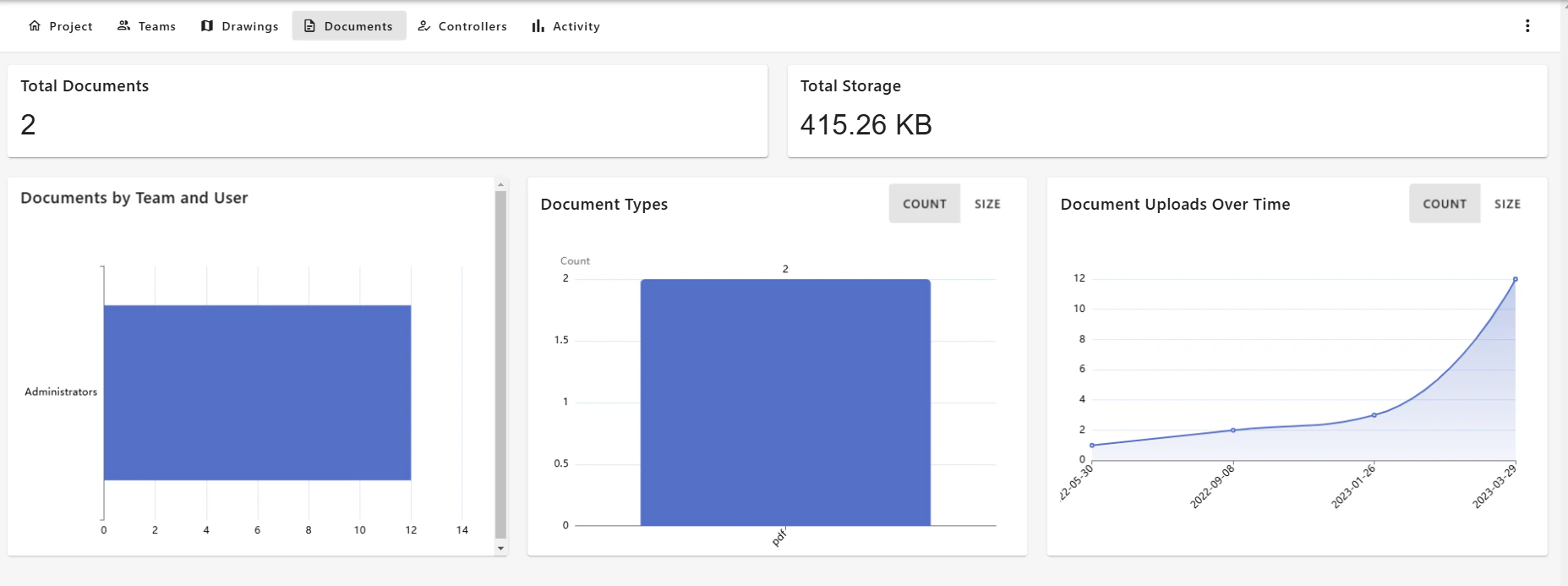
- Access the Documents page to review files stored in the Project Document Repository
- Total Documents uploaded.
- Total Storage used.
Controllers
The Controllers page provides an in-depth view of the items your team is managing or has created within the project. It ensures clarity over ownership, responsibility, and contributions, making it a key resource for tracking accountability and distribution
- Item Breakdown Chart - Categorizes items (e.g., Quality, Permits, Fire Assessment) and their status using color codes, similar to the Teams page. This allows for quick analysis of each category’s workload and current state.
- Controller Breakdown Pie Chart -
- Visualizes the distribution of controlled items among teams
- For example, percentages for Administrators, QA/QC teams, and other contributors help identify key stakeholders and their roles in project management.
Activity
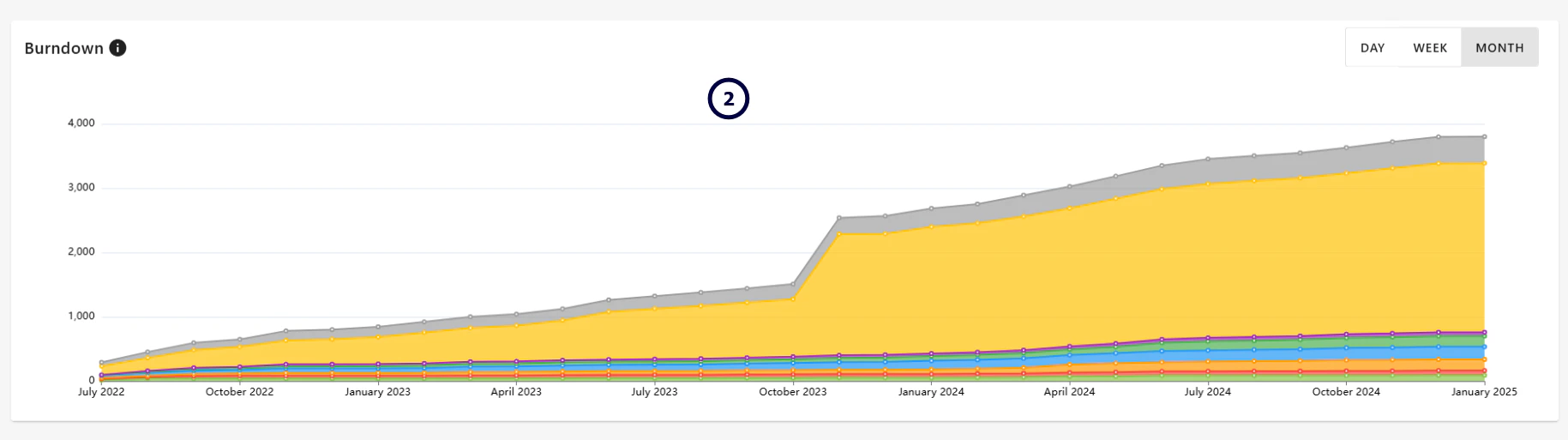
Presents a detailed analysis of project activity grouped by item, team, and location. Color-coded visuals and drill-down options help you focus on trends, performance, and specific areas of interest.
- Activity by Item / Team / Location -
- Displays all activity grouped by Item, Team, and Location.
- Color-coded for easy identification of their current status (e.g., Open, Draft, or Completed).
- Allows you to select specific categories or bars to drill down into detailed data, such as individual items or locations contributing to overall activity.
- Burndown Chart - Tracks the accumulation and resolution of items over time
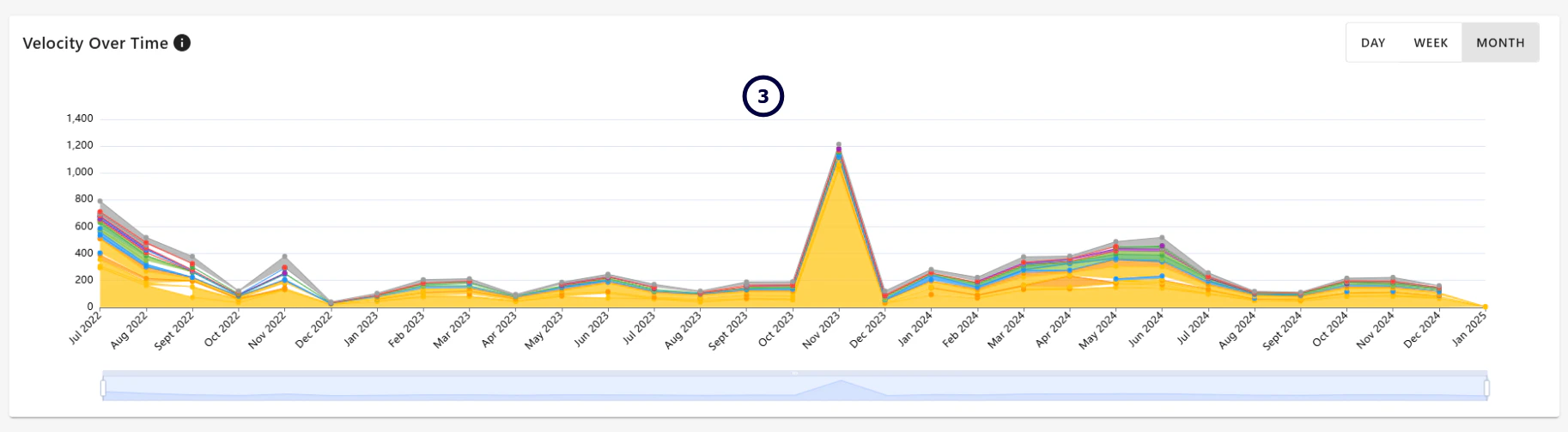
- Velocity Over Time -
- Line chart visualizing activity trends over time, showing the rate at which items are being addressed.
- includes a date slider to narrow the focus of analysis to a specific period of time
- Adjustable views for day, week, or month to provide flexible analysis of activity patterns.
Downloading Data from Dashboard Tables
Data displayed within tables on the dashboard can be downloaded for further analysis, sharing or reporting. This functionality is available from table data throughout the report, so you can export the information relevant to the area you are reviewing. Before downloading, you can use the Search field within the table to narrow the results. The download can then be generated using the available reporting options. Download the Data- Locate the table containing the data you want to report on.
- Use Search to refine the table results if required.
- Select the Download icon in the top-right of the table.
- The Download Report window will open.
- Choose how you want the information to be presented.
- Select the required file format and any additional options.
- Select Generate Report.
Grid Reports
A Grid report exports the detailed information contained within the table. Depending on the selected file format, additional options may be available. For example, when generating a PDF you can select the required page size, such as A4 or A3. This is useful when you need a detailed record of the information displayed in the dashboard.Numeric Reports
A Numeric report allows the information to be summarised rather than showing each individual item. You can select how the data should be grouped using Report Type. For example, the data could be reported By Category, allowing you to see the number of items belonging to each category. This is useful when you want a summary of the dashboard data rather than a detailed item-by-item report.Available File Formats
Reports can be generated in different file formats depending on how you want to use the information. For example, you may want a PDF for sharing or presentation, or an Excel file when you need to work with the underlying data further.Other Reporting Options
Issue Analysis
For more detailed analysis of Issues, the Issue Analysis Dashboard provides additional filtering, visualisation, analysis and data export capabilities. Use Issue Analysis when you need to explore Issue-specific trends and performance in more detail. What does the Issue Analysis Dashboard Offer**Searching and reporting from the List
** Searching and reporting from the List View is useful when you need to find, select and download specific items. RDrive also provides reporting and analytics tools for a wider view of your project. Searching & ReportingFAQs & Troubleshooting
Q: Can I download data from Project Overview? A: Yes. Data can be downloaded from tables throughout Project Overview. Select the Download option from the relevant table, then choose the report type and format you require. Q: Can I drill down into the information shown in Project Overview? A: Yes. Project Overview is interactive, allowing you to explore the information displayed and drill down into areas where more detail is required. Q: Can I search within a table?A: Yes. Where a table includes a Search option, you can use this to narrow the information displayed before reviewing or downloading the data. Q: What’s the difference between a Grid and Numeric report? A: A Grid report provides the detailed table data, while a Numeric report summarises the information using the selected Report Type, such as grouping the results by Category. Q: Can I export Project Overview data to Excel? A: Yes. Where Excel is available as a download format, you can export the data to work with it outside RDrive. **Q: Why can’t I see the information I expect in Project Overview?
**A: Check any filters currently applied to the dashboard. Filters can affect the information displayed across the report. You should also check that you have access to the relevant project information. **Q: Can I download a PDF report?
**A: Yes. Select PDF as the required format when generating your report. Additional options, such as the page size, may be available. Q: Does searching or filtering affect the data I download?
A: Yes. Apply the required searches and filters before downloading when you only want to report on a particular subset of the data. **Q: What’s the difference between Project Overview and reporting from the List View?
**A: Use Project Overview when you want a broader view of project activity, trends and project data. Use the List View when you need to find specific items and produce individual or batch item reports. For more information, see Searching & Reporting from the List View.