
Understanding the Relationship Between Process and Form
A Process must include at least one Form, but it can have multiple Forms. When a Process is created, it automatically generates the associated Form(s) since they are linked as a single entity. However, actions on the Process and the Form can be managed separately.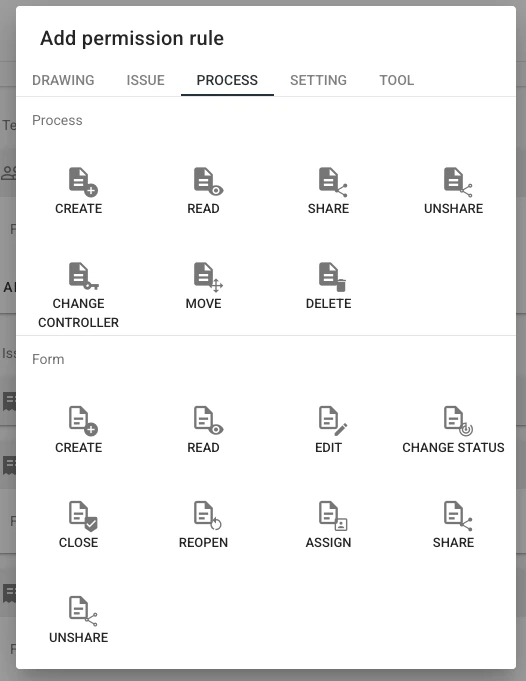
TABLE OF CONTENTS
Common Actions
Both Process and Form permissions share the following common actions:- Create
- Read
- Share
- Unshare
Differences in Actions
Action Process Permission Form Permission Create Creating a Process automatically generates its associated Form(s). Allows users to add additional Forms to an existing Process. By default, all Forms in the Process are available for selection. Read Grants permission to read the Process. Grants permission to read the Form(s). Share Sharing a Process assigns Read permission for the entire Process. Sharing a Form assigns Read permission only for that specific Form. Unshare Removing sharing revokes Read permission for the Process unless the user has explicit read permission assigned. Removing sharing revokes Read permission for the Form unless the user has explicit read permission assigned.Important Notes on Read Permission
- If a user has Read Process permission but lacks Read Form permission, they will not be able to view the Process. The process will only become visible if at least one form is shared with them, and the shared form will be displayed within the process.
- If a user has Read Form permission but lacks Read Process permission, they will also be unable to view any Process details. Only if a Form is shared with them along with Read Process permission will they gain access to the entire Process.
Process-Specific Actions
The following actions apply only to Processes:- Change Controller
- Move
- Delete
Form-Specific Actions
The following actions apply only to Forms:- Edit
- Change Status
- Close
- Reopen
- Assign
Assign
Assigns the Form to a user or team for follow-up actions. Assignment also includes sharing the Form. Note on Assignments:- Assigning a Form to a team makes all team members participants, granting them access.
- Assigning a Form to an individual user makes them a subscriber, meaning they will receive status notifications.
If you’re unsure how to start setting up Permission Policies, find ideas and tips here. For a detailed guide on designing organized Permission Policies, click here. To understanding Permission Policies and Rules, click here.