There is no versioning in presets
Versioning is only applicable to templates. Changes to presets affect all versions of forms regardless of when they are created.Effects of modifying presets after forms are created
1. Changing the preset name at the company level (Not recommended)
All process templates and forms in all projects now reference the new name for their presets. All the project-specific values will reset as default.This has no effect on the selected values of any existing record.
2. Changing the preset value at the company level
This will affects the preset value which is in default and the new projects that will be created in the future. New projects will adopt these values for their presets. This does not affect any preset values in any existing projects if have a project-specify value. If, the preset value has been changed as the project specified - Project specify values will retain; If, the preset value wasn’t edited by the project specify - Values will change with the company level.3. Changing the preset value at the project level
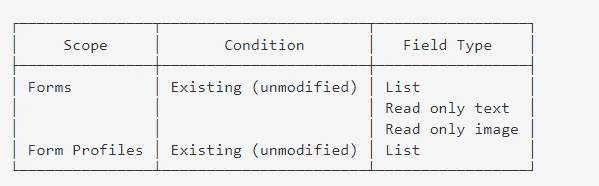
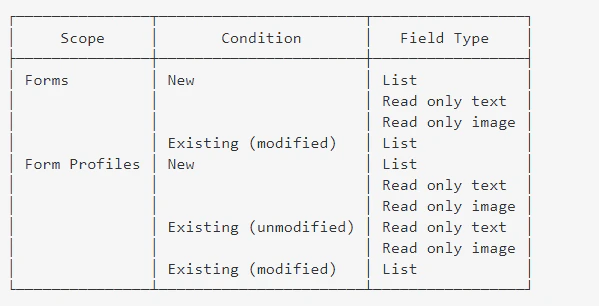
Changing the value at the project level will immediately affect all items in that project. Regardless of the version of the items, they will now use the new values when they are modified. Existing values Existing forms and form profiles with fields that have already been filled will retain their values, unless they are modified after the change in presets. If you have filled in a list field before the change in preset value, so long as you do not modify it, it will keep its value. Fields of the following types will retain their values: