
TABLE OF CONTENTS
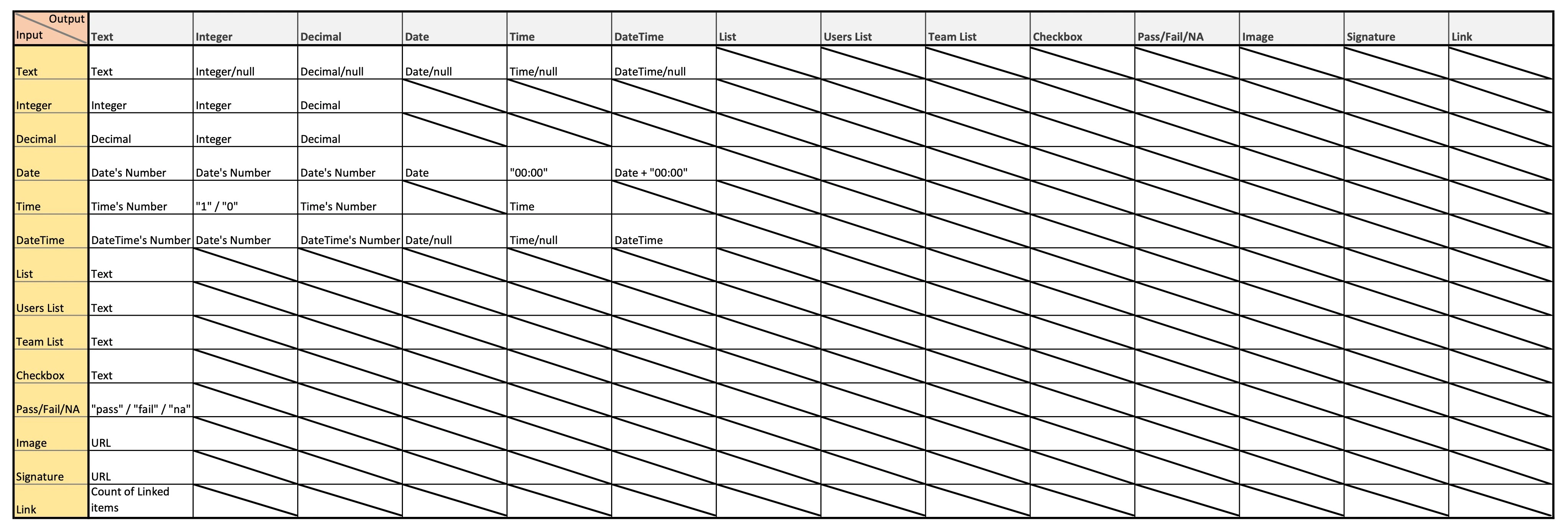
Basic Fields
Text
- Output Value: The exact text entered by the user.
Integer
- Output Value: A whole number provided as input.
Decimal
- Output Value: A number with decimal points, reflecting the input accurately.
Date Time
Date
- Output Value:
- Data Type = Text: Numeric representation of the date (e.g.,
45635). - Data Type = Date: Displays the input date based on the specified output format (e.g.,
2024-12-09).
- Data Type = Text: Numeric representation of the date (e.g.,
Time
- Output Value:
- Data Type = Text: Numeric representation of the time (e.g.,
0.489). - Data Type = Date: Displays the chosen time based on the specified output format (e.g.,
14:30:00).
- Data Type = Text: Numeric representation of the time (e.g.,
DateTime
- Output Value:
- Data Type = Text: Numeric representation of the datetime (e.g.,
45635.489). - Data Type = DateTime: Displays the combination of date and time based on the specified output format (e.g.,
2024-12-09 11:44).
- Data Type = Text: Numeric representation of the datetime (e.g.,
List Fields
List
- Output Value: The selected items from a predefined list, displayed as text.
Users List
- Output Value: Names of selected users, displayed as text.
Team List
- Output Value: Names of selected teams, displayed as text.
Checklist Fields
Checkbox
- Output Value: The value of the checkbox (e.g.,
Yes/No).
Pass/Fail/NA
- Output Value: The chosen status from the options:
"pass","fail", or"na".
Image Fields
Image
- Output Value: The URL of the uploaded image.
Signature
- Output Value: The URL of the uploaded signature.
Link Fields
Link
- Output Value: Total number of linked items and documents.
By referencing this list, users can efficiently interpret the computational output generated from each input data type, enhancing their understanding and system usage.