In response to the valuable feedback and requests from our esteemed customers, we are thrilled to introduce an exciting new feature that allows you to save the media you capture via the APP. Here’s how to enable it:
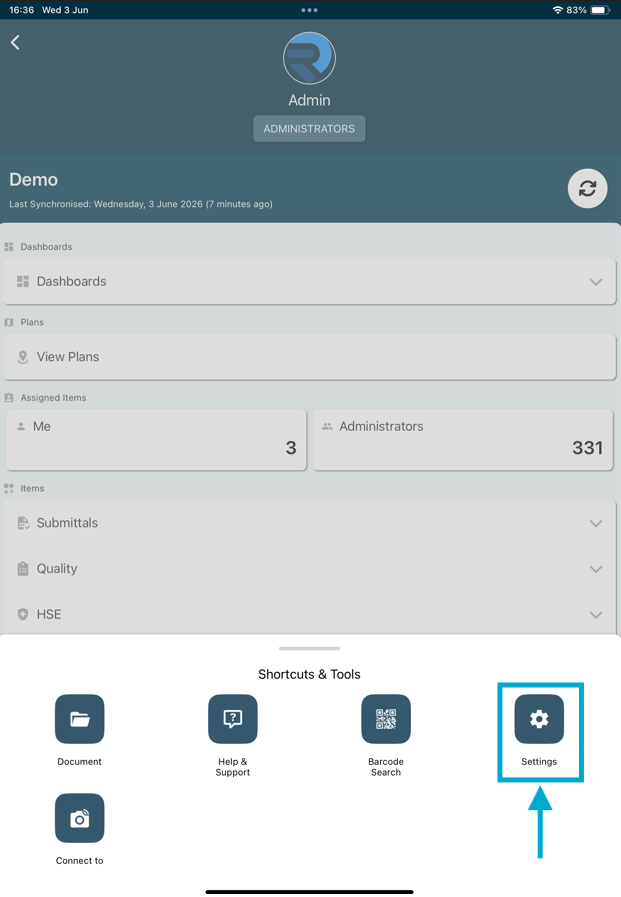
  1. Swipe up to display more options and click on the “Settings” button within the APP interface.Can I save the media I captured from the APP?Can I save the media I captured from the APP?
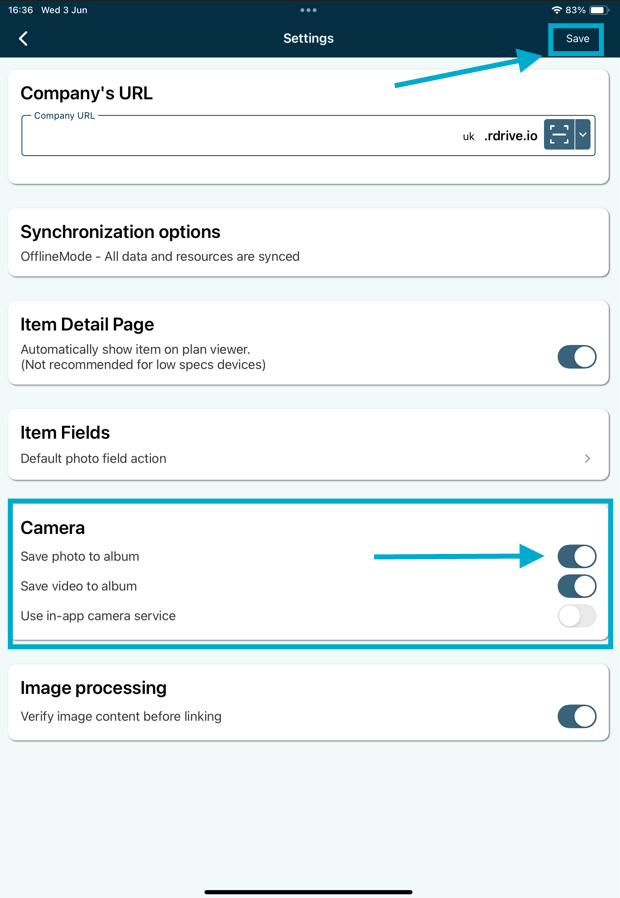
  2. Scroll down to the bottom of the screen to find the “Camera” section.\ Can I save the media I captured from the APP?
  3. Enable the option that suits your needs—whether it’s capturing images or videos. Remember to click Save to confirm.\ Can I save the media I captured from the APP?

Once you have enabled the preferred option, every photo or video you capture using our APP will be securely saved in your local storage.  At RDrive, we take customer satisfaction seriously and always strive to enhance user experience. Your suggestions and comments have played a significant role in shaping the development of our APP. We deeply appreciate your input and are dedicated to continuously improving our services based on your valuable feedback. Download the latest version of our APP now and unlock the full potential of this incredible new feature!