
Overview
- Purpose: This guide introduces the RDrive app’s in-app notification features, explaining how notifications are delivered and managed within the app.
- Who It’s For: RDrive app users
Prerequisites: - RDrive app installed on the device. - User has approved the device permissions for RDrive app to push notifications.
In-App Notification Features
✅ Comment NotificationsUsers will receive in-app notifications when new comments are added to items they are involved with, such as mentions or replies. ✅ Status Change Notifications (Subscription-Based) Users who subscribe to specific items will be notified whenever the status of those items changes. ✅ Un-Sync Reminder If the app remains idle for more than 15 minutes with unsynced data, a reminder notification will be pushed to alert the user to sync their data. Ensuring the notifications are enabled in the app settings on the device will then show any and all notifications for RDrive on the application.
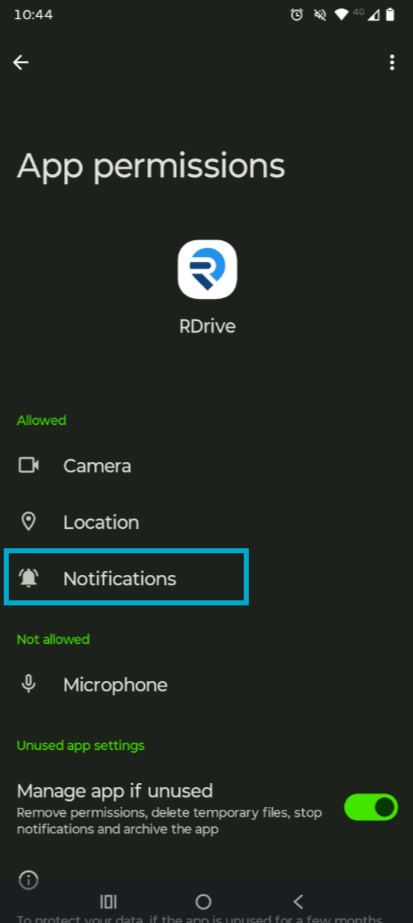
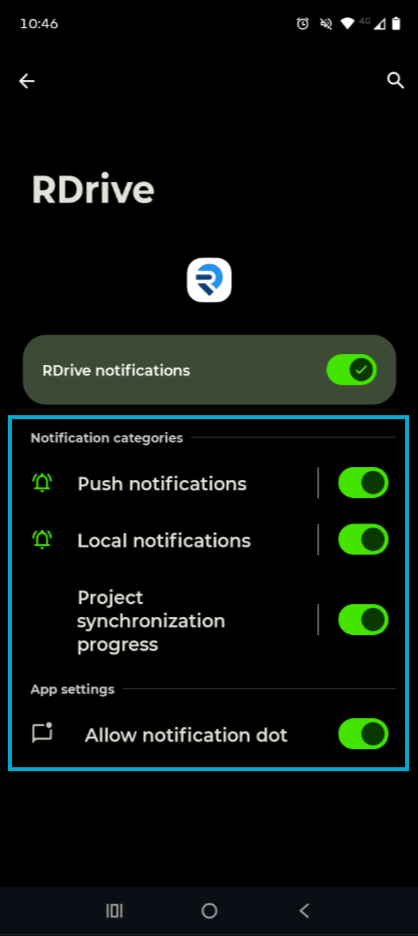
Notifications will only appear if the user has granted the app permission to send notifications on their device. Ensure notifications are enabled in the device settings to receive alerts._
FAQs & Troubleshooting
Q: I am not receiving notifications. What should I do?A: Confirm that your device allows RDrive to push notifications. Check app settings and device notification settings. Q: Can I customize which notifications I receive?
A: Yes, you can subscribe to specific items to receive only status change notifications for those.